
Run Dozens Of Claude CodeSessions On One Canvas.
A free-form 2D workspace for multi-session AI development, built on Tauri, Rust and raw PTY control. It turns multi-agent development from a linear, tab-switching chore into a spatial, parallel workflow.

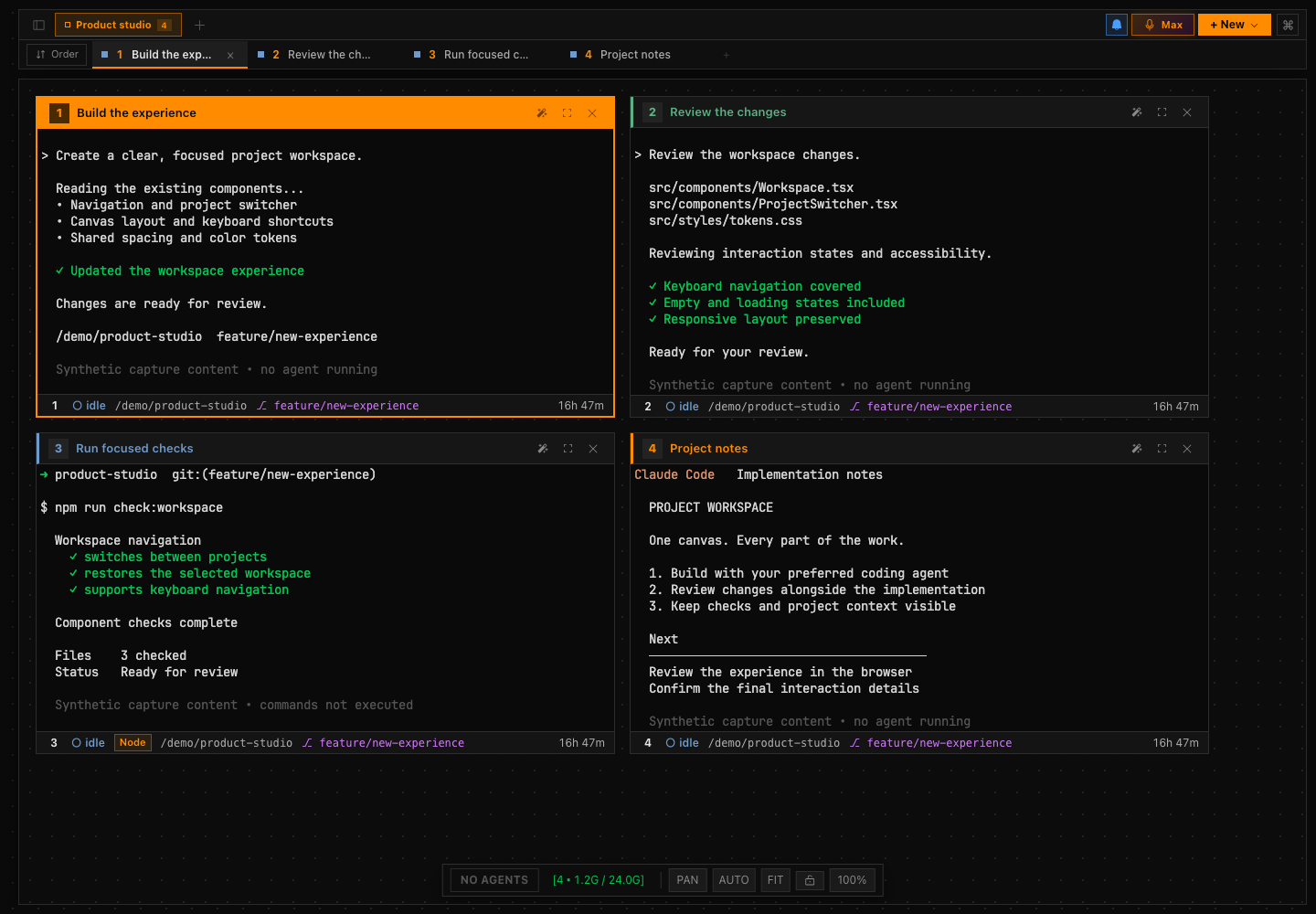
The Actual Interface.
Parallel Agents Do Not Fit In A Stack Of Tabs.
Running several coding agents at once means switching between terminal tabs that all look alike, on branches that collide, with no sense of which session is doing what. The work is spatial. The tooling is linear.
CodeGrid is a native macOS desktop app built around that mismatch. It is a code-signed .app binary: Tauri v2, a Rust backend and a React frontend, with a real PTY spawned per tile and a full Claude Code session in every terminal.
An Infinite Canvas With Real Terminals On It.
Infinite 2D workspace. A free-form canvas where terminal tiles can be placed, moved, resized and grouped spatially. Pan with middle-click or trackpad, zoom in and out, and organise sessions by project, by task type, or by anything else. The canvas imposes no structure.
Real sessions, real control. Each terminal tile spawns a real PTY via the portable-pty Rust crate. Resize events, signal forwarding, exit detection and clean teardown are all handled on the Rust side. xterm.js renders the terminal in the React layer with full VT100 compatibility.
Sessions that do not collide. Each new session starts in an isolated git worktree, automatically created, named and tracked. Multiple sessions on the same repository work in parallel branches without file conflicts or HEAD collisions, and worktrees are cleaned up automatically when sessions close.
Fan-out to all agents. Cross-session broadcast sends a command or context snippet to every running session at once via raw PTY injection. One instruction reaches all running agents, which matters for coordinating shared context updates or stopping everything at once.
Survives restarts. A SQLite persistence layer stores canvas layout, session history, worktree mappings and tile positions. Close the app, reopen it, and sessions restore to their last known state with worktree context preserved.
Keyboard-first. Global shortcuts spawn a new session, focus a tile by index, kill a session and rearrange the layout without touching the mouse. Built for developers who live in the terminal and do not want to break flow to navigate a UI.
Rust Owns The Pty Lifecycle.
The backend, written in Rust using the Tauri v2 command API, manages the full PTY lifecycle for every terminal tile. That is what makes CodeGrid feel native rather than like a web wrapper.
- PTY spawn with shell inheritance and env passthrough
- Resize events forwarded from xterm.js to PTY on canvas resize
- SIGWINCH, SIGTERM and SIGINT forwarding per tile
- Exit detection triggers worktree teardown and UI update
- Output streams piped to xterm.js via the Tauri event system
Why Tauri v2. Electron was ruled out immediately: the memory footprint for an app spawning dozens of terminals would be untenable. Tauri v2 ships a code-signed native macOS binary, shares one WebView instance for the React UI, and gives direct access to system APIs from Rust with no Node.js process in between.
Binary characteristics. Distributed as .app and .dmg, code signed with an Apple Developer ID, state stored locally in SQLite, and no network dependency at all. It is fully offline-capable.
- Tauri v2
- Rust
- React
- xterm.js
- portable-pty
- SQLite
- Git worktrees
- macOS (native)
Let’s Build What’s Next.
Bring the business problem. We’ll talk through what would make a difference and where to start.