
AI Isn't Coming for Your Business. It's Already Here. Are You Ready?
AI is no longer a future concept - it’s actively transforming businesses today. 68% of small businesses in the U.S. are already using AI tools to save time, increase revenue, and improve customer experiences. Companies are seeing fast results: the average ROI from AI is achieved in just 62 days. Whether it’s automating repetitive tasks, boosting lead response rates, or accelerating product development, AI is helping businesses work smarter without adding headcount.
Here’s why acting now matters:
- 73% of small businesses are using AI, and by 2027, this is expected to reach 45–55%.
- AI tools can save $500–$2,000/month and recover over 20 hours of staff time.
- Real-world examples show businesses increasing revenue by tens of thousands of dollars monthly for minimal AI costs.
The key is starting small: identify repetitive tasks, test AI solutions for 30 days, and expand gradually. Every delay risks falling behind competitors already leveraging AI to gain an edge.
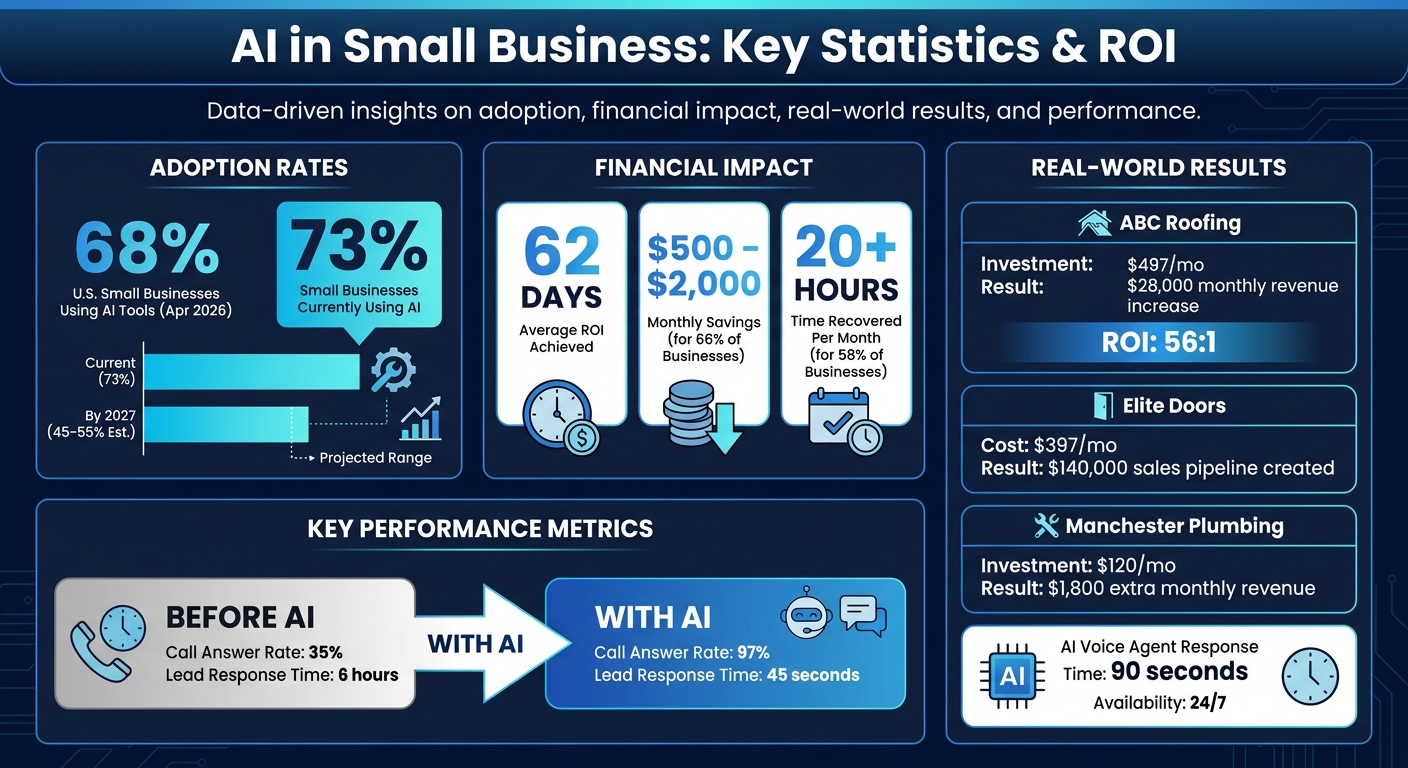
AI Adoption Statistics and ROI for Small Businesses in 2026
Finding Where AI Can Help Your Business Most
Map Your Manual, Repetitive Work
Start by taking a close look at your workflows to pinpoint tasks that are repetitive, time-consuming, and don’t require much decision-making. Think along the lines of data entry, document formatting, email routing, or report generation - these are prime candidates for automation and can provide quick wins with AI.
To identify these tasks, track your activities for a week. Record how long each task takes, how often it occurs, and whether it follows a consistent process. If a task is performed the same way 90% of the time, it’s an excellent candidate for automation. For example, if you’re spending six hours every week chasing overdue invoices or formatting client reports, that’s an annual opportunity cost of $12,000–$18,000, assuming a $50/hour rate.
However, there’s an important rule: don’t automate broken processes. If your workflow is inconsistent or poorly documented, automating it will only magnify its inefficiencies. First, document and standardize the steps, then explore automation options. On the flip side, if a task occurs fewer than 30 times per week, it might still make more sense to handle it manually.
Once you’ve listed these tasks, calculate how much time and money they consume to evaluate their automation potential.
Calculate Cost and Time Savings
The next step is to use your workflow audit to figure out the hourly cost of these tasks and compare it to the potential gains from AI. Look at real-world examples to see how these savings can turn into revenue.
For instance, a plumbing company in Manchester analyzed its website contact forms and noticed they were losing leads after business hours. By implementing an AI agent that responds within 90 seconds, 24/7, they recovered 10 additional jobs per month. With each job worth $180, they generated $1,800 in extra monthly revenue while spending just $120/month on the AI tool.
Another example: Elite Doors used an AI voice agent to boost their call answer rate from 52% to 99%. This change led to 35 additional quotes each month, creating a $140,000 sales pipeline - all for a $397 monthly cost.
AI isn’t just for big businesses. Sixty-six percent of small businesses using AI report monthly savings of $500 to $2,000, and 58% reclaim over 20 staff hours each month. To see if AI is worth it for you, calculate your hourly cost, multiply it by the hours saved, and compare that to the tool’s monthly fee. On average, businesses see a positive ROI in just 62 days.
sbb-itb-765bc22
7 Steps to Automate Any Business With AI
Using AI Agents to Automate Complex Workflows
Once you've pinpointed repetitive tasks, you can elevate your automation game by deploying AI agents to manage more intricate workflows.
What AI Agents Do
AI agents go beyond simply answering questions - they're designed to handle multi-step processes like qualifying leads, following up on overdue invoices, or keeping tabs on inventory levels. Imagine them as digital team members with specialized roles: one might handle customer support, another could track unpaid bills, and a third might ensure inventory is replenished before it runs out.
These agents operate under carefully defined boundaries. For example, while they can fully automate research tasks, actions involving money or your brand's reputation often require human approval. An AI agent might draft a response to a frustrated customer but flag it for review before sending. This "progressive trust" system allows you to start with limited permissions - like read-only access - and gradually expand their responsibilities as they prove reliable. This structured approach ensures smoother integration and measurable results.
Case Study: Automated Customer Support
In 2026, ABC Roofing & Construction, a small five-person team, struggled to manage incoming calls. They were only able to answer 35% of inquiries, with an average response time of six hours - largely because most calls came in while they were on job sites. By integrating a Multiply Revenue AI voice agent with their Jobber CRM, they automated inquiry handling and appointment scheduling 24/7. The results? Within just 90 days, their call answer rate skyrocketed to 97%, response times dropped to 45 seconds, and they saw an extra $28,000 in monthly revenue - all while paying just $497 per month for the tool.
Another success story comes from Flowtivity, which launched an autonomous sales agent called "Flowbee" in February 2026. Using the OpenClaw runtime and Claude LLM, Flowbee identified 67 cold leads, created 25+ personalized interactive prototypes, and sent 74 outreach emails - all in one week. It achieved a 3.8% warm reply rate from completely cold outreach, without any human involvement. These examples emphasize how the right tools can make AI agents a game-changer.
Tools for Building AI Agents
You don’t need a team of developers to create AI agents. Tools like Cursor AI and Claude Code allow non-programmers to design business logic simply by describing their needs in plain English. For orchestrating workflows across multiple apps, platforms like n8n (around $50/month for unlimited executions) and Voiceflow (approximately $95/month for advanced chatbots) provide powerful solutions.
When it comes to voice or SMS agents, Twilio remains a top choice, while Vapi.ai specializes in voice AI. Setting up a production-grade agent typically costs $600 to $900 per month - far less than the $1,500 to $3,000 monthly expense of hiring a part-time virtual assistant.
"Setup is tedious and manual oversight is necessary, but the payoff is high. The value is so high, I am willing to go through the pain." - Claire Vo, Chief Product Officer
Start with one high-volume task, refine it, and then expand your agent's scope. Use dedicated accounts with restricted permissions, and avoid granting agents access to your primary email or calendar. Establish clear escalation rules so the agent can hand off tasks when it encounters angry language, unfamiliar questions, or low confidence in its responses.
Building Products Faster with AI Development Tools
Once workflows are streamlined with AI agents, the next big leap is speeding up product development.
AI-native development slashes timelines, turning months-long projects into tasks completed in days. While traditional agencies spend weeks on setup and boilerplate, AI tools handle these processes in hours, freeing up time to focus on areas like architecture, user experience, and business logic.
Why Traditional Agencies Can't Keep Up
Traditional development agencies often take 6–10 weeks to deliver a minimum viable product (MVP). This timeline includes onboarding, scaffolding, development, and testing. By the time the product is ready, the market opportunity might already be gone. On top of that, these agencies allocate 60–80% of their revenue to labor, meaning every new feature adds more costs, time, and resources.
AI-native development changes the game. By using tools like Cursor, Claude Code, and Next.js, developers can launch production-ready SaaS platforms in just 5–8 days. These platforms come with built-in features like authentication, team management, and payment integration. For example, in March 2026, developer Sebastian delivered a full-stack dashboard in just days, a project that was originally expected to take three months. By automating 80% of the repetitive tasks, he achieved a sevenfold increase in speed.
How AI-Native Development Works
At ZipLyne, over 150 products have been built using this approach. AI takes care of repetitive tasks like CRUD endpoints, form validation, authentication flows, and UI components. This allows human developers to focus on critical areas such as data modeling, system architecture, and security. The result? A reduction in task time by 40–70%.
To make this work effectively, developers start by defining TypeScript interfaces. These interfaces guide the AI, reducing errors and ensuring consistency. Once set, the AI can scaffold projects, generate utility functions, and even create test coverage that typically reaches 75–85% - a significant improvement over the 45–60% coverage seen in traditional workflows. However, the final 10% of the work, which involves strategic decisions, brand-specific nuances, and complex problem-solving, remains firmly in the hands of human experts.
"AI doesn't speed up thinking. It speeds up typing." – Sebastian, Developer
The cost structure also shifts dramatically. Instead of spending most of the budget on salaries, businesses allocate 60–80% of their costs to scalable tools and infrastructure. In 2026, a full AI-native stack - including tools for automation, marketing, payment processing, and access to language models - costs between $60 and $280 per month. That’s a fraction of what it costs to hire even a single junior developer.
Traditional vs. AI-Native Development: A Side-by-Side Look
| Metric | Traditional Development | AI-Native Development |
|---|---|---|
| Time to MVP | 6–10 weeks | 5–8 days |
| Onboarding/Research | 1–2 weeks | Minutes to hours |
| Test Coverage | 45–60% | 75–85% |
| Primary Expense | Labor (60–80% of revenue) | Tools/Infrastructure (60–80% of revenue) |
| Scaling Model | Add headcount | Add tool capacity |
Source:
The key to thriving in 2026 isn’t about typing faster - it’s about thinking smarter, reviewing sharper, and delivering more value. If your competitors are spending 10 weeks on an MVP while you’re launching in just 8 days, you’re not just faster - you’re already ahead. Quick product development doesn’t just save time and money; it positions your business to seize opportunities before the competition can react.
Personalizing Customer Experience with Edge AI
AI isn't just about speeding up product development - it’s about creating a customer experience that feels tailored to each individual. Even the fastest innovations fall short if your customer interactions remain one-size-fits-all. Failing to personalize can mean leaving revenue on the table.
How Edge AI Helps Small Businesses
Edge AI taps into tools you’re already using - like Shopify, Meta platforms, and your CRM - to deliver responses in under 10 seconds. This technology adapts on the fly, responding to customer behavior in real time. It goes beyond basic chatbot functionality, acting more like a virtual AI team. These AI “agents” have specific roles, access to live systems, and are overseen by humans. They can search your product catalog, manage shopping carts, and provide instant answers - all without missing a beat.
Case Study: Boosting Conversions with Real-Time Recommendations
Here’s how it works: Export six months of support transcripts and product catalog data to uncover common customer questions. Then, use platforms like Shopify Actions to enable your AI agent to search live inventory and update carts seamlessly.
The impact is clear. Proactive, personalized prompts on high-value pages engage 28–32% of visitors - compared to just 4% for standard chat options. By delivering instant, relevant answers, response times shrink from hours to just seconds, and conversions soar. Businesses using this strategy have seen engagement rates increase more than sevenfold compared to traditional chat setups.
The key is reducing friction. When AI handles tasks like managing carts, searching catalogs, and answering questions in real time, customers stay engaged and are more likely to complete their purchases. This real-time personalization not only keeps shoppers interested but also drives measurable revenue growth.
Measuring AI Results and Improving Over Time
Metrics That Matter for AI
Once you've integrated AI into your operations, keeping an eye on its performance is key to ensuring it delivers real value. The most important metrics to track are the ones that directly influence your bottom line: time saved, revenue impact, and cost avoided. Here's a helpful formula to calculate ROI:
(Manual Hours Saved × Loaded Rate) + (Incremental Revenue) - (Agent Cost) = Net Monthly Benefit.
Some specific benchmarks to monitor include:
- Call answer rate: Aim for at least 95%.
- Appointment booking rate: A good range is 30–45%.
- Lead response time: Keep this under one minute.
For small businesses, these improvements translate into tangible savings - typically between $500 and $2,000 per month. On average, the payback period for AI investments is just 62 days. If you're not seeing results within that timeframe, it might be time to revisit your data, configuration, or expectations.
Consider the example of ABC Roofing, which implemented an AI voice agent alongside their Jobber CRM. Within 90 days, their call answer rates jumped from 35% to 97%, and lead response times plummeted from 6 hours to just 45 seconds. This led to a $28,000 monthly revenue boost, while their AI investment was only $497 per month - an impressive 56:1 ROI. This case study underscores the power of tracking the right metrics to uncover significant gains.
By focusing on these key indicators, you can identify areas for improvement and ensure your AI continues to deliver results.
Using AI Dashboards to Track Performance
A structured approach to testing AI tools can help you build confidence in their capabilities. Start with a 14-day pilot:
- Days 1–3: Gather baseline data.
- Days 4–7: Refine the logic (e.g., aim for a return on ad spend (ROAS) above 3).
- Days 8–14: Enable specific actions, like drafting revenue recovery messages.
This phased approach helps you maintain control while allowing the AI to demonstrate its potential.
Take the example of a boutique home goods brand generating approximately $310,000 per month. In early 2026, they introduced a BiClaw "Morning Ops Brief" agent to streamline daily operations. This AI reconciled Shopify sales with Meta Ads spend every morning at 7:15 AM. Within 30 days, the founder saved 16.5 hours of manual reporting time and quickly identified a 4% spike in refunds, protecting an estimated $3,800 in margin. The use of immutable execution logs ensured every decision was documented, making it easy to detect and address issues.
To maintain quality, always require human approval for tasks involving financial or customer interactions. This oversight is crucial - especially considering that 55% of companies that fully replaced staff with AI in 2026 later regretted the decision. Keeping humans in the loop ensures accuracy and avoids costly mistakes.
Conclusion
What to Remember
You've explored a comprehensive guide: from auditing workflows to pinpoint tasks that eat up time but require little judgment, to using AI tools for automating repetitive tasks like call handling and lead routing. You’ve seen how AI-native tools can accelerate product development, edge AI can personalize customer experiences, and ROI can be tracked with meaningful metrics. The formula is straightforward - start small, fix your data, and scale gradually. Focus on one workflow at a time: pick the biggest time-sink, test solutions for 30 days, refine the process, and then move on to the next.
Success doesn’t depend on having the largest budget. It’s about making a small team work like a much larger one. AI handles the mundane tasks - data entry, scheduling, drafting - so your energy goes to strategy, building relationships, and other areas where human input makes the biggest difference. This step-by-step approach provides a clear path to action.
Why You Need to Start Now
With this playbook in hand, the time to act is now. The longer you wait, the more ground you lose to competitors. As of April 2026, 68% of small businesses in the U.S. are already using AI tools. AI isn’t just a nice-to-have anymore - it’s the new standard.
Early adopters gain exponential advantages. In the first three months, AI helps capture leads you might otherwise miss. By six months, you’re refining your sales strategies with insights from conversation data. By the end of the first year, your optimized processes are delivering conversion rates that outpace competitors. By year two, you’re seeing the benefits in referrals and reviews, thanks to the speed and reliability AI brings. Every delay narrows your opportunity to pull ahead.
"The question isn't whether you can afford AI, it's whether you can afford NOT to have it. Every missed call loses a customer to a faster competitor." – Multiply Revenue
Not seeing results in 62 days? You might be targeting the wrong workflow or skipping the fine-tuning phase. Start today to lock in a 12–18 month lead over your competition.
FAQs
What’s the best first workflow to automate with AI in my business?
If you're looking for a straightforward way to dip your toes into automation, appointment scheduling is a great place to start. It's one of those tasks that's repetitive, eats up a lot of time, and can be easily handled by tools like Calendly. The best part? Setting it up takes just a few minutes, but it can save you hours every week.
Here’s how to get started:
- Configure your availability in Calendly (or a similar tool) so it aligns with your schedule.
- Add the booking link to your email signature, making it simple for others to schedule time with you.
Want to take it a step further? Use platforms like Make to connect Calendly with other apps. This lets you automate follow-ups and reminders, cutting down on even more manual work. It's a small change that can make a big difference in your productivity.
How do I keep AI agents from making costly mistakes with customers or money?
To avoid expensive errors, it’s essential to thoroughly test and monitor AI agents. Incorporate real-time error detection and fact-checking mechanisms to quickly identify inaccuracies or anomalies before they escalate. During the initial deployment phase, human oversight plays a critical role in reviewing outputs and ensuring everything aligns with required standards.
Additionally, establish systems for continuous learning and content filtering. These steps help maintain the AI's reliability and minimize errors as it evolves over time.
What data do I need before an AI agent can work effectively?
To set up an AI agent for success, start by collecting detailed information about your workflows, objectives, and current systems. This should include specifics like process steps, decision-making rules, and key metrics that guide your operations. Sharing examples of past successful outcomes can also help the AI learn and adjust more effectively. Prioritize clear, actionable details to simplify implementation and drive impactful results.
Frequently Asked Questions
How much does it actually cost to set up AI automation for a small business?
A production-ready AI agent stack—covering automation, voice or chat handling, and workflow orchestration—typically runs $600 to $900 per month. That's a fraction of what a part-time virtual assistant costs, and the full AI-native development stack including language models, marketing tools, and payment processing can be as low as $60 to $280 per month depending on what you need.
How do I know if a workflow is actually ready to automate or if I'm wasting time?
If a task runs the same way 90% of the time and happens more than 30 times a week, it's ready to automate. If the process is inconsistent or poorly documented, don't touch it yet—standardize the steps first, or you'll just automate the chaos.
What's the difference between a basic chatbot and an AI agent?
A chatbot answers scripted questions; an AI agent executes multi-step processes like qualifying leads, updating CRMs, booking appointments, and escalating edge cases to a human—all without manual input. Agents operate with defined permissions and can be connected to live systems like your inventory, CRM, or payment processor.
How long does it take to get an AI-native app or MVP actually built and shipped?
Using AI-native development tools, a production-ready SaaS platform with authentication, team management, and payment integration can go from zero to launched in 5 to 8 days—compared to 6 to 10 weeks with a traditional agency. The speed comes from automating 80% of the repetitive scaffolding work so senior focus stays on architecture and business logic.
What should I do if I'm not seeing ROI from AI within the first couple months?
The most common reasons are automating the wrong workflow first or skipping the fine-tuning phase after initial deployment. Revisit your baseline data, confirm the task volume justifies automation, and spend days 4 through 14 actively refining the agent's logic before expanding its scope.