
How to Build a SaaS Product with AI in 30 Days
Want to launch an AI-powered SaaS product in just 30 days? Here's how you can do it without breaking the bank or wasting months on development.
The secret lies in focusing on one specific problem, using AI tools to speed up development, and deploying a lean MVP for user feedback. Here's a quick breakdown:
- Day 1-7: Validate your idea. Solve a narrow problem and confirm demand before building. Use platforms like Fiverr or Upwork to identify pain points and tools like ChatGPT for market research.
- Day 8-14: Build your core features. Use tools like Supabase for backend, GPT-4 for AI, and Next.js for frontend. Keep it simple and functional.
- Day 15-21: Connect integrations. Set up payment processing with Stripe, automate workflows, and ensure your backend is efficient.
- Day 22-30: Test and launch. Fix bugs, optimize performance, and create a clear marketing plan. Use platforms like Product Hunt and Reddit to reach your audience.
By leveraging AI tools like OpenAI, LangChain, and Supabase, you can cut costs and speed up development. With this roadmap, you'll go from idea to launch in just a month.
Remember: Start small, focus on solving one problem, and iterate based on user feedback.
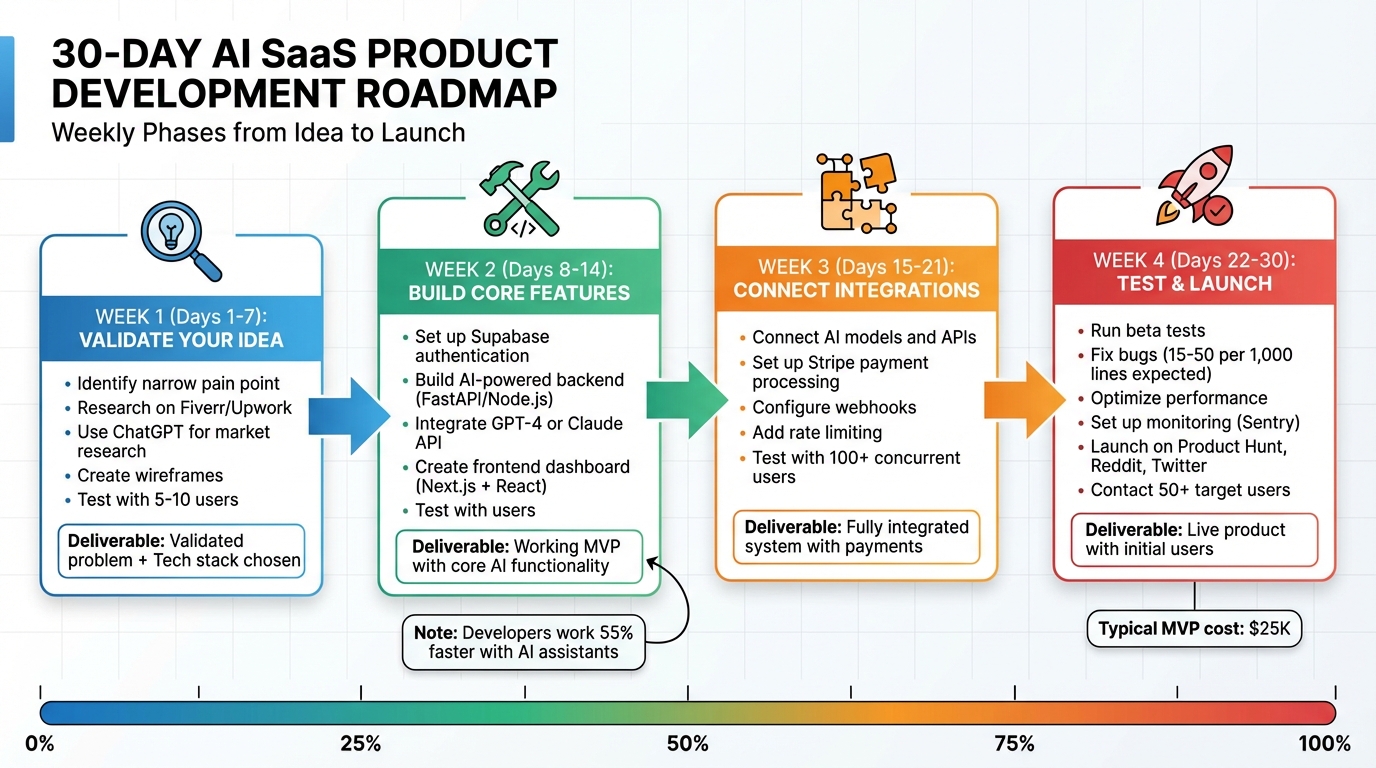
30-Day AI SaaS Product Development Timeline
What I Learned Launching an AI SaaS (in 30 days)
sbb-itb-765bc22
Days 1-7: Validate Your Idea and Plan Your Build
The first week is all about figuring out if your product solves a real problem that people are willing to pay for. Start by zeroing in on a specific, narrow pain point where AI can deliver immediate value. Skip broad ideas like "productivity tools" or "writing assistants." Instead, think along the lines of "automatically generating email subject lines" or "extracting key terms from contracts". Collins Okolo from RocketDevs emphasizes this:
"A good AI MVP tackles one narrow pain point. Think 'extract key terms from contracts,' not 'automate legal operations.'"
Don’t write a single line of code until you validate demand. A great place to start is by exploring platforms like Fiverr or Upwork to see what tasks people frequently outsource - these are ripe for AI automation. Use AI tools to speed up your research. For example, run competitor names through Perplexity AI to explore the market landscape, and analyze customer reviews in ChatGPT to identify recurring pain points and feature requests. Before you dive in, make sure you can confidently answer these three questions: Does this solve a real problem? Will people pay for it? Can you build a basic version quickly? These steps lay the foundation for successfully creating an AI product in just 30 days.
Choose Your Primary AI Function
Pick one core AI capability that directly addresses the problem you’ve validated. Whether it’s natural language understanding, automated content creation, predictions, or document analysis, be clear about what the AI should do and the level of performance you expect from version one. Use a "golden set" of 50 real-world prompts or questions with expected outcomes to measure success.
Before you start building, test your idea manually using the "Wizard of Oz" method. This simply means performing the task yourself to confirm it’s feasible. It’s a quick way to validate your concept without diving into development too early.
Build Wireframes and Map User Flows
Next, sketch out simple wireframes that illustrate the full user journey - from sign-up to the point where users get value. Tools like Figma, Uizard, or UX Pilot make it easy to draft and test these wireframes. Think through critical questions: Where does data enter the system? How does the AI process it? What does the user see as output? Once you’ve created static screens, turn them into clickable prototypes with tools like InVision or Marvel. Test these prototypes with 5–10 potential users to uncover any confusing parts of the flow before you start coding. With a clear user journey in hand, you’ll be ready to choose the tech stack for your solution.
Pick Your Tech Stack and Development Tools
Now it’s time to select the tools that will bring your product to life. For the frontend, Next.js (React) combined with Tailwind CSS is a popular choice for modern SaaS projects. It’s fast, well-documented, and works smoothly with AI coding assistants. For the backend and database, Supabase is a great option - it provides Postgres databases, authentication, and real-time features without the hassle of managing servers.
When it comes to your AI provider, choose based on your specific needs. OpenAI’s GPT-4 is ideal for general reasoning and content generation, while Anthropic’s Claude is better suited for tasks involving long-context understanding, like summarizing lengthy documents. If your project requires chaining multiple AI operations, consider using LangChain. For hosting, platforms like Vercel or Netlify work well and support continuous integration with GitHub.
Leverage tools like GitHub Copilot or platforms like Bolt.new and Lovable to speed up development through conversational prompts. To maintain a consistent design, create a "Design Vibe Snippet" that documents your colors, fonts, and framework choices - this can be used in every AI prompt to ensure uniformity. Developers using AI coding assistants can work up to 55% faster, which is critical when you’re working on a tight timeline. Make sure every tech decision aligns with the focused problem you identified in week one.
Days 8-14: Build Your Core AI Features
During the second week, your product begins to take shape. With your ideas validated and a clear roadmap from week one, now's the time to focus on the foundational elements: secure user access, an AI-powered backend, and a user-friendly interface.
Add User Authentication and Account Management
Start by implementing secure login and account management. Supabase is a great tool for this, as it integrates authentication directly with your database. Establish user roles right away - this will make it easier to scale later with features like team accounts or enterprise-level access. Additionally, set up rate limiting on your backend to avoid unexpected cost spikes caused by high-volume AI API usage.
Build Your AI-Powered Backend
Once user access is in place, shift your attention to powering your product with a robust backend that integrates AI models. The choice of backend framework depends on your needs:
- Python with frameworks like FastAPI or Flask is ideal for leveraging extensive AI libraries.
- Node.js with Express is better suited for handling high-performance asynchronous tasks.
Integrate your AI models using APIs from providers like OpenAI GPT-4, Anthropic Claude, or Google AI. Tools such as LangChain or the Vercel AI SDK can simplify complex workflows, including prompt chaining and memory management, saving you from building these features from scratch.
Take inspiration from Muhammad Adeel, founder of Spembra, who launched an AI-powered content analyzer in August 2026. Using Node.js, Supabase, and the GPT-4 API, he demonstrated how a lean backend can quickly deliver value to users.
To ensure optimal AI performance, consider the following:
- Caching: Store frequent AI responses to reduce latency and cut API costs.
- Semantic Search: Use tools like Pinecone or PostgreSQL with pgvector for Retrieval-Augmented Generation (RAG) workflows, where AI pulls data from your documents or database.
- Timeout Configurations: Set a custom maxDuration (60–900 seconds) for multi-step workflows to avoid timeouts.
- Scalability: Deploy on serverless platforms like AWS Lambda, Vercel, or Google Cloud, which automatically scale based on processing demands.
Create Your Frontend Dashboard
Design a responsive and intuitive AI dashboard using React or Next.js. Keep the interface simple - users should immediately understand its purpose and key metrics within just a few seconds. Place high-level summaries at the top, followed by detailed data below. Use clear, specific labels like "Monthly Active Users (Last 90 Days)" instead of generic titles like "Performance."
For AI products, transparency is key to building trust. Consider including elements like confidence scores, disclaimers, or interactive features that explain how the AI arrived at its conclusions. When presenting data, choose the right visualization methods:
- Line charts for trends over time.
- Bar charts for comparisons.
- Tables for detailed, granular data.
To speed up development, leverage tools like Vercel for generating UI components. Cursor can also help you add features using conversational prompts. Finally, test your dashboard with 5–10 users to identify and address any usability issues before launch.
Days 15-21: Connect Integrations and Automate Workflows
In week three, the focus shifts to connecting external APIs and automating workflows. This is the time to integrate AI models, set up payment systems, and reduce manual tasks, building on the foundation you established earlier.
Connect Your AI Models
Start by pinpointing your "Golden Path" - the primary user journey that delivers the most value. Map out the entire data flow and prioritize third-party APIs for complex tasks like OCR, NSFW filtering, or background removal. These integrations can speed up development. To keep things streamlined, wrap APIs in a thin layer to standardize their outputs. For multi-step processes, such as anonymizing data, detecting logos, and labeling content, use asynchronous frameworks like Celery or RabbitMQ to maintain efficiency.
"A flaky backend will kill even the prettiest app." - Oleg Tagobitsky, Re:plain
Run tracer bullets through your pipeline to uncover missing fields or slow API calls. To ensure your AI outputs meet quality standards, implement guardrails using tools like Guardrails AI or NVIDIA NeMo, which can help filter out unsafe or low-quality responses.
Set Up Payment Processing and Multi-User Access
Integrate Stripe to handle payments in USD, and configure webhooks (e.g., payment_intent.succeeded) so updates to your database occur instantly. Set up rate limits based on subscription tiers - free users might have a restricted number of API calls, while paid users get expanded access. Enable account owners to invite team members and assign different permission levels to them.
Test the entire payment flow thoroughly: sign up, input test card details (e.g., Stripe's 4242 4242 4242 4242), confirm the charge in your Stripe dashboard, and ensure the user's account upgrades immediately. This ensures a smooth experience for your users.
Test Real-Time Features and Automated Processes
Verify that real-time interactions, like live updates through WebSockets, work seamlessly across multiple browser tabs. For automated workflows, integrate tools like Zapier or n8n to trigger actions - such as sending a welcome email after a user completes onboarding.
Stress test your system by simulating over 100 concurrent uploads or API calls to identify bottlenecks. Measure the 95th percentile latency to understand worst-case performance scenarios. Use tools like Sentry or Grafana with unique request IDs to trace slow endpoints. Conduct a soft launch with 5–10 users to identify friction points and use feature flags (e.g., LaunchDarkly) to disable problematic features without disrupting the entire system.
Days 22-30: Test, Refine, and Launch
The last stretch is all about making sure everything works smoothly and preparing for a successful launch. This is where you separate products that stumble under real-world use from those that handle it with ease.
Run Beta Tests and Fix Issues
Bring in beta testers from your target audience to explore your product. Pay attention to how they interact with the AI features - do they find the outputs easy to understand? Do they trust the recommendations? On average, software contains between 15 and 50 bugs per 1,000 lines of code, so it’s normal to encounter some hiccups. Conduct functional and usability tests to check if features work as intended and to see how users respond to AI-generated outputs. Add transparency tools like confidence scores or a “why” button next to AI results to build user trust.
Make sure your product works across major browsers like Chrome, Safari, and Firefox, as well as on both desktop and mobile. Perform security tests by running vulnerability assessments and ensuring data is encrypted both at rest and in transit. After fixing any issues, run regression tests to confirm no new bugs have popped up. Once user feedback has been addressed, shift focus to fine-tuning your system’s performance.
Improve Performance and Monitor Your System
Use browser developer tools to identify errors and track down slow API endpoints (like 404 or 500 errors). If you notice sequential data fetching - where multiple calls are waiting on each other - speed things up by using Promise.all to run independent queries at the same time. Also, optimize your database queries to avoid performance slowdowns.
Set up tools like Sentry to catch crashes and flag performance issues in real time. For AI-specific concerns, keep an eye out for model drift or any drop in output quality using MLOps frameworks. To maintain stability during high-traffic moments, implement API rate limiting. Once your system is stable, it’s time to focus on your launch strategy.
Create Your Marketing Plan and Launch Strategy
With your product running smoothly, it’s time to plan how you’ll introduce it to the world. Start with a landing page that has one clear call-to-action, like joining a waitlist, scheduling a demo, or starting a free trial. Use the MM/DD/YYYY date format on your interface and marketing materials to align with U.S. conventions. Secure a professional domain and business email to boost credibility.
Consider a soft launch by sharing your product with a small group of beta testers or your email list before going public. For broader exposure, post on platforms like Product Hunt (Tuesday through Thursday works best), X (Twitter), LinkedIn, and Reddit communities such as r/SideProject or r/indiehackers. Reach out directly to at least 50 people in your target market to drive initial traffic. When presenting your AI, use simple and clear language to convey its value.
Use privacy-focused analytics tools like Plausible or Fathom to track user behavior after launch. Finally, make it a priority to connect with your users within 48 hours of launch. Their feedback can highlight pain points and help you refine the experience.
Tools You Need to Build an AI-Powered SaaS Product
Once you've mapped out your tech stack and core features, the right tools can make a world of difference. They simplify development, speed up AI integration, and let you focus on what truly sets your product apart. From AI capabilities to user authentication and payment processing, these platforms handle the heavy lifting so you can concentrate on innovation.
For AI functionality, platforms like OpenAI's GPT-5.2 and Anthropic's Claude 4.5 are great starting points. Both are user-friendly, with setup taking just minutes, and they support fast, cost-efficient builds. LangChain serves as the glue, connecting AI models to tools while managing multi-step workflows, saving you from reinventing the wheel.
On the development side, Vercel's v0 can generate Next.js frontend code from text prompts in no time, while Cursor's AI Agent translates natural language into backend logic. A real-world example? In June 2026, software engineer Jeff Morhous created "Deep Focus", a micro-SaaS web app, in just one afternoon. He used Vercel's v0 for the prototype, Cursor for backend features, Supabase for authentication, and Stripe for payment processing.
"AI tools, no matter how clever, should never take the place of a firm understanding of what you're building." – Jeff Morhous, Software Engineer
AI Tools Comparison
| Platform | Primary Use Case | Setup Time | Cost (30-Day Build) | Best For |
|---|---|---|---|---|
| OpenAI GPT-5.2 | Text, Vision, Reasoning | Minutes | Pay-as-you-go | General AI features and agent workflows |
| Anthropic Claude 4.5 | Coding & Complex Logic | Minutes | Pay-as-you-go | Technical tasks and code generation |
| LangChain | Agent Orchestration | Hours | Free (Open Source) | Connecting models to tools and memory |
| Supabase | Backend & Database | <1 Hour | Free tier / Pro from $25/mo | Authentication, PostgreSQL, vector storage |
| Replicate | Image & Open Models | Minutes | Pay-as-you-go | Specialized image or model tasks (e.g., Flux, SDXL) |
Building a basic AI SaaS MVP with these tools typically costs around $25,000. However, creating custom models can push that figure beyond $500,000. If you're working on a tight timeline, API-based solutions are your best bet. They offer a streamlined framework for development, perfectly suited for hitting that 30-day launch goal.
Conclusion
Creating an AI-powered SaaS product isn’t about taking shortcuts - it’s about laser-sharp focus. The roadmap is clear: validate one specific problem in the first week, build your core AI features in the second, integrate tools in the third, and dedicate the fourth to thorough testing. Each phase emphasizes assembling existing resources, like APIs and tools, to accelerate your launch rather than reinventing the wheel. This streamlined approach drives every step of the process.
In this game, speed beats perfection. As Collins Okolo aptly says, "The difference between building your product this month versus next could mean missed opportunities." With 75% of venture-backed startups eventually failing, those that actively engage with real users early on are the ones that last. Early feedback and traction consistently outshine the pursuit of flawless design.
The toolbox is already in your hands - platforms like OpenAI, Claude, LangChain, and Supabase are ready to support your efforts. Many even provide free tiers, allowing you to start without a hefty upfront cost. For instance, ZoomInfo’s 2023–2026 trial with GitHub Copilot showed developers completing tasks 20% faster, with AI suggestions accepted 33% of the time. These tools make rapid execution more achievable than ever.
Here’s the key: AI handles the technical heavy lifting, but you’re in charge of the strategy. Write a concise Product Requirements Document, break down features into actionable steps, and validate your idea before diving into development. As Aakash Gupta puts it, "The question is no longer 'can I build this?' but 'should I build this?'"
FAQs
What AI tools can help me build a SaaS product in 30 days?
To create a SaaS product in just 30 days, having the right AI tools at your disposal can make all the difference. Start with AI-powered coding assistants like GitHub Copilot, Cursor, or Claude Code. These tools allow you to write, debug, and refine code using natural language prompts, saving you a ton of time during development.
For your product's intelligence layer, tap into LLM APIs like Google’s Gemini 3 or Anthropic’s Claude. These can handle tasks such as text generation, classification, or building conversational features. Combine this with a vector database like Supabase for fast and efficient data retrieval, and use a cloud hosting platform like Vercel to deploy your application smoothly. Don’t forget to include essential integrations like Stripe for payment processing and tools like Firecrawl to pull in external data if needed.
With this streamlined tech stack, you can quickly prototype, refine, and launch an AI-powered SaaS product - all within just one month.
How can I make sure my AI SaaS product solves a real problem?
To make sure your AI-powered SaaS tackles a real problem, start by pinpointing a specific pain point. Think about it: What problem does this solve? Who struggles with this issue the most? How are they dealing with it now? And what would they be willing to pay for a better solution (say, $49/month)? Back up your answers with data - look into trends, check out forums to spot recurring complaints, and use surveys or landing-page tests to measure interest and pricing potential.
After confirming the problem, zero in on a narrow use case for your Minimum Viable Product (MVP). Instead of trying to automate an entire process, focus on a single task - like pulling key terms from contracts. A targeted MVP helps you gather real-world feedback, validate the product’s value, and fine-tune it using clear metrics such as user adoption, churn rates, and revenue per customer. By prioritizing user input and continuously improving, you can ensure your AI SaaS addresses a real need before scaling up.
What are effective strategies for marketing my AI-powered SaaS product after launch?
To effectively market your AI-powered SaaS product, it’s crucial to lay a solid groundwork right from the start. Begin by pinpointing your target audience and understanding their primary challenges. Craft messaging that clearly communicates the real, measurable benefits and the ROI your product offers. Make sure to have key elements in place, such as a pricing page, a smooth onboarding process, and in-app analytics to monitor user behavior and adjust your strategy based on actual data.
Validate interest in your product with cost-effective experiments like creating targeted landing pages, analyzing Google Trends, or engaging in community discussions. Use the findings to develop SEO-friendly content like blog posts or demo videos that showcase practical applications of your product. Consider running small-budget paid social and search campaigns to reach your audience, while retargeting ads can help re-engage those who didn’t convert on their first visit.
Organic growth is another powerful tool. Build a community - perhaps through a private Slack or Discord group - where early users can provide feedback and share their experiences. Incentivize referrals by offering rewards, such as free service months, to both the referrer and the new user. Keep a close eye on metrics like activation rates, retention, and customer lifetime value to continuously refine your approach and ensure steady, long-term growth.
Frequently Asked Questions
How do I avoid burning money on AI API costs while building my MVP?
Cache frequent AI responses so you're not hitting the API for identical requests, set rate limits tied to subscription tiers from day one, and start with API-based models instead of training custom ones—custom models can push costs past $500K while API-based builds can launch around $25K. Timeout configurations and serverless hosting like Vercel or AWS Lambda also prevent runaway compute bills during traffic spikes.
What's the minimum I actually need to ship in week two to have something real?
Secure auth, one working AI-powered endpoint that delivers the core output, and a frontend that shows the result clearly—that's it. Skip every feature that isn't on the primary user path; anything that doesn't move the user from input to value is scope creep that kills your 30-day timeline.
How do I pick between GPT-4 and Claude when building my AI feature?
Use GPT-4 for general reasoning, content generation, and agent workflows; use Claude when your use case involves long documents, complex code, or tasks requiring deep contextual understanding like contract analysis or technical summarization. The wrong pick here doesn't sink the product, but the right one cuts latency and improves output quality from day one.
What's the biggest mistake founders make that causes 30-day SaaS builds to fail?
Building before validating—writing code before confirming even 10 people would pay for the solution. The 'Wizard of Oz' method fixes this: manually simulate what the AI would do, confirm the output is valuable to real users, and only then start building. Skipping that step turns a 30-day sprint into a months-long rebuild.
Can a non-technical founder realistically execute this 30-day build, or do you need an engineer?
AI coding tools like Cursor, Bolt.new, and Lovable have genuinely lowered the floor, but they don't eliminate the need for engineering judgment—especially around backend architecture, auth security, and production stability. A non-technical founder can get surprisingly far on the frontend and prototype, but production-ready systems with real data, payments, and scale still benefit from someone who understands what they're building, not just prompting.