
Your Team Is Spending 40% of Their Day on Work AI Could Do Right Now
Your team is wasting 40% of their time on tasks AI can handle today. That’s hours lost to repetitive work like meeting notes, data entry, and email sorting - time that could be spent on growth and problem-solving. For small businesses, this inefficiency translates to $126,500 in wasted capacity annually for a 10-person team.
Here’s what AI can do right now:
- Customer Support: AI chatbots handle 60-80% of FAQs and ticket triage.
- Sales: AI qualifies leads and automates follow-ups, boosting response times.
- Finance/Admin: Automates invoicing, expense tracking, and meeting summaries.
- Cost Savings: AI tools cost $150–$400/month but replace $3,000–$6,000 in manual work.
How to start: Audit your team’s time, pick a repetitive task, and test an AI tool for 30 days. Tools like Fireflies.ai, Zapier, and QuickBooks Online can save hours weekly. Start small, measure results, and scale what works. Don’t let inefficiency block your team’s potential - AI can reclaim their time today.
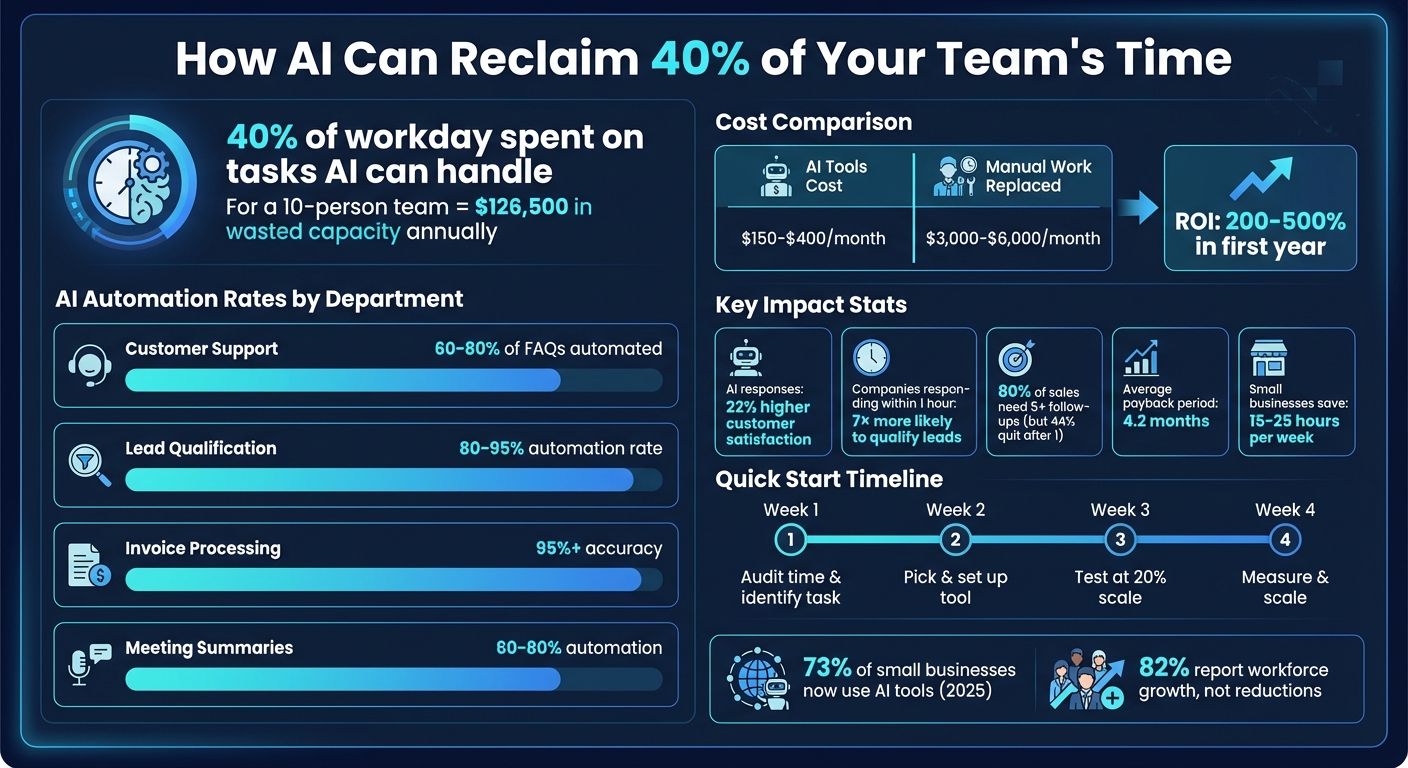
AI Time Savings and Cost Benefits for Small Business Teams
The BEST AI Automation Use Cases For Businesses: STEAL THESE
sbb-itb-765bc22
Where the 40% Hides: Tasks AI Can Handle Today
The 40% isn’t tucked away in one spot - it’s scattered across departments. From customer service to finance, repetitive tasks are everywhere, and AI is already capable of handling many of them. The challenge is knowing where to look.
Customer Service: Tickets, FAQs, and Chat
Support teams often spend countless hours answering the same questions: “What are your hours?”, “How much does this cost?”, or “Do you ship to my area?” AI-powered chatbots like Jotform AI Agents and Revenue Care AI (HustleBot AI) can take care of 60%–80% of these routine inquiries without human involvement. And here’s the kicker: instant AI responses score 22% higher in customer satisfaction for basic questions compared to delayed human responses.
But AI doesn’t stop at chat. It can prioritize support tickets based on urgency and even draft responses for human review. This allows team members to focus on complex issues, improving response times and overall customer happiness. These same efficiencies extend into sales and marketing.
Sales and Marketing: Lead Qualification and Follow-Up
When it comes to managing leads, AI is a game-changer for sales and marketing teams. Tools like Clay and HubSpot CRM can collect leads from your website, enrich them with extra data from platforms like LinkedIn, and rank them based on criteria like company size or job title. AI can even kick off follow-up sequences automatically.
Here’s a stat to consider: 80% of sales need at least five follow-ups, but 44% of salespeople quit after just one. AI doesn’t forget. It sends consistent, personalized follow-ups until a lead responds or opts out. And speed matters - companies that respond to leads within an hour are 7× more likely to qualify them than those that wait two hours.
On the marketing side, AI can draft blog posts, turn them into social media content, and even keep an eye on competitor pricing. For as little as $20 a month, these tools can save hours of manual work every week.
Finance and administrative tasks also benefit from AI’s efficiency, cutting down on tedious processes.
Finance and Admin: Invoicing and Document Processing
AI tools for invoice data extraction and automated expense categorization now achieve over 95% accuracy. But invoicing is just the start. AI can summarize meetings with actionable takeaways and streamline client onboarding. For a small business handling 200 invoices monthly, automation can save between $24,000 and $31,200 annually. That’s time and money your team can redirect toward analyzing data instead of inputting it.
Getting Your Team on Board
The biggest hurdle to adopting AI isn’t the technology - it’s the people. Employee skepticism, especially fears about job security, can derail progress. Addressing these concerns head-on is essential to achieving the 40% time savings mentioned earlier.
Position AI as a Tool for Efficiency, Not Job Cuts
Present AI as a way to remove tedious tasks, not as a threat to jobs. In March 2023, Zapier’s CEO, Wade Foster, emphasized this perspective, which led to 97% of employees using AI daily. They even created a new leadership role: Chief People & AI Transformation Officer.
"Knowing how to orchestrate AI is a critical skill advantage for their long term careers." - Wade Foster, CEO, Zapier
The idea is to empower employees to "build the robot" that handles the repetitive parts of their jobs. For example, automating tasks like ticket triage or invoice entry doesn’t eliminate jobs - it eliminates monotony. Interestingly, 82% of small businesses using AI tools reported workforce growth, not reductions.
The next step? Build trust by giving employees low-risk, hands-on AI experiences.
Building Trust Through Practical Experience
Trust grows when teams can experiment with AI in a controlled, hands-on way. One effective approach is hosting an AI hackathon. Take a week, pause regular tasks, and let everyone on the team try building something with AI. Zapier did this after issuing their "Code Red" memo, and even non-technical teams created tools like "Sidekick", a support ticket summarizer that eventually cut average handle time by 50%. These experiences help employees see AI as a practical and helpful tool.
Another way to build trust is by adopting a "draft-first" policy. This means AI can draft emails, summarize meetings, or prepare reports, but the final decisions and approvals stay with humans. For example, in January 2026, a 12-person digital agency implemented a "Workflow Packet" system. AI turned raw data into polished drafts, while humans ensured the quality and accuracy. The result? They saved 40 hours per week across the team.
Finally, start with tasks that your team finds draining - like responding to customer complaints, entering data manually, or sending repetitive status updates. When employees see AI taking over these energy-sapping tasks, they’re more likely to embrace it as a helpful partner. In fact, employees without proper AI training are six times more likely to view it as a burden rather than a benefit. By focusing on practical, low-risk steps, you can build trust and free up your team’s time for more strategic, meaningful work.
How to Start: AI Implementation for Small Budgets
Once your team is ready to embrace AI, the next step is figuring out how to implement it without overspending. The good news? You don’t need a massive budget or a dedicated IT team to see results. In fact, small businesses are adopting AI tools faster than larger companies because they can’t afford to waste resources. By 2026, 73% of small businesses were using at least one AI tool, compared to just 42% in 2026. This rapid adoption is largely driven by the need to cut costs and boost efficiency.
Here’s the math: a functional AI stack costs between $150 and $400 per month, but it can replace manual tasks that would otherwise cost $3,000–$6,000 monthly. That’s the difference between hiring extra help and automating repetitive work.
Quick Wins: High-Impact, Low-Cost Solutions
Start by targeting tasks your team performs repeatedly, even if they only take a few minutes each time. These small wins can add up fast:
- Customer Support Intake: Tools like Tidio's Lyro or Jotform AI Agents (priced at $0–$39/month) can handle FAQs, ticket sorting, and basic troubleshooting. Businesses using AI-driven support strategies have cut their cost-per-resolution by 45%.
- Lead Qualification: Did you know 78% of customers buy from the company that responds first? AI assistants like HubSpot’s free tier or Clay (starting at $50/month) can score leads, send initial responses, and schedule follow-ups, helping you stay ahead of the competition.
- Invoice Reminders and Payment Follow-Ups: Automated invoice reminders shorten payment collection times by 40% on average. QuickBooks Online ($30/month) or Wave (free) can send reminders, predict cash flow, and flag overdue accounts - all with minimal effort.
Test these tools with a 30-day pilot to see their impact. Here’s a simple roadmap:
- Week 1: Audit your time and identify a repetitive task to automate.
- Week 2: Pick a tool (spend no more than 2 hours researching) and set it up.
- Week 3: Launch on a small scale (e.g., 20% of tasks), refine as needed, then expand to 50%.
- Week 4: Measure results and decide whether to scale or pivot.
"AI automation isn't about robots taking over your business. It's about getting back the 10-12 hours you waste every week on tasks a computer could handle in seconds."
– Justin Dews, Partner, PathOpt
Tools That Work for Small Teams
Once you’ve identified your key tasks, it’s time to choose the right tools. Here are some budget-friendly options that are easy to set up and deliver real results:
| Tool Category | Tool | Monthly Cost | What It Does | Setup Time |
|---|---|---|---|---|
| Meeting Notes | Fireflies.ai | $18 | Records calls, extracts action items, and summarizes decisions | 15 minutes |
| Customer Service | Tidio (Lyro) | $0–$39 | Handles FAQs, triages tickets, and drafts responses | 30 minutes |
| Workflow Automation | Zapier / Make | $0–$30 | Connects apps, automates data transfers (e.g., lead → CRM → email) | 1–2 hours |
| AI Assistant | ChatGPT Plus / Claude | $20 | Drafts emails, analyzes data, and writes proposals | 5 minutes |
| Bookkeeping | QuickBooks Online | $30 | Automates invoices, payment reminders, and cash flow tracking | 2 hours |
| Scheduling | Calendly / Reclaim.ai | $10–$18 | Books meetings, blocks focus time, and syncs calendars | 20 minutes |
For example, Fireflies.ai integrates with platforms like Zoom or Google Meet to transcribe conversations and highlight actionable insights. Zapier or Make can link your existing apps - for instance, adding a new lead to your CRM, notifying your team on Slack, and sending a welcome email automatically. And for general tasks like drafting proposals or summarizing contracts, ChatGPT Plus or Claude are great options. If you need more flexibility, their APIs offer usage-based pricing starting at $5/month.
When choosing tools, don’t overthink it. Start with one, take advantage of free trials, and assess its value. If it doesn’t save time within two weeks, move on to the next option. To calculate ROI, use this formula:
(Hours saved per week × Your hourly rate × 52) – (Annual tool cost + Setup cost). If the result is positive, scale it. If not, try a different approach.
"The goal isn't to become a robot... The goal is to stop doing $15/hour work so you can focus on the $150/hour work that only you can do."
– SoloStack
Small businesses that adopt targeted AI solutions typically save 15–25 hours per week and see a 200–500% ROI in their first year. These aren’t just predictions - they’re real outcomes happening right now.
Measuring Results: Tracking AI ROI
Your team spends 40% of its time on manual tasks - time that could be reclaimed with AI. But how can you be sure your investment in AI tools is delivering real value? The key is tracking measurable outcomes.
Here’s the basic formula to calculate ROI:
Annual Net Benefit = (Total Hours × Fully-Loaded Wage × Automation Rate) – (Total AI Costs + Rework Cost).
To get accurate results, use your fully-loaded hourly rate, which includes salary, benefits, taxes, and overhead. This rate typically ranges between 1.25× and 1.4× the base salary.
Start by documenting task duration, frequency, and error costs over a two-week period. This baseline will help you track four critical inputs:
- Time Savings: The reduction in labor hours.
- Error Reduction: Lower costs for rework and compliance.
- Revenue Enablement: Faster deal closures.
- Cost Avoidance: Avoiding the need to hire additional staff.
Metrics That Matter
The right metrics depend on the function you're analyzing. For instance:
- Customer service: Focus on average response time and resolution rate.
- Sales: Monitor lead response times and conversion rates.
- Administrative tasks: Measure reductions in repetitive work and improvements in accuracy.
On average, AI projects pay for themselves in about 4.2 months, with top-performing implementations breaking even in under 8 weeks. Aim for an automation rate of 85–95% for high-volume tasks. For example, lead scoring often achieves 80–95% automation, while content drafting typically hits 60–80%. If a task’s automation rate is below 60%, it may not be a great candidate for AI.
Keep in mind that up to 40% of saved time can be lost to rework if outputs require heavy correction. To avoid this, budget for a 15–30% review overhead, especially for client-facing tasks, where quality control is critical.
"Every hour saved is only valuable if it doesn't create an hour of rework."
– Distrya
To calculate your payback period, divide total implementation costs by your monthly net benefit. A payback period under 12 months signals a solid investment, while under 6 months is considered excellent.
Common Mistakes to Avoid
One of the biggest pitfalls is automating flawed workflows. If a process is unclear or redundant, AI will only amplify those issues. Fix the process first, then automate.
Another frequent error is over-automation. Trying to automate everything at once often backfires - studies show an 80% failure rate when over-automation is attempted. Instead, start with one high-volume, costly task. Prove its success, then expand.
Don’t forget to account for ongoing costs like API integrations, orchestration, and training. Plan to allocate 15–20% of your initial setup cost annually for maintenance and updates. AI isn’t a “set it and forget it” solution - it requires regular attention to stay effective.
Also, eliminate tools that don’t pull their weight. If a tool saves less than 5 hours per week or doesn’t prove its value within 14 days, it’s time to cancel. Redundant tools can create more work than they eliminate.
Finally, track how saved time is reinvested. Automation may free up hours, but the benefit is lost if that time is spent on low-value tasks instead of strategic priorities. As Distrya warns:
"If the hours saved by AI are not reinvested into strategy, creativity, relationship building, or innovation, the financial benefit remains theoretical."
– Distrya
Conclusion: Reclaim 40% of Your Team's Time
Did you know your team could reclaim 40% of their day with AI? That’s time currently spent on tasks AI can handle right now. And inefficiency isn’t cheap - small business owners lose between 20% and 30% of their annual revenue to manual processes and outdated workflows. The real question isn’t if you should automate; it’s which task you should start automating this week.
A good first step? Conduct a 48-hour time audit. Track how much time your team spends on repetitive tasks like customer inquiries, scheduling, data entry, or meeting recaps. Then, calculate the cost of those hours using this formula:
(Hours per week) × (Hourly cost) × 52 weeks.
Once you’ve done the math, focus on the task draining the most productivity. For most small businesses, this is often lead qualification, invoice processing, or meeting summaries - tasks that consume 6-12 hours every week.
Here’s a simple 30-day plan to get started:
- Week 1: Audit your time and pick a target task.
- Week 2: Build a basic AI workflow for that task.
- Week 3: Test the workflow with 20% of the workload.
- Week 4: Measure the results and refine the process before scaling further.
Keep a human in the loop during the early stages - let AI handle the heavy lifting while your team verifies the output. This approach can save 80% of the effort while ensuring accuracy by catching the 10-20% of errors AI might miss. A successful pilot like this lays the groundwork for bigger, ongoing improvements.
As Justin Dews from PathOpt puts it:
"The businesses winning with AI aren't the ones using the fanciest tools. They're the ones that start small, measure everything, and scale what works".
Your team’s time is far too valuable to waste on tasks a machine can do better, faster, and at a lower cost. Don’t overthink it - start small. Pick one task today, automate it this month, and measure the impact. Then, rinse and repeat.
FAQs
Which task should I automate first?
Automating lead capture and follow-up should be your first priority. Why? Because it offers some of the best returns by cutting down response time and boosting revenue opportunities. Speed matters - a lot. Companies that respond to leads within an hour are seven times more likely to qualify them.
Beyond that, consider automating other time-consuming tasks like handling customer inquiries, scheduling, invoicing, and routine communications. These changes can free up your team’s time, allowing them to focus on more strategic efforts while streamlining operations.
How do I keep AI from making costly mistakes?
To keep AI from making costly errors, it's crucial to regularly review its outputs. This lets you spot and fix mistakes early. A smart first step is to automate a single high-priority process. This gives you a chance to evaluate how well the system works before expanding its use.
Make sure the process remains transparent, and keep a close eye on it to prevent biases and improve the quality of decisions. By consistently monitoring and fine-tuning, you can ensure AI becomes a reliable tool for your business while reducing potential risks.
What data should I track to prove ROI fast?
Tracking how much time your team spends on repetitive tasks is a smart move. Once you automate those tasks, measure the hours saved and see how it affects key factors like revenue or lead response times. These metrics offer quick, clear evidence of ROI, making it easier to support the case for investing in more automation.
Frequently Asked Questions
How much does it actually cost to set up AI automation for a small team?
A functional AI stack typically runs $150–$400 per month, covering tools for meeting notes, customer support, workflow automation, and bookkeeping. That's a fraction of the $3,000–$6,000 in monthly manual labor costs those tools replace, and most setups can be running within a few hours using free trials.
What happens to the time my team saves after automating repetitive tasks?
Saved time only creates real value if it gets reinvested into high-leverage work like sales, strategy, or customer relationships. Track where those hours go after automation kicks in—if they drift back into low-value busywork, you've fixed the symptom but not the problem.
How do I know if a process is actually ready to be automated?
Fix the process before you automate it. If a workflow is unclear, redundant, or inconsistent, AI will amplify those flaws at scale. Map it out, remove the broken steps, then hand it off to automation once it runs cleanly with a human doing it.
How long before AI automation pays for itself?
Most AI implementations break even in about 4 months, and top-performing setups hit payback in under 8 weeks. Divide your total implementation cost by monthly net savings to get your specific payback period—anything under 12 months is a solid investment.
What do I do if my team sees AI as a threat to their jobs?
Start by automating the tasks your team actively hates—ticket sorting, data entry, repetitive status updates. When people see AI eliminating their least favorite work, resistance drops fast. Businesses that framed AI this way saw 82% report workforce growth, not cuts.