What does production-ready AI app development actually mean?
Production-ready AI app development is the work required to make an AI system reliable for real users, not just impressive in a one-off demo. OpenAI says production apps need two core things: application logic and evaluations that measure quality, safety, and reliability. That's the gap between a slick screenshot and software your business can run tomorrow.
Most "AI app" content stops at picking a model. Real production work covers what OpenAI calls a four-phase process: learning AI foundations, building hands-on, shipping with evals and guardrails, and optimizing cost, latency, and performance for real-world use (Source: OpenAI). The demo is the fun part. The last three phases are where apps live or die.
Here's the number that should scare you. One practitioner writing on DEV Community reports an AI content feature that produced roughly one output in twenty that was subtly wrong before the surrounding system was built. Subtle wrongness is the killer. A demo that fails loudly gets caught. A production app that's confidently wrong 5% of the time erodes trust while everyone assumes it's working.
So production-ready means grounded outputs, tested behavior, defined permissions, deployment controls, and monitoring that catches drift before your users do. Not a prototype that only behaves on your laptop.
What are the stages of AI app development?
AI app development moves through structured stages from problem definition to monitored production use. OpenAI frames the build itself as four phases, and Couchbase describes a parallel path: define the problem, prepare data, train, deploy, and maintain models. The route matters because skipping stages is exactly how demos never become software.
Here's the combined path, drawn from OpenAI's four-phase track and the production controls Databricks describes:
| Stage | What happens | Source |
|---|---|---|
| Foundations | Understand agents, evals, prompting, RAG, fine-tuning | OpenAI |
| Build | Develop the app logic with real example code | OpenAI |
| Data prep | Prepare and structure the data the app reads and writes | Couchbase |
| Ship with confidence | Add evals and guardrails for safety and reliability | OpenAI |
| Deploy with controls | Role-based access, blue-green deploys, drift monitoring | Databricks |
| Optimize | Tune cost, latency, and performance for real use | OpenAI |
Databricks says a structured process spans model strategy, prompt design, agent orchestration, and data preparation, so teams move from idea to production without rebuilding infrastructure for every use case (Source: Databricks). That's the point of stages. You build the route once, then reuse it.
The stages that competitors gloss over are the last two: shipping with evals and running with monitoring. Most guides spend their word count on model choice and stop before the work that keeps an app alive.
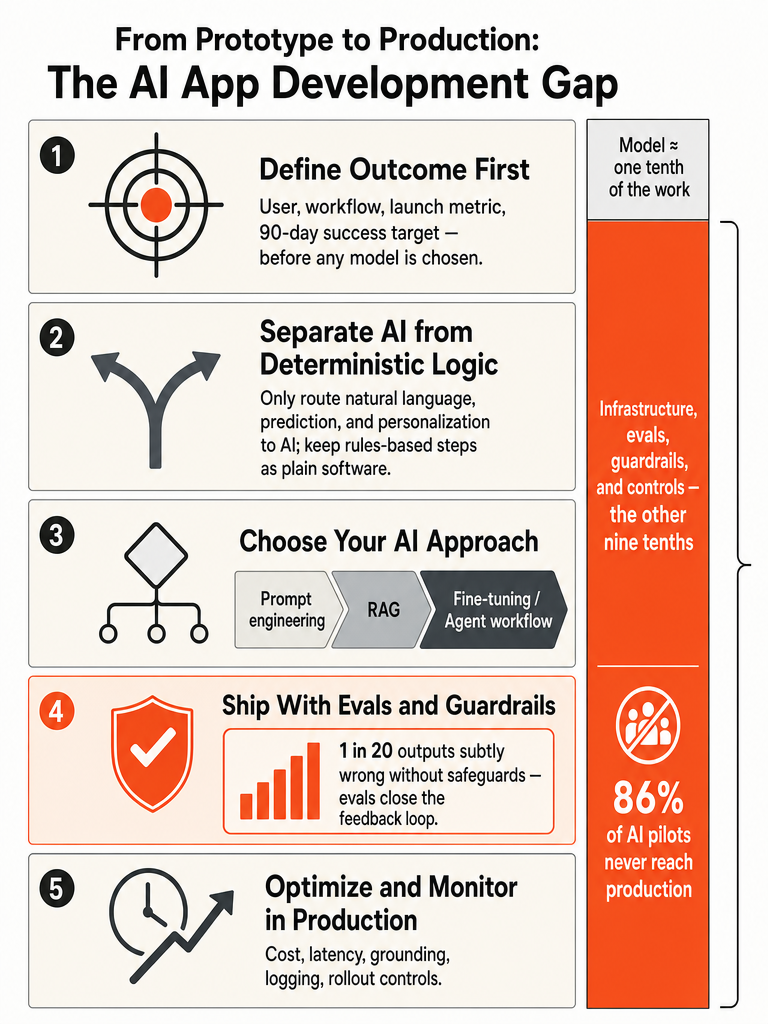
Start with the outcome before you pick GPT-4o, Claude, Gemini, or any app builder
Define the user, the workflow, and the launch metric before you touch a model. Databricks says the best AI app development cycles begin with a clear statement of who the app serves and what outcome it delivers, before choosing tools or writing code (Source: Databricks). Model choice is a downstream decision, not the starting line.
The trap for founders and operators is picking GPT-4o, Claude, or a no-code builder first because that feels like progress. It isn't. If you can't name the user, the workflow it replaces, and the number that proves it worked, you're not building a product. You're collecting tools.
Databricks recommends defining what success looks like at launch and again at 90 days after launch (Source: Databricks). That second checkpoint is the honest one. Plenty of apps look fine on launch day and quietly degrade. If you don't set the 90-day target up front, you have no way to tell whether the thing still works.
Outcome first. Model second. Every time.
Let's build something real — start your build with ZipLyne
Which parts of the app actually need AI?
Most of your app should stay deterministic software. AI belongs only where the task requires judgment, prediction, or language, work that fixed rules can't handle. Couchbase defines AI app development as building apps that analyze data, recognize patterns, generate predictions, understand natural language, and adapt to new inputs without explicit reprogramming (Source: Couchbase). Everything else is regular code.
Couchbase points to concrete AI use cases: personalization engines that tailor recommendations from behavior, predictive analytics in finance and healthcare, natural language processing, computer vision, and process automation. Notice what's on that list and what isn't. Login flows, permissions, billing, CRUD screens, and routing are deterministic. Don't dress them in an LLM.
Here's a working split:
- Keep deterministic: authentication, database reads and writes, form validation, payments, scheduled jobs, anything with a known right answer.
- Use AI: classifying messy inputs, drafting language, extracting fields from unstructured text, ranking or personalizing, predicting outcomes from patterns.
The apps that survive production use AI as a component inside real software, not as the entire product. When you wrap a chatbot around a workflow that a simple rule could handle, you've added cost, latency, and a new failure mode for no reason.
Map every feature. Deterministic where you can. AI only where the task genuinely needs it.
Do you need RAG or fine-tuning for an AI app?
Most AI apps don't need fine-tuning. Start with prompt engineering, add retrieval-augmented generation when the app needs your own data, and reserve fine-tuning and agent workflows for cases that actually demand them. OpenAI lists prompt engineering, RAG, and fine-tuning as the basic techniques used to improve an AI system's performance, plus structured outputs and tool calls to connect the model to the rest of your app (Source: OpenAI).
Here's the decision framework, cheapest and simplest first:
| Approach | Use it when | Watch for |
|---|---|---|
| Prompt engineering | The model already knows enough; you need clear instructions and constraints | Vague prompts; break complex tasks into steps (Source: Medium/Raj) |
| RAG | The app must answer from your documents, data, or knowledge base | Fluent answers not grounded in the source (Source: DEV Community) |
| Fine-tuning | You need consistent tone, format, or a narrow specialized behavior at scale | Cost and maintenance; rarely the first move |
| Agent workflows | The task needs multi-step reasoning, tool calls, and memory | Orchestration complexity; more places to break |
The Medium guide on production-ready builds puts the prompting principle plainly: provide context and constraints, start general then get specific, be explicit, and split complex tasks into smaller steps (Source: Medium/Raj).
The RAG warning matters most. The DEV Community practitioner says naive RAG often fails by producing fluent answers that aren't grounded in the source material, and recommends checking model claims against evidence before users see the answer (Source: DEV Community).
How do agents work in a real AI app?
An agent is an AI system with instructions, tools, and guardrails that can reason, hold context, and act. OpenAI defines agents as systems that reason and make decisions, maintain context and memory, and call external tools and APIs. Instead of one-off prompts, agents manage dynamic, multistep workflows that respond to real-world situations (Source: OpenAI).
That's the difference between a chatbot and an agent. A chatbot answers. An agent takes an input, decides what to do, calls a tool, checks the result, and moves to the next step. ChatGPT is the conversational interface most people know; consumer assistants like Siri and Alexa show the same pattern of turning language into action.
Databricks adds the production reality: agentic workflows involve multi-step tool calls and non-deterministic outputs, which is exactly why they need orchestration and controls (Source: Databricks). Frameworks like LangGraph, CrewAI, and AutoGen exist to manage that orchestration, wiring together the model, tools, memory, and the order of operations.
Every tool an agent can call is a new place it can fail, which is why guardrails aren't optional in an agent app. OpenAI is explicit that agents include guardrails to guide behavior, not just instructions and tools.
The honest take for operators: agents are powerful when the workflow is genuinely multi-step. If a single grounded prompt does the job, a full agent stack just adds surface area for things to break.
The production gap: why the model is maybe a tenth of the work
The model is the easy part. The DEV Community practitioner estimates the model itself is maybe a tenth of the work in building production AI systems, with the rest sitting in surrounding infrastructure and controls (Source: DEV Community). This is the production gap: the distance between a demo that impresses and software that survives real users.
The evidence for how wide that gap runs is blunt. The same source cites that something like 86% of AI agent pilots never reach production (Source: DEV Community). The bottleneck isn't model intelligence. It's the operational layer nobody demos.
What actually fills the other 90%:
- Grounding — checking model claims against real evidence so answers aren't fluent fiction (Source: DEV Community).
- Evals — measuring quality, safety, and reliability so you can improve instead of guess (Source: OpenAI).
- Fallback handling — deciding what happens when the model is uncertain or wrong.
- Logging — capturing every input, output, and decision so failures are traceable.
- Model routing — sending each task to the cheapest model that can do it well.
- Deployment controls — role-based access and blue-green deploys before real users hit it (Source: Databricks).
- Ownership — a named person responsible when it breaks.
Routing is where cost quietly compounds. The DEV Community source notes a mini-tier model can handle classification, extraction, routing, or drafting for roughly a fifteenth of flagship model cost, and argues cost is an architecture decision made on day one (Source: DEV Community).
This is why real engineering beats vibe coding. A prototype demos the tenth. Production is the other nine. If you want the difference between real AI integration and the LinkedIn version, it lives entirely in this gap.
How do evals and guardrails keep AI apps from quietly breaking?
Evals verify that an AI app is correct, safe, and reliable before real users depend on it. OpenAI says evals create a feedback loop that lets teams verify correctness, enforce guardrails, track quality over time, and ship with confidence (Source: OpenAI). Without them, you're launching on vibes and hoping.
The danger isn't the app that crashes. It's the app that's subtly wrong. The DEV Community practitioner describes a content capability producing roughly one output in twenty that was subtly wrong before the surrounding system was built (Source: DEV Community). A 5% subtle-error rate passes a quick demo and poisons a production system, because nobody notices until trust is already gone.
Evals and guardrails split into distinct jobs:
- Evals measure quality against known-good answers, so a change that degrades output gets caught before deploy (Source: OpenAI).
- Grounding checks verify model claims against source material, killing the fluent-but-wrong RAG failure (Source: DEV Community).
- Guardrails enforce what the app is and isn't allowed to do — the behavioral boundaries OpenAI bakes into agents.
- Human review sits on the outputs that carry real risk until confidence is proven.
Databricks reinforces the discipline: production-grade AI applications require quality gates at every layer, including automated evals and drift monitoring (Source: Databricks). Not one gate at the end. Gates throughout.
If you can't measure whether your AI app is right, you can't tell when it starts being wrong — and it will. Build the eval before you scale the feature.
Can AI build a production-grade web app without a developer?
Yes, for low-risk, narrowly scoped apps, AI can now ship production-grade web apps without a developer. Rocket.new states that in 2026 AI can build a production-grade web app with no developer, but only for low-risk, narrowly scoped applications, and recommends starting with a low-risk internal tool, validating the workflow, and scaling from there (Source: Rocket.new).
The scope of what's possible has genuinely expanded. Rocket.new cites Gartner forecasting that over 80% of enterprises will deploy generative AI in production by 2026, and IDC estimating nearly 70% of new line-of-business applications are being built outside central IT using AI-assisted tools (Source: Rocket.new). One no-code demo showed a full client portal — database, user roles, authentication, automation — built in under 10 minutes.
But the same demo is honest about the limit: it acknowledges most AI solutions fall apart when it comes to building real, usable software, and warns AI-generated code often breaks the moment real users touch it.
So the real question isn't whether AI can build apps. It's whether your app falls into the safe category. Internal tools, narrow workflows, single-user-type portals — often yes. Regulated data, payments, complex permissions, apps that must hold up under real load — that's where you need build ownership. When you hit that line, understanding where no-code breaks first saves you a rebuild.
What is the difference between an AI app prototype and a production app?
A prototype proves the idea works once; a production app proves it works reliably for real users with real data. Rocket.new is explicit that a production-grade web app is not just a working demo on someone's laptop, but a live application with the infrastructure to match (Source: Rocket.new). That infrastructure is the whole difference.
Here's the split, drawn from Rocket.new's production criteria and Databricks' quality gates:
| Dimension | Prototype | Production app |
|---|---|---|
| Access | Anyone with the link | Role-based access control (Source: Rocket.new / Databricks) |
| Errors | Breaks silently or crashes | Error monitoring and handling (Source: Rocket.new) |
| Testing | Manual, "it worked once" | Automated testing (Source: Rocket.new) |
| Deployment | Manual push | CI/CD, blue-green deploys (Source: Rocket.new / Databricks) |
| Data | No clear owner or backup | Owned data model and backup strategy (Source: Rocket.new) |
| Scale | Breaks past a few dozen users | Built to hold under load (Source: Rocket.new) |
| Monitoring | None | Drift and quality monitoring (Source: Databricks) |
Rocket.new lists the disqualifiers plainly: hardcoded API keys, missing error handling, front-end-only code, and no one owning the data model are all signs you have a prototype, not a product (Source: Rocket.new).
A prototype answers "does this work?" A production app answers "does this keep working when I'm not watching?" If you're deciding which to build first, the prototype-vs-MVP tradeoff is where to start.
What should you monitor after an AI app launches?
Monitor quality, grounding, cost, latency, and failure modes — because AI apps degrade quietly, not loudly. Databricks says production-grade AI applications require drift monitoring as a standing quality gate, not a launch-day checkbox (Source: Databricks). The app that passed evals in April can be subtly wrong by July if nobody's watching.
Track these after launch:
- Drift — is output quality sliding as inputs and data shift over time? (Source: Databricks)
- Retrieval grounding — are RAG answers still tied to source material, or drifting into fluent fiction? (Source: DEV Community)
- Quality trends — run evals continuously, not once, so degradation surfaces (Source: OpenAI).
- Cost — is model spend creeping? Route tasks to the cheapest model that does the job well (Source: DEV Community).
- Latency and failure modes — where and how does it break under real load?
The anchor metric ties back to where you started. Databricks recommends defining success at launch and again at 90 days (Source: Databricks). At 90 days you find out whether the app still performs — or whether it looked great on day one and quietly stopped earning its keep.
Launch is not the finish line; it's the moment the real monitoring starts. Someone has to own the failures. If no one does, drift wins.
Which first AI workflow should you build before scaling the product?
Build one recurring, low-risk workflow with clear inputs and reviewable outputs before you scale anything. Rocket.new's advice applies directly: start with a low-risk internal tool, validate the workflow, then scale from there (Source: Rocket.new). Databricks agrees the cycle begins with a clear statement of who the app serves and what outcome it delivers (Source: Databricks). Prove one lane works before building ten.
The mistake operators make is scoping the whole platform first. You don't know which workflows will hold up in production until one does. Pick the process that bleeds time every week, has clean inputs, and lets a human review the output before it ships. That's your test case for evals, grounding, and monitoring on a small blast radius.
To pick well, work through these:
- Score your candidates with the first-AI-workflow scorecard.
- Rank processes by volume, exceptions, and decision logic using how to prioritize processes for AI automation.
- Decide whether you're building a prototype or an MVP with prototype vs MVP for founders.
- If a spreadsheet is running the process today, see when to upgrade to an internal tool.
Ship one lane. Put it through the full production gap — evals, grounding, guardrails, monitoring. When it holds, you've earned the right to scale.
Frequently asked questions
What is the AI app development process from idea to production?
OpenAI structures the path into four phases: learn AI foundations, build with real code, ship with evals and guardrails, then optimize for cost, latency, and performance. Couchbase adds a parallel track: define the problem, prepare data, train, deploy, and maintain. The phases most teams skip — evals and drift monitoring — are where apps survive or collapse.
Can AI build a production-grade web app without a developer?
Yes, for low-risk, narrowly scoped apps. Rocket.new confirms AI can ship production-grade web apps without a developer in 2026 — but only for internal tools, single-user-type portals, and narrow workflows. Regulated data, complex permissions, and apps that must hold under real load still require build ownership. Gartner forecasts over 80% of enterprises will deploy generative AI in production by 2026.
What is the difference between an AI app prototype and a production app?
A prototype proves the idea works once; a production app proves it keeps working. Rocket.new lists the disqualifiers plainly: hardcoded API keys, missing error handling, front-end-only code, and no one owning the data model all mean you have a prototype, not a product. Production adds role-based access, CI/CD pipelines, automated testing, error monitoring, and drift tracking.
Why do 86% of AI agent pilots never reach production?
The bottleneck isn't model intelligence — it's the operational layer nobody demos. One practitioner on DEV Community estimates the model itself is maybe a tenth of the work; the rest sits in grounding, evals, fallback handling, logging, model routing, deployment controls, and named ownership. Skipping those layers is exactly why pilots stall before real users ever touch them.
Do you need RAG or fine-tuning for an AI app?
Most apps don't need fine-tuning. OpenAI recommends starting with prompt engineering, adding retrieval-augmented generation only when the app must answer from your own data, and reserving fine-tuning for narrow, high-scale behavioral consistency. The biggest RAG failure to watch: fluent answers not grounded in source material — check model claims against evidence before users see the output.
What should you monitor after an AI app launches?
Track five things: output drift, retrieval grounding, quality trends via continuous evals, model cost creep, and latency under real load. Databricks treats drift monitoring as a standing quality gate, not a launch-day checkbox. Set a 90-day success metric before launch — that's when you find out whether the app still earns its keep or quietly degraded after day one.
Sources
- AI app development: Concept to production - OpenAI Developersdevelopers.openai.com
- A Complete Guide to the AI App Development Process - Couchbasewww.couchbase.com
- Building production ready full stack apps with AI - YouTubewww.youtube.com
- AI App Development: Guide To Building AI-Powered Apps | Databricks Blogwww.databricks.com