How to choose the first AI workflow to build
Pick a recurring, low-risk workflow with clear inputs, reviewable outputs, a measurable business impact, and fast time to value. That's the first AI workflow worth building. The Fresnel Group puts it bluntly: the fastest way to waste time with AI is to start with a tool instead of a business problem. Most first pilots die not because the tech fails, but because someone chose the wrong project.
Here's the operator move. You don't guess. You rank real workflows against a scorecard, then stress-test the winner before anyone writes code.
This guide combines four frameworks into one. The Fresnel Group scores candidates on business impact, frequency, inputs and data, implementation effort, and risk. The AI Deployment Authority adds reviewability and time to value across a 6-dimension rubric that takes 5–7 minutes to run. SystemSculpt forces the discipline: exactly one workflow marked pursue now, with one named owner and one measurable target metric. AnovaGrowth handles what comes after selection — proving the workflow works in production, not just in a demo.
A good first AI project solves a real pain, gets used weekly or daily, is easy to measure, and can be improved over time. That's the Fresnel Group standard, and it's the bar everything below is built to clear.
The rest of this article gives you the candidate list, the scorecard, the reject rules, the tie-breaker, and the production checklist. Score honestly. Build the boring one that moves a number.
Let's build something real
Start with workflows, not AI tool ideas
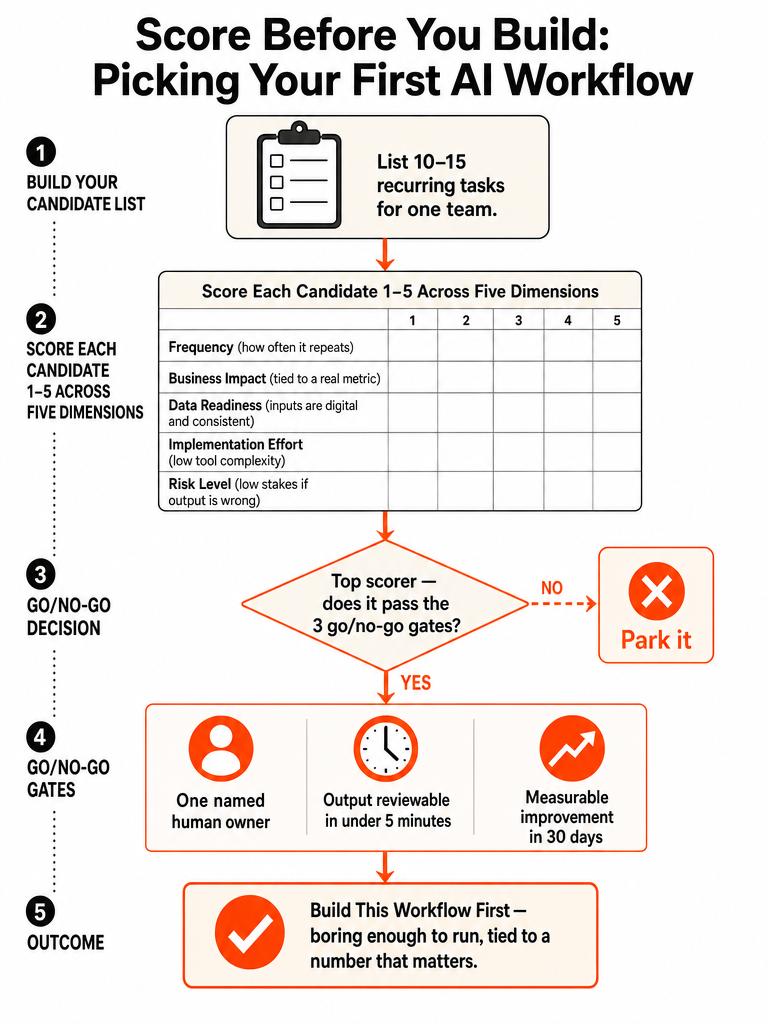
Build your candidate list from real daily work, not from a list of AI features you saw somewhere. The Fresnel Group's method is simple: pick one team — support, sales, operations, finance, or HR — then list 10 to 15 recurring tasks. Only tasks that happen often make the cut.
For each task, write down two numbers: how often it happens, and how long it takes today. Note which tools are involved, because tools decide how hard the build gets. You don't need a perfect analysis at this stage. You need a short list of real candidates.
Notice what changed. You're not asking "where can I use AI?" You're asking "which of the things we already do every day is worth handing to a system?" Those are different questions, and the second one produces workflows that survive.
An AI use case is not "using AI." Per the Fresnel Group, it's AI helping a specific process — drafting the first version, summarizing context, extracting key fields, suggesting next actions — while your team reviews and sends.
If you want a deeper method for ranking the processes themselves, see how to prioritize business processes for AI automation.
How to choose the first workflow to automate with AI from your task list
Score each candidate on the same criteria so you rank instead of guess. The Fresnel Group scores every candidate from 1 to 5 across five practical questions: business impact, frequency, inputs and data, implementation effort, and risk. The goal isn't precision — it's ranking. Ranking is what tells you which project goes first.
Here's what each question is really asking:
- Business impact — if this works, what changes in the next three months? Hours saved per week, faster response times, fewer errors, more leads handled.
- Frequency — does it happen daily or weekly? Rare tasks don't earn a first build.
- Inputs and data — is the information already digital, accessible, and consistent?
- Implementation effort — how many tools does it touch, and how hard are they to connect?
- Risk — what breaks if the AI gets it wrong before a human catches it?
SystemSculpt runs a leaner version: score business value, implementation complexity, and risk exposure on a 0-to-5 scale, cap the candidate list at up to 3 workflows, then mark one to pursue now, one to queue, and one to reject. Fewer candidates, faster decision.
Both frameworks agree on the point that matters. You compare workflows against each other on the same axes, then commit to one. A high impact score with a low effort score is your signal. A high impact score buried under high risk and messy data is a trap you skip for now.
The first-build scorecard: impact, frequency, data, effort, risk, reviewability, and time to value
Consolidate the overlapping frameworks into one scorecard that separates what to build first from whether it's ready to scale. The AI Deployment Authority rubric compares candidate workflows across six dimensions — Frequency, Value, Reviewability, Evidence, Risk, and Time to value — and is designed to run in 5–7 minutes. That's the selection layer. Production evaluation comes later.
Here's the combined operator model, pulling the Fresnel Group, AI Deployment Authority, and SystemSculpt criteria into one pass:
| Dimension | Question it answers | Scale | Source |
|---|---|---|---|
| Business impact / Value | What number changes in 3 months? | 1–5 | Fresnel Group |
| Frequency | Daily or weekly enough to matter? | 1–5 | Fresnel Group / ADA |
| Inputs & data | Digital, accessible, consistent? | 1–5 | Fresnel Group |
| Implementation effort / complexity | How many tools, how hard to connect? | 0–5 | Fresnel / SystemSculpt |
| Risk exposure | What breaks if it's wrong? | 0–5 | SystemSculpt / ADA |
| Reviewability | Can a human check output fast and safely? | 1–5 | AI Deployment Authority |
| Time to value | Testable within 30 days? | 1–5 | AI Deployment Authority |
Reviewability and time to value are the two dimensions the simpler scorecards miss, and they're the ones that keep a first build from turning into a six-month science project. The AI Deployment Authority is explicit: the first useful version should be testable within 30 days.
Score every candidate on all seven, sort by combined rank, and the workflow that scores high on impact and reviewability while staying low on risk and effort is your build. No source publishes a weighting formula, so use the scores to rank, not to compute a false-precision number.
Why does the first workflow matter so much?
The first workflow sets the pattern for everything after it, which is why it should be boring enough to run in production — not the flashiest thing you can demo. The AI Deployment Authority says teams often pick the loudest demo, but a first workflow should be dull enough to actually run and tied to a number the business cares about. A win here earns you the next three builds. A dead pilot poisons the whole idea internally.
The Fresnel Group names the five hidden issues that kill early AI projects: the value is unclear, the workflow isn't stable, the data isn't accessible, the process touches too many tools, or the risk is too high for a first attempt. Any one of those turns into the same outcome — time spent, budget spent, lots of meetings, and nothing that becomes part of daily operations.
You're trying to ship something that gets used every day and keeps working. That's the standard the first build has to meet.
For a sharper look at why execution beats hype, read what separates businesses that win with AI from businesses that just talk about it.
Should we start with the biggest problem?
Not always. The biggest pain is only the first build if it's safe to run before you have review controls in place. The AI Deployment Authority is direct here: workflows that require final judgment, sensitive data, legal approval, pricing decisions, or customer-facing promises should be parked until a review process exists.
The instinct is understandable. Your worst bottleneck is the one you want gone first. But your worst bottleneck is often worst because it's high-stakes — it touches contracts, money, or customer trust. Those are exactly the workflows where an AI mistake costs you before a human can catch it.
Start adjacent instead. Automate the prep work around the big problem, not the final decision inside it. If pricing approval is your bottleneck, automate the data gathering and draft that feeds the approval — leave the approval to a human.
Once the safer version proves out, you've built the review controls you need to move up the risk ladder.
What is a poor first workflow?
A poor first workflow has weak volume, unclear ownership, messy inputs, high approval risk, hard integrations, no measurable target, or no safe human review point. Park those — don't force them into a first AI build. The Fresnel Group's failure list maps almost exactly: unclear value, unstable process, inaccessible data, too many tools, too much risk.
Here's the reject list in operator terms:
- Weak volume — runs monthly or rarely. Not enough repetition to justify the build or measure a win.
- Unclear ownership — no single person accountable for the output. SystemSculpt requires one named owner before a workflow is even ready for planning.
- Messy inputs — data lives in inboxes, PDFs, and someone's head. The AI can't work reliably on inconsistent inputs.
- High approval risk — touches legal, pricing, or customer promises before controls exist.
- Hard integrations — spans too many tools that don't talk to each other.
- No measurable target — you can't say what number should move.
- No safe review point — nowhere for a human to catch errors before they ship.
A candidate hitting several of these isn't a bad workflow forever. It's a queue item. Fix the process, clean the data, or build the review step, then rescore it. Forcing it into a first build is how you burn your one shot at internal buy-in.
The operator rule: AI prepares, a human approves
The cleanest go/no-go rule for a first build: AI prepares work, a human approves it. If your candidate workflow can't fit that shape, it's not your first build. The AI Deployment Authority's default recommendation is to start with a workflow where AI prepares work for review rather than making final decisions.
The named examples from the AI Deployment Authority are the template:
- Lead routing — AI reads the inbound, suggests the assignment, a rep confirms.
- Proposal checks — AI flags gaps or errors, a human decides.
- Onboarding missing-item review — AI lists what's missing, someone chases it.
- Reporting briefs — AI drafts the summary, a human sends.
- Support escalation summaries — AI compresses the thread, an agent acts.
Every one of these keeps the human at the decision point. The AI does the reading, extracting, drafting, and flagging — the tedious 80% — while judgment stays with a person. That's what makes it safe enough to ship first and honest enough to trust in production.
When a workflow needs a human to approve the output anyway, that review step becomes your safety net — which is exactly why it belongs in your first build. Run the insertion test on every candidate: where does a person sign off? No clean sign-off point means no first build.
This is the difference between real AI integration and the demo-ware version — more on that in what real AI integration looks like.
What real business metric should improve in the first 30 days?
Pick one number before you build, and commit to moving it inside 30 days. The Fresnel Group's month-one sequence is exact: you list workflows, score them, pick a use case, and define one success metric — something measurable like time saved. SystemSculpt reinforces it — the selected workflow must have one measurable target metric before planning starts.
Candidate metrics, depending on the workflow:
- Hours saved per week
- First-response time
- Error rate or records needing correction
- Routing or classification accuracy
- Records processed correctly
AnovaGrowth's lead-qualification example shows what a real production baseline looks like. Across 50 leads, the workflow created the correct record 47 times, routed the lead correctly 44 times, and required human correction on 6 records. First-response time dropped from 41 minutes to 9.
| Metric | Result |
|---|---|
| Leads processed | 50 |
| Correct records created | 47 |
| Correct routing decisions | 44 |
| Records needing human correction | 6 |
| First-response time | 41 min → 9 min |
Notice what that gives you: a number that improved, an error count you can act on, and a clear picture of where the human still needs to review. That's a workflow you can defend and expand.
Set the baseline before you build. If you can't state today's number, you can't prove the win. For where the hours usually leak, see the best admin work to automate first.
How do I pick the first workflow to automate with AI when two candidates score close?
When two candidates land near-even on the scorecard, break the tie with the criteria that decide real-world success: faster time to value, cleaner review boundaries, easier data access, fewer tools touched, and one clearly named owner. The published frameworks rank candidates well but stay thin on this exact tie-break, so treat the list below as an operator's default.
Run the tie-breaker in this order:
- Faster time to value — which one is testable inside 30 days? The AI Deployment Authority anchors selection to that window; the faster proof wins.
- Cleaner review boundary — which has the clearer "AI prepares, human approves" handoff? Fewer judgment calls buried in the workflow means safer shipping.
- Easier data access — which one's inputs are already digital and consistent, per the Fresnel Group's data criterion?
- Fewer tools touched — implementation effort scales with integration count. Pick the one spanning fewer systems.
- One named owner — SystemSculpt won't call a workflow ready without a single accountable owner. If one candidate has an obvious owner and the other has "the team," pick the owned one.
Break the tie on which workflow you can ship, measure, and defend fastest. Speed to a proven number beats scope every time on a first build.
Where this scorecard fits with process prioritization and admin automation
This scorecard is the front door to a bigger sequence: prioritize processes, automate the right admin work, replace the spreadsheets holding you hostage, then scale what proves out. Selection is step one. What you build after depends on where the hours and errors actually live in your operation.
A few places to go deeper depending on your situation:
- Ranking the processes themselves before you even score AI candidates — how to prioritize business processes for AI automation.
- The admin lanes that pay back fastest for small teams — the best admin work to automate first in small business.
- When a spreadsheet has outgrown itself and needs a real tool — custom internal tools vs spreadsheets: when to upgrade.
- Finding where profit is leaking before you pick anything — an AI operations audit.
- Building systems around your workflow instead of buying generic tools — stop buying AI tools, start building AI systems.
Before you build, stress-test the winner against production proof
Selection ends when one workflow survives a production readiness check — not before. SystemSculpt says the scorecard isn't ready for implementation planning unless exactly one workflow is marked pursue now, that workflow has one named owner, and it has one measurable target metric. Miss any of the three and you're not ready to build.
Then apply AnovaGrowth's production lens. AnovaGrowth argues the next advantage isn't another model subscription — it's a simple scorecard that tells you whether an AI workflow is trustworthy enough to scale. A good pilot, in its words, is a small workflow with visible pass-fail criteria, not a flashy demo and a few screenshots.
Your pre-build checklist:
- Exactly one workflow marked pursue now.
- One named owner accountable for the output.
- One target metric with a baseline number.
- Visible pass-fail criteria — what "working" means, written down.
- Clear approval boundaries — where the human signs off.
- Exception handling — what happens when the AI is unsure.
Before scale, AnovaGrowth recommends measuring workflow accuracy, context quality, tool reliability, approval boundaries, exception handling, and an outcome metric. That mirrors what the major vendors pushed recently: AnovaGrowth notes OpenAI, Microsoft, Anthropic, Google, and AWS each emphasized evaluation, context quality, deployment proof, or tool-calling accuracy — measurement as part of the product.
Score real workflows, pick one, prove it moves a number in 30 days, then scale. That playbook beats chasing the loudest demo every time.
That's the work ZipLyne does: score, build, ship, measure, expand. If you've got a workflow bleeding hours and you're ready to fix it in production, not slides, start here.
Let's build something real
Frequently asked questions
How do I pick the first AI workflow to build when I don't know where to start?
Score real candidates against seven dimensions before writing any code: business impact, frequency, data quality, implementation effort, risk, reviewability, and time to value. The Fresnel Group recommends listing 10–15 recurring tasks from one team, scoring each 1–5, then ranking — not guessing. The workflow that scores high on impact and reviewability while staying low on risk and effort is your build. Run the whole scorecard in under 10 minutes.
What makes a first AI workflow a bad choice?
Seven red flags disqualify a candidate: it runs monthly or rarely, no single person owns the output, inputs live in inboxes or PDFs, it touches legal or pricing decisions before review controls exist, it spans too many disconnected tools, there's no measurable target metric, or there's no safe point for a human to catch errors. Any one of these turns a promising pilot into a dead one. Park the workflow, fix the underlying issue, then rescore it.
Should I start with my biggest business problem or a smaller workflow?
Start adjacent to the biggest problem, not inside it. Your worst bottleneck is often worst because it's high-stakes — touching contracts, pricing, or customer trust. The AI Deployment Authority recommends parking workflows that require final judgment, sensitive data, or legal approval until review controls exist. Automate the prep work feeding the big decision instead. Once that proves out, you've built the review layer you need to move up the risk ladder.
What real metric should improve in the first 30 days of an AI workflow?
Commit to one number before you build. In a real lead-qualification production test documented by AnovaGrowth, across 50 leads the workflow created correct records 47 times, routed correctly 44 times, and cut first-response time from 41 minutes to 9. Pick one metric — hours saved per week, first-response time, error rate, or routing accuracy — set today's baseline, and measure against it at day 30. No baseline means no provable win.
What is the 'AI prepares, human approves' rule for first builds?
The AI Deployment Authority's default for a first build: AI handles the reading, extracting, drafting, and flagging — the tedious 80% — while a human makes the final call. Named examples include lead routing (AI suggests, rep confirms), proposal gap checks, onboarding missing-item reviews, reporting briefs, and support escalation summaries. If a candidate workflow can't fit that shape, it's not your first build. The human sign-off point is also your safety net in production.
How do I break a tie when two AI workflow candidates score almost the same?
Run five tiebreakers in order: faster time to value (testable inside 30 days per the AI Deployment Authority), cleaner human review boundary, easier data access (already digital and consistent per the Fresnel Group), fewer tools touched, and one clearly named owner. SystemSculpt won't mark a workflow ready for planning without a single accountable owner — if one candidate has an obvious owner and the other has 'the team,' pick the owned one every time.
Sources
- AI Readiness Scorecard for Business Successwww.fresnel-group.com
- How to create Scorecards - Help Center - Avomaanovagrowth.com
- AI Scorecards Before Scale | AnovaGrowthsupport.greenhouse.io
- Summarize scorecards using AIsupport.gainsight.com
- Optimize Scorecards with AI - Gainsight Inc.www.aideploymentauthority.org
- First Workflow Selection Rubric | AI Deployment Authoritysystemsculpt.com
- AI Workflow Intake Scorecard for Automationwww.linkedin.com