Should I use Zapier or build a custom API?
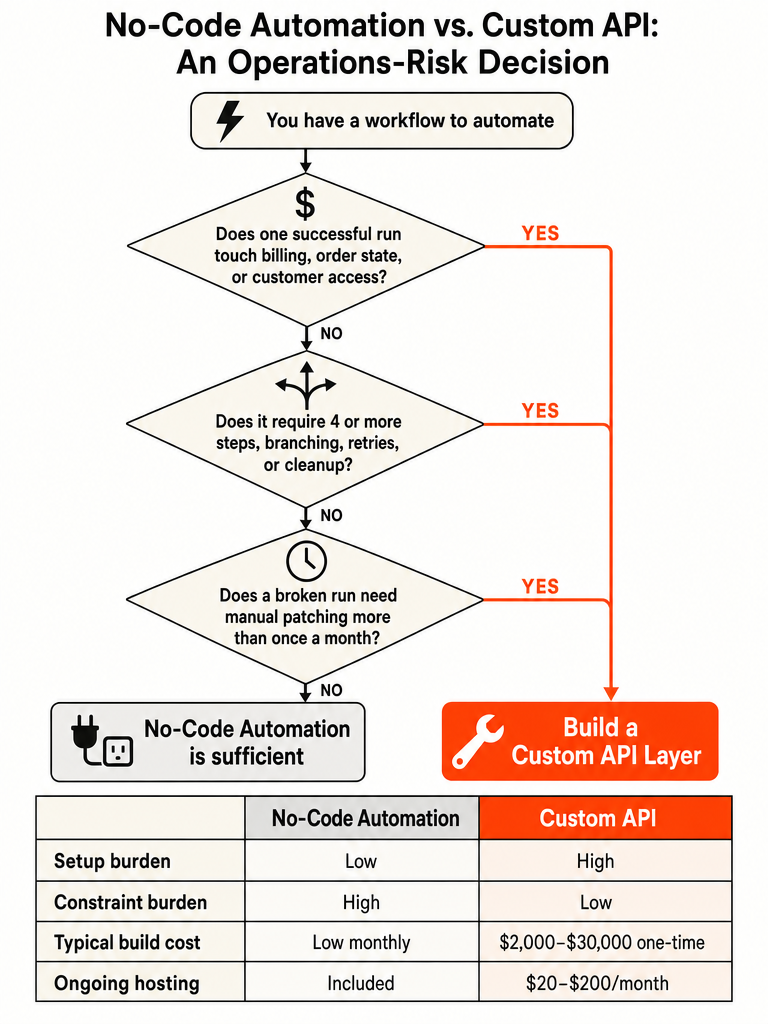
Keep Zapier for low-stakes, linear SaaS handoffs; build a custom API the moment a failure touches money, access, order state, or forces repeated manual cleanup. That single line settles most of the debate. SaaS Central gives the practical cutoff: move beyond Zapier when one task needs 4 or more steps, branching, retries, or cleanup to finish cleanly (Source: SaaS Central).
Frame this as an operations-risk decision, not a tool argument. Zapier is a no-code automation platform that connects apps like Google Sheets, Slack, and Trello without you writing code. A custom API is a set of endpoints, keys, and request logic your code calls directly, giving you control over retries, ordering, and error handling.
Here's the honest split. If a broken run is cheap to rerun by hand and the workflow rarely changes, Zapier wins on speed. The second a failure duplicates a charge, skips provisioning a customer, or leaves someone with the wrong access, the cost of that failure outweighs the convenience of no-code.
If your automation now runs the business instead of assisting it, you've already outgrown the sticky-notes-and-string phase.
When should you use Zapier vs an API?
Use Zapier when you need fast, no-code automation between common apps; use a custom API when you need controlled, tailored integration between systems. ApiX-Drive puts it cleanly: Zapier is built for connecting apps quickly without coding, while APIs are for high customization and control over integrations (Source: ApiX-Drive).
Zapier fits a specific shape of work:
- Automating repetitive tasks between apps
- Building workflows without writing code
- Integrating popular tools like Google Sheets, Slack, and Trello
- Deploying quickly without extensive setup
APIs earn their place elsewhere. ApiX-Drive notes that APIs are the better call for complex data workflows, integrating proprietary systems, and high-volume data transactions where performance and scalability matter. They also connect virtually any software that exposes an endpoint, including services Zapier doesn't support.
The clean rule: pick Zapier for simple, common, low-risk handoffs; pick an API when the logic, the systems, or the failure cost push past what no-code can hold.
One more grounding point on reach: the Knack community forum notes Zapier has over 3,000 app integrations, which is exactly why it's the right first stop for common SaaS work. Breadth of connectors is Zapier's strength. Control over how those connections behave under failure is the API's strength.
What is the difference between custom API integration and no-code automation?
No-code automation hides the plumbing; custom API integration exposes it. A tool like Zapier lets you orchestrate workflows without reading a line of API documentation. A custom API integration puts the endpoints, keys, requests, docs, and testing directly in your hands.
Standard API documentation practice lays out the five steps behind any raw API connection:
- Pick an API through GitHub, Google's APIs Explorer, or a site's developer section.
- Get your API key, which acts like a password for access.
- Read the documentation to learn what the API can do.
- Write a request using GET, POST, PUT, or DELETE methods.
- Test your connection, checking status codes: 2xx for success, 4xx and 5xx for errors.
No-code does all of that for you behind a visual editor. That's the trade. You lose visibility into retries, payload shape, and auth handling, and you gain speed. No-code lowers setup burden; a custom API lowers constraint burden (Source: SaaS Central). One gets work moving fast. The other gives you control when the details start to matter.
When should I move from Zapier to custom API workflows?
Move from Zapier to custom API workflows once a single task needs 4 or more steps, branching, retries, or cleanup to finish cleanly. SaaS Central sets this as the hard cutoff, and adds a second filter: if a person has to check a failed run more than once a month, maintenance burden should outweigh setup speed (Source: SaaS Central).
The real question isn't sophistication. It's who absorbs the fixes. When a broken run turns into a recurring admin task, the automation has crossed from convenience into operations.
Here's the decision table SaaS Central lays out, because it scores the workflow shape instead of the brand:
| Signal | Stay on Zapier | Move to custom API |
|---|---|---|
| Flow shape | 1 to 3 linear steps | 4+ steps, branches, or loops |
| Data handling | Simple field mapping | Transforms, dedupe, or state tracking |
| Failure cost | Manual rerun is cheap | Duplicates or missed records cause real damage |
| Authentication | Standard connector auth | Custom tokens, refresh logic, nonstandard headers |
| Ownership | No dedicated owner yet | One owner reads logs and fixes breakage |
The build itself is rarely the expensive part. The expensive part is the second and third fix. Once a workflow needs repeat intervention, the question stops being whether it works and becomes whether it works with less friction than the alternative.
When is Zapier not enough?
Zapier stops being enough when the workflow needs state tracking, deduplication, custom authentication, or connections to systems Zapier doesn't support. ThatAPICompany describes a 120-employee manufacturing firm that started simple, then ended up running 47 different Zaps at about £800 a month, with its operations manager stuck debugging failures (Source: ThatAPICompany).
His line says it all:
"It worked great when we were smaller. But now it feels like we're trying to run a factory with sticky notes and string."
That's the pattern. The warning signs ThatAPICompany looks for include a monthly bill that makes you wince and "Frankenstein workflows" where you start building Zaps to manage other Zaps.
The failure modes that push past Zapier:
- State tracking — the workflow needs to remember what happened last time
- Deduplication — you can't afford duplicate records or duplicate actions
- Custom auth — nonstandard tokens, refresh logic, or unusual headers
- Unsupported systems — the app you need has no reliable connector
- Manual babysitting — someone checks and patches failures on a schedule
When you're building automations to babysit your automations, you've already outgrown the tool. The setup was cheap. The daily cleanup isn't.
Can Zapier handle complex workflows with branching and retries?
Zapier can handle simple multi-step flows with basic conditional logic, but custom API logic wins when branching, replay safety, ordering, payload shape, and explicit error handling matter. ApiX-Drive frames it directly: Zapier handles simpler, common tasks, while custom APIs manage the complex or unique requirements Zapier can't accommodate (Source: ApiX-Drive).
The Knack forum comparison notes Zapier supports multi-step Zaps and conditional logic, but its focus on simplicity can limit workflow depth. Make.com, by contrast, offers iterators, routers, and custom functions for more intricate flows. So even inside no-code, there's a ceiling.
Where custom API logic pulls ahead:
| Requirement | Zapier | Custom API |
|---|---|---|
| Branching | Basic conditions | Full control flow |
| Retries | Limited | Explicit replay logic |
| Ordering | Not guaranteed | Enforced |
| Payload shape | Fixed by connector | Fully controlled |
| Error handling | Rerun manually | Explicit, coded, auditable |
SaaS Central makes the trade-off plain: a custom API workflow makes the plumbing visible, giving you control over retries, ordering, payload shape, and error handling. That control adds logging, token refreshes, version checks, documentation, and test coverage. You pay for control in upkeep. When ordering and replay safety actually matter, that's a fair price.
Is Zapier cheaper than a custom API?
Zapier is cheaper to start and often more expensive to scale. The Knack forum lists Zapier's free plan at up to 100 tasks per month with paid plans from $29.99/month; ThatAPICompany puts the Starter plan at $19.99/month for 750 tasks (Sources: Knack forum; ThatAPICompany). A custom API costs more upfront but flattens as volume grows.
Here's the full picture across sources:
| Option | Cost |
|---|---|
| No-code entry paid plan | $10–$30 / month (Alltomate) |
| No-code growing business | $69–$200 / month (Alltomate) |
| No-code high-volume / team | $300–$800+ / month (Alltomate) |
| Simple custom API build | $2,000–$8,000 one-time (Alltomate) |
| Multi-system custom API build | $10,000–$30,000 one-time (Alltomate) |
| Custom API hosting | $20–$200 / month (Alltomate) |
| Custom API maintenance | $500–$2,000 / year (Alltomate) |
The crossover matters. Alltomate notes moderate-volume, multi-step no-code workflows often reach $300–$600/month within 12–18 months of growth, and a $5,000–$10,000 custom integration typically recovers its cost within 12–24 months after that.
ThatAPICompany's manufacturing client makes it concrete: they built a custom platform for roughly £15,000 against an £800/month Zapier bill, breaking even in about 18 months. Every failed Zap still counted as a paid task, so they were paying for workflows even when those workflows broke.
Money, access, billing, and order state belong on the safer side
Any workflow that touches billing, provisioning, order state, or customer access belongs on the custom API side. SaaS Central is direct on this: those flows need replay safety, explicit error handling, and a clear trail of what changed and why. The reason is failure impact, not sophistication.
When a run breaks in a low-stakes workflow, you rerun it. When a run breaks in a billing sync, you might double-charge a customer or skip one entirely. SaaS Central's own decision note puts it plainly: the higher the error cost, the more control matters. Duplicates or missed records in these flows create real damage.
Think about what a failure actually does in each of these:
- Billing — a duplicate charge or a missed invoice
- Provisioning — a paying customer who can't access what they bought
- Order state — an order stuck between "paid" and "shipped" with no record why
- Access syncs — someone keeps access they should have lost
If a broken run can charge someone twice or lock a paying customer out, that workflow is production software, not automation. No-code can't give you the replay safety and audit trail those flows demand. A thin custom layer can.
The hybrid build: keep Zapier at the edge, put the risky logic in a thin API
The middle path most comparisons skip: keep Zapier at the edge for simple orchestration, and put the risky logic in a thin custom API. Zapier still catches the trigger and moves the simple data. The custom layer handles normalization, auth, retries, and the safety and auditability that critical flows demand.
This maps directly to what the sources already establish. SaaS Central says a custom API gives you control over retries, ordering, payload shape, and error handling. ApiX-Drive says APIs are the fit for proprietary systems and complex data workflows. You don't need to rip out Zapier to get those benefits on the flows that matter.
A practical shape:
- Zapier — trigger detection, notifications, low-stakes handoffs to common SaaS tools
- Thin custom API — deduplication, custom auth and token refresh, retry and replay logic, payload validation, and a clear log of what changed and why
This keeps the setup speed of no-code where the stakes are low, and puts explicit control exactly where a failure would cost you. Draw the line by failure cost and build on both sides of it.
Do I need a custom API for proprietary or legacy systems?
You need a custom API when prebuilt connectors are missing or unreliable, which is common with proprietary and legacy systems. ApiX-Drive states that APIs let you connect virtually any software with an endpoint, and are the go-to when you need to integrate services Zapier doesn't support. If there's no dependable connector, no-code has nothing to click.
That's the core case. A no-code tool is only as good as its connector library. When the system you need is homegrown, old, or niche, you're either forced into brittle workarounds or a custom integration that talks to the endpoint directly.
There are adjacent no-code and integration options worth knowing before you commit to a full custom build. The Knack forum notes Make.com offers a free plan with up to 1,000 operations and paid plans from $9/month, with iterators and routers for granular control. ApiX-Drive positions itself as a unified API integration platform for services Zapier doesn't cover. n8n exists in the same category of more flexible integration tooling.
Check whether one of those covers your system first. If none of them connect reliably to your proprietary or legacy tool, the custom API is the honest answer.
Who owns the failures after launch?
A custom API only makes sense if someone will read the failures, inspect payloads, and fix auth or schema problems after launch. SaaS Central names ownership as a primary filter: custom code without an owner becomes a stranded system. If nobody's watching the logs, staying on Zapier is the smarter call.
This is the question most comparison pages dodge. They score control and cost and never ask who's on the hook when the integration breaks at scale.
Before you build, someone has to own:
- Logs — reading them when a run fails, not weeks later
- Payloads — inspecting the actual data when a request looks wrong
- Auth failures — catching and fixing expired tokens or refresh breakage
- Schema issues — handling changes when an upstream system alters its data shape
- Maintenance — Alltomate estimates $500–$2,000/year in developer upkeep for a custom API integration
SaaS Central's decision note is blunt about the alternative: custom code without ownership becomes a stranded system. A custom API with no owner is worse than a Zapier flow that breaks loudly. Zapier at least tells you when a task fails. An unmonitored custom integration fails silently.
If the workflow is still changing every week, do not hard-code the mess
If non-technical staff need to change the workflow constantly, Zapier's accessibility beats deeper control until the process stabilizes. SaaS Central warns that custom code exposes weak process design: if the business flow changes every week, code locks in churn.
You don't want to hard-code a process that isn't settled yet. Every change becomes a developer ticket instead of a five-minute edit in a visual builder.
The signal is simple. Watch how often the workflow's rules actually change:
- Changing weekly, edited by non-technical staff → stay on Zapier
- Stable for months, edited rarely → a custom API is safe to commit to
Zapier's whole value here is that someone without code can adjust the flow the moment the business shifts. Lock a churning process into custom code and you've bought yourself constant rework. Wait until the process holds still. Then build.
Use this workflow scorecard before you build the integration
Score the workflow before you build, using the same signals throughout this piece: flow shape, data rules, failure cost, auth complexity, and ownership. Run each candidate through those five, and the right side of the line usually picks itself. The tool debate ends where the operations math begins.
If you're deciding where automation should even start, how to choose the first AI workflow to build and how to prioritize business processes for AI automation both give you a scoring frame for volume, exceptions, and data structure.
For the broader no-code-versus-custom call, no-code vs custom AI tools and what breaks first covers exactly where the cracks show up. And when the workflow you're scoring is really a spreadsheet holding the business together, when to upgrade from spreadsheets to custom internal tools and how to build an internal tool that replaces spreadsheet ops show the upgrade threshold and the clean cutover.
What to build next when the automation is now production work
Scope the smallest production-ready integration that removes the manual cleanup, protects the critical data, and gets you off the fragile chain. Don't rebuild everything. Find the one flow where failures touch money, access, or order state, and put that logic behind a thin custom API first.
The path is straightforward:
- Identify the workflow that costs you the most when it breaks.
- Keep the low-stakes edges on Zapier if they already work.
- Build a thin API layer for the risky logic: dedupe, auth, retries, and a clear audit trail.
- Assign one owner to read logs and fix breakage after launch.
That's the whole decision, scored as operations risk instead of a tool preference. When an automation has become production work, treat it like production software.
At ZipLyne, we build the thin, production-ready layer that gets a business out of fragile workflow chains without the agency bloat. If your Zaps have quietly turned into operations, that's the signal to build something real.
Frequently asked questions
When should you move from Zapier to a custom API workflow?
Move once a single task needs 4 or more steps, branching, retries, or cleanup to finish cleanly — that's the hard cutoff SaaS Central sets. Add a second filter: if someone has to check a failed run more than once a month, the maintenance burden has already outweighed the setup speed. At that point, you're running operations, not automation.
Is Zapier cheaper than building a custom API?
Zapier is cheaper to start — paid plans begin at $19.99/month for 750 tasks — but expensive to scale. Alltomate's benchmarks put moderate no-code workflows at $300–$600/month within 12–18 months of growth. A custom API build runs $2,000–$30,000 one-time plus $20–$200/month hosting, and typically recovers its cost within 12–24 months. One manufacturing firm paid £800/month on Zapier, built a custom platform for £15,000, and broke even in 18 months.
What are the signs Zapier isn't enough for your business?
Five clear signals: your monthly Zapier bill makes you wince, you're building Zaps to manage other Zaps, the workflow needs state tracking or deduplication, you require custom auth with nonstandard tokens, or someone is manually patching failures on a schedule. ThatAPICompany documented a 120-employee firm running 47 Zaps at £800/month with an operations manager stuck debugging — that's the pattern.
Can Zapier handle complex workflows with branching and retries?
Zapier supports multi-step Zaps and basic conditional logic, but it can't enforce ordering, guarantee replay safety, or give you explicit, auditable error handling. Custom API logic wins on all four: full control flow, explicit retry logic, enforced ordering, and coded error responses. Even inside no-code, Make.com's iterators and routers push further than Zapier — but both hit a ceiling when failures touch money or order state.
Do I need a custom API to connect proprietary or legacy systems?
Yes, when no reliable connector exists. ApiX-Drive states that APIs connect virtually any software with an endpoint, covering services Zapier doesn't support. Before committing to a full custom build, check Make.com (free up to 1,000 operations, paid from $9/month) and ApiX-Drive as alternatives. If none connect reliably to your proprietary or legacy system, a custom API is the honest answer — no connector means no-code has nothing to click.
What's the hybrid approach — can you use Zapier and a custom API together?
Keep Zapier at the edge for trigger detection, notifications, and low-stakes SaaS handoffs. Put the risky logic — deduplication, custom auth, retry and replay, payload validation, and audit logging — behind a thin custom API layer. This preserves no-code setup speed where stakes are low and puts explicit control exactly where a failure would cost you. Draw the line by failure cost, then build on both sides of it.
Sources
- When to use Zapier vs an APIzapier.com
- How to use an API: Guide for beginners [2025]forums.knack.com
- MAKE, Zapier, or Even simpler? - API & Custom Codethatapicompany.com
- Pros of Zapier vs getting it custom coded.apix-drive.com
- When Zapier Isn't Enough: 5 Signs You Need a Custom API ...saas-central.com
- Zapier Vs APIalltomate.com
- When to Use Custom API vs No-Code Automationwww.reddit.com