How much does an internal tool cost compared with SaaS at 10 users?
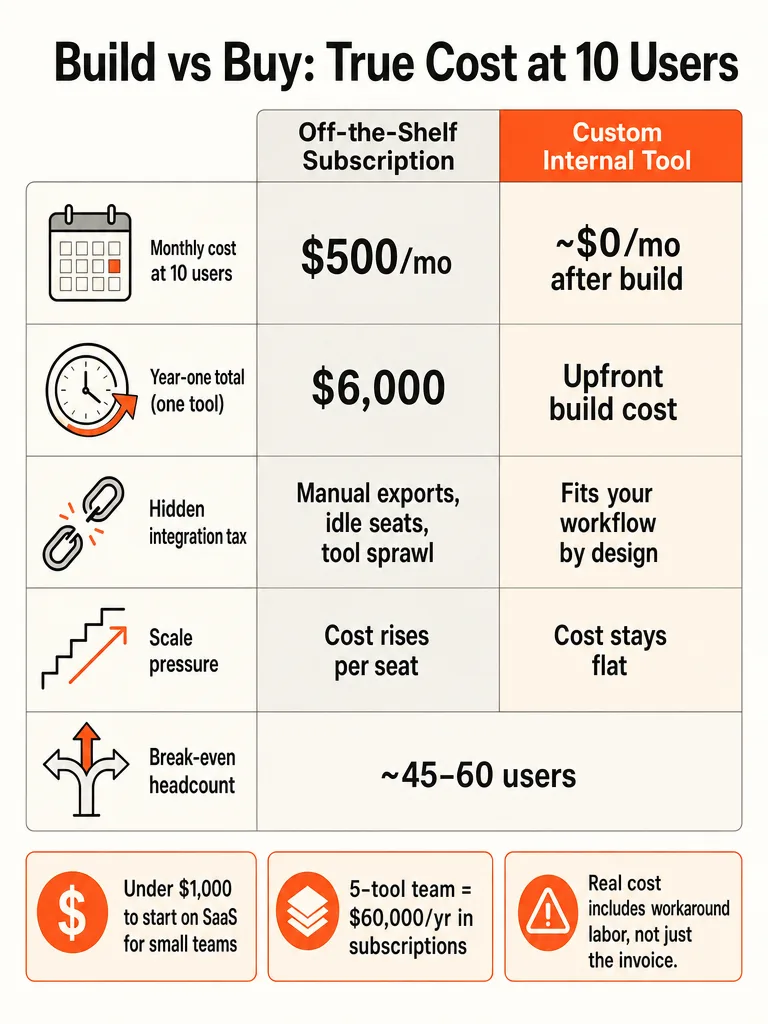
At 10 users, one SaaS subscription almost always costs less than building an internal tool when you compare one tool to one tool. Softermii's published build-vs-buy model uses a base assumption of $50 per user per month, which puts a 10-user SaaS app at $500 per month, $6,000 per year, and $18,000 over three years. A custom build rarely comes in under that at this size.
That's the clean answer. Now the caveat that most cost articles skip: the sticker price isn't the whole bill.
Softermii's own framework says a fair comparison has to include setup, integrations, training, and the staff time spent working around what the tool can't do. A 10-person team using one clean, standard SaaS product will beat a custom build on total cost. A 10-person team stitching together three tools with manual exports and duplicate data entry is already paying a second bill nobody put on an invoice.
So the real question at 10 seats isn't "SaaS or build." It's whether the workflow fits an off-the-shelf product or whether your people have quietly become the integration layer.
If you already suspect your team is bleeding hours between tools, look harder before you sign the renewal on autopilot.
Why the real choice is internal tool vs SaaS, not SaaS vs on-premise
The decision that matters isn't SaaS versus on-premise servers, it's whether to buy off-the-shelf SaaS and adapt your operations to it, or build software that fits your operations exactly. Brocoders frames this as the question companies at 50, 100, or 200 employees actually face, and says the infrastructure debate is over for anyone without strict compliance rules. On-premise is now a niche requirement: regulated industries, data residency laws, government environments.
Their example lands hard. A field operations company with 15 technicians picks a scheduling SaaS. It works fine. Three years later they have 60 people, four service lines, and dispatch logic no tool on the market can handle. They start shopping for alternatives, and every article they find compares SaaS to on-premise servers. Neither answer fits the actual problem.
So reframe the decision around fit. Email, expense reports, and CRM are commodities. Vendors spent years and billions solving them, and Brocoders is blunt that there's no advantage in rebuilding your expense tool. But the process that runs your business, the one nobody else does exactly the way you do, is where off-the-shelf software starts costing you in workarounds. That's the line that decides build versus buy, not where your servers live.
How do you calculate build vs buy for internal business tools?
Build vs buy is a total cost of ownership calculation, not a monthly price check. Next Level Software lays out the two sides plainly: for SaaS, add the recurring subscription, user growth, upgrades, integrations, implementation, training, and the staff time spent working around limitations. For custom software, count design, development, hosting, maintenance, support, training, and future improvements.
The difference that matters is how each cost behaves over time. SaaS keeps generating a bill for as long as you use it. Custom software moves spending toward the front and hands the business control of the system afterward.
Here's a working checklist to run before you sign or build anything:
- Subscription base. Seats times per-user price times 12. Then project user growth over three years.
- Price escalation. User Solutions notes average B2B SaaS increases run 5–10% annually, and models a $250/user/month plan rising to $325–$400 by year five under that pressure.
- Integration cost. What does it take to connect this tool to the others, and who maintains it?
- Implementation and training. One-time, but real.
- Workaround labor. The hours your team spends exporting, re-keying, and reconciling because two systems don't talk. This is the line item that hides the true cost.
Most teams nail lines 1 and 2 and completely miss line 5. That's the number that decides whether SaaS is actually cheap.
What is the break-even point for building an internal tool?
The crossover is roughly 45–60 users, not 10. Softermii's published build-vs-buy model uses $50 per user per month plus about $2,000 in monthly support for the custom side, and custom software only overtakes SaaS in that 45–60 seat range. Below it, one SaaS subscription wins on raw cost almost every time.
The reason is per-seat pricing. SaaS charges by user, so the bill climbs in a straight line with headcount. Custom software front-loads the spend and then flattens, since adding a user to a tool you own costs close to nothing.
Watch how the SaaS line moves. Brocoders spells out the trajectory: one platform at $50 per user per month is $500/month for 10 users. At 100 users, the same tool is $5,000/month, or $60,000 a year, for software that hasn't changed.
| Users | Monthly SaaS ($50/seat) | Annual |
|---|---|---|
| 10 | $500 | $6,000 |
| 50 | $2,500 | $30,000 |
| 100 | $5,000 | $60,000 |
For a 10-person team, this means one thing: don't build to save money on seats yet. Build when the workflow itself stops fitting.
Where SaaS gets expensive before the invoice looks scary
The dangerous SaaS costs never show up as a line item. Next Level Software describes the pattern exactly: people export data from one system into another, managers ask for updates because the dashboard is missing context, and teams keep spreadsheets because two platforms don't share the same information. Your employees become the integration layer, and their time is the hidden bill.
The scale of the problem is real. Next Level Software cites a 2026 review reporting the average company runs about 275 SaaS applications, and that 53% of SaaS licenses sit idle. You're paying for more than half of what nobody uses, and paying again in labor to move data between the ones you do.
Here's where the money actually leaks in a small team:
- Tool sprawl. More logins, more contracts, more renewals to track.
- Disconnected systems. Data lives in silos, so someone reconciles it by hand.
- Manual exports. CSV out, CSV in, every week, forever.
- Missing dashboard context. Reports get rebuilt in spreadsheets because no single tool sees the whole picture.
- Idle licenses. Seats bought for people who never log in.
None of this appears when you compare $50/seat to a build quote. All of it appears in your team's calendar. If your people spend hours a week moving data between tools, you're already paying for a custom build, you're just paying it in wages.
That's the honest read on when a workflow has outgrown its stack. If yours has, map it before the next renewal.
Custom software vs SaaS subscriptions: what is the real 5-year cost?
Over five years, stacked SaaS subscriptions cost far more than the monthly invoices suggest. Next Level Software models a company with 20 employees using five core SaaS products at an average of $50 per user per month. That's a direct subscription cost of $60,000 per year, or $300,000 over five years, before price increases, extra seats, premium features, or add-ons.
Then add the work between the systems. Customer records copied between the CRM and an operational tool. Project status updated by hand for management reporting. Support info checked before an account gets approved. Finance exporting data because the platforms don't share it. None of that coordination is in the $300,000.
The market pressure backs this up. Next Level Software reports a 2026 survey of 817 enterprise builders where 35% had already replaced at least one SaaS tool with a custom build, and 78% expected to build more custom internal tools during 2026. Workflow automation and internal administration were among the categories facing the most replacement pressure.
| Model | 5-year cost | Cost behavior |
|---|---|---|
| Five SaaS tools, 20 users | $300,000+ | Recurring, rises with seats and price hikes |
| Custom internal tool | Front-loaded | Spend peaks early, then flattens; business owns it |
SaaS isn't always the loser here. The fair comparison is the whole system over five years, not this month's total. SaaS keeps billing as long as you need it. A custom build shifts cost forward and hands you the controls.
When should you stop paying for SaaS?
Stop paying for SaaS when the tool stops fitting the work and your team starts absorbing the gap. The trigger isn't a price threshold, it's a workflow one. Across the sources, the same signals show up: the process has diverged from what the vendor built, and your people are now the glue holding it together.
Here are the practical trigger points:
- The workflow no longer fits. You're stacking workarounds. Brocoders describes the moment a team spends 20 minutes on a task the tool was supposed to automate.
- Staff have become the integration layer. Exports, re-keying, and reconciliation are now someone's recurring job.
- Data needs tighter control. You want ownership of the data, roadmap, or deployment that a vendor won't give you.
- Per-seat pricing scales badly. Headcount growth is pushing the subscription toward the 45–60 user range where custom ownership catches up, per Softermii's model.
- You're paying for workarounds instead of output. The tool costs you money and your team costs you hours, and the combined bill buys you friction.
One useful test: separate the per-seat cost from the manual-work cost. If most of your real spend is the labor between tools rather than the licenses, replacing the SaaS won't fix it. Building the workflow into one owned system will.
The clearest signal to build is a workflow your people are holding together by hand, long before the invoice itself looks alarming.
Building internal tools vs buying SaaS for a 10-user team
For a 10-user team, SaaS wins by default and an internal tool wins by exception. SaaS gives you a low upfront cost, a working product on day one, and vendor-managed updates. Floor Plan Mapper notes many small businesses can get started with SaaS for under $1,000 initially, depending on users and plan. For any standard, commodity workflow, that's the right call.
An internal tool starts making sense when the workflow is specific to how you operate. Build when the process is proprietary, repetitive, operationally critical, or already bleeding time through manual coordination.
| Situation | Better choice at 10 users | Why |
|---|---|---|
| Email, CRM, HR, expense reports | SaaS | Commodity workflows vendors already solved |
| Standard workflow, tight budget | SaaS | Low upfront cost, fast start |
| Proprietary process no tool handles | Internal tool | Software fits the operation, not the reverse |
| Team already re-keying data between tools | Internal tool | You're paying workaround labor either way |
| Data or roadmap control matters | Internal tool | Ownership justifies higher upfront spend |
Don't build at 10 users to shave money off seats. Softermii's math says you won't save until 45–60 users. The right reason to build small is fit: your workflow is the product, and no vendor sells it. If your ops run on a spreadsheet everyone edits and nobody trusts, that's the case for replacing spreadsheet ops with a real internal tool, not another subscription.
How to choose between a SaaS subscription and a custom internal tool
Choose by workflow fit and time horizon, not by this month's price. Run the decision through seven questions before you commit budget:
- User growth. How many seats in three years? If you're heading toward 45–60 users on one tool, per-seat pricing is about to hurt.
- Workflow stability. Will this process stay the same, or is it still changing? Stable and standard favors SaaS. Stable and proprietary favors building.
- Integration needs. How many other systems must this connect to, and who maintains those links?
- Data control. Do you need ownership of the data, roadmap, or deployment? If yes, that pushes toward a custom build.
- Maintenance ownership. Do you have someone to own upkeep and support if you build? No owner means SaaS is safer.
- Support expectations. SaaS includes vendor support. A custom tool needs a support plan, budgeted, per Next Level Software's TCO list.
- Does it replace manual admin or just add a login? This is the one that decides it.
That last question is the whole game. If a tool eliminates hours of manual coordination, the spend pays for itself. If it's a seventh dashboard your team logs into and then re-keys data out of, it's adding cost, not cutting it. Before choosing, it helps to know which admin work to automate first so you're solving the workflow that actually leaks time.
What to read next before replacing spreadsheets or admin work
If your team is drowning in manual work and disconnected tools, the next move is mapping the workflow before you build or buy anything. These ZipLyne guides go deeper on the exact decisions this article touches.
- How Much Does It Cost to Build an Internal Tool for Your Team? breaks down the real price bands and cost drivers, from messy data to roles and permissions.
- How to Build an Internal Tool That Replaces Spreadsheet Ops shows how to map the workflow, define the rules, and cut over clean.
- How to Choose the First AI Workflow to Build: A Scorecard helps you rank candidates and avoid a bad first build.
- What to Automate Before You Hire Another Admin covers the repeatable lanes to fix before adding headcount.
Start with the workflow that's costing you the most hours. Get the map right, then decide whether one clean SaaS tool solves it or whether it's time to build.
Frequently asked questions
How much does an internal tool cost compared with SaaS at 10 users?
At 10 users, SaaS almost always costs less than a custom build on raw price alone. A tool priced at $50 per user per month runs $500/month, $6,000/year, and $18,000 over three years — and a custom build rarely undercuts that at this size. The crossover only happens around 45–60 users, where per-seat SaaS billing overtakes the front-loaded cost of owning the software. Below that threshold, build decisions should be driven by workflow fit, not seat savings.
What is the break-even point for building an internal tool vs paying for SaaS?
The break-even lands at roughly 45–60 users. Below that range, SaaS wins on cost because the per-seat bill is still lower than the upfront build plus ~$2,000/month in ongoing support. Above it, SaaS compounds fast — 100 users at $50/seat runs $60,000/year for software that hasn't changed — while the custom tool's cost curve has already flattened. If you're running multiple subscriptions to cover one workflow, that crossover arrives much sooner.
What is the real 5-year cost of SaaS subscriptions vs custom software?
Five SaaS tools at $50/user/month for 20 employees costs $300,000 over five years in direct subscriptions — before price hikes, extra seats, or add-ons. Average B2B SaaS price increases run 5–10% annually, so a $250/user/month plan can reach $325–$400 by year five. A 2026 survey of 817 enterprise builders found 35% had already replaced at least one SaaS tool with a custom build, and 78% planned to build more custom internal tools in 2026.
Where does SaaS get expensive before the invoice looks scary?
The real costs never appear as a line item. The average company runs about 275 SaaS applications, and 53% of those licenses sit idle — so you're paying for more than half of what nobody uses. On top of that, employees become the integration layer: exporting CSVs, re-keying data between systems, and rebuilding reports in spreadsheets because no single tool sees the full picture. That labor is the bill that hides inside your payroll, not your software budget.
When should a small business stop paying for SaaS and build an internal tool instead?
Stop when your team is absorbing the gap the tool can't close. The trigger is a workflow one, not a price one. Clear signals: staff spend recurring time exporting and re-keying data between platforms, the process has diverged from what the vendor built, per-seat costs are approaching the 45–60 user range, or you need data and roadmap control the vendor won't give you. If most of your real spend is manual-work labor rather than license fees, replacing SaaS fixes it — adding another subscription won't.
How do you calculate build vs buy total cost of ownership for internal tools?
TCO has two sides. For SaaS: recurring subscription, projected user growth, integrations, implementation, training, and the staff hours spent working around limitations. For a custom build: design, development, hosting, maintenance, support, and future improvements. The number most teams miss is workaround labor — the hours spent exporting, re-keying, and reconciling because two systems don't talk. That hidden line item is what decides whether SaaS is actually cheap over a 3–5 year horizon.
Sources
- SaaS vs On-Premise Office Software Cost Breakdownfloorplanmapper.com
- On-Premise vs SaaS TCO for Intranets with MangoAppswww.mangoapps.com
- SaaS vs On-Premise Software: The 2026 Guidethenextlevelsoftware.com
- Custom Software vs SaaS: The Real 5-Year Costusersolutions.com
- One-Time License vs SaaS Scheduling Softwarewww.softermii.com
- SaaS vs Custom Software: When to Stop Paying (2026 Model)www.vrinsofts.com