Custom software vs off-the-shelf tools: build when the workflow is the business
Buy standard tools when the workflow is common. Build when the workflow is how you win. That's the whole decision, and the price tag is the wrong place to start. As the SMB decision framework from transfactor.dev puts it, off-the-shelf software is cheaper to start with, while custom software is cheaper to live with (sometimes).
The trap is per-seat pricing that looks trivial at 5 people and painful at 50. It's the manual workaround labor nobody tracks. It's the data handoffs your team performs by hand between tools that won't talk to each other.
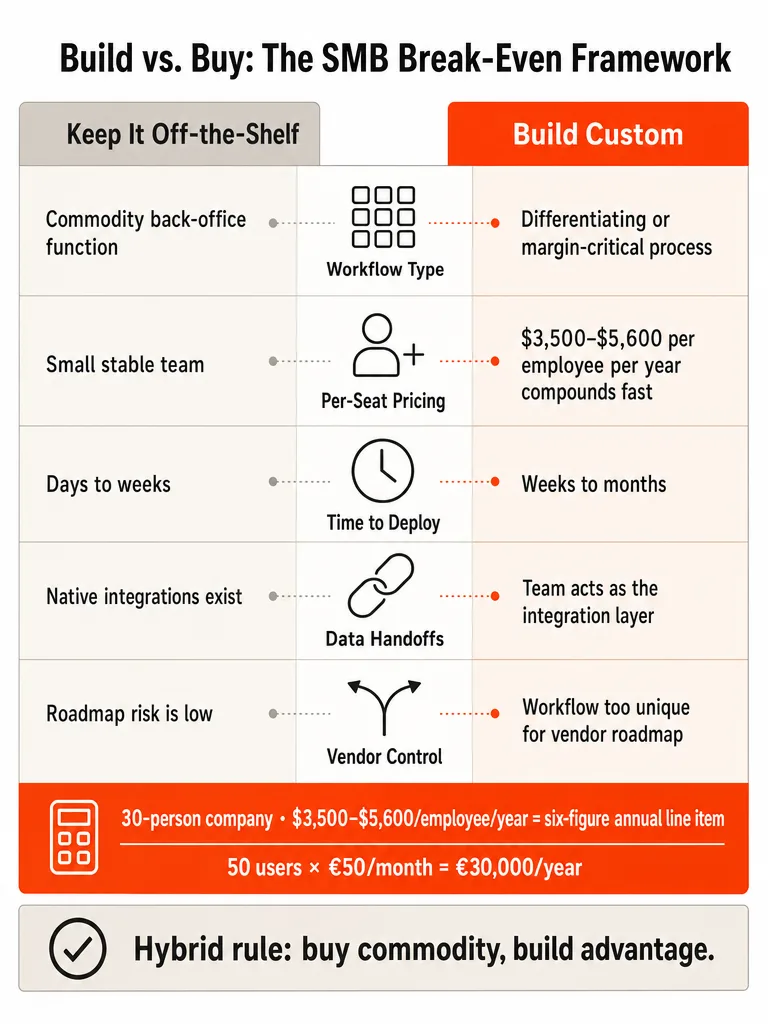
Here's the operator's rule. If a packaged tool covers a commodity job like accounting or email, buy it and move on. If the workflow is differentiating, margin-critical, or you're paying people to patch its gaps every week, that's the signal to build.
What is the difference between custom software and off-the-shelf software?
Off-the-shelf software is pre-built for a broad market; custom software is built around one company's specific workflow, data, and constraints. You buy the first and adapt your process to it. You build the second so it fits the process you already run.
Off-the-shelf tools, also called SaaS or commercial off-the-shelf, come as a preset package you activate and use fast. Synegen points to Microsoft Office, QuickBooks, and Asana as examples: mass-market products solving common problems. Add Gmail, Microsoft 365, Salesforce, HubSpot, and Slack to that list, per Classic Informatics. If a few hundred thousand companies use a tool for the same basic function you need, it's a strong buy candidate.
Custom software is built from the ground up through ideation, design, development, testing, deployment, and ongoing maintenance. Classic Informatics frames it plainly: it's designed to fit an existing process instead of asking you to reshape your process around someone else's tool. The line isn't price or size. It's whether your process is common enough that a packaged tool already fits it.
How do you compare total cost of ownership for custom software vs off-the-shelf tools?
The useful comparison isn't subscription price against build quote. It's total cost of ownership over 3 to 5 years, including per-seat growth, add-ons, integrations, manual workaround labor, hosting, monitoring, and maintenance. transfactor.dev calls this a comparison of cost shapes, not a price tag.
Off-the-shelf has a low entry cost and a compounding ongoing cost. You pay per seat, per month, forever. The price scales with headcount, vendors raise prices, and most businesses accumulate tools faster than they retire them. transfactor.dev cites 2025 industry benchmarks putting SaaS spend at roughly $3,500 to $5,600 per employee per year. For a 30-person company, that's a six-figure annual line item that mostly renews on autopilot.
Custom software inverts the shape. Cost is concentrated up front in the build. Ongoing cost stays comparatively flat: hosting, monitoring, maintenance. No per-seat fees, so cost per user falls as you grow instead of rising.
| Cost factor | Off-the-shelf | Custom software |
|---|---|---|
| Upfront cost | Low | High (concentrated in the build) |
| Cost per user as you grow | Rises with headcount | Falls |
| Ongoing cost | Per-seat, per-month, forever | Hosting, monitoring, maintenance |
| Hidden cost | Manual glue work, unused licenses | Maintenance, dependency on the builder |
Both carry hidden costs the spreadsheet misses. For off-the-shelf, it's the manual work gluing tools together and licenses nobody uses. For custom, it's maintenance and the risk of scoping the wrong thing. Run the math on the horizon you'll actually keep the system, not month one.
Is custom software worth the cost for a small business?
Custom software is worth the cost for a small business when the process is stable, unique, margin-critical, or too expensive to keep patching with people. You don't need to be Amazon-sized to have a legitimate case. You need a workflow where the software itself is part of how you compete.
Classic Informatics puts it sharply: off-the-shelf fits standard back-office needs, custom fits when the software is part of your competitive advantage. transfactor.dev sees custom become compelling on three triggers: people are manually moving data between tools, the workflow is how the business wins customers, or reporting and compliance have outgrown exports and spreadsheets.
The counterpoint matters as much. Custom is overkill when the gap is only an inconvenience. If your process isn't stable yet, a cheap monthly subscription is a better experiment than a fixed build, per transfactor.dev. Don't build a system for a workflow you're still inventing. Build when your team is adapting around the tool, and buy when the tool already fits the process.
Curious what a build actually runs? See how much an internal tool costs.
Which workflows should stay off the shelf?
Commodity back-office functions should almost always stay off the shelf: payroll, accounting, email, calendars, document storage, basic CRM, and standard collaboration. These are solved problems, and vendors solve them better than a custom build ever will. transfactor.dev recommends buying here more often than you'd expect from a company that builds custom software.
The reason is simple: a few hundred thousand companies run the same basic function, so the packaged tool is mature, maintained, and cheap relative to rebuilding it. Here's where the broad-market names land:
| Function | Common off-the-shelf tools | Build custom? |
|---|---|---|
| Payroll / HR | ADP, WorkDay | Rarely |
| Accounting | Sage, Xero, QuickBooks | Rarely |
| Email / calendar | Gmail, Microsoft 365 | Almost never |
| Collaboration | Microsoft Teams, Slack | Almost never |
| Basic CRM | HubSpot, Salesforce, Zoho | Only if workflow breaks the package |
The entity list comes from Classic Informatics and Synegen. The heuristic holds: if the workflow matches common industry best practice, buy it. Standard CRM stays off the shelf until seat costs or a non-standard sales workflow break the package, which is exactly when custom CRM vs HubSpot becomes a real question.
Should SMBs use a hybrid approach for custom software and off-the-shelf tools?
The hybrid approach is usually the smartest move: buy off-the-shelf for commodity functions, then build custom only where the workflow creates advantage or removes recurring drag. Classic Informatics lists this as a top takeaway, and it's the middle path the strongest sources keep landing on.
The logic is prioritization, not either/or. Synegen frames off-the-shelf as buying time, not transformation: packaged tools give you the speed and structure to stabilize operations, then you assess where custom will actually drive competitive advantage. You keep Gmail and QuickBooks for the boring parts and spend your build budget on the one workflow that makes you money.
Classic Informatics uses Amazon's fulfillment and recommendation systems and Netflix's streaming infrastructure as custom-software examples: built because no off-the-shelf product could handle their specific competitive requirements. You don't need their scale to borrow the principle. Build the differentiator, buy the rest.
The philosophy behind this: stop buying AI tools and start building AI systems around your actual workflows.
How fast can off-the-shelf software be implemented compared with custom software?
Off-the-shelf software wins on speed almost every time. Many packaged products are available to download and use immediately, per Synegen, or need only a short onboarding and training period, which is why they fit teams that need a solution in place fast.
Custom software takes longer by definition. Classic Informatics describes the full path: ideation, design, development, testing, deployment, and ongoing maintenance. That's not a weekend. It's a sequence you commit to because the fit is worth the wait.
So the speed call is about timing. When you need to stabilize operations quickly, onboard a lean team, or bridge a gap while you figure out the real workflow, buy. Synegen makes the case for off-the-shelf as a deliberate bridge, provided you keep an exit plan. When speed matters more than perfect fit, don't build. When fit is the point, budget the time.
How to choose: 90% fit, workflow control, and an exit plan
Use the 90% rule as your first filter: if an off-the-shelf tool covers 90 percent or more of what you need and the remaining 10 percent is a tolerable inconvenience, buy it. transfactor.dev draws the line right there. The moment your team is adapting around the software instead of being supported by it, the math flips toward building.
Run this checklist before you commit:
- Coverage. Does the tool cover 90%+ of the workflow? If yes, and the gap is an annoyance not a bottleneck, buy.
- Adaptation. Is your team reshaping its process to fit the tool? Friction that slows operations is a build signal.
- Manual glue. Are people exporting, cleaning, and re-entering data between tools by hand? That's payroll spent as an integration layer.
- Control. How much say do you need over roadmap, data access, and workflow changes over the next two to three years? Off-the-shelf hands that to the vendor.
- Exit plan. If you buy now for speed, can you get clean exports out later?
That last point is the lock-in check. Ksense flags vendor risk directly: you depend on someone else for roadmap, uptime, and data access policies. Mitigate it by choosing tools with clean data exports and planning a staged migration path before you're trapped. Buying for speed is fine. Buying with no way out is how the "cheap" tool becomes the expensive one.
Buy when the tool fits and you can leave. Build when your team is the workaround.
Run the same decision on internal tools, CRM, and automation costs
The build-versus-buy call repeats across every corner of your operation. The framework is always the same: buy the commodity, build the differentiator, and run the total cost over the years you'll actually use it. Here's where to take the specific version of that decision next.
- At 10 users, does SaaS still win? Run the raw numbers in internal tool vs SaaS subscription cost.
- CRM breaking the package? Compare custom CRM vs HubSpot when workflow shape or seat costs push you past off-the-shelf.
- Scoping a build budget? See what an internal tool actually costs to build.
- Pricing an automation project? The custom AI automation pricing breakdown shows build tiers, retainers, and run costs.
- Killing manual work for good? Learn how to turn a repetitive process into a custom AI system instead of gluing tools together by hand.
If the workflow is the business, and you're tired of paying people to patch a tool that almost fits, that's the build signal.
Let's build something real
Frequently asked questions
What is the difference between custom software and off-the-shelf software?
Off-the-shelf software is pre-built for a broad market — you buy it and adapt your process to fit it. Custom software is built around one company's specific workflow, data, and constraints, so the tool fits the process you already run. The line isn't price or company size. It's whether your process is common enough that a packaged product already handles it well.
How do you compare total cost of ownership for custom software vs off-the-shelf tools?
2025 industry benchmarks put SaaS spend at roughly $3,500–$5,600 per employee per year. For a 30-person company, that's a six-figure annual line item that renews automatically. Custom software inverts the shape: cost concentrates in the build, then stays flat — no per-seat fees, so cost per user falls as headcount grows. Run the math over 3–5 years, not month one.
What are the hidden costs of off-the-shelf software SMBs miss?
The biggest hidden cost is the manual labor your team performs to make disconnected tools behave like one system — exporting, cleaning, and re-entering data between apps that were never built to talk to each other. Add feature clutter you pay for but don't use, subscription tier creep as headcount scales, and vendor risk over roadmap and data access. Finance sees the subscription line; it doesn't see the payroll hours lost to integration work.
Is custom software worth the cost for a small business?
Yes — when the workflow is stable, unique, and margin-critical, or when you're paying people to patch a tool's gaps every week. The build becomes compelling on three triggers: people are manually moving data between tools, the workflow is how the business wins customers, or reporting has outgrown spreadsheets. It's overkill when the gap is only an inconvenience or the process isn't stable enough to build against yet.
Which workflows should always stay off the shelf?
Payroll, accounting, email, calendars, document storage, and standard collaboration should stay off the shelf. These are solved problems — vendors like QuickBooks, Gmail, Slack, and ADP solve them better than any custom build will. If hundreds of thousands of companies run the same basic function, the packaged tool is mature, maintained, and far cheaper than rebuilding it from scratch.
Should SMBs use a hybrid approach combining custom and off-the-shelf tools?
The hybrid approach is almost always the smartest move: buy off-the-shelf for commodity functions, build custom only where the workflow creates competitive advantage or removes recurring operational drag. Keep Gmail and QuickBooks for the boring parts. Spend the build budget on the one workflow that makes you money. The principle: buy the commodity, build the differentiator.
Sources
- Off The Shelf vs Custom Software: Choose the Better ROIksensetech.com
- Custom Software vs. Off-The-Shelf? How to Choose What's ...www.synegen.com
- Why Custom Software Development is Important for SMEstransfactor.dev
- Custom Software vs Off-the-Shelf: A Decision Framework ...www.classicinformatics.com
- Custom Software vs Off-the-Shelf: How to Decidewww.troyweb.com
- Custom Software vs. Off-the-Shelf: Build-or-Buy Guidewww.reddit.com