How much does a custom internal tool cost in 2026?
Most custom internal tools for SMBs cost $8,000 to $50,000, according to NocodeAssistant, which has built these tools for seven years for companies with 15 to 80 employees. Most of its projects land between $15K and $35K — the range where a company has outgrown spreadsheets but doesn't need enterprise software.
An internal tool is software your team uses to run operations — dashboards, admin panels, workflow apps — built for your business instead of bought off a shelf. Where you land in the range comes down to three things: how complex the tool is, how many systems it connects to, and how messy your current data is.
Here's the honest version of the price ladder from NocodeAssistant:
| Tool | Price range | What it does |
|---|---|---|
| Simple operations dashboard | $8K–$15K | Pulls from 2–3 sources, displays cleanly |
| Middle-tier build | $15K–$35K | Where most SMB projects land |
| Order management system | $30K–$50K | Inventory + CRM + shipping, role-based permissions for a team of 30 |
Ignore anyone quoting you a flat number before they've seen your data and your systems. The range is wide for a reason. WeOffer Growth puts it bluntly: when you see a wild swing in a quote, it usually means the scope was never nailed down.
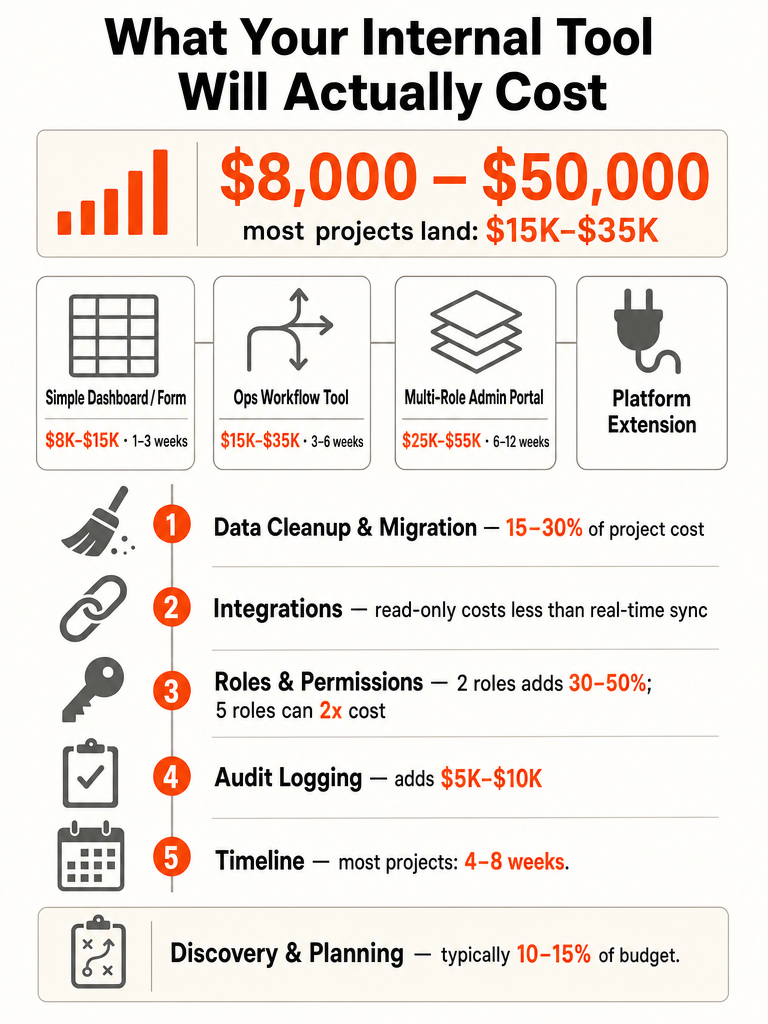
What does a custom internal tool actually cost to build by tool type?
Internal tool cost tracks the build class, not vague agency vibes. TechConcepts breaks it into four practical types, each with its own price and timeline. A simple form costs $8K–15K; a full platform extension runs $40K–80K+. Match your need to the tier and you'll stop overpaying for scope you don't need.
| Build class | Price | Timeline | Example |
|---|---|---|---|
| Simple form or view | $8K–15K | 1–3 weeks | Intake form, inventory tracker, single dashboard |
| Ops workflow tool | $12K–30K | 3–6 weeks | Connected workflows, roles, a couple integrations |
| Multi-role admin portal | $25K–55K | 6–12 weeks | Many roles, reporting, multiple integrations |
| Platform extension | $40K–80K+ | 3–6 months | System the business runs on daily |
WeOffer Growth frames the same ladder differently: a focused single-purpose tool at roughly $800 to $2,500, a multi-screen app at $2,500 to $8,000, and an operations platform at $8,000 and up. The lower floor reflects a leaner scope — one login, one database, a view or two.
Most teams asking this question sit in the first two tiers. That's the good news, because those tiers pay back fastest. If you want the build side of this, here's how to build an internal tool that replaces spreadsheet ops.
What drives the cost of internal tool development?
Workflow count is the biggest lever on price. The cost of an internal tool is driven by the number of screens and workflows, integrations, roles, permissions, data condition, and audit requirements. WeOffer Growth calls the number of distinct screens and workflows the single biggest driver — each one is design, build, and test time.
Here's how NocodeAssistant splits a typical project:
- Discovery and planning: 10–15%. Mapping your process, finding bottlenecks, deciding what to build first.
- Data cleaning and migration: 15–30%. Connecting to existing systems, cleaning data, building sync logic. Most agencies underquote here because they can't see your data until the project starts.
- Building the tool: 40–50%. Screens, workflows, permissions, business logic — the part your team touches daily.
- Testing and launch: 10–15%. Making sure it holds up with real data and users before your whole team depends on it.
The other levers stack fast: integrations, user roles, and polish. GloriumTech notes the same pattern — a simple scheduling tool costs less than a feature-rich CRM with real-time analytics, and requirements that change mid-build can push a project from $10,000 to six figures.
The expensive build is rarely the one with more features. It is the one where nobody decided what to leave out. — WeOffer Growth
How much should you budget for messy spreadsheets and data migration?
Budget for data before you budget for screens. NocodeAssistant calls data the most expensive part of many internal tool projects, allocating 15–30% of total cost to cleaning and migration. Google Sheets history, QuickBooks records, duplicate SKUs, and email-based processes all add work before a single screen is finished.
One real example: a wholesale distributor with about 40 employees wanted to track orders and inventory across three warehouses. Their order data lived in QuickBooks. Inventory sat in a Google Sheet four people updated by hand. Shipping ran through email. Their product catalog was a 6,000-row Excel file with duplicate SKUs and inconsistent naming.
The tool itself took four weeks. Cleaning and migrating the data took two and a half weeks on top of that. That pushed the project from $18K to $28K.
The upgrade threshold is worth checking before you spend anything. Here's when to move from spreadsheets to a custom tool.
How much do integrations add per system?
Integrations add real money per system, and the cost depends on how the data moves. TechConcepts prices a read-only API integration at $2K–4K, a bidirectional sync at $4K–8K, and a real-time sync at $6K–12K each. One integration is cheap. Five of them is a project on its own.
| Integration type | Cost per integration | What it does |
|---|---|---|
| Read-only | $2K–4K | Pull data in one direction, display it |
| Bidirectional sync | $4K–8K | Data flows both ways, kept in step |
| Real-time sync | $6K–12K | Live updates as changes happen |
The system matters as much as the method. Pulling read-only data from a CRM is one job. Keeping a tool in real-time sync with Salesforce, QuickBooks, Jira, Notion, a WordPress CMS, and a Google Sheet is a stack of separate builds, each with its own failure modes.
Before you commit to a live sync, decide whether the failure actually hurts. That's the difference between a quick automation and real engineering — the same call covered in when to build a custom API instead of a no-code connector. If a broken sync touches money, order state, or access, pay for the sturdier integration.
How much do roles, permissions, and audit logging increase the price?
Permissions are one of the biggest hidden multipliers. TechConcepts says a two-role tool costs 30–50% more than a single-role tool, and a five-role tool may cost 2x the single-role equivalent. Audit logging adds another $5K–10K when every action needs a user, timestamp, and before/after record.
"Everyone sees everything" is fast to build. "Sales sees this, finance sees that, admins see all" is where the cost climbs — each role means more logic, more testing, more edge cases.
| Add-on | Cost impact |
|---|---|
| Second user role | +30–50% vs single-role |
| Five user roles | Up to 2x single-role cost |
| Audit trail + exportable reports | +$5K–10K |
Audit logging isn't optional if you're in a regulated flow or need to prove who changed what. TechConcepts is specific: if every action must be logged with user, timestamp, before/after values, and exportable reports, add $5K–10K to the estimate.
Decide your roles and audit needs before the quote, not after — retrofitting permissions into a live tool is the most expensive way to add them. Map who touches the workflow and what each person is allowed to see. That single decision moves your number more than most feature requests.
Build vs buy internal tools: how do you decide?
Build vs buy comes down to team size and how fast per-seat SaaS compounds. TechConcepts frames it with a $20K custom tool against Retool at $500–2,500/month for a 50-person team — the build pays for itself in 8–40 months. Grow to 200 people and per-seat cost crosses break-even in 6–12 months.
Run the same math against the other two options:
| Option | Cost | When it wins |
|---|---|---|
| Custom build | ~$20K one-time | Team scales, seat cost compounds, you own the code |
| Per-seat SaaS | $50–$200/user/month | Small team, standard workflow, low customization |
| Full-time developer | $80K–130K/year salary | Ongoing internal build pipeline |
| Low-code platform (Retool) | $500–2,500/month at 50 users | Standard needs, under ~30–50 users |
NocodeAssistant lays out the SaaS trap plainly: off-the-shelf software often runs $50–$200 per user per month, which for a 30-person team is $18K to $72K per year. Hiring a developer isn't cheaper up front either — after ramp time and overhead, NocodeAssistant estimates $60K to $90K before you have a working tool.
The tell is compounding. Per-seat pricing looks fine at 10 users and brutal at 150. A custom tool's cost is mostly fixed. NocodeAssistant says a custom build pays for itself within 6 to 12 months for most companies it works with.
Want this scoped against your real team size and systems? Let's build something real.
Retool vs custom: when does each make sense?
Retool works until scale and customization break the math. TechConcepts pegs the crossover at 30–50 users — below that, Retool at $500–2,500/month for a 50-person team is often the faster, cheaper call. Above it, or when customization needs expensive workarounds, custom build starts to win.
Retool fits when your workflow is fairly standard, your team is small, and you don't need the tool to look or behave in a specific way. It's fast to stand up and cheap to start.
Custom starts to make sense when:
- Your team pushes past 30–50 users and per-seat cost compounds.
- Customization limits force workarounds that are expensive to maintain.
- You need to own the code and the future roadmap without platform constraints.
Retool's own build-vs-buy guide is honest about this: the decision is highly context-dependent and should account for tradeoffs now and later as the company scales. It also warns that internal tools get underestimated because requirements and integration needs surface later in the build. Pick for where your team will be in two years, not just today.
What are the alternatives to an internal tool?
You have four real options, and cost scales with control. TechConcepts and NocodeAssistant map them out: keep patching existing software, adopt a low-code platform like Retool or WeWeb, hire a developer at $80K–130K/year, or build custom starting around $8K. Each trades money for ownership differently.
- Keep patching. Cheapest today, most expensive over time. NocodeAssistant describes one field services client burning 12 hours a week on workarounds — roughly $20K in wasted labor a year. They replaced it with a $22K scheduling system.
- Low-code platform. Retool or WeWeb get you moving fast. Good for standard needs; the cracks show as workflows get real, covered in where no-code breaks first.
- Hire a developer. A salary of $80K–130K/year, plus ramp time — NocodeAssistant estimates $60K–90K before you have a working tool.
- Build custom. One-time cost, you own it. NocodeAssistant cites a logistics company running a full-time re-entry role at $45K–55K a year that a $25K tool could eliminate permanently.
If the goal is to stop patching, start by mapping the manual processes quietly killing your business.
How long does it take to build an internal tool?
Most internal tools ship in 4 to 8 weeks, according to NocodeAssistant. TechConcepts breaks it finer by build class: 1–3 weeks for a simple form, 3–6 weeks for an ops workflow, and 6–12 weeks for a multi-role admin portal. Data cleanup adds time on top.
| Build class | Timeline |
|---|---|
| Simple form or view | 1–3 weeks |
| Ops workflow tool | 3–6 weeks |
| Multi-role admin portal | 6–12 weeks |
| Platform extension | 3–6 months |
Remember the distributor example: four weeks to build, plus two and a half weeks for data. Messy source systems don't just cost money — they cost calendar time before your team ever logs in.
Scoping in phases keeps value shipping early instead of at the end. WeOffer Growth scopes operations platforms this way on purpose so you get a working slice fast. If your project keeps slipping, the fix is usually scope discipline, not more hours — the same trap covered in why MVPs take too long.
What ongoing costs will you own after launch?
Launch isn't the finish line — post-launch ownership is real and buyers miss it. Retool's build-vs-buy guide flags hosting, library updates, test maintenance, and DevOps work as costs that surface after go-live. WeWeb adds that developers spend roughly a third of their time on maintenance and tech debt, a cost that grows with every custom tool.
The recurring side is smaller than the build for a focused tool. WeOffer Growth puts hosting at roughly $10 to $30 a month for a small-team tool, and calls the flat monthly cost the quiet advantage of custom over per-seat SaaS.
What you'll actually own after launch:
- Hosting. Runs on a provider like AWS or Azure; small for a lean tool, larger as usage and data grow.
- Maintenance. Bug fixes, data corrections, and keeping the tool aligned as your process changes.
- Library and security updates. Dependencies age; someone has to keep them current.
- Test maintenance. As you add features, the tests that catch breakage need updating too.
Budget for a maintainer alongside the build. A tool your team uses 40 hours a week deserves someone keeping it healthy.
What changes when the internal tool includes AI automation?
AI changes what the tool does, not the pricing rules you should apply. Public, independently verified 2026 pricing for AI-native internal tools — as distinct from standard internal tools — is limited as of this writing. So don't accept hype-based pricing. Scope AI the same way you scope everything else: workflow logic, data handling, testing, and production reliability.
The cost drivers don't disappear because you added a model. An AI step still needs clean input data, reviewable output, error handling, and testing before your team depends on it. Treat it as another workflow with logic and failure modes, not a magic line item.
A demo that works once and a system that holds up in production are two different things — price for the second one. That's the difference laid out in what real AI app development looks like in production.
Before you commit, pick the AI workflow that's actually worth building first. The scorecard for choosing a first AI workflow ranks candidates by risk, clarity, and impact so you don't spend the budget on the wrong thing.
What should you scope before asking for an internal tool quote?
Nail scope before you ask for a quote, or the number stays garbage. WeOffer Growth is blunt: a wild price range usually means scope was never pinned down. Define the workflow, users, roles, source systems, data condition, integrations, deadline, and what to leave out — then the first shipped version pays back faster.
Bring these answers to the call:
- The workflow. The exact process the tool replaces, start to finish.
- Users and roles. Who logs in, and who's allowed to see or do what. Remember a two-role tool runs 30–50% more.
- Source systems. Where your data lives today — QuickBooks, Google Sheets, a CRM, email.
- Data condition. Clean and API-accessible, or scattered across spreadsheets. This drives 15–30% of cost.
- Integrations. What must connect, and whether each is read-only or a live sync ($2K–12K each).
- Deadline. When your team needs it live, against the 4–8 week baseline.
- What to leave out. The features you'll skip in v1. This is the decision that keeps the number sane.
Start with the smallest version that ends the pain. ZipLyne builds production internal tools without agency bloat — real engineering, fast timelines. Let's build something real.
Frequently asked questions
How much does it cost to build a custom internal tool in 2026?
Most custom internal tools for SMBs run $8,000 to $50,000, with the majority of projects landing between $15K and $35K. A simple operations dashboard pulling from two or three sources costs $8K–$15K. An order management system with inventory, CRM, and shipping integrations for a 30-person team runs $30K–$50K. Complexity, integration count, and data condition are the three variables that move you up or down that range.
What factors drive internal tool development cost the highest?
Workflow count is the single biggest lever — each screen is design, build, and test time. After that: integrations ($2K–$12K each depending on sync type), user roles (a two-role tool costs 30–50% more than a single-role build), data condition (messy spreadsheets add 15–30% to total cost), and audit logging ($5K–$10K when every action needs a user, timestamp, and exportable record). Scope creep mid-build can push a $10K project past six figures.
How much does data migration add to an internal tool project?
Budget 15–30% of total project cost for data cleaning and migration. One real example: a wholesale distributor's tool took four weeks to build, but two and a half additional weeks were spent cleaning a 6,000-row Excel file with duplicate SKUs, Google Sheets updated by four people manually, and order data scattered across QuickBooks and email — pushing the project from $18K to $28K. Agencies routinely underquote this line item because they can't see your data until the project starts.
Build vs. buy internal tools: when does a custom build actually pay off?
A custom build at roughly $20K one-time pays for itself in 8–40 months against Retool at $500–$2,500/month for a 50-person team. Off-the-shelf SaaS at $50–$200 per user per month costs a 30-person team $18K–$72K annually. The crossover accelerates as headcount grows — at 200 users, per-seat cost crosses the custom build break-even in 6–12 months. The tipping point: when per-seat pricing compounds faster than your team grows.
How long does it take to build an internal tool?
Most internal tools ship in 4–8 weeks. A simple form or inventory view takes 1–3 weeks. An ops workflow tool with roles and integrations runs 3–6 weeks. A multi-role admin portal lands at 6–12 weeks. Data cleanup adds time on top of those baselines — the wholesale distributor example above added two and a half weeks before a single user logged in. Phasing the build so the smallest useful version ships first keeps value arriving early.
What are the ongoing costs after an internal tool launches?
Hosting for a small-team tool runs roughly $10–$30 a month — a flat cost that quietly beats per-seat SaaS at scale. Beyond hosting, budget for bug fixes and process alignment as workflows change, dependency and security updates as libraries age, and test maintenance as features get added. Developers spend roughly a third of their time on maintenance and tech debt, so budget for a maintainer from day one rather than treating the launch as the finish line.
Sources
- How much does a custom internal tool cost in 2026? - NocodeAssistantwww.nocodeassistant.agency
- Build vs buy: a guide for internal toolsretool.com
- What does a custom internal tool actually cost to build?gloriumtech.com
- A Full Guide to Software Development Costs for Businessestechconcepts.org
- Internal Tool Development Cost (2026) · Inparlorwww.reddit.com