How to use AI to automate tasks without building the wrong thing?
The fastest way to waste money on AI is to automate a process you never mapped. Pick one repetitive process, document every step a human takes today, then define the trigger that kicks it off and the actions that end it. Add AI only where the work has real variation. According to F22 Labs, a single-workflow AI agent typically takes 4–10 weeks to build for production use, so scope matters.
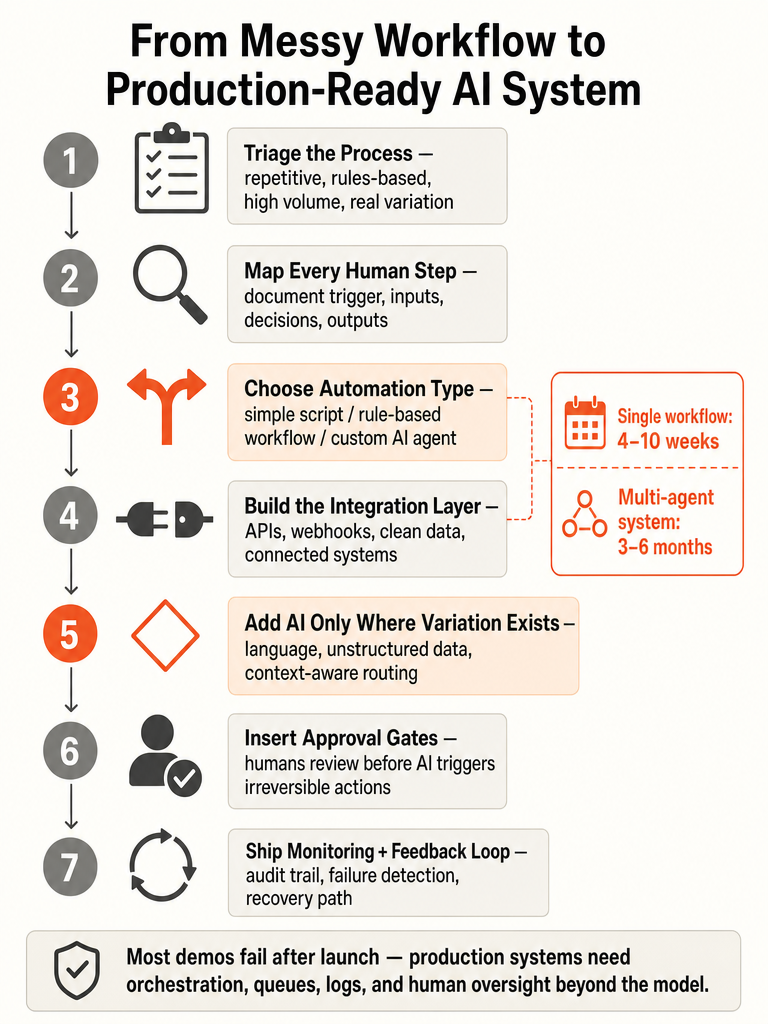
Here's the conversion path that keeps you from building the wrong thing:
- Pick one process. Not five. The one that eats hours every week and follows a repeatable shape.
- Map the current steps. Write down what a person actually does, in order, including the judgment calls.
- Define the trigger and the actions. What starts the flow (a form, an email, a schedule) and what has to happen at the end.
- Add AI only where variation lives. Rigid parts stay as plain rules. AI handles the messy, context-dependent steps.
- Keep a human in the loop. Let people review edge cases and approve anything that touches money or access.
- Ship monitoring and feedback. Logs, failure alerts, and a way to correct the system when it gets something wrong.
Which repetitive processes are actually worth turning into an AI system?
The best candidates are repetitive, rules-based, and valuable enough to justify the build. Dan Martell's framework says a task should pass three tests before you automate it: is it repetitive, is it rules-based, and is it worth the time it takes to build. Skip anything that runs once a quarter or changes shape every time.
F22 Labs adds a sharper filter for AI specifically: a strong candidate is high volume, moderate complexity, and has enough variation that rigid scripts keep breaking. That last part is the tell. If a simple script already handles the job, you don't need AI. You need AI when the input is messy enough that fixed rules snap.
Devcore's list of the tasks quietly draining founders is a good hunting ground:
- Updating CRMs manually
- Copying notes between tools
- Creating the same reports every week
- Chasing team members for status updates
- Rebuilding the same client workflows over and over
Devcore describes turning a 3-hour manual client-onboarding process into 5 minutes with intelligent automation. That's the profile you want: high frequency, high drag, clear before-and-after.
If you're stuck ranking candidates, work through how to prioritize business processes for AI automation before you commit engineering time.
What is AI task automation, and when is normal automation enough?
AI task automation is the use of artificial intelligence to handle routine, repetitive, or data-driven tasks without constant human input (Source: Leland). Unlike traditional automation that runs on rigid "if this, then that" logic, AI systems adapt in real time using machine learning, natural language processing, and data analysis. The Leland guide, posted November 25, 2025, frames this for a 2025 workplace.
But not every process needs AI. If the input is predictable, plain automation is cheaper and more reliable. Here's how the three options compare:
| Approach | Best for | How it handles variation |
|---|---|---|
| Rule-based script | Simple, predictable steps | Breaks when inputs change |
| RPA (robotic process automation) | Moving data between systems on fixed rules | Follows static rules only |
| AI automation | Messy, unstructured, context-dependent work | Interprets and adapts using ML and NLP |
Leland notes that when AI is paired with RPA, it can interpret unstructured data, make context-aware decisions, and automate tasks that were once too complex for static rules: invoice processing, onboarding, compliance checks, generating insights from raw data.
Reach for AI only when rigid rules keep failing on real inputs. For a deeper split on this, see AI agent vs workflow automation and what SMBs need first.
How to integrate AI into traditional automation without building a fragile demo?
Fragile demos fail because the model gets built first and the system gets skipped. Integrating AI into automation starts with structured workflows, clean data, connected systems, and human oversight before AI is allowed to make or trigger any decision (Source: LinkedIn expert content on AI workflow integration). Get those four right and the model becomes the easy part.
The integration layer is where data enters and exits the system. Per the LinkedIn breakdown of a real AI automation system, that means:
- APIs to connect services
- Webhooks for real-time events
- Data transformation to turn raw inputs into structured formats
- Data ingestion that cleans inconsistencies, normalizes formats, and enriches with extra signals before the AI ever sees it
The same source is blunt about why this order matters: "Garbage in still means garbage out." Data prep directly affects accuracy, so cleaning and normalizing come before decisioning, not after.
Then keep humans in the loop. Let AI handle the repetitive volume, but keep your team involved for context, judgment, and oversight, especially in complex scenarios (Source: LinkedIn expert content on AI workflow integration).
A demo impresses in a meeting. A production system survives Monday morning. If you're weighing quick connectors against real infrastructure, read when to build a custom API instead of a quick-connector automation.
How do you map a messy manual workflow into triggers, tools, and actions?
You convert a human workflow into a system spec by writing down what a person does, then translating each step into a machine-runnable part. The LinkedIn breakdown of a real AI automation system gives the skeleton: trigger, integration layer, data transformation, ingestion, decisioning, orchestration, action execution, and monitoring. Map your process onto those parts and you have a build spec.
Work through it in this order:
- Document the human workflow. Watch someone do the task end to end and record every step, including the judgment calls they make without thinking.
- Identify the trigger. Every automation starts with a signal. It's either trigger-based (a schedule) or event-based (a user action or system event). No trigger clarity means no predictable automation.
- Define the inputs. What data arrives, from where, in what format.
- Transform the data. Collect raw inputs, then convert them into structured formats the system can use.
- Route the decisions. Use rule-based logic for deterministic choices, learning-based models for predictions, and agentic reasoning only where autonomy is genuinely needed. Most systems need a mix.
- Execute the actions. Update databases, call external APIs, notify users. AI that can't act has no business value (Source: LinkedIn expert content on AI workflow integration).
- Capture feedback. Log outcomes so the system, and your team, can improve the next version.
The spec is done when every human step maps to a trigger, a tool, an action, or a review checkpoint. For turning a spreadsheet-run process into a real tool, see how to build an internal tool that replaces spreadsheet ops.
When should you build a custom AI agent instead of a simple workflow?
Build an agent when the process has enough variation that fixed workflows keep breaking. A custom AI agent takes a goal, breaks it into steps, uses tools and data to work through those steps, and completes a task without someone managing each decision (Source: F22 Labs). It works in a loop: read the situation, decide the next step, take action, check the result, repeat until done.
A simple workflow wins when the process is predictable. F22 Labs is direct about it: not every workflow needs an AI agent, and a simple automation script can be better and cheaper when the work is simple and predictable.
| Signal | Simple workflow | Custom AI agent |
|---|---|---|
| Process shape | Predictable, fixed steps | Variable, messy inputs |
| Volume | Any | High |
| Complexity | Low | Moderate |
| Why it fits | Cheaper, reliable | Scripts keep breaking |
| Typical build | Days | 4–10 weeks (single workflow) |
F22 Labs puts a single-workflow agent at 4–10 weeks and multi-agent systems with complex integrations at 3–6 months. That gap is the honest answer to "how fast can we ship."
Start simpler than you think. Use the first-workflow scorecard to rank candidates, and read AI agent vs workflow automation for SMBs before you commit to an agent.
What does a production-ready AI system need besides the model?
The model is maybe 10% of the work. A production-ready AI system needs orchestration, monitoring, and recovery around it, or it fails the first time reality doesn't match the demo. As the LinkedIn breakdown puts it: most AI automation systems fail in production, not because AI is hard, but because the system around it is poorly designed.
Per that same source, a real AI automation system includes:
- Workflow orchestration: task sequencing, worker queues, and dependency management. This is where automation becomes reliable.
- Action execution: decisions turn into updated databases, external API calls, and user notifications.
- Performance optimization: failover APIs, parallel execution, caching, and human-in-the-loop where needed. Optimization is continuous, not optional.
- Monitoring and reliability: logs and audit trails, failure detection, and recovery mechanisms. Production systems must be observable.
Add approval gates for anything touching money, access, or customer data, and keep security in the design from day one, not bolted on later.
A system with no failure detection and no recovery path isn't finished. It's a demo waiting to break on the first bad input. That's the gap that separates a screenshot from software that runs. For the fuller picture, read what real AI app development looks like in production.
What is the difference between a chatbot and an AI agent?
A chatbot answers once and stops. An AI agent runs a loop until the job is done. ChatGPT or Claude-style chatbots usually respond to a prompt and wait for the next one. An AI agent reads the situation, decides the next step, takes an action, checks the result, and continues until the task is complete (Source: F22 Labs).
The difference is autonomy over a task, not the quality of the reply. A chatbot is reactive: you drive, it answers. An agent is goal-driven: you hand it an outcome, it works the steps.
| Chatbot | AI agent | |
|---|---|---|
| Behavior | Responds to a prompt | Runs a loop toward a goal |
| Scope | One turn at a time | Multi-step until done |
| Tools and data | Usually none | Uses tools and data to act |
| Example | ChatGPT, Claude | Goal-driven workflow runner |
Before you decide either one fits, apply Dan Martell's filter: the task should be repetitive, rules-based, and worth the time it takes to build. A chatbot that answers FAQs is not the same investment as an agent that closes out a workflow, so match the tool to the actual job.
How to develop an AI model that automates repetitive tasks without skipping the prep?
Skip the prep and the smartest model still produces garbage. Before any model work starts, you need clean data, normalized formats, source documents, written decision rules, review checkpoints, and clear integration requirements. Per the LinkedIn breakdown, data ingestion, cleaning inconsistencies, normalizing formats, and enriching with extra signals, directly affects accuracy.
Get these ready before you touch a model:
- Clean, structured data in consistent formats
- Source documents the system will read from
- Written decision rules for the deterministic parts
- Review checkpoints where a human approves edge cases
- Integration requirements for the APIs and systems the model must connect to
Models like GPT and BERT are model-layer options, not magic fixes. Leland notes AI adapts using machine learning and natural language processing, but adaptation only helps when the inputs feeding it are clean. A large model on dirty data is an expensive way to be wrong faster.
The model choice matters less than the data and rules you feed it. That's the difference between a system that holds up and a demo that impressed once.
If you want this built right the first time, without agency bloat or a six-week demo that dies in production, that's the work ZipLyne does: map the process, build the system around the model, and ship something that runs. Let's build something real.
Frequently asked questions
How long does it take to build a custom AI automation system for a single workflow?
A single-workflow AI agent typically takes 4–10 weeks to build for production use, according to F22 Labs. Multi-agent systems with complex integrations run 3–6 months. Scope is the controlling variable — a narrowly defined, well-documented process ships faster than a sprawling one. Map the workflow completely before any build starts and you cut that timeline meaningfully.
Which repetitive processes are actually worth turning into an AI system?
High-volume, moderately complex tasks where rigid scripts keep breaking are the strongest candidates. Dan Martell's filter is useful: the task must be repetitive, rules-based, and worth the build time. Devcore cites turning a 3-hour manual client-onboarding process into 5 minutes as the target profile — high frequency, high drag, clear before-and-after. Skip anything that runs quarterly or changes shape every time.
What is the difference between a chatbot and an AI agent?
A chatbot responds to a prompt and waits for the next one. An AI agent runs a loop — read the situation, decide the next step, take action, check the result, repeat — until the task is complete. The distinction is autonomy over a multi-step task, not reply quality. Handing a chatbot a workflow goal produces nothing; an agent works the steps until it's done.
What does a production-ready AI system need beyond the model itself?
The model is roughly 10% of the work. A production system needs workflow orchestration (task sequencing, worker queues, dependency management), action execution that updates databases and calls external APIs, failover and parallel execution for scale, plus logs, failure detection, and recovery mechanisms. Per the LinkedIn breakdown of a real AI automation system, most failures happen because the system around the model is poorly designed — not because the AI is hard.
When should you use a simple automation script instead of building a custom AI agent?
Use a simple script when the process is predictable and inputs don't vary. F22 Labs is direct: a plain automation is cheaper and more reliable when the work follows fixed steps. Reach for an AI agent only when real inputs are messy enough that rigid rules keep snapping. Simple workflows take days to build; a single-workflow agent takes 4–10 weeks — match the tool to the actual complexity.
Why do most AI automation projects fail in production?
They fail because the system around the model is poorly designed, not because the AI itself is hard. The LinkedIn breakdown of a real AI automation system is blunt: without clean data ingestion, proper workflow orchestration, action execution, and monitoring with failure recovery, the model has nothing reliable to run on. A system with no failure detection isn't finished — it's a demo waiting to break on the first bad input.
Sources
- How to Use AI to Automate Tasks & Be More Productivewww.joinleland.com
- How to Integrate AI Into Traditional Automationwww.linkedin.com
- How to Build Your First AI Agent (Full Guide) | Dan Martellwww.danmartell.com
- How to Build a Custom AI Agent for Your Business Workflowwww.f22labs.com