Can AI replace a virtual assistant?
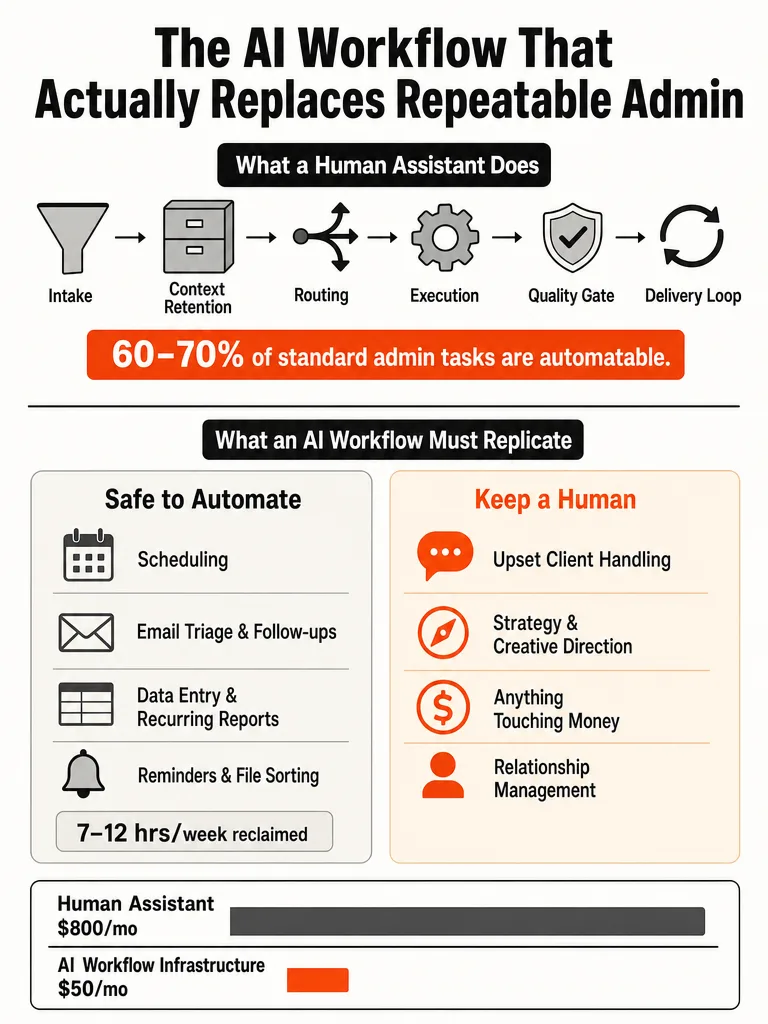
AI can replace the repeatable parts of a VA's job, not the whole human role. The tasks that eat hours without needing judgment (scheduling, follow-ups, file organization, recurring reports, triage) are the ones software handles well. Everything requiring context, empathy, or a spending decision still needs a person in the loop.
The numbers back a partial replacement, not a full one. Bright Curios found roughly 60-70% of standard admin tasks are automatable today after a six-month audit of a 20-hour-per-month VA engagement. Dooza's task-by-task comparison landed on AI winning 7 out of 10 common VA task categories on speed, cost, and consistency. And AI Shortcut Lab pegs solo founder admin at 7-12 hours per week across five task buckets.
So the honest answer isn't "fire your VA." It's this: automate the layers that are pure execution, keep a human on the judgment calls, and stop paying for grunt work.
How do you audit a VA's tasks before automating them?
Run a one-week task audit before you touch a single tool. Every time a repetitive task lands, write down the trigger, how long it took, and whether it needed judgment or was pure execution. Most founders think their VA does "admin." Broken down, it's actually five specific recurring categories, and only some are safe to automate.
AI Shortcut Lab's audit puts the split like this:
| Task category | Time/week | Automation fit |
|---|---|---|
| Scheduling | 2-3 hours | High, rules-based |
| Follow-ups | 2-3 hours | High, template-driven |
| File organization | 1-2 hours | High, deterministic |
| Recurring reports | 1-2 hours | High, data pull |
| Reminders and triage | 1-2 hours | High, but flag edge cases |
The point of the audit isn't just cataloging. Tag each task by two things competitors skip: judgment level and reversibility. A task that's pure execution and easy to undo is a green light. A task that requires reading a client's mood, or that can't be walked back once it's sent, gets a human checkpoint. Sort first, then pick tools. Do it in reverse and you automate the wrong things.
What tasks can AI actually do better than a VA?
AI beats a human VA on speed, cost, and consistency for structured, high-volume work. Anything that follows a rule, repeats daily, and doesn't require reading a room is where software pulls ahead. Dooza's breakdown found AI winning email triage, scheduling, SEO blog writing, follow-up sequences, appointment booking, FAQ support, and data entry, all tasks where a human is slower and error-prone by comparison.
Here's the task-by-task verdict from Dooza:
| Task | AI edge | Verdict |
|---|---|---|
| Email triage and drafting | Reads, categorizes, drafts 24/7 | AI wins |
| Social media scheduling | Posts daily across platforms | AI wins |
| SEO blog writing | Researches, writes, publishes | AI wins |
| Lead follow-up sequences | Instant, never forgets | AI wins |
| Appointment booking | Books 24/7, syncs calendars | AI wins |
| FAQ customer support | Instant, consistent, multilingual | AI wins |
| Data entry and reporting | Near-zero errors, seconds not hours | AI wins |
AI wins 7 out of 10 common VA tasks because it runs 24 hours a day without fatigue errors or sick days.
The cost gap is real too. Dooza's SEO workflow produces 4-8 optimized blog posts per month for $49/month, work that used to mean managing a human writer through drafts and revisions. The advantage isn't intelligence. It's that these tasks are repetitive by nature, and a well-built workflow runs them the same way every time.
Which VA tasks still need a human?
Strategy, upset clients, and creative direction still need a human, full stop. These are the three categories where Dooza's comparison put humans firmly ahead: a person understands your business deeply enough to plan, reads emotions to de-escalate a real complaint, and owns a creative vision end-to-end instead of just generating options that need guidance.
Beyond those, there's a second tier of tasks that need a mandatory human checkpoint before anything executes. Bright Curios names them directly:
- Outbound email to named individuals: review the draft before it sends
- Scheduling conflicts: anything the rules can't resolve cleanly
- Client relationships: touchpoints that shape trust and retention
- Anything touching money: invoices, payments, refunds, approvals
Note what the corpus doesn't cover: legal, compliance, and data-privacy review when you route client information through AI. Public guidance here is thin as of this writing, so treat regulated or sensitive workflows as human-supervised until you've scoped the risk yourself. The rule of thumb: if a mistake can't be undone or damages a relationship, keep a person on the trigger.
How do you replace a VA with AI without chaos?
Replace only the repeatable layers, run AI in parallel before cutover, and keep humans on the checkpoints. The mistake that creates chaos is swapping a person for a single chat window and expecting it to own the whole role. That covers execution and leaves intake, context, routing, and quality control uncovered.
Follow a staged migration instead of a hard cutover:
- Audit first. Use your one-week task list to separate execution from judgment.
- Build the repeatable workflows for the high-volume, rules-based tasks only.
- Run AI in parallel with your existing setup so you can compare outputs against what a human would have done.
- Keep human checkpoints on outbound email, money, and client-facing actions.
- Cut over gradually, one task category at a time, not all five at once.
Bright Curios calls the most defensible outcome a hybrid: agents for the repeatable tasks, a reduced human engagement for the judgment calls. The hybrid isn't a fallback. It's the point. If you want a structured way to rank candidate tasks before you build, the scorecard for choosing your first AI workflow walks through inputs, reviewability, and risk.
The founders who trade payroll for chaos are the ones who automate a fragile process first and skip the parallel-run step.
What does the AI workflow need besides the model?
A production workflow needs six layers, and the model is only one of them. Most "AI vs VA" arguments stop at "the AI drafts the reply." A VA's real job includes taking in messy requests, remembering context, deciding where work goes, doing it, checking it, and closing the loop. Replace only the drafting step and you've built a demo, not a system.
The six layers that actually replace the role:
| Layer | What it does | Why it fails without it |
|---|---|---|
| Intake | Captures and interprets the request | Garbage in, garbage out |
| Context | Remembers who, what, prior threads | Repeats itself, loses history |
| Routing | Decides where each task goes | Sends the wrong action to the wrong place |
| Execution | The model does the work | This is the only part demos show |
| Quality gate | Filters low-confidence output | Bad actions go out unreviewed |
| Delivery loop | Sends, confirms, records the result | Work stalls, nothing closes |
This is the difference between production workflow design and prompt-and-pray automation. Cherry Assistant frames the ongoing work around exactly these seams: documenting the workflow, watching for failure points, reviewing low-confidence outputs, and coordinating human fallback when a workflow should stop instead of forcing a bad automation.
A single chat window replaces the execution layer and leaves the other five uncovered, which is why it never actually replaces the VA.
If you'd rather understand this as a system than a stack of app connectors, the piece on why to build AI systems instead of buying AI tools makes the same case for your own processes.
Ready to replace the grunt work with a system that runs in production? Let's build something real
What does it cost to replace a VA with an AI workflow?
A self-hosted AI stack runs about $23-$43/month, cloud-hosted runs $39-$59/month, against a part-time VA at roughly $300/month. That's the direct comparison from Bright Curios' 2026 teardown, which benchmarked a 20-hour-per-month VA at $15/hour and rebuilt the automatable portion as an AI stack.
Here's the full cost picture from Bright Curios:
| Cost line | VA | AI workflow |
|---|---|---|
| Monthly infrastructure | ~$300 | $18-$35 |
| Self-hosted total | n/a | $23-$43/mo |
| Cloud-hosted total | n/a | $39-$59/mo |
| Setup time (owner) | onboarding | 15-30 hours upfront |
| Ongoing maintenance | managing | 1-3 hours/month |
Individual runtime pieces stay small: a Hetzner CX22 VPS at $6/month, GPT-4o-mini at $4-$8, Claude Sonnet at $8-$14, Perplexity search at $5-$15. Bright Curios lists n8n's cloud Starter plan at €20/month (about $22) for 2,500 executions.
The catch nobody prices honestly is your time. Break-even depends on what your hour is worth: about month 18 at $50/hr, month 9 at $75/hr, and month 6 at $100/hr, per Bright Curios. The lower infrastructure cost alone is more than $3,000/year in savings, but that only counts if the setup hours don't eat the gain. For a fuller build-cost view, see the breakdown on custom AI automation pricing in 2026.
What should you automate before you hire another admin?
Your first workflow should be the highest-volume, rules-based, reviewable, low-risk task, and you should build it before you add a headcount to absorb it. The safest starting point is the task that repeats most often, follows clear rules, produces output you can eyeball in seconds, and won't cause damage if it's wrong. That's usually lead intake, scheduling, or recurring reporting, not client-facing communication.
The logic is simple: a new admin hire spends the first months doing exactly the repeatable work a single workflow could own. Fix the lanes that don't need judgment, then hire for the judgment. The guide on what to automate before you hire another admin lays out the specific lanes to clear first and what to keep human.
A few internal starting points depending on where your time leaks:
- Buried in spreadsheets and manual entry: AI back office automation for small business owners
- Small team, no ops hire: AI workflow automation for SMBs that can't hire ops
- Unsure whether to start with a workflow or an agent: AI agent vs workflow automation
Pick one workflow. Prove it in production, not in a demo. Then stack the next one.
Got a process bleeding hours every week? Let's build something real
Frequently asked questions
What does it cost to replace a VA with an AI workflow in 2026?
A self-hosted AI stack runs $23–$43/month; cloud-hosted runs $39–$59/month. A 20-hour-per-month VA at $15/hour costs roughly $300/month by comparison. Individual runtime pieces stay small: a VPS at $6/month, GPT-4o-mini at $4–$8, Claude Sonnet at $8–$14. The real catch is setup time — break-even hits around month 6 if your hour is worth $100, month 18 at $50/hour.
What percentage of VA tasks can AI actually automate?
Roughly 60–70% of standard admin tasks are automatable today, based on a six-month audit of a 20-hour-per-month VA engagement. A task-by-task comparison found AI winning 7 out of 10 common VA task categories on speed, cost, and consistency — specifically email triage, scheduling, follow-up sequences, appointment booking, FAQ support, data entry, and SEO writing.
How do you run a task audit before replacing your VA with AI?
Spend one week logging every repetitive task: write down the trigger, time spent, and whether it needed judgment or was pure execution. Tag each task by judgment level and reversibility — pure execution plus easy-to-undo equals green light. Note exact email subject lines and triggers during the audit; those become the routing rules your workflow needs. Sort first, then pick tools.
Which VA tasks still need a human even with AI automation?
Strategy and planning, handling upset clients, and creative direction stay human — AI can assist but can't own any of them. Beyond those, four task types require a mandatory human checkpoint before execution: outbound email to named individuals, unresolvable scheduling conflicts, client relationship touchpoints, and anything touching money — invoices, payments, refunds, or approvals.
What does a production AI workflow need beyond the AI model itself?
Five additional layers: intake (captures and interprets the request), context (remembers prior threads and history), routing (sends each task to the right action), a quality gate (filters low-confidence output before it goes out), and a delivery loop (sends, confirms, and records the result). A single chat window covers only the execution layer and leaves all five others uncovered — that's why it never actually replaces a VA.
How do you replace a VA with AI without creating chaos?
Run AI in parallel with your existing setup for at least a week before cutting over. Replace one task category at a time — never all five at once. Keep human checkpoints on outbound email, client-facing actions, and anything touching money. The founders who trade payroll for chaos are the ones who automate a fragile process first and skip the parallel-run step entirely.
Sources
- Can AI agents actually replace traditional workflow ...aishortcutlab.com
- Replace Your VA with AI Workflows: Solo Founder Playbookwww.linkedin.com
- AI is not Replacing Virtual Assistants.www.cherryassistant.com
- Virtual Assistant For AI Automationwww.dooza.ai
- Replace Your VA with AI: What Tasks Can AI Actually Dovaautomationlab.com
- How to Start Using AI as a Virtual Assistant (2026 Guide)stacknovahub.com
- How to Build a $0 AI Stack That Replaces a VAbrightcurios.com