Do small businesses need an AI agent or automation first?
Most small businesses should build workflow automation before touching an AI agent. When the work is already repeatable and routing can be defined clearly, automation shows ROI faster and stays easier to manage than an agent-heavy setup (Source: ProAI Expert). Allo puts a number on it: for 80% of the automation you need in your company, a workflow is the right answer (Source: Allo).
The wrong first move rarely fails loud. It fails slow. According to ProAI Expert, jumping to agent-like complexity when process clarity is still weak usually slows ROI instead of improving it. You get a system that's harder to manage, slower to show value, and weaker on return than a clean workflow would have been.
Here's the blunt version. If a human can describe exactly what should happen, step by step, you want a workflow. If the task needs real judgment calls, you want an agent (Source: Richard Batt). Most SMB operations, lead intake, routing, follow-ups, reminders, status updates, are the first kind, not the second.
The hype pushes the opposite. "AI agent" sounds more advanced, so owners reach for it. But agents cost more, break in ways you can't reproduce, and need clean data to make good decisions. Fix the boring stuff first. Then decide if you even need the expensive thing.
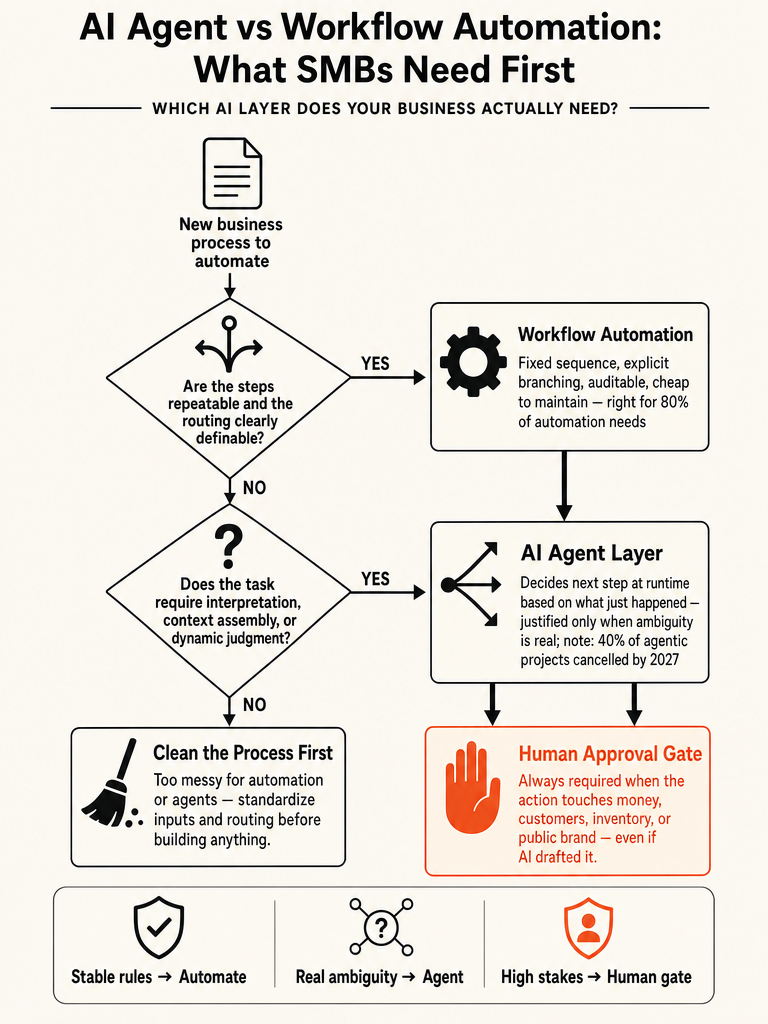
What level of AI does this workflow actually require?
Sort every process into four lanes before you buy anything: deterministic workflow, LLM skill, AI agent, and human approval. The fastest teams split work into rules that run automatically, judgment-heavy steps an agent can draft or decide, and high-risk actions that need human sign-off (Source: DataVessel). Most of your work lands in the first lane.
A deterministic workflow is a trigger and an action. New lead hits the CRM, a Slack message fires. It runs only when triggered, uses no judgment, and almost never breaks (Source: Allo).
A skill is a single request to an LLM: one ask that needs a bit of reading and reasoning. Allo's example takes a comment, enriches the email, checks the CRM, and sorts the lead. A plain workflow can't do that well (Source: Allo).
An agent runs 24/7, decides its next step at runtime, and improves from feedback (Source: Allo). Powerful, and the most expensive to run and maintain.
The fourth lane isn't AI at all. It's the human gate on anything that touches money, customers, inventory, or brand (Source: DataVessel).
Map the work into lanes first, then you'll stop overbuilding by default.
Our scorecard for choosing the first AI workflow to build walks the same sorting logic.
AI agent vs workflow: what does it actually mean for SMBs?
The real difference is whether the execution path is decided at runtime. A workflow follows a fixed sequence with explicit, written-out branching logic: step 1 always leads to step 2. An agent decides its next step based on what just happened, reasoning and choosing tools dynamically (Source: Medium/Alex P.). That single distinction settles most buying decisions.
Workflow automation is a series of if-then-else rules that execute in order. The same input produces the same output, every time (Source: Richard Batt). Trigger, condition, action. The computer does exactly what you told it.
An AI agent takes an instruction, decides what steps are needed, executes them, and adjusts mid-task based on what it learns (Source: Richard Batt). Agents learn. Workflows execute.
Anthropic's framing, cited as a de facto standard, says it plainly: workflows orchestrate LLMs and tools through predefined code paths, while agents let LLMs direct their own process and tool usage (Source: Hauerpower).
| Workflow | Skill | Agent | |
|---|---|---|---|
| What it is | Trigger and action | One ask to an LLM | An AI employee |
| Runs | When triggered | When you call it | 24/7 |
| Judgment | None | Some | High |
| Self-improves | No | No | Yes |
| Breaks? | Almost never | Rarely | Needs care |
Source: Allo.
When should a business use workflow automation instead of an AI agent?
Use workflow automation when you can write down every step the system should take before it starts. That's the whole test. If inputs are mostly known, routing can be defined, steps repeat, and actions follow clear rules, automation gives faster ROI than an agent (Source: ProAI Expert). Hauerpower goes further: it estimates 80% of B2B AI use cases are workflows in disguise (Source: Hauerpower).
Reach for a workflow when any of these are true (Source: Medium/Alex P.):
- The task runs at volume and cost matters
- You need to trace exactly what happened when something breaks
- Inputs and outputs at each stage are predictable types
- The sequence is mostly fixed, even if individual steps use AI
Auditability is where workflows win every time. When a workflow fails, you know which step failed, what the input was, and what the output should have been. You can replay it (Source: Medium/Alex P.). Predictable systems are auditable, debuggable, and cheap to maintain (Source: Medium/Alex P.).
Cost backs this up. Hauerpower says workflows usually need 1 LLM call (sometimes 2-3) per run, which keeps latency and spend low (Source: Hauerpower).
Workflows aren't the dumb option. They're the infrastructure you can version, extend, and hand to someone else.
The same call shows up in when to build a custom API instead of using a no-code tool.
When is an AI agent actually justified for business operations?
An AI agent earns its complexity when the next step can't be defined in advance. The problem space is too variable, or the right move depends on results you can't anticipate (Source: Medium/Alex P.). If a task genuinely needs interpretation instead of rule-following, that's agent territory.
ProAI Expert lists the operational triggers: ambiguous requests, softer classification, context assembly before action, dynamic routing, and partial judgment before the next step (Source: ProAI Expert). Allo frames it as the other 20% of your automation, the cases with heavy personalization and rules that keep changing (Source: Allo).
Richard Batt's example is the clean test. "Review this customer conversation and decide whether to refund them." A workflow can't do that, the refund rules are too ambiguous. An agent reads the conversation, weighs customer history, reason for complaint, product cost, makes a judgment call, and acts (Source: Richard Batt).
Know the trade before you commit. Hauerpower says agent runs can require 5-50+ LLM calls each, versus one for a workflow (Source: Hauerpower). That's higher cost, higher latency, and harder debugging.
AI agents vs workflows: how do you know which one you actually need?
Score the process, don't guess. The one question that decides it: can a human describe exactly what should happen? If yes, use workflow automation. If the task needs judgment calls, use an agent (Source: Richard Batt). Everything below is how you pressure-test that answer against real operating conditions.
Run each candidate process through these six checks:
- Rules clarity. Can you write every step and branch in advance? Fixed sequence means workflow (Source: Medium/Alex P.).
- Data quality. Agents need clean data to make good decisions. A messy CRM or outdated SKUs produce terrible calls, and most agent failures trace back to dirty data (Source: Richard Batt).
- Risk. Does the action move money, customers, inventory, or brand? If so, gate it with a human regardless of which system runs it (Source: DataVessel).
- Debugging needs. Do you need to trace and replay failures? Workflows let you see which step broke; agents fail silently on edge cases (Source: Medium/Alex P.).
- Cost exposure. Volume plus per-run LLM calls. Workflows run on 1 call, agents on 5-50+ (Source: Hauerpower).
- Maintenance burden. Workflows almost never break. Agents need care and ongoing feedback to hold a job (Source: Allo).
| Signal | Points to workflow | Points to agent |
|---|---|---|
| Steps writable in advance | Yes | No |
| Data cleanliness | Not critical | Required |
| Failure tracing | Must replay | Tolerable |
| Judgment needed | None | Real ambiguity |
If most of your answers land in the workflow column, an agent will cost more and deliver less.
Which business actions should always require human approval?
Any action that touches money, customers, inventory, or your public brand should stay gated behind a human, even when AI drafts or recommends the next move (Source: DataVessel). AI can prep the decision. It shouldn't pull the trigger on the ones that hurt when they're wrong.
The safest SMB operating model isn't agent everywhere. It's workflow for stable rules, agent support for judgment-heavy steps, and human approval for high-risk actions (Source: DataVessel). That layering is more practical for real operations than handing an autonomous system a messy process.
Keep these actions behind a sign-off:
- Money: refunds, discounts, payouts, anything that changes an invoice or a balance
- Customers: outbound messages that carry a commitment, apology, or promise
- Inventory: stock adjustments, reorders, or fulfillment changes
- Brand: anything published publicly under your name
Let AI do the reading and drafting. A refund recommendation with the reasoning attached is useful. An automatic refund on ambiguous rules is a liability.
When does workflow automation become too branch-heavy for a workflow?
A workflow has outgrown its shape when the branching logic stops being writable in advance. If you keep bolting on exceptions, and the "right" next step increasingly depends on interpretation instead of a rule, you're drifting into agent territory (Source: Medium/Alex P.). That's the transition point, not a specific number of steps.
Watch for these signals in an existing automation:
- New edge cases show up faster than you can encode them
- Routing decisions now need context you can't reduce to a condition
- Steps require reading and reasoning, not just matching a field (Source: Allo)
- The exception list is longer than the happy path
When those pile up, don't just keep expanding the workflow. Expanding a brittle rule tree makes it harder to debug and easier to break. That's the moment a skill or an agent layer becomes the better fit, the cases with a stack of rules that keep changing (Source: Allo).
The trigger to upgrade isn't complexity. It's when the next step genuinely can't be predetermined.
Until then, keep extending the workflow. It's cheaper and it holds.
What should you automate before you hire another admin?
Automate the repeatable admin lanes before you add headcount: intake, routing, follow-ups, reminders, summaries, and internal handoffs. These already have a stable route, which is exactly why automation improves them fast (Source: ProAI Expert). Hire for judgment. Automate the rest.
ProAI Expert names the lanes that give faster ROI because they're already routed: intake, routing, follow-up, reminders, summaries, internal handoff, and status movement (Source: ProAI Expert). None of these need an agent. They need clear triggers and clear rules.
The decision maps straight onto the agent-versus-workflow call. If you can describe exactly what a new hire would do with a request, step by step, that job is a workflow, not a person (Source: Richard Batt). Reserve the human for the ambiguous calls and the approval gates.
We break the specific lanes down further in what to automate before you hire another admin and in AI workflow automation for SMBs that can't hire ops.
What should SMBs learn from $15K workflows and $50K-$80K agent builds?
Buying an agent before fixing rule-based operations burns budget and delays ROI. Richard Batt says he's seen three companies spend $50K-$80K on agent development and fail, then later succeed with a $15K workflow automation that handled 85% of their actual problem (Source: Richard Batt). Same outcome, a fraction of the cost, because they fixed the process instead of buying autonomy.
The pattern is consistent. One client wanted an autonomous agent for support tickets. But their email routing was manual, triage lived in a spreadsheet, and the data wasn't clean enough to feed any AI system. They needed three workflow automations first. Jumping straight to an agent would have cost $80K and failed within six months (Source: Richard Batt).
The industry sees it too. Gartner forecasts that 40% of agentic AI projects will be cancelled by end of 2027 (Source: Richard Batt). Meanwhile Batt notes roughly 70% of the work teams try to hand an agent is actually just workflow automation (Source: Richard Batt).
| Path | Cost | Outcome |
|---|---|---|
| Premature agent build | $50K-$80K | Failed |
| Workflow after cleanup | $15K | Solved 85% of the problem |
Source: Richard Batt.
The expensive mistake isn't picking the wrong tool. It's buying autonomy on top of a broken process.
For a fuller cost picture, see what founders actually pay for AI app development.
What makes the best AI automation agency for a small business?
The best AI automation partner for a small business fixes the process before it sells you software, ships production-ready workflows first, and treats agents as the exception, not the pitch. The proof isn't a demo. It's a system that runs at volume, fails predictably, and gives you back hours without adding headcount.
Judge a partner against a short, honest test:
- Process cleanup first. Do they audit your routing, triage, and data quality before proposing anything? Agents built on dirty data make expensive mistakes (Source: Richard Batt).
- Workflow default. Do they reach for the deterministic build for the 80% that's rule-based, and say so plainly (Source: Allo)?
- Agent restraint. Do they only recommend an agent where ambiguity and judgment are real (Source: ProAI Expert), or does every pitch end in "autonomous"?
- Approval gates. Do they gate money, customer, inventory, and brand actions behind a human (Source: DataVessel)?
- Shipped outcomes. Do they show systems working in production, not slideware?
That last point is the ZipLyne standard: real engineering, workflows that hold up under load, agent judgment only where it earns its cost. Isaac builds the boring, reliable lane first, then adds intelligence where it changes the result.
Start with the process leaking the most time. Then build one production-ready lane at a time.
Frequently asked questions
Should a small business start with workflow automation or an AI agent?
Start with workflow automation. For 80% of the automation a small business needs, a workflow is the right answer — it's faster to deploy, easier to debug, and shows ROI before an agent ever would. Agents cost more, break in non-reproducible ways, and need clean data to function. Fix the repeatable, rule-based lanes first. Then decide if you actually need an agent for the remaining 20%.
What is the real difference between an AI agent and workflow automation for SMBs?
The difference is whether the execution path is decided at runtime. A workflow follows a fixed sequence — same input, same output, every time. An agent decides its next step based on what just happened, reasoning through tools dynamically. That single distinction settles most buying decisions. Most SMB operations — lead intake, follow-ups, reminders, routing — are workflow problems, not agent problems.
When is an AI agent actually justified for business operations?
An agent earns its complexity when the next step genuinely can't be defined in advance. Ambiguous requests, dynamic routing, and judgment calls like 'review this customer conversation and decide whether to refund them' are agent territory — a workflow can't handle that. Know the trade-off: agents require 5–50+ LLM calls per run versus one for a workflow, meaning higher cost, higher latency, and harder debugging.
What does it cost to build an AI agent versus a workflow automation?
The price gap is steep. Companies that jump to agents prematurely have spent $50K–$80K and failed, then later solved 85% of the same problem with a $15K workflow automation. Gartner forecasts 40% of agentic AI projects will be cancelled by end of 2027. Workflow automations also run on roughly 1 LLM call per execution, keeping operating costs low compared to agent runs that burn 5–50+ calls.
Which business actions should always require human approval even with AI automation?
Any action touching money, customers, inventory, or your public brand needs a human gate — even when AI drafts or recommends the move. That means refunds, discounts, outbound messages carrying commitments, stock adjustments, and anything published under your name. AI can prep the decision. It shouldn't pull the trigger on actions that are expensive to reverse. A five-second human check beats a costly cleanup every time.
What should a small business automate before hiring another admin?
Automate intake, routing, follow-ups, reminders, summaries, and internal handoffs before adding headcount. These lanes already have a stable, definable route — which is exactly why automation improves them fast. If you can describe step-by-step what a new hire would do with a request, that job is a workflow, not a person. Reserve humans for judgment calls and approval gates; automate everything else.
Sources
- AI Agent vs Workflow: What It Actually Means for SMBs - Allowww.withallo.com
- AI Agents vs Workflow Automation: Which Does Your Business Need ...justinmckelvey.com
- AI Agents for Small Business: What to Consider Before You Buy (2026)blog.datavessel.io
- AI Agents vs Automation: What SMBs Should Use First - blog.datavessel.iowww.hauerpower.com