Developing story. Last updated September 29, 2026, with the full livestream, OpenAI's official announcement, and its help center. We will keep updating this post as OpenAI shares more.
OpenAI just launched Dots and ChatGPT Space on its September 29, 2026 livestream. Dots are AI agents you hand a whole responsibility to, not a single prompt. Space is where you, your team, and your dots work together.
OpenAI's own description: dots are "remarkably capable, always-on agents built to handle everything," and "frontier intelligence that have your back." You give one a job, and in the livestream's words, it will "just get to work and keep working."
Here is everything announced so far, what it means, and what to do about it this week.
What is OpenAI Dots?
A dot is an agent that works on your behalf over time. It is powered by GPT-6 Astra, which OpenAI called "our most aligned model," plus "a lot of other things we've built around them." Each dot has its own cloud computer and its own browser, uses the apps you have connected, and learns from feedback over time.
The more you work with it, the more it learns your preferences, how you think, and "what good looks like to you." OpenAI's pitch is that "the magic of dots is when they bring you work done the way you would do it, sometimes before you even think to ask."
Today you start with one primary dot, give it a name, and make it your own. Over time, OpenAI says it envisions teams of dots working together on your behalf.
Availability and pricing
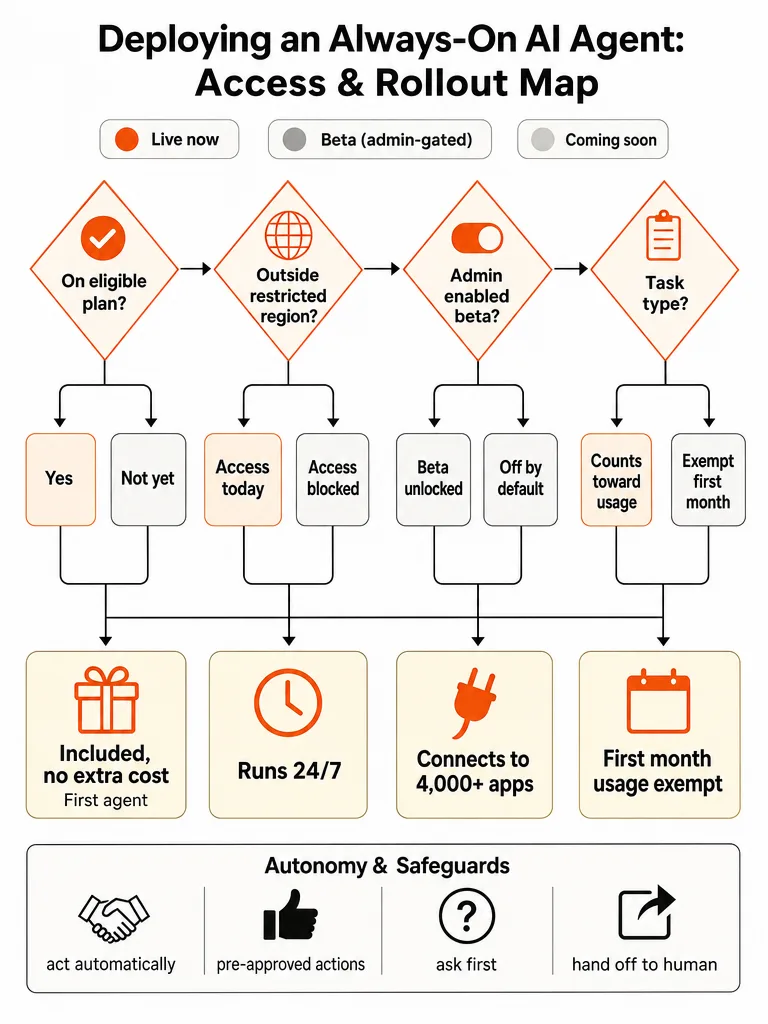
Dots are rolling out today in ChatGPT on web, mobile, and desktop:
- Pro: in markets excluding the European Economic Area, Switzerland, and the UK.
- Business Premium: across all supported ChatGPT regions.
- Enterprise (including Edu and Healthcare): a beta your workspace admin has to enable. It starts turned off by default.
The rollout is gradual, and OpenAI says access may take several days to reach your account. It plans to expand dots to more users soon.
| Plan | Region | Dots today |
|---|---|---|
| ChatGPT Pro | Outside the EEA, Switzerland, and the UK | Rolling out now |
| ChatGPT Pro | EEA, Switzerland, UK | Not yet |
| Business Premium | All supported regions | Rolling out now |
| Enterprise, Edu, Healthcare | Supported regions | Beta, off until an admin enables it |
| Feature | Status |
|---|---|
| Your first dot, chat and voice calls in ChatGPT | Live |
| Slack and Teams messaging | Live |
| Local computer access | Live, off by default |
| ChatGPT Space | Live (per the livestream) |
| Texting | Limited beta, US Pro only |
| Presentations in Space | Coming soon |
| Teams of dots | Future |
| Specialist dots and Agent 365 | Enterprise pilots and preview |
What the plans include:
- Your first dot is included in Pro or Business Premium at no extra cost, available 24/7.
- An allowance for deeper work is included, with extended limits for the first month after launch.
- Usage for the first month. OpenAI's help center says dots usage won't count toward eligible Pro, Business, and Enterprise plan allowances for the next month, after which it will share usage terms for each plan. The announcement adds that conversations with your dot don't count toward ChatGPT usage limits, while tasks it starts in Codex or ChatGPT Work count as usual.
- Later: you will be able to add more dots, and scale each dot by increasing its speed or the total amount of work it can take on per month.
How to set up your dot
- Use desktop. Create your dot in the ChatGPT desktop app (Mac or Windows) or ChatGPT on desktop web. You can't create a dot on mobile, and mobile web isn't supported.
- Name it. Its default handle is @yourname-dot. Name it and the handle becomes @yourname-agentname. You can pick a character or a pet as its avatar, and your dot may even generate a pet for you.
- Connect your apps. Review each app's permissions before you connect it.
- Connect messaging channels from desktop, such as Slack or texting.
- Talk to it on mobile once mobile access reaches your account.
Your dot's profile shows its work under In progress, Scheduled, and Completed, and you can open its computer from there to watch or take over.
The demo: a dot running someone's day
The livestream opened with a presenter's personal dot working through the day:
- It got a staged rollout ready for approval and said it would flag anything that changes.
- It booked the kids' after-school lessons the moment registration opened.
- It noticed tomorrow's finance review had moved onto the same time as the presenter's daughter's recital, and offered to reschedule.
- Then it started prepping the presenter's notes.
A dot "gets to know how I like to work over time and where I want to focus my attention." It can review what came in overnight and ping you in the morning with anything urgent. The presenter said it gave them "some of my attention back" and that they "no longer feel quite as addicted to my phone."
Small tasks, and ambitious ones
Dots handle the small stuff: plane tickets, the time for dinner, the home renovation you keep putting off.
The bigger pitch is delegation "the way you would to a high agency engineer or a chief of staff." Examples from the livestream:
- Monitor incoming bug reports, test fixes, and draft PRs.
- Kick off next year's budget planning cycle and keep all the teams on track.
- Find out what's slowing down our app, build a fix, and show me how much faster it runs.
A dot can take a project and run with it while working on several others. You keep handing it new tasks without juggling separate threads or directing every step.
The flagship example: getting off a legacy API
OpenAI's headline engineering example was "get our app off this legacy API before it shuts down."
That is a hard job. The API can be used all over a codebase, and it is not obvious what breaks as you change things. A dot can trace those dependencies, figure out everything that needs to change, write the code, run the tests, and bring your team pull requests to review.
The pull request is the part to take seriously. The dot does the work, and your team still reviews and merges it. That checkpoint is what makes handing this kind of work to an agent sane.
Five jobs OpenAI says a dot can own
OpenAI's announcement gave five concrete roles:
- Developer: turn feedback into tested fixes. The dot watches customer feedback for recurring requests, scopes small improvements and bug fixes, builds and tests them, and brings you complete PRs with videos showing the changes.
- Launch lead: revise a launch as scope changes. It learns your audience, positioning, and creative standards. When scope changes, it reworks the story and prepares drafts of the asset and doc changes for your review.
- Scientist: update analysis with new evidence. It learns your research question. As new data arrives it reruns analyses, investigates surprises, updates figures, and flags what needs your review.
- Sales lead: update a proposal as requirements shift. It checks customer requirements and account history against product docs, finds what still needs testing, builds a proof of concept for a key integration, suggests a solutions engineer who handled a similar deal, and keeps the proposal and test plan current.
- Content creator: automate production work. When a new interview transcript arrives, it finds moments for clips, prepares show notes, and drafts social posts for your approval, then carries your edits across everything.
Inside OpenAI, OpenAI says a bug appearing in Slack gets dots investigating immediately, a new design gets turned into a working app while the team focuses on customer feedback, and planning cycles stay in sync toward the deadline. Outside OpenAI, an early tester's dot noticed he had forgotten to invoice a publication, prepared the invoice, and sent it after he approved.
How a dot runs
- Its own cloud computer and browser. You can open your dot's computer at any time to inspect its work.
- Your laptop, only if you allow it. Local access starts off. Connect a computer through the ChatGPT desktop app on it and confirm Allow access, and your dot can work on its files from any channel, create Work or Codex tasks, use local skills, and use your local browser when its cloud browser is blocked. Revoke access to stop it.
- Codex cloud environments. Your dot can create cloud tasks in Codex environments you have already set up.
- Scheduled work. Ask for reminders or recurring checks, like reviewing your calendar each morning. Manage them under Scheduled in the dot's profile.
- The apps you already connected. Dots connect to more than 4,000 apps through ChatGPT's plugins, and a new dot gets the plugins you have already connected.
- It follows your access. A dot works with the permissions you have.
Whatever you have connected today is what a new dot can reach on day one. Treat that as a setup checklist.
Where you talk to it
"You don't need to be in ChatGPT to talk to your dot."
- ChatGPT on desktop, web, and mobile. Message it or call it.
- Slack and Teams. Message your dot where your team already works.
- Text (limited beta). Texting runs through a third-party provider and is limited to Pro users in the US. It isn't available in Business or Enterprise workspaces, and not every Pro user has it yet. Set it up from the desktop app, reply STOP to end texts, and message and data rates may apply. OpenAI advises caution about sending sensitive information by text.
- Email. You can connect your personal email account for your dot to use. At launch, a dot can't get its own standalone email address.
- It messages you too, with progress, questions, or decisions that need you. It can't place a call to you at launch; you call it.
Dots carry context across every channel. Start a project in ChatGPT, share context with the team in Slack, and the dot follows through with the full picture.
Voice: talking to your dot like a second brain
The presenter called voice their favorite part of working with dots. "Talking helps me think," they said. Because the dot "already knows who I am, what I'm working on, and why," you can skip the setup and get straight to the point. "It's like talking to a second brain."
You stay in control: the safeguards
OpenAI says dots build on ChatGPT's protections with extra safety and privacy safeguards:
- Separate computers. Each dot works on its own cloud computer. Your computer stays separate unless you connect it.
- Passwords stay hidden. For signing into supported websites, dots can use saved passwords without exposing them to the model.
- Background work is read-only. When you are not actively working with it, your dot looks for ways to help. OpenAI calls this "proactive research." It uses your connected apps through tools restricted to read-only, so it can't send messages, change app content, or control your browser or computer.
- Monitoring can stop it. Security safeguards defend against malicious instructions and watch for harmful behavior. If monitoring detects a safety concern, it can pause or stop the dot's work.
- Custom Rules. Dots start with built-in rules for when to act and when to ask. For actions like sharing, purchasing, or accessing things, you pick one of four behaviors: take action without asking, take action if pre-approved (meaning you asked for it in your prompt), ask before taking action, or hand off to you.
- Pause anytime. Pause your dot from the menu in its profile and resume when you're ready.
- Activity View. Follow progress, including background work, and redirect your dot as needed.
- Auto-review. Actions that could affect your accounts or share information are checked against your instructions, Custom Rules, and safety requirements. Some sensitive tasks, like changing a password, always stay with you.
On memory: your dot receives memories from ChatGPT and forms its own, including from connected apps it reviews proactively. Two details matter here. Disconnecting an app does not delete what your dot already learned from it, and the only way to delete your dot's own memories is Reset, which deletes the dot along with its conversations and scheduled tasks.
On data: OpenAI says it doesn't use content from ChatGPT Business, Enterprise, or Edu workspaces to improve its models by default. On personal plans, you control whether your dot's conversations and work are used. OpenAI says it doesn't train directly on proactive research or your dot's notes to itself.
OpenAI's own caveat is worth repeating: "Dots can still make mistakes, so always review consequential work."
Specialist dots for organizations
Your dot works for you. Specialist dots take on a dedicated responsibility inside a company. Each gets its own identity, credentials, and access to the systems it needs, plus IT-provisioned hardware and deep integrations with the company's systems of record. OpenAI says it tested this internally across procurement, invoice processing, email marketing, customer support, and commercial contracting.
It is starting with focused enterprise pilots, with OpenAI engineers working directly with each organization to define the dot's responsibilities, tools, and how people review and approve its work.
On the livestream, OpenAI described specialist dots as "virtual teammates set up by your company that will work alongside your whole team," for intensive work like accounting, marketing, and legal. You give them goals and context, review what they produce, and give feedback, and that feedback is shared across the whole company.
OpenAI is also working with Microsoft to integrate specialist dots with the enterprise governance and security controls in Agent 365, so businesses can manage dots through the Microsoft tools they already use.
ChatGPT Space: where people and their dots work together
OpenAI said "almost all productivity software was not built for AI and people to work well together." Its answer is ChatGPT Space: "a place where you, your teammates, and your agents can all work together."
- It starts with a page. Write a plan, do research, create images, generate data, or build something new. Hit slash for interactive charts, sheets, live prototypes, and more.
- Tag people and dots the same way. Tag a dot in a comment and it jumps in and gets to work.
- Pages and files live together in a space, like a drive, but spaces "feel alive." Give a page standing instructions, like checking a Slack channel and updating the page daily with findings.
- Charts stay live. Filter them, inspect data points, and have your dot refresh them every hour.
- Presentations are coming soon, built inside Space and shared with your team and everyone's dots. OpenAI called it "a version of slides that could be easily read and modified by agents."
The live demo: a launch the day before it ships
A member of OpenAI's product team showed how OpenAI's own teams use dots, through a fictional playlist app called Blossom Music. OpenAI said dots "have changed how we work and even how we built the product itself."
- It was proactive. With launch a day away, the dot had already caught a review that moved earlier and updated the calendar, read feedback on features shipped to test users the night before, and spotted a last-minute home screen design and sent it over.
- It built the design. With access to the presenter's laptop and dev tools, the instruction was simply "go build it."
- It worked by voice and in Space. By voice, the presenter asked it to drop an FAQ into the team's page before a review with the go-to-market leads. In Space, they tagged the dot to turn user testing data into a bar chart and handed it fiddly jobs, like pulling an onboarding stat from an engineer's Slack DMs or folding in a colleague's feedback.
The presenter's framing: a dot is "a second set of eyes across everything I give it access to," and "a second set of hands to actually take work off my plate."
The demo closed on the design from earlier. The dot used Codex on the presenter's laptop to build the app and launch it in the iPhone simulator, going from a mock on a phone to a working app through local execution. The next step, per the presenter, is asking the dot to "run with it and ship the PR." The first attempt threw an error on stage and had to be rerun, which is a fair reminder that this is live software.
Slack is where dots changed OpenAI's own work
The presenter said Slack is "where Dot has really changed how we work." Everyone gets tagged all day, and a small ask like reconciling launch specs can turn into a whole project. Now they forward the thread to their dot and say "can you take this?" Their DMs are full of those handoffs.
- You decide what needs you. The rest goes to your dot.
- Dots have their own identity, so they become extensions of the team.
- Dots join group chats. Something OpenAI "totally didn't expect": people started treating their dots as delegates and now bring them into group chats from the start. Teammates hand tasks to their dots in the channel, and when the results come back, everyone stays in the loop.
- Bugs get fixed from the feedback channel. Someone drops a session ID and a bug report into a feedback channel, an engineer's dot picks it up, investigates, and opens a PR with a fix. OpenAI said this is a real example and that its engineers have their dots "fixing dozens of bugs a day in this way."
The line that stuck: "It's been amazing to see how much dots were built by dots."
The bigger bet
OpenAI closed on capability, not speed: "It's not just about getting the same work done faster." Inside OpenAI, it said, dots "are changing what we feel capable of taking on." It framed dots and its models as "a whole new set of superpowers" and said it wants people "to discover that they can do things with AI they never thought possible."
What we don't know yet
- When Pro users in the EEA, Switzerland, and the UK get access.
- Usage terms per plan once the first month ends.
- Pricing for extra dots, more speed, or more monthly capacity.
- When texting expands beyond the US Pro beta, and dates for teams of dots and presentations in Space.
- Whether ChatGPT Space has limits or rollout differences by plan. The livestream said Space is available today to Pro, Business Premium, and Enterprise users.
- When specialist dots and the Agent 365 integration move beyond pilots.
We will fill these in as OpenAI publishes them.
What to do this week
Dots are only as useful as the job you give them and the access they inherit.
- Check your plan and region. Business Premium gets it everywhere ChatGPT is supported. Pro gets it outside the EEA, Switzerland, and the UK. On Enterprise, ask your admin to enable the beta. Use the free first month to test it on real work.
- Pick one recurring responsibility to hand off first. Something with a clear outcome, like triaging bug reports or chasing unpaid invoices.
- Clean up your connected apps before you onboard. A dot inherits your plugins and forms memories from them, and disconnecting later doesn't erase what it learned. Remove anything you would not give a new hire on their first morning.
- Write your Custom Rules before you need them. Decide what it can do alone, what needs your approval, and what is blocked.
- Decide who reviews. Name who approves its pull requests, sends, and calendar changes.
- Write down what "done" looks like. A dot that keeps working needs a finish line.
Frequently asked questions
What is OpenAI Dots?
Dots are always-on AI agents in ChatGPT, launched by OpenAI on September 29, 2026. Each dot is powered by GPT-6 Astra, has its own cloud computer and browser, works with the apps you connect, and keeps working on a responsibility you give it instead of answering a single prompt.
Who can use OpenAI Dots right now?
ChatGPT Pro users outside the European Economic Area, Switzerland, and the UK, and Business Premium users in all supported ChatGPT regions. Enterprise, Edu, and Healthcare workspaces can try a beta once an admin enables it, since it starts turned off. The rollout is gradual and can take several days to reach your account.
How much does OpenAI Dots cost?
Your first dot is included in Pro or Business Premium at no extra cost. For the first month, OpenAI says dots usage won't count toward eligible plan allowances, and it will share usage terms per plan after that. Conversations with your dot don't count toward ChatGPT usage limits, but tasks it starts in Codex or ChatGPT Work count as usual. Adding more dots, or more speed and monthly capacity, is planned for later.
Can I set up a dot on my phone?
No. You create a dot in the ChatGPT desktop app (Mac or Windows) or ChatGPT on desktop web. Mobile web isn't supported. After setup, you can talk to your dot in the ChatGPT mobile app once mobile access reaches your account.
Can a dot use my own computer?
Only if you allow it. Local computer access starts off. You connect a computer through the ChatGPT desktop app on it and confirm Allow access, and you can revoke access at any time. With access on, a dot can work with that computer's files, create Work or Codex tasks, use local skills, and use your local browser when its cloud browser is blocked.
Can I text or call my dot?
You can call your dot and talk to it directly in ChatGPT. Texting is a limited beta for Pro users in the US, run through a third-party provider, and not available in Business or Enterprise workspaces. Reply STOP to end texts, and message and data rates may apply. At launch, a dot can't call you.
How do I control what my dot can do?
You choose which apps it can access. Custom Rules let you set one of four behaviors for actions like sharing, purchasing, or accessing things: take action without asking, take action if pre-approved, ask before taking action, or hand off to you. You can follow its work in Activity View, pause it from its profile, and sensitive tasks like changing a password always stay with you.
Does disconnecting an app delete what my dot learned from it?
No. Disconnecting an app does not delete information your dot already got from it. The only way to delete your dot's own saved memories is Reset, which deletes the dot along with its conversations and scheduled tasks.
What is ChatGPT Space?
ChatGPT Space is a shared workspace where you, your teammates, and your dots work together on pages. You can write plans, research, build interactive charts, sheets, and live prototypes, tag a dot in a comment to hand it work, and give pages standing instructions to keep themselves current. OpenAI said on the livestream that Space is available today to Pro, Business Premium, and Enterprise users, with presentations coming soon.
What are specialist dots?
Specialist dots take on a dedicated responsibility inside a company, with their own identity, credentials, system access, and IT-provisioned hardware. OpenAI is starting with focused enterprise pilots, and it is working with Microsoft to integrate specialist dots with the governance and security controls in Agent 365.
Where ZipLyne fits
Agents like dots are only as good as the systems around them: clean access, the right apps connected, clear rules and review steps, and workflows designed for an agent to run. That is the work we do. We build and wire up AI agent workflows and automations so they do real work in production, not demos.
If you want your business ready to hand real responsibilities to agents, let's build something real.