


Who holds your gym members' card details: the software or the payment system?
In gym recurring billing Israel, software decides who to charge, how much, and when; a separate PCI-certified payment system stores the card and a token; Shva routes the request; and the issuer approves or declines. When a gym switches software, members usually don't re-enter cards if the old and new payment providers cooperate.
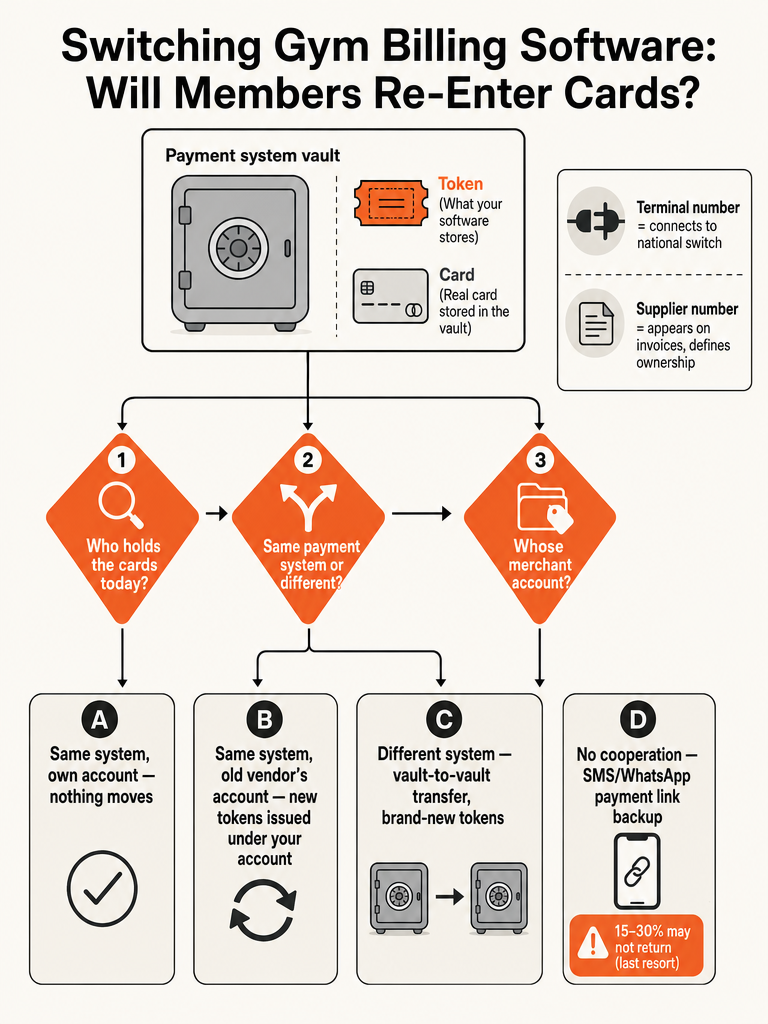
Think of it as a coat check. The card is the coat. The payment system, what Israelis call a chevrat masof (terminal company), is the cloakroom. The token is the paper ticket the cloakroom hands you. A ticket only works at the cloakroom that printed it; it means nothing at the cloakroom down the street. Gym software like Arbox, BoostApp, or Makom is the person checking tickets at the door. It never touches the coat. It just keeps the ticket number and the last four digits on file so it can bill the right card on the right day.
This matters because owners assume the gym management platform "has" the card data. It doesn't, and it shouldn't, since storing raw card numbers outside a certified vault is a compliance problem no gym owner wants to carry. The vault sits one layer below the software, run by a separate, licensed company. Everything that follows here, from how a single charge moves to what happens during a software switch, comes back to that one split: software decides, vault holds.
How does one monthly gym charge actually move through the system?
A single monthly membership charge on the 1st of the month moves through four system layers, the gym's software, the payment system's vault, Israel's national card switch, and the settlement network, broken into eight concrete steps. This section covers the first four; the next covers the rest.
- The member and the gym. The member owns the card and signed up for a monthly plan. The gym is the business expecting that payment to land on schedule, every month, without someone manually running the card.
- Gym software decides who, how much, and when. Platforms like Arbox, BoostApp, or Makom track the plan, any freeze or discount, and the renewal date. On the 1st, the software tells the payment system "charge member X, amount Y, using token Z." It never sees the card itself, only the token and the last four digits.
- The payment system holds the vault. Providers such as Rivhit, CardCom, Tranzila, Pelecard, PayPlus, SUMIT, Grow, Hyp, Z-Credit, EasyCard, PayMe, and iCount store the real card inside a PCI DSS certified vault and issued the token when the card was first added. To do this, the terminal company opened a terminal number (mispar masof) at Shva, Israel's national card-clearing switch, which is what actually lets a charge reach the card networks.
- Whose account gets charged decides what the statement shows. There are two models. Under a shared or aggregated setup, the gym clears through a payment facilitator's own merchant account, so a member's statement might read something like "Upy* Your Gym Name," naming the facilitator (examples include uPay, Grow, or PayMe) alongside the gym. Under the gym's own supplier number (mispar sapak), issued directly by an acquirer, the charge clears under the gym's own name. Whose name sits on that merchant agreement decides who controls the tokens if the gym ever switches vendors.
What is Shva, and who actually approves or declines your members' charge?
Shva, short for Automatic Bank Services, is the company every Israeli card transaction has to pass through between the terminal and the card companies. Shva was founded in 1978 by five of Israel's major banks, according to public corporate records, and it functions as the country's single card-clearing switch rather than one of several competing networks like in most other markets.
- Shva routes the request. Every swipe, tap, or recurring charge crosses Shva's infrastructure before a card company ever sees it. There's no path from a terminal to the card networks in Israel that skips it.
- The acquirer collects the money for the gym. This is the clearing company on the merchant side: Isracard, Max, or Cal, or one of the newer independent acquirers. Tranzila received a clearing license from the Bank of Israel in April 2017, according to those same public records, and CardCom has held a permanent Bank of Israel acquiring license since 2023, according to CardCom's own site.
- The issuer approves or declines the charge. This is the member's side: Isracard, Max, Cal, or the member's bank, checking the charge against card brands Visa, Mastercard, American Express, or Diners. A decline on a recurring charge is usually one of a few plain reasons: the card expired, the card got blocked, or the available credit line can't cover the amount.
- Money and paperwork close the loop. Once approved, funds settle into the gym's bank account on the acquirer's schedule, and a tax invoice or receipt gets issued through a document system such as Rivhit, SUMIT, iCount, or Green Invoice (Morning).
| Step | Who | What they hold | What they decide |
|---|---|---|---|
| 1-2 | Gym software (Arbox, BoostApp, Makom) | Token + last 4 digits | Who pays, how much, when |
| 3 | Payment system (e.g. Tranzila, CardCom, PayPlus) | Real card, in a PCI vault | Issues the token |
| 4 | Facilitator or gym's own supplier number | Merchant account identity | What name shows on the statement |
| 5 | Shva | Nothing; routes traffic | Nothing, it's a pure switch |
| 6 | Acquirer (Isracard, Max, Cal, Tranzila, CardCom) | Settlement relationship | Collects the funds |
| 7 | Issuer (Isracard, Max, Cal, or member's bank) | The cardholder relationship | Approve or decline |
| 8 | Document system (Rivhit, SUMIT, iCount, Green Invoice) | Billing records | Issues invoice or receipt |
What's the difference between a terminal number and a supplier number?
A terminal number (mispar masof) identifies the connection a terminal company opened at Shva so a business can process cards at all. A supplier number (mispar sapak), sometimes called a merchant number, identifies the business itself at a specific credit card company, and it's the number that shows up on the invoices the credit companies send.
One terminal can map to several supplier numbers, split by card brand. SUMIT's own billing glossary gives a concrete example: terminal 2209999 is set up so that Isracard, Mastercard, and American Express charges clear under supplier number 1000000, Visa charges clear under a separate supplier number 2000000, and Diners charges clear under a third, 3000000. One terminal, three merchant identities, each tied to a different card brand's clearing relationship.
This distinction matters because "whose merchant agreement is it in" is the detail that decides what happens later. If the supplier number is registered to the gym's own business entity, the gym owns that relationship outright. If it's registered to a vendor's or facilitator's master account, the gym is renting space inside someone else's merchant identity, and that changes what can move, and how easily, when the gym switches software.
Do members need to re-enter their cards when a gym switches software?
No, not automatically, but it depends entirely on whether the companies involved cooperate. When the payment providers work together, card data moves behind the scenes and members do nothing. When they don't, or when a gym moves to an incompatible setup, members end up re-adding a card through a payment link.
Two questions decide which outcome happens.
- Which payment system holds the cards today? Not the name on the statement. The statement often shows a facilitator's name or the gym's own name, which tells you nothing about which vault actually stores the card. Ask the current software vendor directly which payment system, Tranzila, CardCom, PayPlus, SUMIT, or another, issued the tokens on file.
- Will the gym keep that same payment system, or move to a different one?
If the new software plugs into a different payment system, the cards still move, but not as tokens. A token only means something to the vault that created it; a token from Tranzila is meaningless to CardCom. What moves instead is the underlying card data itself, sent encrypted, vault to vault, between two PCI-certified providers. The receiving payment system then issues brand-new tokens for the new software to use. Members still don't touch anything, but this step only works when both vaults agree to the transfer.
If the gym is staying on the same payment system, the outcome shifts to whose name that account is in, covered next.
Same payment system, different owner: whose name is the merchant account in?
When a gym stays on the same payment system during a software switch, the outcome hinges on one detail: whose name the merchant account carries. There are two versions of "same payment system," and only one of them means literally nothing changes for members.
| Scenario | What's in the account | What happens on switch |
|---|---|---|
| Gym's own supplier number | The gym's own merchant agreement with the acquirer | Nothing moves. The old software hands the token list to the new software, same account, same tokens. |
| Old vendor's master account | A shared account controlled by the previous software vendor | The payment system re-issues new tokens under the gym's own account. Members do nothing, but the gym needs the old vendor to release the data. |
Both rows assume cooperation. If a vendor won't release token data, or a payment system won't run the transfer, there's a fallback that always works: the gym sends members a one-time payment link by SMS or WhatsApp, and they re-add their card in the new system directly.
Treat that link as the last resort, not the plan. Canyon Payments, which works on gateway token migrations, says asking customers to manually re-enter card details risks losing 15-30% of them outright, because some share of members simply never click the link or give up partway through. A cooperative vault-to-vault transfer keeps nearly all of those members billing without them noticing anything changed; a mass re-entry request gambles with a chunk of the member base every time.
What should you ask before switching gym software?
The questions you ask, in order, decide whether your switch is invisible to members or a re-signup campaign disguised as a software launch. Work through them before you sign anything with a new vendor.
- Identify which company holds the vault today. Get the actual payment system name, not the facilitator name on the statement. Call the current software vendor and ask directly.
- Confirm whose merchant agreement the account is in. Is the supplier number registered to the gym's own business, or to the current vendor's master account? This answer alone tells you which outcome from the table above applies.
- Request the transfer in writing. Ask the current payment system, or vendor, to confirm, in writing, that it will export token data or run a vault-to-vault transfer to the new provider. Verbal assurances don't hold up when the switch date arrives and nobody responds.
- Run a parallel billing month. Don't cut over everyone on day one. Keep the old system live through one full billing cycle while the new one processes a subset, so mapping errors surface before they hit every member.
- Reconcile who was actually charged. Compare both systems' charge logs against your member list. Anyone missing, charged twice, or charged the wrong amount gets flagged before the next cycle runs.
- Send payment links only to the failures. Reserve the SMS or WhatsApp re-entry request for the handful of accounts that genuinely didn't transfer, not the whole membership base.
What happens when a recurring charge fails?
Routine recurring charge declines are usually issuer-side: the card expired, got blocked, or the available credit line can't cover the amount. The issuer checks the charge against the cardholder's actual account and says no for one of those plain reasons, not because the gym software did anything wrong.
Gym software doesn't usually give up after one no. Most systems retry automatically before flagging a member as a collections problem. Allpay, an Israeli recurring billing provider, says it retries a failed subscription charge up to six more times, once per day, before it stops and surfaces the failure to the merchant. That gives an expired card enough runway to get updated, or a temporary credit crunch enough time to clear, without a human chasing every missed payment manually.
Once retries are exhausted, that's the point to fall back on the payment link from the earlier section, sent only to the members whose cards genuinely failed, not blasted to the whole list.
What this means if you're building membership or recurring billing software
If you're building a membership platform, a clinic scheduler, or any SaaS with recurring billing baked in, the gym billing chain above is the blueprint, not a curiosity. Get the token-versus-vault split wrong and you've built a compliance liability. Get merchant-account ownership wrong and you've built a product your customers can't leave without a re-signup campaign.
Five rules follow directly from everything above:
- Never store raw card numbers in your own database. Keep tokens and last-4 digits only, exactly like Arbox, BoostApp, or Makom do. Let the certified payment system carry the compliance burden.
- Make merchant account ownership explicit in the contract, not just in the integration. If your customer's supplier number sits under your platform's master account instead of their own business, say so plainly, and put the export path in writing rather than a verbal promise.
- Design billing so switching vaults is a supported operation, not a support ticket. Build the vault-to-vault handoff and new-token issuance into your architecture from day one, instead of treating a payment system change as a one-off migration project.
- Build dunning logic in from the start. Automatic retries on decline, like Allpay's, are table stakes, not a feature saved for version two.
- Build the payment-link fallback before you need it. You will eventually hit a vendor or a vault that won't cooperate. Having the SMS or WhatsApp re-entry flow ready means it's a minor exception, not a crisis.
ZipLyne builds production billing and operations systems like this for real businesses. If you're deciding whether to build this kind of billing logic in-house or buy an off-the-shelf package, this breakdown of custom software vs. off-the-shelf tools covers how to make that call.
Frequently asked questions
Can a payment token move from one payment system to another?
No, a token itself never transfers between providers; it only works at the vault that issued it, so a token from Tranzila means nothing to CardCom. When a gym switches to a different payment system, the old vault sends the encrypted card data directly to the new vault, and the new provider issues brand-new tokens for the new software to use. Members never see this step or do anything.
Can I switch gym software without switching my payment processor?
Yes, if the new software connects to the same payment system the gym already uses, nothing moves at all; the old software just hands the token list to the new software on the same account. The complication appears when that account is registered under a previous vendor's master merchant number instead of the gym's own supplier number, which requires the vendor to release the data before the switch is complete.
Why does my card statement show a different company name than my gym's?
It shows a different name because the gym clears payments through a facilitator's merchant account instead of its own, a setup called a shared or aggregated account. Statements from providers like uPay, Grow, or PayMe often combine the facilitator's name with the gym's, in a pattern such as "Upy* Your Gym Name." A gym with its own supplier number, issued directly by an acquirer, has charges clear under its own name instead.
How many times will gym billing software retry a failed card payment before giving up?
Most gym billing software retries automatically rather than flagging a member after one decline. Allpay, an Israeli recurring billing provider, retries a failed subscription charge up to six more times, once per day, before stopping and surfacing the failure to the merchant. That window gives an expired card time to get updated or a temporary credit shortage time to clear without staff manually chasing every missed payment.
Should gym software store members' credit card numbers directly?
No, gym management platforms like Arbox, BoostApp, or Makom are built to never touch the actual card number. The real card lives inside a separate PCI DSS certified vault run by a licensed payment company such as Tranzila, CardCom, or PayPlus, which hands the software only a token and the last four digits. Storing raw card data outside that certified vault creates a compliance liability no gym owner should carry.
What's the difference between a shared merchant account and a gym's own merchant account?
A shared or aggregated merchant account clears a gym's charges through a payment facilitator's own supplier number, so the facilitator's name sits on the merchant agreement and often on the member's statement alongside the gym's. A gym's own merchant account uses a supplier number issued directly to the gym's business by an acquirer, so the gym controls that relationship outright. Whose name is on the agreement decides who controls the tokens if the gym ever switches vendors.