


What should I check before putting a Jev decision in a real workflow?
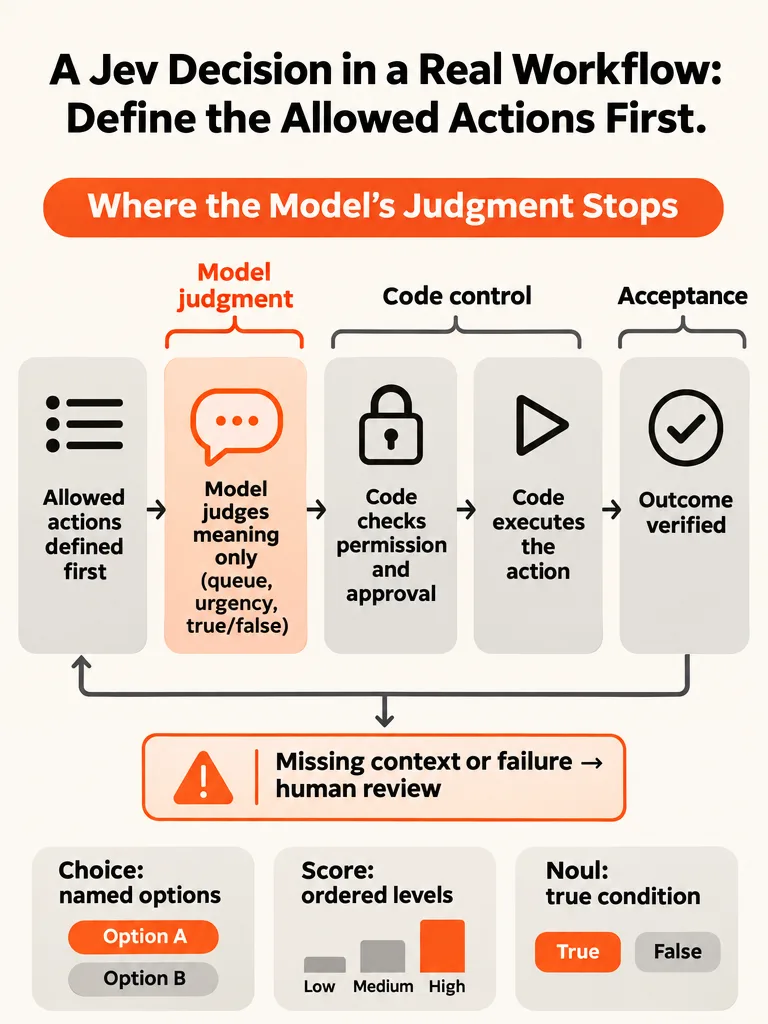
Define the allowed actions first. For a Jev decision in a real workflow, write down what your code will do with every possible answer before you write the question. Jev judges only the semantic question; code owns permissions, approval and execution. If any answer has no named action, the question isn't ready.
The jev-api.com question-design guide makes the action-first point. JevList's decision-layer page separates three things: a proposed action, a model's judgment, and permission to execute. In the illustrative support-ticket app below, those responsibilities sit in different components. An intake step proposes the action. Jev judges one narrow question about it. Permission code decides whether the action is allowed, then runs it. They can live in one codebase. What matters is that a judgment never doubles as permission.
Exact business rules stay in code. The jev-api.com guide reserves Jev for judgment calls such as tone, intent, topic, relevance and urgency. Refund limits, account tiers and who may approve what are lookups, not judgments.
One limit on this article. Jev is a decision model released by TypeSafe AI, according to an empirical arXiv study. The Jev details here come from secondary descriptions, because current TypeSafe AI documentation text wasn't among the sources. This piece makes no claim about current API fields, model availability or compatibility.
What is the allowed-actions list for a support-ticket workflow?
An allowed-actions list is a table of every side effect a workflow may cause, who can trigger it, whether a human must approve it, and what stays off-limits whatever Jev answers. It is written before the prompt. The jev-api.com guide's principle is to start from the action, not the prompt. The specific mappings below are this article's illustrative design, not the guide's examples.
The workflow is a support-ticket router. It is a design example, not a client case.
| Action | Who may trigger it | Needs human approval | Never allowed regardless of Jev's answer |
|---|---|---|---|
| Route to billing queue | Workflow code, after a Jev Choice answer | No | Routing to any destination not on this list |
| Route to technical queue | Workflow code, after a Jev Choice answer | No | Routing to any destination not on this list |
| Send to human triage | Workflow code, when the answer is unclear or unresolved | No | Counting triage as completed work |
| Assign an owner inside the destination queue | Workflow code, using an assignment rule kept in code | No | Assigning outside that queue |
| Attach a review flag | Workflow code, after a Jev Noul answer | No | Treating the flag as a confirmed fact |
| Page the on-call person | Workflow code, after a top-level urgency Score | Yes, always under the current policy | Paging outside on-call hours defined in code |
| Draft a reply | Workflow code | Yes, a person sends it | Sending without review |
| Issue a refund | Support lead only | Yes | Being triggered by a model answer |
This workflow ends at routing. Resolving or closing a ticket is outside it. That would need its own resolution evidence and its own authorization, and a routing check can't supply either.
Paging approval is unconditional under this policy. Changing it takes an authorized owner and an evaluation against observed outcomes. A model probability, or the mere existence of labeled results, can't waive it.
If you haven't picked which process to automate, the ZipLyne post on prioritizing business processes for AI automation starts from the workflow, not the tool.
Should Jev pick a queue, score urgency, or check a true/false condition?
Use Choice for named alternatives, Score for ordered levels, and Noul for a true-or-false condition. João Queirós's September 2026 walkthrough and JevList both describe these three question types. Match the type to the action list, and skip the model when an exact rule does the job.
| Question type | What it returns | Ticket example and mapped action | Exact rule beats it when |
|---|---|---|---|
| Choice | Probabilities over supplied candidates | Billing, technical or unclear? Billing and technical route to those queues; unclear goes to human triage | A plan field or product tag already names the queue |
| Score | A level on an ordered rubric; JevList says it can fall between levels | Urgency from low to critical. Only the top level requests a page, which needs approval; other levels trigger no page and routing continues | Your SLA is defined by a hard field, such as an outage flag |
| Noul | A value from 0 to 1 that a condition is true (per the jev-api.com guide); JevList says it has no separate confidence field | Does the customer say they were charged twice? The result attaches a review flag | The text must contain an exact order number or keyword |
JevList warns against treating every output as "confidence." A selected option's probability is not a probability that the answer is correct. Test the statistic you actually use against observed outcomes. These are secondary-source descriptions of Jev's behavior, not confirmed current API behavior.
The app supplies the evidence. The jev-api.com guide says to include relevant ticket state rather than noisy email material, keep instructions in the question, and not invent customer facts. When essential context is missing, don't guess. Mark the ticket unresolved and send it to human triage.
Weighing Jev against a similar model? A separate ZipLyne post, Clef vs Jev, covers Cloudflare's Clef, which solves the same problem of typed, probability-scored decisions.
What happens after Jev answers: approval, execution and acceptance?
After Jev answers, code checks permissions, a human approves anything that requires it, code executes, and a separate check verifies the outcome. A recommendation is not authorization. JevList says a low model-estimated risk cannot override a required approval, and runtime checks must enforce exact permissions, scope, budget and approval before any side effect.
Here is an illustrative record for one ticket. The values are invented to show the shape.
| Field | Example value | Written by |
|---|---|---|
| Supplied evidence | Ticket text, plan tier, last invoice status | App code |
| Typed answer | Choice: billing; Score: high urgency | Jev |
| Policy version | routing-policy-v3 | App code |
| Permission check | Passed: destination is on the allowed list | App code |
| Human approval | Not required for routing; required for paging | Person or policy |
| Executed action | Routed to billing queue; owner assigned | App code |
| Verified outcome | Ticket appears in billing queue with an owner (routing complete; ticket not resolved) | Acceptance check |
State-machine guards are one way to enforce the order. The Proper Motion Company describes explicit states, allowed transitions and guard conditions, such as requiring a sign-off before a deal changes state. Tickets can use the same idea.
No tested implementation of this record is supplied, and the sources don't cover duplicate-action prevention or records that change between review and execution. Treat these as prelaunch acceptance tests:
- Submit the same ticket twice and confirm it is routed once.
- Change or reassign the ticket between approval and execution, and confirm execution is refused and the ticket returns to review.
For the wider question of when an agent beats a fixed flow, the ZipLyne post on AI agent vs workflow automation says small businesses should usually start with workflow automation.
What should the workflow do when Jev is uncertain or the service fails?
When Jev's answer is missing context, the service fails, or retries run out, the workflow routes the ticket to a human with an explicit unresolved status and never counts it as done. JevList says these conditions need unresolved statuses, not silent completion. The status names below are illustrative application-defined values, not documented Jev API fields.
- Missing context: set
needs_contextand send the ticket to human triage. Don't let Jev fill in customer facts. - Service failure: set
service_failed, retry within a fixed budget, and log each attempt. - Retries exhausted: set
retries_exhaustedand escalate to a person. It isn't completed work. - Weak or ambiguous answer: route to review. The sources supply no validated cutoff for this workflow, so any threshold must come from your own evaluation.
- After execution: run the acceptance check. A passed check proves the routing step finished, nothing more.
What justifies changing automation or review policy? Evidence from labeled cases:
- Build representative ordinary, ambiguous, urgent, missing-context and failure cases.
- Compare Jev's judgments with the labels, then compare authorization decisions and verified outcomes.
- Review missed escalations, incorrect routing, human-review workload, and resources per accepted outcome.
- Evaluate the statistic you act on: the selected option's probability for Choice, the level for Score, the Noul probability for a condition. Don't treat them as interchangeable "confidence."
The sources establish no acceptable error rate for this workflow.
Why insist on outcomes? An empirical study of Jev in agent workflows ran 4,500 task executions across five agents in ALFWorld and AndroidWorld. Jev cut decision cost and latency across all five. But task success declined more substantially in two mobile agents, failed recovery and premature completion limited delivery, and cost per successful outcome rose in one agent even as spending per attempt fell. These were benchmarks, not small-business deployments, so they are no evidence of production performance or savings for a support workflow.
Should you build, buy or defer this Jev workflow?
For this Jev support-ticket workflow, configure existing software first, build a narrow piece only when the mismatch is persistent, measurable and expensive, and defer while the process is still changing. The sources below cover CRMs, not Jev, so treat their rules as heuristics. They disagree on thresholds, so there is no universal Jev cutoff.
| Call | Choose it when | Evidence that flips it |
|---|---|---|
| Buy or configure | Existing software can express your actions and approval rules | Sunwell says most contractors should configure a trade CRM instead of building one |
| Build a narrow piece | The mismatch is persistent, measurable and expensive, and the process is stable | WallFlow defines it by those three words and treats a process stable for at least six months as non-negotiable |
| Defer | The process is still changing or you have no labeled cases | WallFlow warns that software freezes a process, so building around one you're about to change makes the old way harder to leave |
Before any build, answer the ownership questions. Who owns the workflow day to day? Who holds the accounts and billing? Can you export your data in a standard format? Who maintains it? WallFlow recommends registering accounts in your company name, holding the billing yourself, and testing a data export once before launch. The ZipLyne post on no-code vs custom AI tools looks at what breaks first when no-code meets a real workflow.
What should you bring to a project discussion about a Jev workflow?
Bring one Jev ticket-routing workflow written as steps, plus its allowed-actions list, approval rules, sample records, acceptance criteria, labeled test cases and named owners. With those seven items, a builder can scope a real system against defined actions and acceptance evidence. Without them, scope is guesswork.
ZipLyne is Isaac Horowitz's solo AI-powered product development agency, and its site reports 150+ products launched. The ZipLyne post on how founders should brief an agency for an AI workflow frames a brief around the broken process, the numbers, the systems involved and the exact result you want.
- Workflow: one process, such as ticket routing, written as steps.
- Allowed actions: the full list, including the "never" column.
- Approval rules: who approves what, who can't, and who can change the policy.
- Sample records: real field names, scrubbed of private data.
- Acceptance criteria: the evidence that proves each step finished, kept separate from ticket resolution.
- Labeled test cases: ordinary, ambiguous, urgent, missing-context and failure cases.
- Owners: a named person for the workflow, the accounts, the data, infrastructure, integrations and maintenance, and for recurring operating costs such as model usage, hosting and monitoring.
- Provider checks: because tickets carry customer and invoice information, verify the provider's privacy, retention, data residency, availability and contract terms before launch. The sources establish none of these guarantees.
Frequently asked questions
Is Jev an AI model?
Yes. Jev is a decision model released by TypeSafe AI, according to an empirical arXiv study. It is built to make bounded decisions, not to write open-ended text. These details come from secondary descriptions, so check current TypeSafe AI documentation before relying on API fields, availability or compatibility.
What question types can Jev answer in a workflow?
Secondary descriptions list three types: Choice, Score and Noul. Choice returns probabilities over supplied candidates, Score returns a level on an ordered rubric, and Noul returns a value from 0 to 1 that a condition is true. Match the type to the action your code will take, and use an exact rule when one already does the job.
What should I define before I write a Jev question?
Define what your code will do with every possible answer. The jev-api.com guide says to start from the action, not the prompt: if the answer is billing, the ticket goes to the billing queue. If you cannot name an action for an outcome, the question is not ready, and some options may not matter.
Can a Jev answer approve or execute an action on its own?
No. A Jev answer is a recommendation, not authorization. JevList says a low model-estimated risk cannot override a required approval, and runtime checks must enforce exact permissions, scope, budget and approval before any side effect. Code owns permission and execution; the model judges only the semantic question.
What should a workflow do when Jev is uncertain or the service fails?
Send the item to a human with an explicit unresolved status, and never count it as done. JevList says missing context, failures and exhausted retries need unresolved statuses, not silent completion. Status names such as needs_context or service_failed are application-defined, not documented Jev API fields.
How do I test a Jev workflow before launch?
Build labeled cases covering ordinary, ambiguous, urgent, missing-context and failure situations. Compare Jev's judgments with the labels, then compare authorization decisions and verified outcomes. Test the statistic you act on, such as a selected option's probability, and run duplicate-submission and changed-record checks. The sources set no acceptable error rate, so you must set your own.
Sources
- thepropermotioncompany.comthepropermotioncompany.com
- www.sunwellcrm.comwww.sunwellcrm.com
- www.wallflow.prowww.wallflow.pro