


What should I check about construction CRM handoffs?
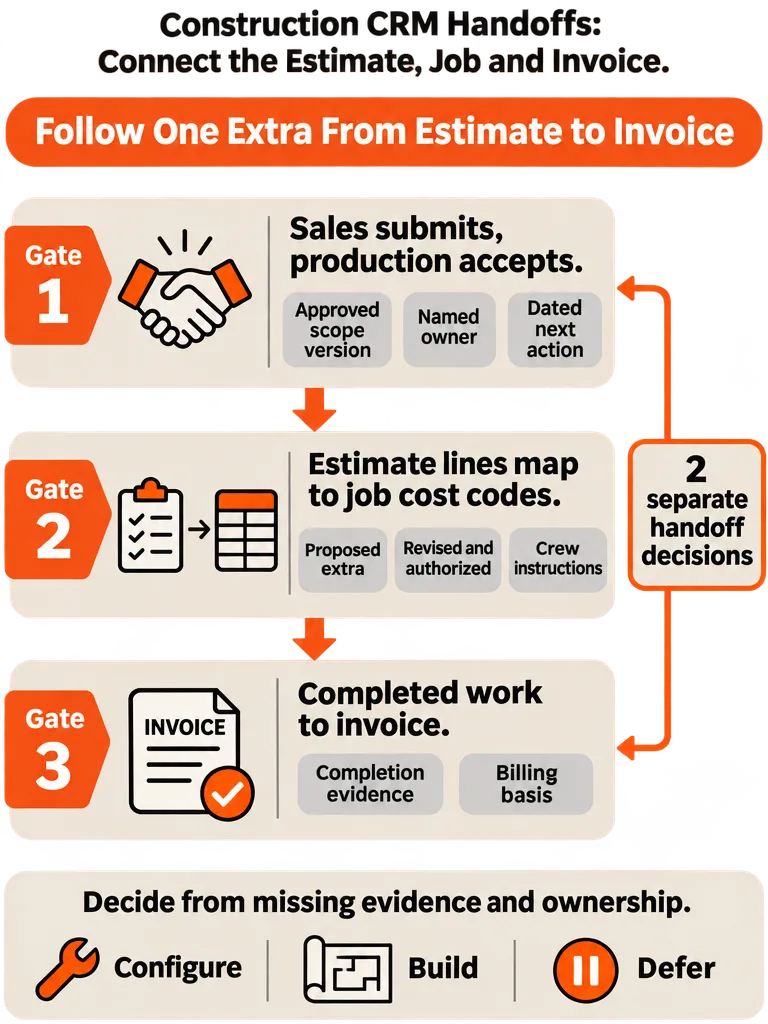
Check three transitions in your construction CRM handoffs, not a feature list: sales to production acceptance, estimate to job cost, and completed work to invoice. Each needs a named owner, the approved scope version, and evidence. TheLeadBug's October 1, 2026 framework splits the first into two decisions, submit then accept. That's a process recommendation, not a measured result.
The second check comes from DATUM, which suggests evaluating any handoff by tracing approved scope through production to final billing on a job that includes a scope change. Pick a real job with an extra on it. Follow the scope version from the signed estimate to the crew's instructions to the invoice.
If you can't find the approved version at each stop without calling the estimator, the handoff is broken. More pipeline polish won't fix that.
What did the customer approve, and who owns the first production action?
Production needs a reviewable job record from sales before it accepts anything. TheLeadBug separates the two decisions: sales submits the record, then production accepts it by naming an owner and a dated next action. Until both happen, the job is sold, not ready. DATUM adds that a signed deal and a scheduled install are different records with different responsibilities.
A signature shows the customer agreed. It doesn't tell the crew what to build. Before production accepts, the record should state each of these without a phone call:
- Approved scope: the estimate or scope version the customer signed, plus the product and material choices.
- Exclusions: every alternate or discussed item the customer declined, written down.
- Date commitments: each date labeled firm, conditional or only requested. A preferred start isn't a commitment.
- First production action: one named owner and a date, not "the office."
DATUM's checklist ties the record to the customer, the service address and a job ID, then adds measurement inputs, unresolved conditions and billing basis. For the broader tool picture, see CRM for construction: what contractors need.
TheLeadBug suggests calibrating its checklist on 10 jobs before enforcing it. That's a sensible way to test the form on real work. The excerpt reports no results from doing it, so it isn't proof the checklist works.
What does an estimate-to-job-to-invoice record look like when the customer adds an extra?
An estimate-to-invoice handoff keeps one job record linked to a scope version, an accountable owner and a piece of evidence at every stop. When the customer adds an extra, the record changes in a controlled way instead of living in a text message. The example below follows DATUM's script: test the extra before approval, revise it before authorization, then follow the authorized version through crew instructions, completion evidence and invoice review.
Hypothetical job, not a client case, with no prices or savings. A remodel estimate includes line E-04, "install base cabinets." Mid-job the customer asks for under-cabinet lighting, which becomes proposed extra X-01. All identifiers are invented for illustration. The cost-code and budget mappings are schematic, not fields or behavior in any named software.
| Stage | Record | Scope version | Accountable owner | Evidence required | Billing basis |
|---|---|---|---|---|---|
| 1. Sold | Signed estimate, line E-04 | v1 | Estimator | Customer signature, listed products, exclusions | Contract scope |
| 2. Submitted | Job record; E-04 mapped to cost code CC-120 and budget line B-120 | v1 | Salesperson | Address, job ID, measurement input, unresolved conditions | Contract scope |
| 3. Accepted | Production acceptance | v1 | Production lead | Named owner, dated next action | Contract scope |
| 4. Extra proposed | Draft change X-01 | v1 plus proposed X-01 | Estimator | Description, reason found, marked "not authorized" | None yet |
| 5. Extra authorized | Revised scope; X-01 mapped to CC-140 and budget line B-140 | v2 | Estimator | Customer approval of v2, recorded as AUTH-01 | Contract scope plus X-01 |
| 6. Crew instructions | Work order | v2 | Production lead | Instructions pulled from v2, not v1 | Contract scope plus X-01 |
| 7. Completed | Completion record DONE-01 | v2 | Crew lead | Photo or sign-off per line, X-01 marked done | Lines with completion evidence |
| 8. Invoice review | Draft invoice | v2 | Billing | Match against v2, AUTH-01 and DONE-01 | Reviewed invoice |
Stage 5 separates two roles. The estimator is internally accountable for producing v2. The customer is the approver, and AUTH-01 is the proof.
These are the example's chosen operating rules: X-01 stays out of scheduling and billing until v2 exists and AUTH-01 is on file, and invoice review looks for completion evidence per line. They aren't universal construction billing or authorization requirements. The research here doesn't cover contract-specific deposits, progress billing or legal authorization requirements, so your contract and applicable rules govern.
DATUM also warns that a measurement report doesn't define authorized work on its own. It doesn't capture the customer's chosen products, exclusions, change approvals or every condition found on site. Link the measurement to the document that defines what was authorized.
Which system should own the customer, the job and the invoice?
The CRM-to-job-cost playbook from CRM Experts Online assigns systems of record by category. The CRM owns leads, contacts, opportunities and sold scope. Accounting owns budgets, purchase orders, actual costs and invoices. A construction management system owns scheduling and field execution. A system of record is the one whose version wins when two systems disagree.
Site & Stack gives examples of CRM-side tools: HubSpot is a general CRM, and Jobber is a trade app with a client manager built in. The supplied research doesn't verify API behavior or field mappings for any named software pair, so test any integration with your own tools. Don't assume a combination exchanges data cleanly because each tool fits its category.
The playbook doesn't say which system owns the job record or the completion evidence (photos, sign-offs, checklists). That's an operator decision to document before building anything. Write down where the job record lives, where completion evidence lives, and how billing reaches both.
The playbook also says to define deterministic mappings from estimate line items to job cost codes before building the integration. A given estimate line always lands on the same code, and nobody interprets it twice.
Handoff offers a simple duplicate-entry test: creating an estimate should also create the homeowner's contact with the job attached. If someone retypes the contact and job somewhere else, the systems don't share a record.
Can I customize my current software, or does this handoff justify a custom build?
Check configuration first. Site & Stack separates customizing a CRM (adding fields, renaming stages, setting reminders) from custom development (building what the vendor didn't). It also notes that some CRMs offer more on higher-priced plans, so price the plan you'd actually need before ruling an app out. A new record type, a rule between records, a calculation or a customer-facing view is a trigger to investigate, not an automatic build decision.
Compare four paths against the actual requirement: configuration, features already in your trade software, a focused extension, and a custom build.
| Handoff requirement | Check first | Escalate when |
|---|---|---|
| "Scope version" field, "Accepted" stage, reminder | Configuration | Almost never. Missing fields alone aren't a reason to build |
| Extras as their own records under a parent job | Custom objects, higher plans, trade-software job features | Nothing available models extras linked to the job |
| Block invoicing until completion evidence exists | Built-in rules or automation in your CRM and accounting tools | No existing tool can enforce a rule between those records |
| Homeowner approves a change online | Customer portals in your current trade software | No existing view shows a customer only their own records |
| Process still changing monthly | Defer | Revisit once it's stable |
Sunwell's contractor guide says most contractors should configure a trade-specific CRM rather than build. WallFlow describes a middle path: start from an existing product and configure it around your business. WallFlow also offers a scored checklist. Its thresholds disagree, with five or more points in the checklist versus at least three conditions in its FAQ, so treat it as a prompt list, not a validated rule.
Build prices, timelines and payback periods are left out here. The vendor ranges in the research don't share a scope, so they can't be compared. Size any build against your own record types and rules.
Should I build, or wait before automating the handoff?
Wait on construction-handoff automation when the process is still changing, when the mismatch can't be measured in hours, or when no real job has been run through manually. WallFlow explains why: software freezes a process, so building around one you're about to change makes the old way harder to leave. Its checklist asks for a process stable for at least six months and a mismatch costing more than four hours a week. Those are WallFlow's thresholds, not a validated rule.
Run one job by hand and log where information gets re-entered. These signals should change your decision:
- A spreadsheet shadows the CRM to track what it can't.
- Someone retypes the estimate into an invoice.
- Extras get done with no owner who authorized them.
None of the research here includes measured savings or error-reduction figures for this workflow. Decide on your own hours, not a vendor's claim.
Once the process is stable, The Proper Motion Company recommends modeling stages as explicit states with allowed transitions and guard conditions. It also recommends logging timestamped stage changes if you need time-in-stage reporting.
What should I bring to a project discussion about this handoff?
Bring the approved scope, a revised extra, completion evidence, your current tools and workarounds, and the people who accept jobs and bill them. These documents give a builder the inputs to assess whether to configure, build or wait. No timeline or outcome can be promised before someone sees a real job record.
- One approved estimate or scope version, with exclusions in writing.
- One job with a revised extra, showing the proposed change, the customer's approval and the revised scope.
- Completion records for that job: photos, sign-offs or checklists.
- Your current tools and manual workarounds. Include every spreadsheet, group text and retyped invoice.
- Who accepts jobs and who bills. Names or roles, plus what each needs before acting.
- Where the job record and completion evidence live today, and who you'd name as owner of each.
- Ownership terms, which WallFlow recommends settling before any build:
- - Scope and exclusions in writing.
- - Database and hosting accounts in your company's name, with a named owner for the infrastructure.
- - A named person responsible for long-term maintenance. Site & Stack notes that custom software needs someone to look after it.
- - A tested data export in a standard format before launch.
ZipLyne builds internal tools and automates manual business workflows, and documents like these are what it would review to scope a handoff build.
Frequently asked questions
Should a contractor build a custom CRM or use an off-the-shelf one?
Most contractors should configure a trade-specific CRM rather than build one, according to Sunwell's contractor guide. Building makes sense when your records don't fit, such as extras that can't be modeled as their own records under a parent job. Site & Stack suggests pricing both paths when three or more warning signs show up together, like retyped invoices, a spreadsheet beside the CRM, or seat fees for people who only check the schedule.
What is the difference between a custom CRM and a configurable one?
A configurable CRM lets you rename fields and rearrange a pipeline inside boundaries the vendor set. A custom CRM has no such boundary, so it can hold calculations, roles and document flows a configurable one has no concept of. Configuring is cheaper and faster, and Site & Stack says it covers fields, stages and reminders. Building starts to matter when you need a new kind of record, a rule between records or a customer-facing view.
Why isn't a signed construction estimate enough for production to start?
A signature shows the customer agreed, but it doesn't tell the crew what to build. Before production accepts a job, the record should state the approved scope version, declined alternates, and date commitments labeled firm, conditional or only requested. It should also name one owner and a date for the first production action. A customer's preferred start date isn't a commitment.
Does a measurement report define the authorized work on a construction job?
No. A measurement report doesn't capture the customer's chosen products, exclusions, change approvals or every condition found on site, according to DATUM. Link the measurement to the document that defines what was authorized, such as the signed estimate or the revised scope version, so the crew builds from the approved version instead of from measurements alone.
How do I keep a customer's extra from being done but never billed?
Give the extra its own record, and keep it out of scheduling and billing until a revised scope exists and the customer's approval is on file. Then make crew instructions and the invoice draw from that same revised version, and match the invoice against completion evidence per line. These are example operating rules, not legal or contract requirements, so your contract governs.
What is a system of record in a construction CRM setup?
It's the system whose version wins when two systems disagree. CRM Experts Online's CRM-to-job-cost playbook assigns them by category: the CRM owns leads, contacts, opportunities and sold scope, accounting owns budgets, purchase orders, actual costs and invoices, and a construction management system owns scheduling and field execution. The playbook doesn't say who owns the job record or completion evidence, so decide and document that yourself.
Sources
- siteandstack.comsiteandstack.com
- www.sunwellcrm.comwww.sunwellcrm.com
- www.wallflow.prowww.wallflow.pro
- thepropermotioncompany.comthepropermotioncompany.com