What Does a CRM for Construction Actually Do?
A CRM for construction centralizes leads, bids, contacts, and follow-up in one system, and the strongest tools carry a won deal straight into estimating, scheduling, and project handoff instead of forcing re-entry into a second tool. Buildern's 2026 comparison puts it bluntly: a lead should reach a signed contract and a running job without retyping anything.
Before a CRM, that job falls to sticky notes, a shared inbox, and a spreadsheet only one person keeps current. Projul's 2026 contractor guide calls this out directly: a construction CRM replaces "sticky notes, spreadsheets, and the 'I'll remember to call them back' approach" that costs real money, and the same guide estimates contractors lose roughly 30% of their leads from slow follow-up alone. The failure mode is specific. A homeowner calls while the crew is on a job site, the callback gets forgotten, and the lead has already hired someone else by the time anyone remembers the sticky note.
Nimble's construction CRM guide breaks the real value into three jobs a spreadsheet can't do: bid and pipeline tracking, so you know which bids are active, stalled, or due for follow-up this week; contact and relationship management across every role on a job, architects, subcontractors, suppliers, and referral sources, not just the client; and follow-up that actually happens, because construction sales cycles run weeks or months and whoever stays in touch usually wins the job. Teams still running this on spreadsheets often reach a point where the process itself needs replacing spreadsheets with a real internal tool before a CRM can even plug in cleanly.
That's the baseline. What separates a basic contact tracker from a real construction CRM is what happens the moment a bid turns into signed work.
Construction CRM vs Project Management Software vs ERP: Where's the Line?
CRM, project management software, and ERP solve three different problems that often get sold as one product. CRM owns the sales side: leads, bids, and follow-up before a contract exists. Project management software takes over execution: schedules, budgets, and site documents. ERP runs company-wide financials. Procore and Odoo each blur two of these categories into a single platform.
Procore is the clearest example of a product that refuses to sit in one box. Monday.com's 2026 CRM comparison lists Procore as built for "construction companies of all sizes managing complex projects," with CRM and project management folded into one platform and pricing available only on request. Odoo runs the opposite blur: it starts as an ERP for operations and financials, then layers CRM and project tools on top. HubSpot's 2026 construction CRM guide prices Odoo's Standard plan at $24.90 per user per month and its Custom plan at $37.40 per user per month.
The practical question isn't which category sounds more sophisticated. It's whether a contractor needs a lightweight front door for leads and bids, a full system that also runs the job, or financial control layered on top of both. Builders who buy a CRM expecting it to also schedule crews and track budgets usually find out fast that the sales tool and the job tool were never meant to be the same product.
Which Type of Contractor Needs Which CRM?
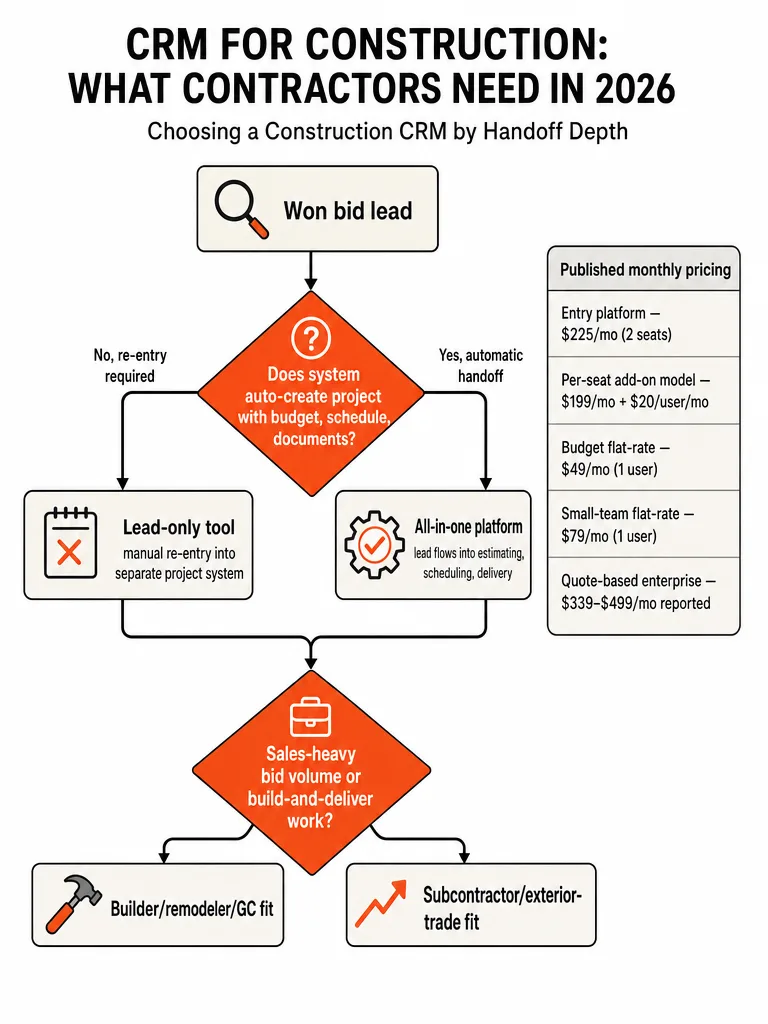
Contractor type decides which CRM is worth paying for, not feature count. Buildern's 2026 comparison and monday.com's construction CRM guide point custom home builders and remodelers toward all-in-one platforms tied to estimating and delivery, while bid-heavy subcontractors and exterior trades do better on sales-focused CRMs built for fast follow-up and high lead volume.
| Business Model | Best-Fit CRM Type | Example Platform |
|---|---|---|
| Custom home builder / GC | All-in-one platform through to accounting | Buildern |
| Remodeler / small builder | All-in-one platform, transparent per-user pricing | JobTread |
| Established residential builder | Full construction management platform | Buildertrend |
| Commercial GC, bid-heavy sub | Sales CRM built for long bid cycles | Followup CRM |
| Roofing / exterior trade | Sales CRM built for high lead volume | JobNimbus |
| Service contractor | Field CRM with scheduling and dispatch | Jobber |
Buildern's own 2026 comparison positions itself for custom home builders and GCs who want the CRM connected all the way to accounting, with JobTread serving remodelers who want transparent, published per-user pricing instead of a quote. Followup CRM and JobNimbus skew toward sales-heavy commercial subs and exterior trades for the opposite reason: those businesses live on lead volume and speed, not job-costing depth. Jobber's placement comes from monday.com's 2026 roundup, which lists it as built for construction and remodeling teams working on-site.
The platform built for a custom home builder rarely fits a roofing crew chasing high-volume leads. Matching category to business model before buying avoids a painful switch later.
What Pipeline Stages Should a Construction CRM Actually Use?
Construction bids move through six stages that rarely match a generic sales pipeline: lead, site visit, estimate sent, bid submitted, negotiation, and won or lost. Generic CRM stages like "qualified" or "demo scheduled" don't fit a process that runs for months and depends on an in-person site visit before any price exists.
Projul's 2026 contractor guide names this construction-specific version directly, citing stages like "Site Visit Scheduled," "Estimate Sent," and "Contract Signed" as the ones that actually map to how a bid moves. BuildWorkPro's construction CRM guidance makes the same point from the other direction: forcing a bid-heavy workflow into a generic sales pipeline is a common setup mistake that buries the stages that actually predict a win.
A workable pipeline looks like this:
- Lead captured: inbound call, web form, referral, or site sign.
- Site visit scheduled: first in-person assessment booked.
- Estimate sent: cost built from a catalog or takeoff, delivered to the prospect.
- Bid submitted: formal proposal or bid package filed.
- Negotiation: scope, price, or terms under discussion.
- Won or lost: outcome logged, with a reason code on every loss.
That last stage matters more than it looks. A pipeline that tracks why bids are lost, price, timeline, or competitor, turns a CRM into a feedback loop instead of a glorified address book.
What Happens After You Win the Bid? The Real Handoff Test
The real test of any construction CRM is what happens the second a bid is won: does a project with its budget, schedule, and documents appear automatically, or does someone retype everything into a second tool? Buildern's 2026 evaluation criteria treat this handoff as a core scoring category, asking plainly whether a won lead "becomes a project with its budget, schedule and documents, or do you start over in another tool."
On that test, platforms split cleanly into two groups. Buildern and JobTread carry a won deal directly into estimating, scheduling, and project delivery, because the CRM and the job management live in the same system by design. Followup CRM, Pipedrive, and HubSpot sit on the other side of that line: strong at capturing leads and running a sales pipeline, but built as lead-and-contact systems, not job-execution systems. Winning a bid in one of those tools still means opening a different platform, or a spreadsheet, to actually build the project.
Neither approach is wrong. A sub with a lean back office and a bookkeeper in QuickBooks may prefer a lead-only CRM paired with a separate scheduling tool. A GC juggling several active jobs at once usually feels the re-entry cost fastest, because every manual handoff multiplies across every open project.
Can Your Field Crews, Subs, and Clients Actually Use It?
Field crews won't use a CRM that only works from a desktop, and construction crews are rarely at a desk. Nimble's 2026 construction CRM guide frames mobile access and multi-stakeholder tracking, covering clients, architects, subcontractors, suppliers, and referral sources, as core requirements, because a single project can involve people across many different roles at once.
That multi-stakeholder reality also shows up in pricing, in a way most comparison pages skip. Buildern's 2026 comparison table lists its Starter plan at $225 per month for 2 seats, with clients, subcontractors, and field users included at no extra charge. That's a real differentiator against platforms that bill every external login as a paid seat: a GC coordinating several subcontractors and a project architect on one job can watch seat costs climb fast under a per-user model, even before the office team logs in.
Whether that bundled access is worth paying for depends on how many outside people actually touch a given job and how much time your team currently loses chasing updates by phone or email instead of inside one system.
How Much Does a Construction CRM Really Cost in 2026?
Three pricing models cover nearly every contractor CRM on the market in 2026: per-seat software billed by user count, flat-rate platforms charging one price regardless of team size, and quote-only systems that publish no number at all. Mixing these up is how a $12-per-seat tool and a $499-per-month platform end up compared as if they were the same purchase.
| Tool | Pricing Model | Starting Price | Source |
|---|---|---|---|
| monday CRM | Per-seat | $12/user/month | monday.com |
| Pipedrive | Per-seat | $14/seat/month | Buildern |
| Zoho CRM | Per-seat | $14/user/month | Agiled |
| HubSpot CRM | Per-seat | Free tier; paid plans from $7 to $20/seat/month | HubSpot, Buildern |
| BuildBook | Flat, per-user | $79/month (1 user, billed annually) | Buildern |
| Contractor Foreman | Flat, per-user | $49/month (1 user) | Buildern |
| Knowify | Flat | $68/month | Agiled |
| Buildertrend | Quote-based | Reported $299 to $499/month | Agiled, Buildern |
| Procore | Quote-based | Reported about $4,000/year | Agiled |
The HubSpot row shows why "published pricing" still needs a skeptical read. HubSpot's own 2026 construction CRM guide lists paid plans from $7 per seat per month, monday.com's 2026 roundup lists HubSpot from $15 per user per month, and Buildern's comparison lists it starting near $20 per seat. Same product, three different numbers, because each source checked a different plan tier on a different date. Buildertrend shows the same pattern in reverse: Buildern's October 2026 scan reports it at roughly $339 to $499 per month, while Agiled's 2026 comparison puts it at $299 per month. Neither vendor publishes a price page, so every Buildertrend number here is a reported quote, not a list price.
How Do You Choose the Right CRM for Your Construction Business?
Choosing the right CRM comes down to four checks before signing anything: pipeline fit, handoff depth, portal needs, and the real seat math once every field user and client login gets counted.
- Map your real pipeline stages first. Write down your actual stages, lead, site visit, estimate, bid, negotiation, won or lost, before you look at a single demo. Any CRM that can't be configured to match loses by default.
- Run the handoff test. Ask the vendor directly: when a bid is marked won, does a project get created with budget, schedule, and documents attached, or does someone start over? Get the answer in writing, not a sales deck.
- Price every stakeholder, not just your office seats. Count clients, subs, architects, and field crew logins against the per-seat rate before comparing a $12-per-seat tool to a flat-rate platform.
- Check the full picture, not the monthly teaser. A flat-rate tool and a quote-based platform can land at similar annual spend once seat growth and add-ons are factored in, so ask every vendor for a total that includes every login you'll actually use.
- Flag the gap a packaged tool can't close. If your workflow runs hybrid bid-and-build operations across multiple trades, or your handoff needs don't match any category covered here, treat that mismatch as a signal to look harder at your options rather than forcing another renewal on a tool that half-fits.
Frequently asked questions
Is there a free CRM for construction companies?
Yes, several CRMs used in construction offer a free tier, including HubSpot CRM, Zoho CRM, and Capsule CRM, according to monday.com's 2026 construction CRM roundup. Free plans typically cap users, automation, and reporting, so most contractors outgrow them once lead volume or job complexity picks up. A paid plan usually becomes necessary the moment you need pipeline automation or more than a couple of logins.
How many leads do contractors actually lose to slow follow-up?
Contractors lose roughly 30% of their leads to slow follow-up alone, according to Projul's 2026 contractor guide. A homeowner calls while the crew is on a job site, the callback gets forgotten, and the lead hires a competitor before anyone remembers the sticky note. That failure pattern, not bad pricing or bad work, is what a CRM's automated follow-up reminders exist to stop.
What's the cheapest CRM for contractors right now?
QuoteIQ starts at $29.99 per month for one user and tops out at $699 per month for unlimited users with no per-seat fee, per a 2026 contractor CRM comparison. Jobber's entry plan runs $49 per month and Housecall Pro starts at $79 per month billed monthly, while ServiceTitan publishes no pricing and quotes per technician. The lowest sticker price doesn't always mean the lowest real monthly bill.
Why do construction CRM prices look different on every comparison site?
Published prices vary because each review site checks a different plan tier on a different date, and several vendors don't run a public pricing page at all. HubSpot's own guide lists paid plans from $7 per seat per month while other 2026 roundups list it from $15 to $20 per seat, and Buildertrend gets quoted anywhere from $299 to $499 a month for that reason. Treat every number as a starting point to verify, not a final quote.
What should I do if no off-the-shelf CRM fits my construction business?
If your workflow runs hybrid bid-and-build operations across multiple trades, or no CRM's handoff process matches how your team actually works, that mismatch is a sign to build around your process instead of forcing another renewal on a tool that half-fits. Contractors in this spot often get further with a custom internal tool built to their exact pipeline and handoff rules than with a packaged CRM they have to bend their business around.
Does a construction CRM replace QuickBooks or other accounting software?
No, most construction CRMs don't replace accounting software, so contractors still run QuickBooks or a similar tool alongside the CRM for books and taxes. Buildern is a notable exception: its 2026 comparison positions it for custom home builders and GCs who want the CRM connected all the way through to accounting in one system. Most other platforms on the market stop at estimating and project handoff, leaving accounting as a separate tool.