What should a two-week AI prototype actually prove?
A two-week AI prototype should prove whether the idea is worth the next round of investment, using evidence from real code, real inputs, and real users rather than a polished demo. The sprint ends with one of three calls: build, kill, or park.
That standard comes directly from Adam Hickey's framing of what a working prototype has to deliver: proof built on real code, real inputs, and real users in the place they'd actually use it, not a staged walkthrough with clean sample data. A demo that only works on the examples you picked tells you nothing about whether the idea survives contact with a real Tuesday.
Most teams get this backwards. They spend two weeks polishing an interface so it looks finished, then show it to a stakeholder who nods along. That's theater, not evidence. The actual job of a two-week sprint is to surface the one risk that would sink the idea at month six, and surface it now, cheaply, while the only thing you've lost is two weeks.
A prototype that does its job gives you a number for accuracy, a number for cost, a number for failure rate, and a clear answer: build it, kill it, or park it until the next signal arrives.
What should an AI prototype test before you invest in scale?
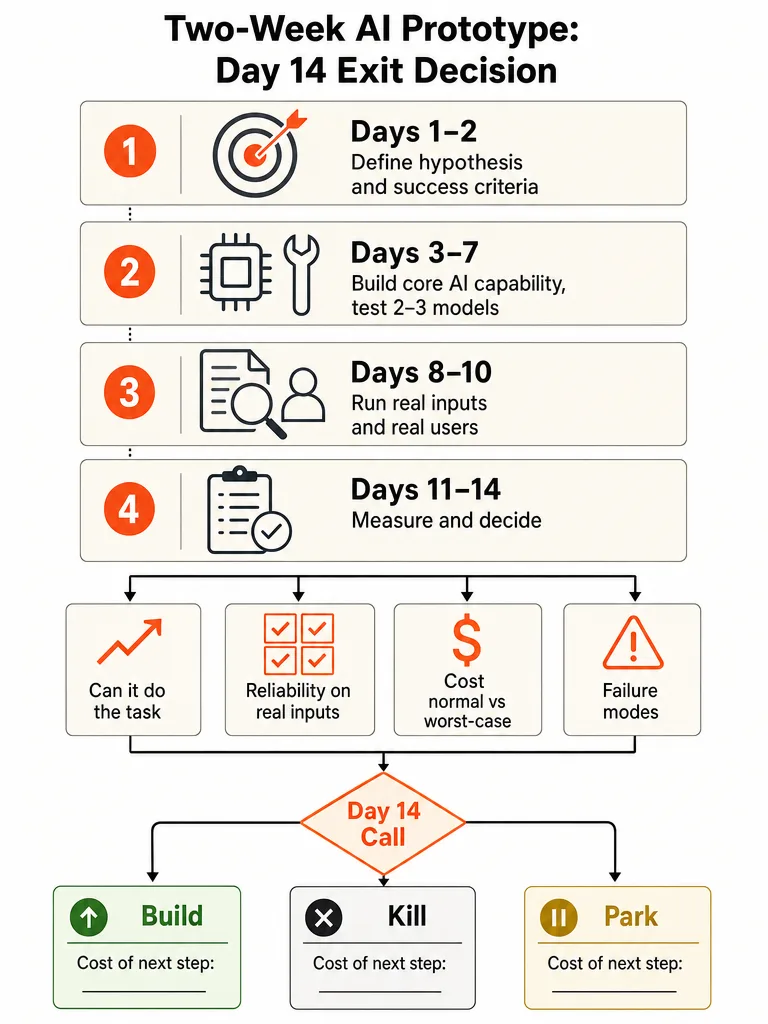
An AI prototype has to answer four questions before anyone discusses scale, cost architecture, or go-to-market: can the model do the task, how reliable is it on real inputs, what does it cost in normal and worst-case use, and how does it fail. Product Faculty lays out this exact sequence as the core execution pipeline behind real AI prototyping, and it holds regardless of industry or use case.
The reasoning matters as much as the list. Product Faculty points out that AI inverted the usual risk profile of software. In classic development, feasibility risk was technical: could you build it, could you scale it, could you maintain it. With AI, feasibility risk is behavioral. A model can look confident while being wrong, and it can perform well on the examples you tried and quietly fail the moment real-world ambiguity shows up. That creates a dangerous illusion where a team believes it's further along than it actually is.
That's why "can the model do the task" isn't a yes/no question answered by one clean example. It has to hold up across real-world inputs, not just happy paths. Cost has to be measured in both the typical case and the worst case, because a model that's cheap on average and expensive on outliers will blow up a budget at scale. Failure mode matters more than failure rate alone: a model that's wrong 2% of the time in a way that's obvious is safer than one that's wrong 1% of the time in a way that looks correct. Product Faculty's own conclusion is blunt about the stakes here: until those four questions have real answers, business value, user trust, and technical feasibility are still unproven, and everything built on top of them is theater.
How do you validate an AI idea in two weeks?
Validating an AI idea in two weeks means running a fixed four-phase sprint: define the problem, build the core capability, test it on real conditions, then document and decide. Autor's sprint structure breaks the fourteen days into blocks with specific deliverables attached to each one, so nothing drifts past day 14 without a verdict.
- Days 1-2: Define the problem and the success criteria. Write the hypothesis, the exact metric that would count as a pass, and the scope boundaries that keep the sprint focused on the AI risk instead of the surrounding product. Skip this step and the team spends day 14 arguing about what "working" even means.
- Days 3-7: Build the core AI capability. Autor's framework calls for testing two to three models against your actual data during this window, not just the model you assumed you'd use. By the end of week one, the goal is a working system that demonstrates the capability, even if the interface is rough.
- Days 8-10: Test on real data and real users. This is where most teams flinch and stick to sample data. Autor recommends testing on actual data or a representative sample and, where possible, putting the prototype in front of two to three real users.
- Days 11-14: Document and decide. Accuracy, latency, cost, and failure rate get written down against the day 1-2 criteria, and the team makes the call.
This cadence only works if someone on the team can actually drive the tools fast. Colin Matthews, who has taught more than 500 product managers how to run AI prototyping sprints, pushes teams to get the whole group building together rather than working solo in tools like v0, Bolt, Replit, Lovable, Cursor, and Magic Patterns. For a rundown of which of these tools fit which part of the sprint, see 7 AI tools that speed up product development.
What should you leave out of a two-week AI prototype sprint?
A two-week AI sprint has to exclude login, billing, and admin surfaces, because building those things burns days that should go toward testing the actual AI capability. Autor's framework treats scope boundaries as part of the problem definition, set on day one, not discovered on day ten when the team is behind.
The instinct to build a "real" product in two weeks is exactly what kills prototype sprints. Every hour spent wiring up authentication or a billing flow is an hour not spent finding out whether the model can do the job on messy real data. None of that scaffolding tells you anything about the risk you're actually trying to retire.
Autor's framework is explicit that a two-week sprint won't answer everything. It won't tell you how the system performs at scale, it won't cover every edge case, and it won't predict long-term adoption. Those are later-stage questions. The sprint's only job is to isolate the core AI capability and get a clean read on it, fast.
AI prototype vs MVP vs demo: what each one has to prove
A prototype and a demo test different things, and conflating them is how teams waste two weeks building the wrong artifact. A prototype proves whether the core AI risk is survivable. A demo proves an impression, nothing more. Where this gets murky is the MVP: the sources behind this piece don't draw a hard line on what counts as proof of real MVP adoption, so treat that boundary as unresolved rather than settled.
| Artifact | What it's for | What counts as evidence | What it skips |
|---|---|---|---|
| Prototype | Testing whether the core AI capability can do the task on real inputs | Accuracy, cost, and failure rate from testing against real or representative data | Polish, full feature set, scale performance |
| Demo | Making an idea tangible enough to react to | A reaction from a stakeholder or sample audience to a staged walkthrough | Reliability under real conditions, cost at scale |
| MVP | An open question in this research | Not established in the sources reviewed for this piece | Not established in the sources reviewed for this piece |
Glen Coates, VP of Product at Shopify, described a workflow where he takes screenshots and prompts AI to turn them into a working prototype before his team invests time in an idea. "It speeds up the feedback cycle," Coates said on The Product Podcast. "It also helps me realize how dumb my ideas are before my team has to waste time on them." That's the prototype's entire value proposition: find out an idea is dumb before the team spends real engineering time on it.
The mistake worth naming directly: treating a slick demo as proof the idea works. A demo can look finished and still fail the moment it meets real inputs, because the examples were chosen to make it look good. For a longer breakdown of when to build which artifact first, see AI Prototype vs MVP.
How do you know real users validated it, not just liked the demo?
Real validation means target users ran the prototype through something close to their actual workflow, with their own messy inputs, not a staged click-through you guided them through. Adam Hickey's standard is explicit: evidence has to come from real code, real inputs, and real users, or it isn't evidence at all.
This distinction is the difference between a user saying "that looks great" and a user actually doing the task they'd do on a normal day. A polished walkthrough invites polite approval. A real workflow test invites the friction that tells you whether the thing actually works.
The clearest demonstration of this discipline in the research comes from a Medium case study where the author built three AI prototypes and tested them with 15 real users over three weeks, applying the Google Ventures Design Sprint method, understand, diverge, decide, prototype, validate, to each one. Each week ran the same cycle: four days to build, one day to test with real users. That cadence forced a verdict every week instead of letting a shaky idea drift for a month before anyone found out it didn't work.
Hickey's own build on an app called Lucy Learns shows what real validation buys you downstream. Once the team had a real pipeline tested against actual output, a change that would have taken five more days a month earlier got done in one afternoon, after the team ran a blind pilot comparing four image models to find the one that actually held up.
How do you make the build, kill, or park call on day 14?
Day 14 ends with one decision: build, kill, or park, made against the accuracy, latency, cost, and failure rate you measured, not against how the demo felt. Autor's sprint framework treats this as a formal comparison: the numbers from testing get checked against the success criteria written on day one, and the gap between them drives the call.
- Document the results. Write down accuracy, latency, cost per use, and failure rate exactly as measured during days 8-10, no rounding up.
- Compare against day 1-2 criteria. If the model hit the bar you set before you were emotionally invested in the outcome, that's a build signal. If it missed by a wide margin, that's a kill signal.
- Decide, and attach the cost of the next step. A "build" decision needs a number next to it: what the next phase costs in time and money. A "park" decision needs a trigger: what has to change before you revisit it.
Autor's framing of the stakes is blunt: a red light at week 2 beats a red light at month 6. Companies that skip this discipline often discover by month five that the model doesn't perform well enough on their actual data, or that users never wanted it in the first place, after months of engineering spend that a two-week sprint would have avoided.
The upside case shows up in the same research. Product School cites Lovable's own blog reporting $17 million in annual recurring revenue within three months of launch, and a separate case study crediting Bolt with reaching $40 million ARR within a few months of pivoting to AI. The sources don't explain exactly why each company's revenue grew the way it did, but both moved fast once the core capability was validated, and neither got there by spending longer polishing a demo.
Running this scorecard is exactly the discipline behind choosing the first AI workflow to build: score the candidate, test it against real conditions, and don't let a good-looking demo talk you into skipping the math.
Frequently asked questions
Can you build an AI MVP in two weeks?
No — two weeks is enough time to validate the core AI capability, not to ship a finished MVP. Autor's sprint framework explicitly excludes login, billing, and admin screens from the two-week build because they don't test the AI risk you're trying to retire. The sprint produces proof the capability works, not a shippable product, and that's a separate, later phase of work.
How many real users should test an AI prototype?
Autor's sprint framework calls for putting the prototype in front of two to three real users during the days 8-10 testing window, using their actual inputs instead of staged examples. A separate case study tested three AI prototypes with 15 real users across three weeks, one user group per week, to apply the same real-workflow standard. The number matters less than whether testers ran their own tasks, not a guided walkthrough.
Which AI tools do teams use to build prototypes fast?
Product teams building AI prototypes commonly use v0, Bolt, Replit, Lovable, Cursor, and Magic Patterns, tools built to turn a prompt into a working interface in hours rather than weeks. Colin Matthews, who has taught more than 500 product managers to run these sprints, pushes teams to build together in one tool rather than working solo, since silo-building creates rework when the team has to merge separate prototypes later.
What happens if you skip prototype validation and build the full product first?
Skipping validation means you find out the model doesn't work after months of engineering spend instead of after two weeks. Autor's sprint framework is built on the principle that a red light at week two beats a red light at month six: teams that skip the sprint often discover by month five that the model fails on their actual data or that users never wanted the feature, after sinking far more time and budget into the effort.
Does a working AI prototype need a polished interface?
No. Autor's sprint framework explicitly allows a rough interface during the days 3-7 build phase, as long as the system demonstrates the core AI capability. A prototype's job is proving the model can do the task on real inputs at an acceptable cost and failure rate, not looking finished. Polish is a distraction that burns days better spent testing against actual data.
What's the payoff for validating an AI prototype before scaling it?
Companies that validate the core capability before scaling tend to grow fast after launch. Lovable reported $17 million in annual recurring revenue within three months of launch, according to Product School's citation of the company's own blog, and a separate case study credited Bolt with reaching $40 million ARR within a few months of pivoting to AI. Neither result came from polishing a demo longer; both followed a validated capability.