Does a 10-person team need a custom CRM, or will a configurable platform do?
Most 10-person teams should default to a configurable CRM platform, not a custom build, per lcgc.dev. Scoping a custom CRM for a 10-person team means testing a go/no-go filter first, then defining core objects, MVP workflows, permissions, and milestone-based discovery only if the filter says build.
lcgc.dev's guidance on that go/no-go filter is direct: build custom only when the sales process is genuinely unique, the current CRM bill is already high and climbing, or the team is losing real hours to workarounds like shadow spreadsheets and manual data entry.
Run that filter before spending a dollar on the rest of the scoping work below. HubSpot's free tier and Pipedrive both handle a standard B2B pipeline at ten seats without friction. A team whose reps close deals in a predictable sequence, track a normal set of fields, and don't fight the tool daily is well served by a platform for years.
What signals a team has outgrown that option is specific pain: a workflow the platform genuinely can't model, a renewal quote climbing past what ten seats should cost, or a second system quietly built in spreadsheets because the CRM doesn't fit. If none of those are true yet, the right move is configuring the platform already in place, not scoping a build.
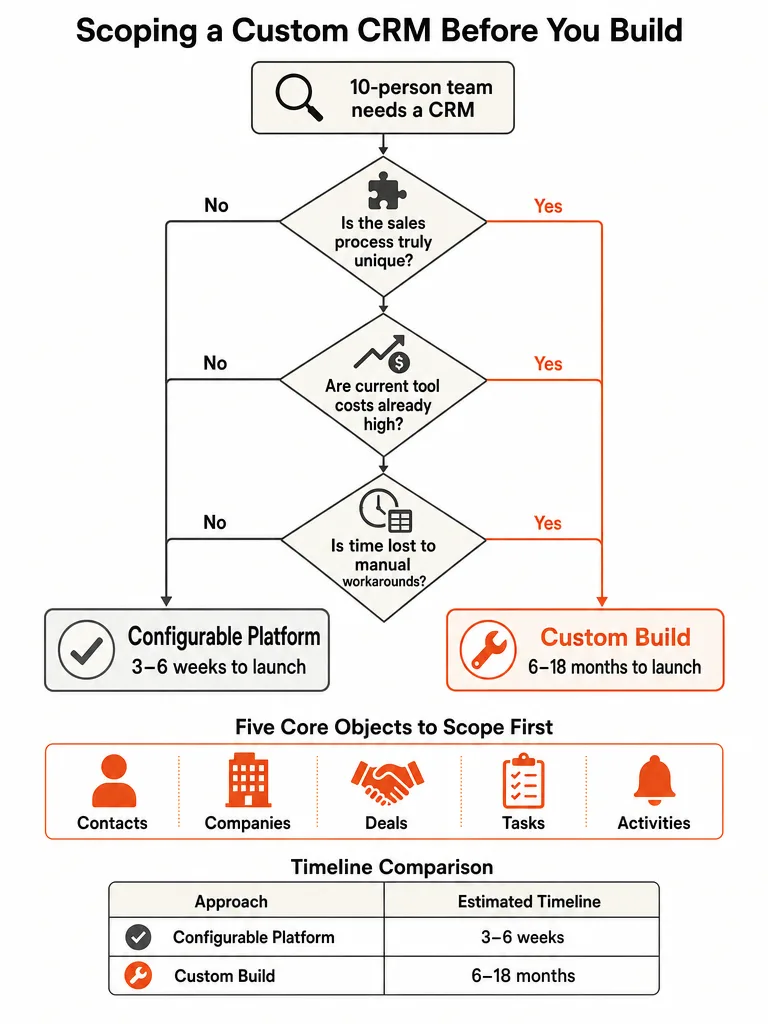
Custom CRM vs configurable platform: which fits a 10-person team?
A custom CRM makes sense once the cost math and the workflow friction point the same direction, not just one of them. lcgc.dev documents a real case: a company paying $18,200 per month for Salesforce, facing an 18% price increase on renewal, while brokers lost 40 minutes a day to manual data entry the platform couldn't automate away. Rising cost plus a process the tool actively fights is what justified that build.
Before assuming the same logic applies to a given team, rule out the configurable and low-code options first. HubSpot and Pipedrive cover most standard sales motions out of the box at ten seats. Platform-based, no-code builders, the approach monday.com describes as configuring pipelines and automations through drag-and-drop visual builders instead of writing code, extend that flexibility further for teams with slightly unusual stages. Backendless sits closer to a build-it-yourself kit: Backendless's own guidance notes that packaged CRMs are typically designed for businesses with large sales teams, so a small business with only a handful of customers can end up paying for scale it doesn't need.
The comparison of custom CRM vs HubSpot walks through the specific triggers that flip this decision, and the broader custom software vs off-the-shelf tools framework applies the same logic to any tool a team is considering building instead of buying.
How much does a custom CRM cost for a 10-person team, and how long does it take?
A custom CRM build runs $60,000 to $150,000 upfront and $86,000 to $195,000 over three years, according to lcgc.dev's cost comparison. These figures come from lcgc.dev's 30-user comparison table, not a 10-person-specific breakdown: public sourcing on exact custom-CRM budgets for a team of ten is limited as of this writing, so treat the ranges below as directional, not a quote for a specific seat count.
lcgc.dev's 30-user comparison puts HubSpot Professional at $84,624 over three years and Salesforce Enterprise at $249,044 over three years, against roughly that same $86,000 to $195,000 range for a custom build. At smaller seat counts the platform gap narrows, which is exactly why the go/no-go filter above matters more than the price tag alone.
Timeline splits just as sharply. monday.com's research puts platform-based CRM launches at 3 to 6 weeks, while a from-scratch custom build runs 6 to 18 months depending on scope. Gautam Khorana's playbook narrows that further with a concrete 14-week, five-phase schedule for teams that scope tightly from day one.
| Approach | Upfront Cost | 3-Year Total | Typical Timeline |
|---|---|---|---|
| Custom CRM build | $60,000-$150,000 | $86,000-$195,000 | 3-6 months (scoped), up to 6-18 months (scratch) |
| HubSpot Professional (30 users) | Included in subscription | $84,624 | 1-4 weeks |
| Salesforce Enterprise (30 users) | Included in subscription | $249,044 | 2-8 weeks basic, 3-6 months customized |
Teams already running a system and weighing whether to keep paying for seats or build once can compare that math in internal tool vs SaaS subscription at 10 users. CRM-specific automation work fits inside broader project pricing frameworks covered in custom AI automation pricing.
What are the five core objects your CRM needs on day one?
A lean starting point for a custom CRM's data model often includes five objects: contacts, companies, deals, tasks, and activities. That's not a fixed schema the sources hand down: the corpus doesn't lay out one definitive 10-person CRM data model, and Lark's guide to building a CRM folds leads in alongside contacts and companies as a category teams track. Treat five as a workable count to test against a team's own workflow, not a rule to follow blindly.
Contacts and companies hold the who. Deals hold the what and how much. Tasks hold the next action. Activities hold the history: calls, emails, meetings, notes. Two tables get underestimated constantly in scoping conversations, per Gautam Khorana's build playbook: the activity log and the custom fields table. Clients routinely need both, and both get treated as afterthoughts because they don't show up in a feature demo the way a pipeline view does.
One example of what sits underneath those objects: Gautam Khorana's playbook describes a lean team CRM built on a PostgreSQL database with Prisma handling the schema layer, a React front end, and TanStack Query managing data fetching and cache state. That's one team's implementation choice, not a rule every 10-person CRM has to follow. The right stack depends on who's building it and what they already know how to maintain.
Running a discovery workshop with a shared wireframe tool like Whimsical, sketching the objects and how they relate before anyone writes a line of code, is a low-cost way to surface disagreements about scope early, before they turn into rework.
Which workflows belong in the MVP, and what should wait until after launch?
A workable MVP default covers three workflows: lead capture, pipeline movement, and task follow-up. That's a suggested cut point, not a rule pulled directly from the sources. Itransition's full functional scope of marketing, sales, and customer service capabilities is the closest thing to a sourced menu here, useful as a list to cut from, not a target to build toward.
The workflows worth defaulting into v1:
- Lead capture. A new contact or company enters the system from one defined source (a form, an inbox, a manual entry) and lands in the right place automatically.
- Pipeline movement. A deal moves from stage to stage with clear rules for what triggers each move, visible to the whole team.
- Task follow-up. Every deal generates a next action with an owner and a due date, so nothing sits untouched by accident.
Everything else on Itransition's list (sentiment analysis, lead scoring, customer journey mapping, 24/7 chatbot support, CPQ and contract automation) is real functionality that real CRMs ship. None of it needs to be in a 10-person team's first version by default. Integrations follow a similar starting rule of thumb: treating tools like Mailchimp, Zendesk, and Bloomreach as post-launch additions, unless a specific workflow is actively broken without them today, is a reasonable default, though the sources don't establish it as a fixed rule.
Teams whose real bottleneck is what happens after a lead lands in the CRM can look at AI workflow automation for SMBs that can't hire ops, which covers the automation layer that sits on top of lead intake once the CRM itself is solid.
What pipeline stages and stage-move rules should your team define?
Pipeline stages should describe a team's actual sales process, not a vendor's default template. Lark's guide to building a CRM makes this point directly: a custom CRM should let a team decide what information to track and how deals move forward, instead of forcing everyone into a generic vendor stage list.
Define stages and rules in this order:
- Name the stages in the team's own language. If the team calls it "in contract review," don't rename it "negotiation" because that's what a CRM template calls it. The tool should speak the team's language, not the reverse.
- Write the rule that moves a deal forward, stage by stage. Every stage needs one clear, checkable condition for advancing. "Signed proposal received" is a rule. "Feels close" is not.
- Assign who's allowed to make each move. Some stage changes should be automatic, like a signed contract triggering the next stage. Others need a human decision, usually a manager sign-off before a deal is marked won.
- Test the rules against five real, closed deals. Walk each one through the proposed stages before launch. If a real deal doesn't fit cleanly, the stages need fixing, not the deal.
Skipping this step is how teams end up with a CRM that technically works but nobody trusts, because the pipeline view doesn't match what's actually happening in a sales conversation.
Who should have access to what? A permission matrix for a 10-person team
A useful example template for a 10-person CRM splits access into four roles: admin, sales rep, manager, and support. That's a template to adapt, not a role count pulled from the sources. Lark's build guide is explicit that access control and data governance need to be planned early, before launch, because retrofitting permissions onto a system people already use the wrong way is harder than defining them upfront, though it doesn't specify how many roles a small team needs.
| Role | Permission Level |
|---|---|
| Admin | Full access to all records, settings, and integrations; can edit permission rules |
| Sales Rep | Full access to own contacts, companies, and deals; read-only on team-wide pipeline |
| Manager | Full access to team pipeline and reports; can reassign deals and edit stage rules |
| Support | Read access to contact and deal history; write access limited to activity notes |
Defining a matrix like this before the build starts beats fixing it after someone accidentally deletes a colleague's deal. On the infrastructure side, Gautam Khorana's build playbook describes one team's stack using Auth0 for authentication and role-based access and DigitalOcean for hosting once the system is live. That's one working example, not the only way to run it, but a reasonable starting point for a team that hasn't picked infrastructure yet.
How to run CRM discovery without scope creep taking over
Discovery for a custom CRM should produce four deliverables before anyone writes code: a prioritized MVP-versus-post-launch feature list, an entity-relationship outline, defined user roles with permission levels, and a signed-off timeline with named milestones. Gautam Khorana's 14-week playbook locks these four items early because loose discovery is what turns a scoped project into an open-ended one.
Gautam Khorana's playbook documents the failure mode directly: one CRM project's shared discovery document grew to 47 pages before the team forced a decision on scope. Discovery without a cap turns into scope creep wearing a planning process as a disguise. Capping discovery at the four deliverables above, getting sign-off, and starting to build is what keeps a 14-week schedule from sliding into six months.
Broad guides like Itransition's feature catalog and Lark's build framework are useful starting points for seeing the full range of what a CRM can do. Neither tells a specific ten-person team what it needs on day one. Closing that gap, generic feature lists standing in for an actual scoping decision, is the work a 10-person team has to do itself before signing off on a build.
Frequently asked questions
What is a custom CRM, and how is it different from a configurable CRM platform?
A custom CRM is built from scratch around a specific team's sales process, data structure, and permissions, rather than fitting that team into a vendor's generic pipeline, per Lark's build guide. A configurable platform, like HubSpot or a no-code tool such as monday.com, lets a team adjust pipelines and automations through drag-and-drop settings inside software someone else built and maintains. The difference is who owns the underlying code and infrastructure, not just how flexible the setup feels day to day.
How much does Salesforce cost for a 10-person team?
Salesforce Enterprise costs $165 per user per month, which works out to roughly $1,650 a month for a 10-person team before any customization, according to lcgc.dev's cost comparison. That figure is list price for seats alone and doesn't include implementation, custom fields, or add-ons. Comparing that ongoing bill against a $60,000 to $150,000 custom build is one half of the go/no-go decision; the other half is whether the platform's workflow actually fits the team's process.
What tech stack do teams use to build a custom CRM for a small team?
One documented small-team CRM build used PostgreSQL for the database, Prisma to manage the schema layer, React for the front end, and TanStack Query for data fetching and cache state, per Gautam Khorana's build playbook. Authentication and role-based access ran on Auth0, with DigitalOcean handling hosting once the system went live. That's one team's working setup, not a required stack; the right choice depends on what the builder already knows how to maintain long-term.
Should integrations like Mailchimp or Zendesk be built into the CRM from day one?
No, integrations like Mailchimp, Zendesk, and Bloomreach are safe to push to a post-launch phase for a 10-person team's first CRM version, unless one specific workflow is actively broken without them today. Building every integration into version one is a common way small-team CRM projects miss their launch date. The default should be a working core system first, then adding integrations once real usage shows which ones the team actually needs.
What's a low-cost way to catch scope disagreements before writing any code?
Running a discovery workshop with a shared wireframe tool like Whimsical, and sketching out the CRM's objects and how they connect before development starts, surfaces disagreements about scope while they're still cheap to fix. Teams that skip this step tend to discover mismatched assumptions about what a "deal" or "contact" means only after development is underway, when changing the data model costs far more than an hour spent whiteboarding it first.
What are the two parts of a CRM's data model that teams usually underestimate?
The activity log and the custom fields table are the two parts of a CRM's data model teams most often leave out of early scoping, per Gautam Khorana's build playbook. Neither shows up in a typical feature demo, since pipeline views and contact cards get the attention instead. Clients routinely need both once the system is live, which makes leaving them out of the initial data model one of the most common causes of mid-build rework.