Should You Build or Buy a Client Portal?
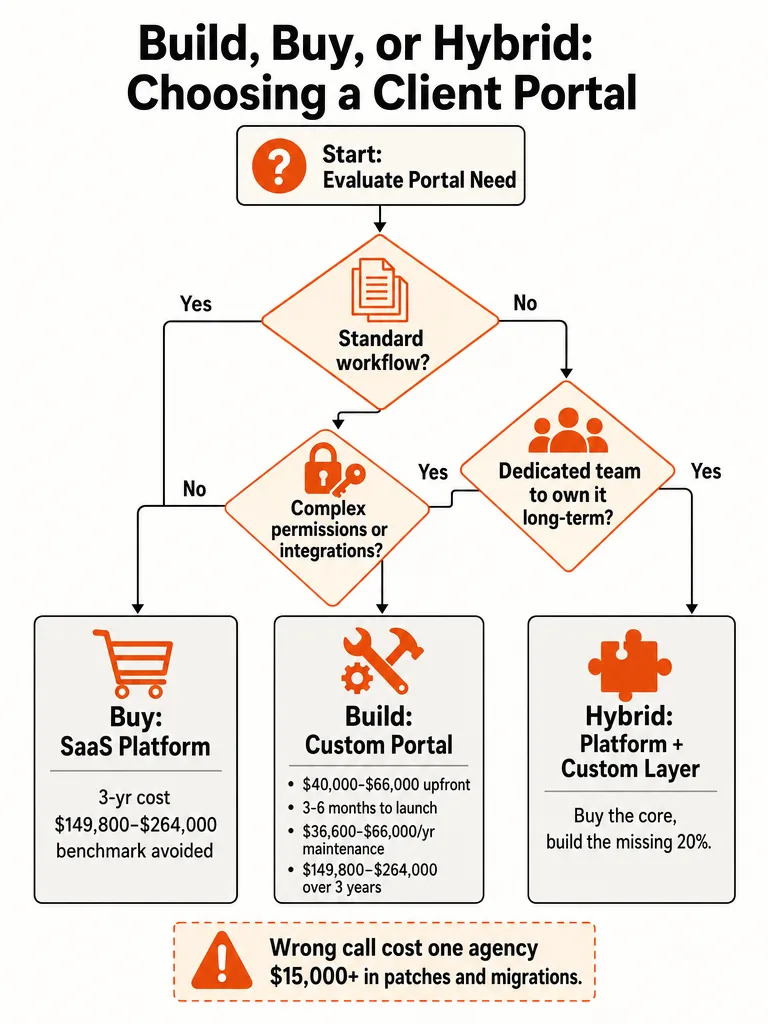
Buying a client portal wins for most businesses under about 20 active clients, according to BaoDev.studio's cost breakdown of agency portal projects, with the math starting to flip around 25 to 30 seats. The build vs buy client portal decision only tips toward building when permissions, integrations, or client experience create real differentiation, and a team exists to own it long term.
Hybrid, buying a platform and extending the one piece that's missing, is the default middle path for everyone in between. That threshold matters because the build quote is the cheapest part of owning a portal. Every agency that skips past it ends up paying for hosting, security patches, and feature requests long after the invoice clears.
The decision isn't about whether a developer can build a login page with file uploads in a weekend. They can. It's about who answers the support ticket eighteen months from now when a client's upload breaks, and whether that cost was ever in the plan.
Most service businesses don't need a differentiated portal. They need clients off their email inbox and onto something that looks professional, fast. A SaaS platform does that in weeks. Save the custom build for when the workflow itself is the product, not the wrapper around it.
What Does a Real Client Portal Actually Need to Do?
A client portal is a secure online platform that lets a business and its clients share documents, communicate, and track work from one place, according to Zuar's build vs buy guide. That definition undersells what a real one has to do. OnboardMap's breakdown of the decision argues a login page with file upload is maybe a tenth of the actual job.
The rest of the list is what most build-it-yourself estimates skip: secure authentication, granular access control so each client sees only their own records, audit logs tracking who touched what and when, automated reminders that nudge clients who stall out mid-task, a mobile-friendly interface, backups, uptime monitoring, and an internal admin view separate from what clients see. Miss any one of those and the portal either leaks data or turns into a support burden nobody budgeted for.
This same list is the checklist to run against any SaaS platform you're evaluating. Customer Portals names five platforms built around this feature set: Assembly, SuiteDash, Clinked, Moxo, and FuseBase. Each is a different take on the same core promise, document sharing, messaging, and client-facing status, which is the entire point of buying instead of assembling it piece by piece.
How Much Does It Cost to Build vs Buy a Client Portal?
Building a custom client portal costs $40,000 to $66,000 upfront and $36,600 to $66,000 a year to maintain, according to AgencyPro's agency cost analysis, putting three-year ownership at $149,800 to $264,000. Buying a comparable SaaS portal runs $2,600 to $11,300 in year one and $5,000 to $18,500 over three years by the same analysis, a gap AgencyPro frames as a 95 to 98 percent saving for the buyer.
Customer Portals lands in a wider range for both options: $20,000 to $100,000+ to build depending on complexity, with $5,000 to $20,000 a year in maintenance, against $50 to $500 a month to buy and configure a platform. The gap between the two guides isn't disagreement, it's scope. AgencyPro is pricing a standard agency portal with planning, front end, back end, integration, and QA. Customer Portals is pricing everything from a simple intake form up through a fully custom platform with its own authentication and database layer, which drags the top end toward six figures.
BaoDev.studio's numbers read lower still because they're priced per client instead of as a flat platform fee: $30 to $50 per active client per month, or $5,400 to $9,000 a year for 15 clients on a white-label tier. That's the trap in every build vs buy spreadsheet. Per-client SaaS pricing looks cheap at 15 clients and expensive at 150. A flat-fee custom build looks expensive on day one and flat forever, assuming the budget also covers the $3,000 to $8,000 a year in maintenance BaoDev.studio says a real, daily-use portal demands.
| Approach | Setup / Upfront Cost | Ongoing Annual Cost | 3-Year Total |
|---|---|---|---|
| Build (AgencyPro estimate) | $40,000-$66,000 | $36,600-$66,000/year | $149,800-$264,000 |
| Build (Customer Portals estimate) | $20,000-$100,000+ | $5,000-$20,000/year | not broken out |
| Buy SaaS (AgencyPro estimate) | included in the $2,600-$11,300 year-one figure | not broken out separately | $5,000-$18,500 |
| Buy SaaS (Customer Portals estimate) | 10-40 hours of configuration | $1,000-$10,000/year | not broken out |
None of these ranges include the labor cost of your own team learning, supporting, or eventually migrating off the system. That's the same blind spot behind how much it costs to build an internal tool for your team: the quote is never the total bill.
When Does It Make Sense to Build a Custom Client Portal?
Building pays off only when five conditions line up: client count has crossed roughly 25 to 30 active seats, the workflow is unusual or regulated enough that no SaaS platform fits without heavy workarounds, the portal itself is part of the customer experience, a team exists to own the result after launch, and buying has already been tried and fallen short. BaoDev.studio puts the flip point at 25 to 30 seats, up from a sub-20-seat range where buying usually wins, and Moxo ties the build decision to differentiation and ownership capacity, not preference.
- Client count clears roughly 25 to 30 active seats. BaoDev.studio's math shows per-client SaaS pricing starts outrunning a flat-fee custom build around this point, not before it.
- The workflow is genuinely unique or regulated. Approvals, custom permission layers, or compliance requirements that no off-the-shelf platform handles cleanly are the honest case for custom code, per Moxo.
- The portal is part of what clients are buying, not just back-office plumbing. Moxo frames this as the real differentiation test: does the portal change why someone picks you, or does it just hold files.
- A dedicated team will own it indefinitely. Roadmap, security patching, and UX upkeep don't stop at launch. AltStack is blunt that building means inheriting an ongoing product, not a one-time project.
- Buying has already been tried and genuinely failed to fit. Customer Portals and AltStack both land on the same sequence: buy and configure first, and only build if that path runs out of road.
If all five check out, the build case is real. If it's three out of five, you're looking at a hybrid, which is exactly where most businesses actually land. The fuller framework for drawing this line sits in custom software vs off-the-shelf tools.
Hybrid Client Portals: Buy the Platform, Build the Missing 20%
Hybrid means buying or configuring a platform for the foundation, then extending the gap through an API, SDK, or webhooks instead of rebuilding the whole thing from scratch. Customer Portals lists this directly as a third option alongside pure build and pure buy: start with a platform like Salesforce Experience Cloud and customize with code, or use an internal tool builder like Retool or Budibase to patch the missing piece.
The pattern shows up because no platform covers everything, and no business needs everything custom. Moxo and AltStack both describe the same shape from different angles: buy now and customize later, or build a small core and expand in phases, rather than treating build vs buy as an all-or-nothing fork. The stack underneath a custom layer usually looks familiar: React or Next.js on the front end, Node.js on the back end, PostgreSQL for data, and Auth0 handling authentication so nobody is rebuilding login security from zero.
The missing 20% is almost never the whole portal, it's one workflow, one integration, or one permission rule the platform can't configure its way around. That's the part worth paying for custom work on, and the part a platform vendor's roadmap will never prioritize for you.
This is also the fastest way to de-risk a build decision: ship the hybrid version, watch what clients actually use, and only fund a fuller custom build once real usage proves it's worth owning. That's the same logic behind choosing between an AI prototype and a full MVP: build the smallest thing that tells you the truth before committing to the big one.
What Happens When Agencies Get the Build vs Buy Call Wrong
A branding studio in Bandung paid around $12,000 to build a custom client portal, then spent more than $15,000 fixing it over the following eighteen months, according to BaoDev.studio's account of the project. The portal broke every time a client uploaded a file over 100MB, and the studio called BaoDev.studio looking for a quote to patch it.
Adding up what the portal actually cost after launch told a different story than the original invoice. There was a server migration, two security patches, and hours the studio's own designer spent walking confused clients through logins that should have worked the first time. None of that showed up in the original $12,000 estimate, because none of it was the build. It was ownership, arriving one support ticket at a time.
The studio priced a subscription against a one-time build cost and stopped there, never pricing what the portal would cost to run after launch. A portal you build is a product you now own, and every product needs someone budgeted to run it. That's the line BaoDev.studio draws between agencies that underestimate build vs buy and the ones that get it right the first time: they price the ownership, not just the launch.
How to Choose Between Build, Buy, and Hybrid for Your Client Portal
The right call comes from scoring five factors, not gut feel: client count, workflow uniqueness, integration needs, team capacity, and budget. Run your own numbers through these in order and the answer tends to fall out on its own, the same way it does across every source in this space.
- Count active clients. Under about 20, buy. Over 25 to 30, start taking a build seriously, per BaoDev.studio's threshold.
- Score workflow uniqueness. If a SaaS platform covers your intake, approvals, and file handling without workarounds, buy. If clients need something no platform offers, that's a build signal.
- Map integration needs. A handful of standard integrations points to buy or hybrid. Deep, nonstandard integrations into internal systems point toward build or hybrid with a custom layer.
- Check team capacity honestly. No one on staff to own security patches and uptime after launch means buy, full stop, regardless of how the other scores land.
- Set a real budget including maintenance. Price year one and year three, not just launch cost, using the ranges above as a floor, not a ceiling.
When the five scores split, hybrid is usually the right default: buy the platform that covers 80% of the need, then scope a custom layer for the 20% that's actually unique to your business. Most businesses running this checklist land on buy or hybrid, which is the right outcome for the majority of client counts under 25 seats. For the ones that score toward a real build, that's exactly the kind of production-ready system worth scoping properly rather than guessing at the cost after launch.
Frequently asked questions
Is it cheaper to buy a client portal than build one?
Buying costs 95 to 98 percent less than building over three years, according to AgencyPro's agency cost analysis. A custom build runs $40,000 to $66,000 upfront plus $36,600 to $66,000 a year in maintenance, for a three-year total of $149,800 to $264,000. A SaaS portal runs $2,600 to $11,300 in year one and $5,000 to $18,500 over three years. That gap narrows only once client count climbs past 25 to 30 seats.
How long does it take to build a client portal compared to buying one?
Buying a SaaS client portal takes 2 to 6 weeks from decision to launch, according to Customer Portals' build vs buy guide. Building a custom portal takes 3 to 9 months depending on complexity, per the same guide, with AgencyPro's agency-focused estimate landing at 3 to 6 months for a standard build. The timeline gap matters as much as the cost gap: a slow build leaves clients stuck in email for months longer.
Is a client portal actually worth it for a small service business?
Yes, for most service businesses a client portal pays for itself quickly. Agencies without one spend 10 to 15 hours a week on support requests, according to AgencyPro's cost analysis, and adding a portal cuts "where's my file" questions by 60 to 80 percent. That freed time goes back into billable work instead of status updates, which is the real return a portal delivers, not the login page itself.
What happens to client data if you cancel a SaaS client portal?
Canceling a SaaS client portal means losing your clients' history unless you've been exporting data along the way, according to BaoDev.studio's build vs buy analysis. White-label portal tools are a rental: the subscription stops, and anything stored only inside the platform stops being accessible with it. Businesses planning to buy should treat regular data export as a standing task, not an afterthought, especially before switching platforms or renegotiating a contract.
What ongoing costs should you budget for after building a custom client portal?
Budget $3,000 to $8,000 a year for a custom portal that sees daily use, according to BaoDev.studio's cost breakdown. That covers hosting and backups at $50 to $200 a month, a security patch every time a dependency gets flagged, and the steady feature requests that come in once clients start relying on it. Skip this budget line and the first year's invoice looks cheap until the support tickets start arriving.
Can you start with a SaaS client portal and switch to a custom build later?
Yes, starting with an off-the-shelf platform and replacing it with a custom build later is one recognized hybrid path, according to Customer Portals' build vs buy guide. Businesses use the SaaS version to learn what clients actually use before committing engineering time to a permanent system. This sequencing turns a guess about requirements into a build decision backed by real usage data, instead of a six-figure bet made on day one.