What's the Next Process to Automate After Invoicing?
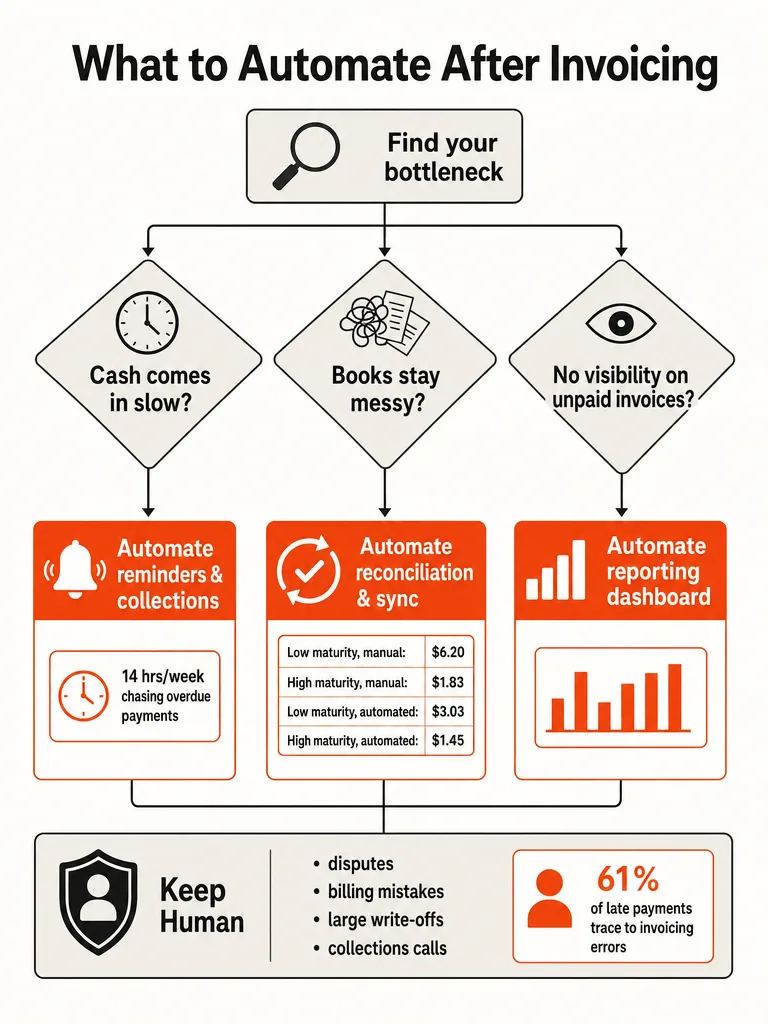
The next process to automate after invoicing depends on which bottleneck is actually costing you money: slow cash flow means reminders and collections come first, messy books mean reconciliation comes first, and no visibility into what's unpaid means reporting comes first. Yonovo found finance teams spend 14 hours a week chasing overdue payments, and the Institute of Finance & Operations Management (IOFM) puts manual invoice processing costs as high as $6.20 per invoice.
Most businesses that just finished automating invoice creation made the same mistake: they treated the invoice going out as the finish line. It isn't. Invoicing is the first domino in a longer chain, and if the next domino doesn't fall on its own, you're still doing the work by hand, just one step later. IOFM's 2021 World Class AP Performance report, cited by Rossum, shows the gap clearly: companies with low process maturity and no automation pay $6.20 per invoice, while end-to-end automation drops that to $3.03. At the high-maturity end, the same shift takes the cost from $1.83 down to $1.45.
Those numbers only move when you automate what happens after the invoice, not the invoice itself. That's the real decision point here: pick the bottleneck that's actually bleeding money, not the automation that sounds most impressive on a sales page.
What Stages Come After Invoice Generation?
Invoice generation is one link in a six-part chain: generate, approve, deliver, collect, reconcile, and report. Aviy defines a full invoice automation workflow this way, and the distinction matters because most businesses stop building after the first two links and call it done.
Flow Digital sees the same failure pattern across construction, logistics, and healthcare clients. Manual billing breaks down in predictable ways: duplicate data entry across systems, inconsistent records between spreadsheets and software, delayed invoicing, and zero real-time visibility into what's actually been billed. A construction firm copying vendor data into separate Google Sheets for each project has the same underlying problem as a logistics company keying invoices into QuickBooks by hand after every delivery. The tool changes. The gap doesn't.
Invoice automation is the practice of using software to handle the repetitive steps of billing so a person doesn't have to touch each one. That's the plain definition. The chain around it, approval routing through tools like PandaDoc or DocuSign, delivery through email or a client portal, collection through payment links, and reconciliation back into the books, is where most SMBs still have a person doing manual work that looks automated from the outside.
If you haven't mapped which admin tasks are actually worth fixing first, the best admin work to automate first in small business breaks down how to rank them by time drain and error risk, which is the same lens that applies here.
Should You Automate Payment Reminders or Reconciliation First?
The right next build depends on which symptom is hurting you today, not a generic best-practice ranking. No single source in this space ranks reminders, reconciliation, and reporting by ROI, because the answer changes with your bottleneck.
If invoices sit unpaid for weeks and you're the one sending follow-up emails, reminders and collections come first. If your accountant spends month-end matching bank deposits to invoices by hand, reconciliation comes first. If you genuinely don't know what's outstanding without opening three tabs, reporting comes first.
| Bottleneck | Automate next | Representative tools |
|---|---|---|
| Slow cash, clients pay late | Payment reminders and collections | FreshBooks, Zoho Invoice |
| Messy books, manual matching at month-end | Reconciliation and payment sync | Square, Stripe |
| No visibility into what's unpaid | Owner-facing reporting and dashboards | Wave |
None of these tools require you to rip out your current stack. Fix the loudest problem, confirm it holds, then move to the next one. That sequencing, not a universal checklist, is what actually determines what comes after invoicing.
If you're still deciding whether to automate a process at all or wait until you've hired more admin help, what to automate before you hire another admin lays out that trade-off directly.
How Do You Automate Payment Reminders and Collections?
Payment reminders and collections are often the fastest next win when late payment is the bottleneck slowing down cash flow. Yonovo reports the average finance team spends 14 hours a week chasing overdue payments, hours that disappear from selling, building, or running the business.
Here's the build sequence:
- Define your reminder cadence. A pre-due nudge plus escalating overdue reminders works for most businesses without feeling aggressive.
- Set the escalation tiers. First reminder friendly, second firmer, third routed to a human for a phone call or account hold.
- Add exception rules. Pause reminders or route large invoices for manual review so the system never overrides good judgment on a key account.
- Connect payment status back to the trigger. A recorded payment should stop the reminder sequence automatically, not rely on someone remembering to cancel it.
- Track the metric that matters. Days sales outstanding, not just "reminders sent."
This sequence works regardless of which invoicing software sits underneath it. The cadence and the exception rules matter more than the specific platform running them, and building the escalation tiers before you automate anything keeps a good customer relationship from getting steamrolled by a bot.
How Do You Automate Payment Reconciliation and Accounting Sync?
Reconciliation is where the real cost savings show up, and the IOFM data proves it. Rossum's citation of IOFM's 2021 World Class AP Performance report puts manual invoice processing at $6.20 per invoice at low maturity and $1.83 at high maturity, with no automation involved.
| Process maturity | Manual processing cost | End-to-end automated cost |
|---|---|---|
| Lowest maturity | $6.20 per invoice | $3.03 per invoice |
| Highest maturity | $1.83 per invoice | $1.45 per invoice |
Automation cuts the cost roughly in half at every maturity level, which is a bigger swing than most owners expect from what looks like a back-office chore.
The mechanism Aviy describes is simple: a paid invoice should update your accounts automatically instead of waiting for someone to key it in. That's the difference between an invoicing tool that just sends PDFs and a workflow that actually closes the loop. In practice this means the payment event, not a person, becomes the trigger that posts the entry.
For most small businesses this sync runs through the same tools already handling billing, QuickBooks on the accounting side and Stripe on the payment side, with the payment confirmation triggering the ledger update instead of a person typing it in. Businesses still running billing out of spreadsheets see the same pattern between Google Sheets or Airtable and whatever tracks the project, sometimes Monday.com. The accounting software changes by company size. The pattern, payment triggers the ledger update, doesn't.
What Should Stay Human After You Automate Billing?
Disputes, angry customers, billing mistakes, unusual discounts, payment plans, legal threats, and collections decisions should stay human-led even after every other step is automated. The Pro Toolkit is direct about this: the safest setup is controlled automation, where software drafts, reminds, updates, and reports, while a person keeps authority over anything that touches trust or money at scale.
There's a reason this matters more than it sounds like it should. Rossum cites Amalto's finding that 61% of late invoice payments in the US trace back to invoicing errors, not customer unwillingness to pay. A wrong line item or a duplicate charge doesn't just delay one payment, it damages the relationship. That's exactly the kind of failure a fully hands-off system won't catch, because the system has no idea the invoice is wrong until the customer complains.
The fix isn't avoiding automation, it's routing exceptions to a human instead of letting them run silently. The Pro Toolkit's own guidance covers this directly: add exception rules that pause reminders or flag large invoices for review, so automation never overrides judgment on the accounts that matter most. Whatever notification channel your team already checks daily is the right place to route those flags, a separate system nobody watches defeats the purpose.
How Do You Build an End-to-End Invoice Workflow Without Replacing Your Stack?
You don't need to rip out your current tools to build an end-to-end invoice workflow. Flow Digital's core finding across six client rebuilds was that the better move is almost always to connect the tools a business already has and automate the handoffs between them, not start from zero.
Aviy's advice on sequencing backs this up directly: automate in layers, not all at once. When no single bottleneck is dominating, and you're building the whole chain from scratch rather than fixing one specific pain point, this default order holds up:
- Start with recurring invoices and reminders. These are the highest-impact, lowest-risk pieces, and they don't touch your accounting data yet.
- Add approval routing next. Route invoices above a threshold to a human before they go out, so speed doesn't outrun judgment.
- Layer in reconciliation. Once reminders are reliable, connect payment confirmation to your accounting sync so paid invoices update the books without manual entry.
- Add owner-facing reporting last. By this stage you have clean data flowing through the chain, which is what makes the report trustworthy instead of just another spreadsheet.
If reconciliation is what's actually breaking down for you today, start there instead. This order is a starting point for a from-scratch build, not a rule that overrides the bottleneck you already identified.
The tools that sit in this stack vary by business. A services company might run its pipeline through HubSpot and its billing through QuickBooks. A team still working out of Google Sheets and Airtable is running the exact same workflow with a different toolkit, the discipline matters more than the brand names.
If your business is running this whole chain out of spreadsheets and someone's memory right now, how to turn a repetitive process into a custom AI system walks through mapping the process before you build anything. And if the idea of connecting tools yourself feels like a developer-sized project, automating your business without hiring a single developer shows where the no-code ceiling actually sits.
Frequently asked questions
How much does manual invoice processing cost compared to automated invoicing?
Manual invoice processing costs $6.20 per invoice at the lowest process maturity level, according to IOFM's 2021 World Class AP Performance report. End-to-end automation cuts that to $3.03 at the same maturity level, and the gap persists even at high maturity, where manual processing runs $1.83 per invoice versus $1.45 automated. The savings come from eliminating manual data entry and matching, not from switching invoicing tools.
How many hours a week do finance teams spend chasing overdue payments?
Finance teams spend an average of 14 hours a week chasing overdue payments, according to Yonovo. That time comes directly out of hours that could go toward selling, building product, or running daily operations. Automating reminder cadences and escalation tiers, rather than sending each follow-up manually, is what reclaims those hours instead of just moving the chasing to a different day of the week.
What's the main cause of late invoice payments?
61% of late invoice payments in the US trace back to invoicing errors, not customers unwilling to pay, according to Amalto's research cited by Rossum. Wrong line items and duplicate charges delay payment and damage the client relationship at the same time. That's why automated reminder systems need exception rules and human review built in, since a bot has no way to catch an invoice that's simply wrong.
What tools do small businesses use to automate payment reminders?
FreshBooks and Zoho Invoice are commonly used to automate payment reminders and collections when slow cash flow is the bottleneck. For businesses whose main issue is messy reconciliation instead, Square and Stripe handle payment sync, and Wave covers owner-facing reporting. None of these require replacing your existing invoicing setup, since the right next tool depends on which bottleneck is actually costing you money.
What's the difference between automating one billing task and building a full workflow?
A single automated task, like auto-sending one reminder, only fixes one step; a full invoice workflow chains generate, approve, deliver, collect, reconcile, and report into one continuous sequence, as Aviy's invoice automation guide defines it. Most businesses that stop after automating invoice generation and delivery are still doing the rest by hand. The value comes from connecting the whole chain, not from any single automated step.
Is invoice automation worth building if I only bill a handful of clients?
Yes, the same automation principles apply whether you're a freelancer billing five clients or an agency processing hundreds of invoices a month. You define the reminder cadence, approval rules, and reconciliation trigger once, and the system runs them every time regardless of volume. The return shows up faster at low volume too, since a few hours a week saved matters more to a solo operator than to a large AP team.