What's the safest way to replace a spreadsheet everyone in your business depends on?
Replacing spreadsheets with an admin tool works best as a read-only rollout: the new tool is useful day one, viewing the same data faster, and can't corrupt the spreadsheet it replaces. TSB Bank's April 2018 migration of roughly five million accounts, per Digital Applied, led to a reported 70x fraud spike and a £48.65M fine.
That case is well documented, but it's one dated example, not proof of an industry-wide failure rate. Digital Applied's own research is explicit on this point: no source backs a general migration failure percentage, so this piece makes no claim about one either. What the TSB Bank case does show is what happens when a new system takes over everything at once, before anyone has checked it against the old one.
Read-only-first lowers that risk by design rather than eliminating it outright. The admin tool launches as a mirror of the spreadsheet: easier to search, easier to filter, visible to everyone who needs it, and it writes nothing back. When a number in the new tool disagrees with the spreadsheet, that's a data question to run down rather than a record to restore. The failure mode that hit TSB Bank, an unready system taking live writes for millions of accounts overnight, can't happen when the new tool has no write access yet.
The sequence worth building around: ship the view first, confirm it agrees with the spreadsheet on real data, then move write access over one surface at a time. That sequence carries through the rest of this cutover.
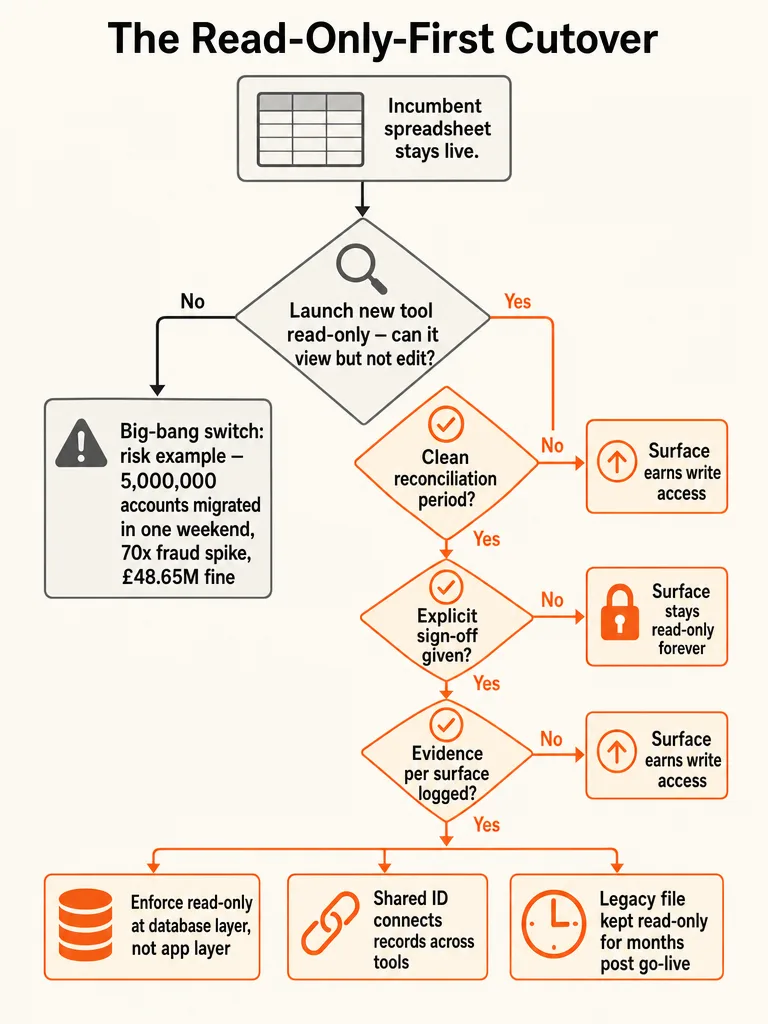
How do you launch the new admin tool without breaking the spreadsheet process people use today?
Launching an admin tool without breaking today's spreadsheet workflow means shipping it read-only first, mirroring the spreadsheet's own data, and letting it earn write access surface by surface. The rollout runs in four repeatable steps: build the read-only view, run it alongside the spreadsheet, treat disagreements as questions, then move one surface to write access at a time.
- Build the read-only mirror first. Point the new admin tool at the spreadsheet data (or a synced copy of it) and ship it as a faster, cleaner way to look at what already exists. No new data entry lives here yet.
- Run it alongside the spreadsheet while the spreadsheet stays the system of record. People learn the new interface and start trusting the numbers before anything depends on them.
- Treat disagreements as investigations. When the tool shows something the spreadsheet doesn't, that's a data mapping question, not an outage. Log it, fix the mapping, move on.
- Move one surface to write access at a time, starting with whichever surface has the cleanest, most consistent data. Everything else stays read-only until it earns the same treatment.
Cutover's AI Assistant shows a version of this pattern outside the admin-tool world entirely. The tool can generate complete runbooks, with tasks, dependencies, and descriptions, directly from static sources including spreadsheets, flow charts, and documents. That's a useful model for a cutover in any industry: read the old format as it exists, and let the new view stand on its own before anyone gives it write access.
For the full workflow-mapping process before you build any of this, how to build an internal tool that replaces spreadsheet ops covers it step by step.
Which parts of the workflow should stay read-only, and which should earn write access?
Not every surface in a spreadsheet workflow should graduate to write access, and that's the pattern working as intended, not a stalled migration. Digital Applied's rollout research frames graduation around evidence: a clean reconciliation period against the spreadsheet and an explicit sign-off decision from whoever owns that surface's data, enforced at the database layer with tools like Postgres permissions rather than left to the application to police.
The exact thresholds, how long a reconciliation period should run, or how many cycles to require before sign-off, are calls your team makes; the research doesn't specify fixed numbers. The table below is an illustrative example of how that evidence-based approach applies across common surfaces, not a sourced checklist of exact criteria.
| Surface / Task | Evidence to Earn Write Access | Typical Outcome |
|---|---|---|
| Client contact list | Clean reconciliation against the spreadsheet, sign-off from the data owner | Usually graduates |
| Invoice totals | Reconciliation against finance records, sign-off from finance | Usually graduates |
| Manual pricing overrides | Ongoing exceptions that resist a stable rule | Often stays read-only |
| Project status field | Clean reconciliation, sign-off from the process owner | Usually graduates |
| One-off approval notes | Edited by judgment call, no consistent structure | Often stays read-only |
A pricing override that changes by feel every time doesn't belong in a rigid schema; forcing it there just relocates the chaos instead of fixing it. Digital Applied's framing holds here: a surface that stays read-only permanently isn't a failed migration. It's a correct call about where structure helps and where it doesn't.
For the threshold that decides whether a given surface is worth upgrading at all, see custom internal tools vs spreadsheets.
What data has to be cleaned before the cutover will actually work?
Data cleanup eats more of a spreadsheet cutover's timeline than the app build itself. Houseblend's migration research puts data migration at 40-60% of a typical implementation timeline, with 30-40% of that effort going to cleansing alone. Skipping this step raises the odds that the new tool's numbers won't match anyone's memory of the truth, which is the fastest way to lose trust in it before it earns any.
- Reconcile record counts between the spreadsheet and any downstream copy of it (a synced export, a second tab, a shared drive backup). Every mismatch is a question to answer before anything moves.
- Dedupe. Spreadsheets accumulate duplicate rows from copy-paste habits and re-entry after errors. Find them before the schema does.
- Standardize fields. Names, statuses, and date formats drift over years of manual entry. Pick one format per field and convert everything to it.
- Map spreadsheet columns to the new schema column by column, not in one bulk pass. A single mismapped column can silently corrupt every row that touches it.
If your record count is large, plan the batch size ahead of time. Houseblend notes that NetSuite's own CSV Import Assistant is typically capped around 25,000 records per import, a practical ceiling worth checking for regardless of which tool you're loading into.
What connects your new admin tool to the rest of your stack?
A join key is the shared identifier, usually a client ID or project ID, that lets a record in your admin tool match the same client's record in your CRM, project management tool, and accounting system. Without one, teams fall back to reconciling by hand across every tool that touches that client, and Move at Pace's ops-stack research calls manual reconciliation the point where trustworthy data breaks down.
The same client record fragments across tools every day: HubSpot or Pipedrive on the sales side, ClickUp, Asana, Monday, Harvest, Toggl, or Float for delivery and time tracking, Xero or QuickBooks for finance, Jira or Trello for engineering work. None of that is a problem by itself. It becomes one the moment two of those systems disagree about the same client and nobody can say which one is right.
A join key that appears in every system turns four separate tools into one calculable domain, and Move at Pace documents this at scale with a real example: the agency Kaizen ran 70,000 projects through a single naming and folder standard tied to a consistent identifier over the life of the business, with nobody hunting for the right file or naming things differently. That consistency is what makes the data trustworthy enough to calculate margin by client or capacity by team without a manual pass first.
The admin tool replacing your spreadsheet only earns its "source of truth" label once it carries that same key into every adjacent system, not just the one it started in.
How do you validate the cutover before you shut off the spreadsheet for good?
Validating a cutover means proving the new admin tool matches the spreadsheet on real numbers, and having a defined way back if it doesn't. Houseblend's migration framework calls for freezing the legacy system, running one final extraction and load, defining rollback triggers before go-live, reconciling record counts and financial totals, and getting formal sign-off before anyone loses access to the old system.
- Freeze the spreadsheet. No new entries after a set cutoff time, so the final load has a stable target.
- Run the final extraction and load into the new admin tool, capturing everything that changed since the last sync.
- Define rollback triggers before go-live, per Houseblend's framework, so the team already knows what conditions send the process back to the spreadsheet instead of arguing about it mid-cutover.
- Reconcile record counts and financial totals line by line, not by spot check alone. Every number should trace back to a row in the frozen spreadsheet.
- Spot-check a sample of individual transactions and the reports people actually pull weekly. If those reports don't match, the reconciliation above missed something.
- Get formal sign-off, then keep the spreadsheet in read-only mode for months after go-live, per Houseblend, so anyone can verify history while they adjust to the new system.
Houseblend also notes that migration-related issues push close to half of ERP-style projects over budget. Build that buffer into the calendar before you set a go-live date, not after you've already missed one.
Which features can't be missing from the admin tool that replaces your spreadsheet?
The research behind this piece supports one required feature directly: fields the system won't let a record save without. Move at Pace's ops-stack research calls this a minimum data standard enforced in the system itself, which turns completeness into a system behavior instead of a discipline problem. Beyond that point, the available sources don't spell out an exact feature checklist for audit trails, permissions, or reconciliation views, so the rest of this list is a recommendation built from the rest of this playbook, flagged as such.
- Required fields enforced by the system. If a record can save without a client ID or a status, someone eventually will save it that way, and the join key from the previous section breaks. This is the one requirement the research directly supports.
- An audit trail of who changed what, and when. The sources don't specify an exact audit pattern for SMB admin tools, but visibility into changes is a reasonable baseline for any system replacing a spreadsheet that had none.
- Permission rules tied to role, not to individual habit. The graduation ladder covered earlier only holds if the roles behind it are enforced consistently, though the research stops short of prescribing a specific permission model.
- A reconciliation view against the legacy spreadsheet during the transition window. This follows from the validation steps above: if mismatches only surface three months later in a client invoice, the reconciliation step caught them too late.
Whether you build this from scratch or configure it on top of existing software is a real decision. Move at Pace's point about governance applies either way: the tool doesn't create reliability, the standards enforced inside it do. If you're weighing whether to build custom or buy off the shelf, custom software vs off-the-shelf tools: when SMBs should build walks through that decision point, and how much it costs to build an internal tool for your team breaks down what actually drives the price either way.
Frequently asked questions
How long should you keep the spreadsheet accessible after the new admin tool goes live?
Keep the legacy spreadsheet in read-only mode for months after go-live, not days. Houseblend's migration framework calls for formal sign-off before cutover, then continued read access to the old system so anyone can verify a number against history while they adjust to the new tool. Cutting access immediately removes the safety net that turns a mismatched number into a quick lookup instead of a dispute nobody can resolve.
What actually goes wrong when a company switches off a spreadsheet all at once?
A single-weekend cutover can leave the new system live before it's ready, with no fallback if it breaks. TSB Bank moved roughly five million customer accounts to a new platform in one weekend in April 2018; the investigation that followed found the platform wasn't ready, fraud attempts spiked roughly 70x above normal, and regulators issued a combined £48.65M fine. That's one dated, well-documented case, not an industry-wide failure rate, but it shows the exposure a big-bang switch creates.
How much of a migration budget typically goes over plan because of data issues?
Migration-related problems push close to half of ERP-style implementation projects over their original budget, according to Houseblend's research. Data issues tend to surface late, usually during reconciliation, after teams have already committed to a go-live date. Building a buffer into the calendar before setting that date, rather than after missing one, is the practical takeaway for any team planning a spreadsheet cutover.
Is there a limit on how many records you can import into a new system at once?
Yes, most import tools cap batch size, and planning around that cap avoids a failed load mid-cutover. Houseblend notes that NetSuite's own CSV Import Assistant is typically capped around 25,000 records per import, a practical ceiling worth checking regardless of which system data is loading into. Large record counts should be split into batches ahead of cutover day, not discovered as an error during it.
How much of the total migration timeline usually goes to cleaning data rather than building the new tool?
Data migration typically consumes 40-60% of a spreadsheet cutover's implementation timeline, and cleansing alone accounts for 30-40% of that migration effort, according to Houseblend's research. Deduping records, standardizing date and status formats, and reconciling counts against the old spreadsheet takes longer than most teams expect going in. Skipping that work to save time is what usually causes the new tool's numbers to disagree with what everyone already believes is true.
What's a real example of a company that made spreadsheet-era data trustworthy at scale without new software?
The agency Kaizen ran 70,000 projects through one consistent naming and folder standard tied to a single client identifier over the life of the business, according to Move at Pace's research. Every order placed in the CRM automatically created correctly named folders every time, with nobody hunting for files or naming things differently. The lesson: a join key and enforced structure make data trustworthy, not the software running it.