How do you let AI agents use your logged-in Chrome without taking over your screen?
AI agent browser automation on a real, logged-in Chrome profile works by giving each agent a background tab inside an always-unfocused lane window on a hidden virtual display, with a per-lane scheduler and guard keeping your own tabs, focus, and links untouched. Agent Lanes for Chrome, an open-source project, built this setup to run many agents on one logged-in Chrome session at once.
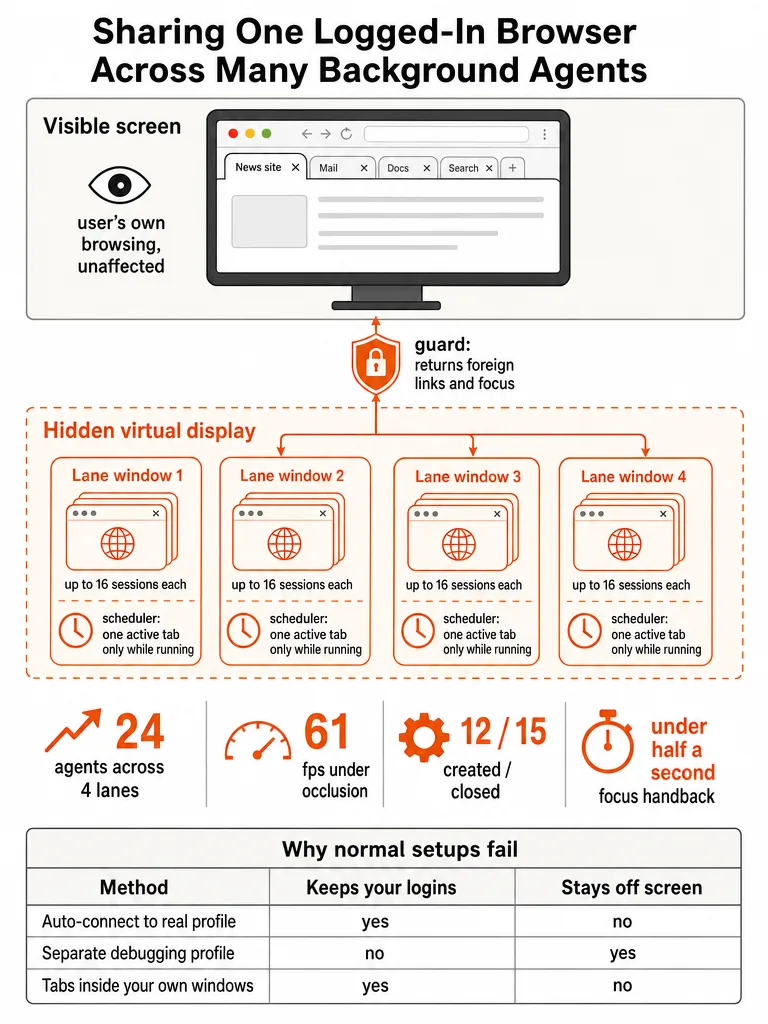
The setup runs on your actual profile, not a copy. Your cookies, SSO, passkeys, and extensions stay put. An agent doesn't need you to log in again or re-approve two-factor authentication. Each new agent connection creates a tab inside the least-loaded lane, never a new window. According to the Agent Lanes for Chrome README, the default pool holds four lanes of up to 16 session tabs each, for up to 64 agents running at once on a single Google Chrome profile.
Nothing about that setup requires you to stop working. Chrome never comes to the front. Your selected tab never changes. Your macOS Space never switches while agents run.
Why can't a normal Playwright or DevTools setup safely use the Chrome profile you're already logged into?
Every standard route to a logged-in Chrome profile breaks at least one requirement. You need your logins, several agents running at once, and no screen takeover. No single common tool does all three, which is the gap Agent Lanes for Chrome was built to close.
Chrome DevTools MCP's --autoConnect mode is built for debugging, and it's good at that job. It asks for a click on "Allow" for every debugging connection. It drives your own tabs directly instead of isolating each agent in its own space. A remote debugging port on your real profile is worse. Chrome has ignored --remote-debugging-port and --remote-debugging-pipe on the default data directory since Chrome 136, a change Google made after malware started using the debugging port to steal cookies. A copied profile or Chrome for Testing sidesteps that restriction. It starts logged out, or carries logins over unreliably, and it leaves a second copy of your cookies sitting on disk. The stock Playwright extension from Microsoft gets closest. At the revision this project forked, it activates and focuses tabs. It groups sessions per client in your window. It can put a pairing token into every agent's MCP config file.
| Route | Your logins | Many agents | Stays off screen | The problem |
|---|---|---|---|---|
Chrome DevTools MCP --autoConnect | Yes | Awkward | No | A permission dialog per connection; drives your own tabs |
--remote-debugging-port on your profile | No | Yes | Yes | Chrome 136+ ignores it on the default profile |
| Copied profile / Chrome for Testing | Unreliable | Yes | Yes | Second copy of your cookies; logins often break |
| Stock Playwright extension | Yes | Awkward | No | Activates your tabs; token lands in your configs |
Why doesn't Chrome's remote debugging port solve this on a real profile anymore?
Chrome ignores --remote-debugging-port and --remote-debugging-pipe on the default profile as of Chrome 136, so this route no longer works for a real, logged-in Chrome. According to Chrome's own developer blog, the only way to get a debugging connection now is to point Chrome at a separate --user-data-dir, which starts a different, logged-out profile.
Chrome made that change because malware was using the open debugging port to steal cookies straight off real profiles. There's no flag that undoes it. Before Chrome 136, the flag opened a WebSocket connection into whatever profile Chrome was running, which let a tool like Playwright attach to your everyday, logged-in browser without launching a second one. That door is closed now. Any setup that promises "just open the debugging port on your real Chrome" is describing a route that no longer exists.
What breaks when agent tabs live inside your normal Chrome windows instead of background lanes?
Chrome only renders and delivers trusted input to the active tab of a non-minimized window. An agent working in a tab buried behind the one you're reading gets no reliable clicks or keystrokes at all. That single platform behavior forces the entire lane design. It isn't the only wall.
A minimized agent window stops rendering completely. It reports visibilityState: hidden. It fires no animation frames. It never delivers trusted input, so Playwright's actionability checks wait forever. Chrome suspends a window's compositor whenever its NSWindow isn't visible, and a minimized window counts as not visible. A fully covered window fares almost as badly. macOS Chrome marks it as occluded and throttles it in the background, unless Chrome runs with --disable-backgrounding-occluded-windows. Popup-type windows add a different constraint. Chrome retargets any navigation into a popup back to a normal window. A popup can only hold one tab anyway, which rules out packing several agent sessions into one lightweight window.
Ordinary Chrome windows do the opposite of what you'd want for an agent's window. Chrome routes an external link, one you click in Mail or Slack, to whichever normal window Chrome most recently activated. If that window is an agent's, your link opens where an agent is working instead of where you are.
How does the system keep external links, focus, and cleanup isolated from your own browsing?
A lane guard and an invisible display do the isolation work. They watch for exactly two things that must never quietly happen: a foreign tab landing in a lane, or a human taking a lane by clicking into it. If a tab shows up in a lane that no agent session asked for, the guard moves it straight to your most recently focused normal Chrome window. If you focus, move, resize, or maximize a lane on a visible screen, every session running in it ends immediately. Its tabs are preserved for you, and its anchor becomes a tombstone so it never gets reused as an agent lane again.
The lanes themselves live somewhere you can't see or accidentally close: an invisible virtual display built on CoreGraphics' CGVirtualDisplay, a private Apple class also used by tools like BetterDisplay and DeskPad. It sits parked diagonally off the corner of your real screens, with a 20 Hz cursor fence that warps your pointer back if it ever slips through that single touching point. Agents themselves never see a token in their configuration files. They reach the extension through a native messaging host and an owner-only Unix socket, part of the @playwright/mcp fork this project builds on, so the pairing credential stays out of every agent's MCP settings entirely. The guard and the hidden display solve the same problem from two directions: a lane you can see is a lane you can accidentally destroy, and cleanup that depends on a human remembering to do it isn't cleanup at all.
What proof shows background tabs still take trusted clicks and typing?
The claim that background lane tabs stay fully interactive isn't theoretical. According to the Agent Lanes for Chrome status table published in the project's README, the setup has been run and measured live, with dates attached, rather than described as a features list.
| Proof point | Date |
|---|---|
| 24 simultaneous agents across four lanes, trusted input, exact cleanup, no focus or Space change | 2026-09-04 |
| 61 fps on the invisible display, trusted typing, clicks, and screenshots while another app was in front | 2026-09-28 |
| 12 lane windows created and 15 closed in the background without Chrome coming forward | 2026-09-28 |
| Focus landing on a hidden lane handed back in under half a second, agent kept working | 2026-09-28 |
The 61 fps figure, per the same status table, matters because it was measured while a different app sat in front of Chrome, the exact condition where a normal covered window would get throttled by macOS occlusion. The sub-half-second focus handback, recorded on the same date, matters for the opposite reason. It shows the guard catches an accidental focus event, such as clicking Chrome's Dock icon, fast enough that the working agent never notices.
What exact install steps does a builder need to follow to try this on a Mac?
Setting up Agent Lanes for Chrome takes one script and four manual steps inside Chrome itself, because Chrome treats profile changes as human-only actions that a script can't perform for you.
- Clone the repository and run
scripts/install.sh, which builds the extension, installs the command-line tools, a fresh owner-only pairing token, the native messaging host, and the launcher app. - Remove the Web Store "Playwright MCP Bridge" extension if it's already installed, since this project's extension reuses the same ID so
@playwright/mcpcan find it. - Quit Chrome with Command-Q and reopen it using the included launcher app,
Google Chrome (Agent Safe).app, which starts Chrome with the occlusion flag the lanes depend on. - In
chrome://extensions, turn on Developer mode, choose Load unpacked, and point it at the installed extension folder, then click into Chrome for a few seconds to let the pool fill.
From there, connecting agents is a one-line config change. Claude Code, Codex, Cursor, and Claude Desktop each point at the same local browser-mcp-server binary over MCP, with the absolute path spelled out since JSON and TOML configs don't expand ~. Once agents are wired in, the project's AGENTS.md file gives them the ground rules for this route: stay in their own tabs, never pull Chrome forward, always call browser_close when done, and treat credentials as human-only. That last rule matters here specifically: this route uses your real, logged-in profile, so nothing in the design hands an agent your passwords, and the docs are explicit that it shouldn't.
What are the real limits of this setup today, and what hasn't been tested live yet?
This setup is macOS-only. According to the project's install docs, the only environment it's actually been tested against is macOS 27 on Apple silicon running Google Chrome 154, with two monitors attached during testing. That's a narrow, honest window, not a broad compatibility claim.
The invisible display depends on CGVirtualDisplay, a private Apple API rather than a documented, supported one, which means a macOS update could change or break it without warning. A handful of scenarios the project flags as real but unproven in production: what happens across sleep and wake with the virtual display attached, what happens if you click Chrome's Dock icon while only lane windows are open, and how the setup behaves with macOS's "Displays have separate Spaces" option turned on. None of those have been run live yet, according to the project's own status notes, and the documentation says so directly instead of papering over it.
What this means if you're running agents that actually ship code
An agent that can't reliably click and type in the background fails you at the worst moment: under real load, while you're not watching. The engineering in Agent Lanes for Chrome, per-lane scheduling, an occlusion flag, a guard that undoes accidental focus, exists because a browser session that silently drops input under load will fail exactly when you're running the most agents at once.
The project is published under the Apache-2.0 license, and the team behind it opened a proposal with the Playwright team to bring a background mode like this upstream, so multiple agents could eventually get logged-in browser access without a fork. If you're stitching together the rest of an agent-driven build, the best AI agent coding setup for 2026 covers the rulebook side of the same production standard: build for the condition where things break, not the demo where they don't.
Frequently asked questions
What is AI agent browser automation?
AI agent browser automation lets AI coding agents like Claude Code or Cursor operate a real Chrome browser instead of writing code blind, clicking, typing, and reading pages the way a person would. Most setups either run a logged-out Chromium instance or hand an agent full control of your screen. Agent Lanes for Chrome, an open-source project, instead runs agents in background tabs inside your actual logged-in profile, so they keep your SSO and cookies without taking over your display.
Can multiple AI agents use the same Chrome profile at once?
Yes, up to 64 agents can run on one logged-in Chrome profile at the same time. Agent Lanes for Chrome's default pool holds four lanes of up to 16 session tabs each, and a new agent connection always creates a tab in the least-loaded lane rather than a new window. Each session owns only its own tabs, so agents can't touch each other's work or yours.
Is Agent Lanes for Chrome free to use?
Yes, Agent Lanes for Chrome is published under the Apache-2.0 license on GitHub, so it's free to clone, run, and modify. The project was built to solve a problem the team hit running their own agents daily, and it ships with an install script, a launcher app, and docs covering architecture, operations, and security. There's no paid tier or subscription tied to using it.
Does this setup work on Windows or Linux?
No, Agent Lanes for Chrome only runs on macOS today. The project's install docs state the only environment it has actually been tested against is macOS 27 on Apple silicon running Google Chrome 154, with two monitors attached during testing. The invisible display it depends on uses CoreGraphics' CGVirtualDisplay, a private macOS API with no Windows or Linux equivalent, so porting it isn't a simple flag change.
What happens if Chrome crashes while agents are running?
Chrome's own session restore brings the lane windows back, and the extension re-adopts each one by its saved marker once it holds nothing but its anchor tab. In a recorded test on 2026-09-28, lanes were re-adopted correctly after a crash and relaunch, and a lane holding a leftover session tab was deliberately set aside for the user instead of being reused automatically. Sessions don't just vanish.
How is this different from a computer-use AI agent that controls your screen?
A computer-use agent drives your visible screen directly with the mouse and keyboard, which means it uses your real logins but locks you out of the machine while it runs, and only one can operate at a time. Agent Lanes for Chrome instead keeps every agent's tab inside a hidden lane on an invisible virtual display, so you keep working normally while up to 64 sessions run at once in the background.