

What should you check about owners, units, and tenants before building a property management CRM?
Owners, units, and tenants need five separate, linked records in a property management CRM: owner, property, unit, tenant, and lease. Stacking them into one flat contact list pushes tenant history, owner payouts, and unit occupancy into a notes field, where none of it can drive renewals, reporting, or maintenance approvals.
In the simplest version of this model, one owner holds one or more properties, one property contains one or more units, and one lease ties one tenant to one unit for a defined term. That's the baseline worth building first. Real portfolios complicate it: some properties are co-owned by two or more owners, and some leases list a co-tenant or a guarantor alongside the primary renter. Fuzen's breakdown of property management CRM structure treats maintenance, payments, leases, tenants, units, and properties as separate connected records for exactly this reason, instead of folding everything into one generic customer-and-deal structure. Co-ownership and co-tenancy both need their own join table layered on top of the five core entities, not an extra field bolted onto one of them.
A lease is the record that should trigger renewal dates, rent changes, and move-out notices, since it ties a specific tenant, or tenants, to a specific unit for a specific term. That's the structure the worked example below walks through.
How are owner, property, unit, tenant, and lease related?
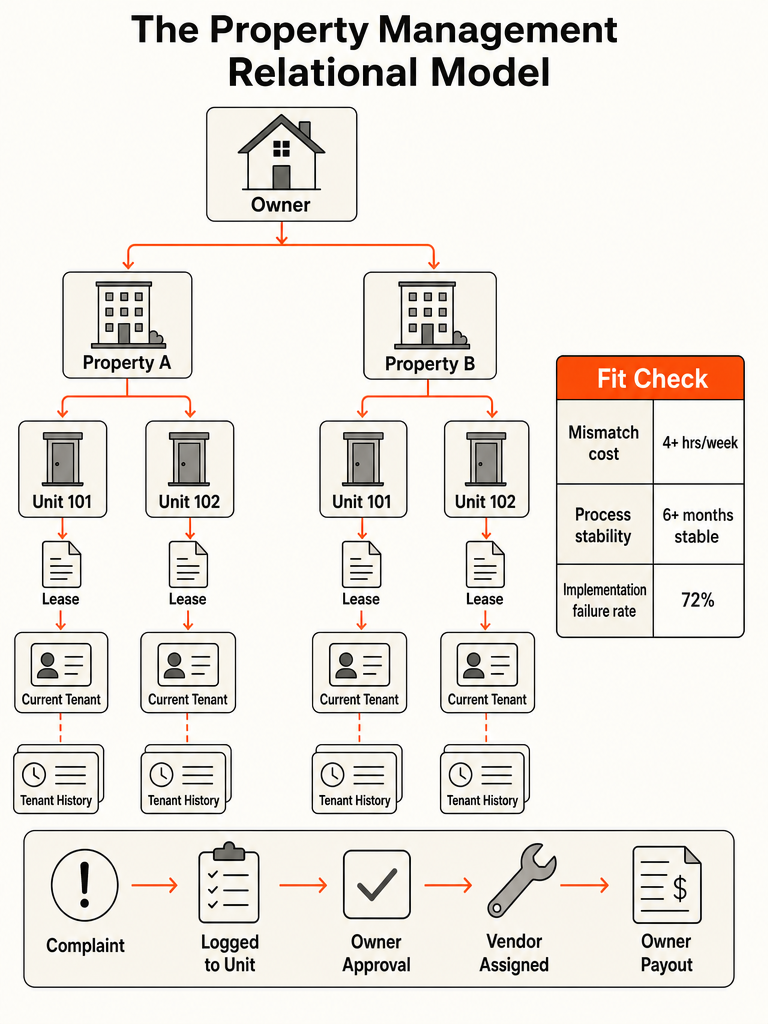
Five linked tables carry the weight of this data model: owner, property, unit, tenant, and lease, each one-to-many into the next, with a join table where real life breaks the chain. One owner can hold several properties, one property contains several units, and each unit cycles through a current tenant and a string of past ones, with the lease as the actual link between tenant and unit, not the property or the owner. CloudSketch AI's published property database schema shows one way to build this out: 9 tables, 16 columns, and 8 relationships in that example, not a target every build needs to hit.
Picture one owner holding two properties: Property A with four units, Property B with six. Each unit links to a lease, and each lease links to a tenant, or, where the lease allows it, a co-tenant and a guarantor alongside the primary renter, which needs its own join table rather than a wider tenant record. Unit 2B's current lease ties to today's tenant; its history table holds the two tenants who lived there before, each with their own lease dates, without the unit record ever getting overwritten. The owner sees roll-up totals across both properties without the system creating a duplicate owner record every time a unit turns over.
Amazing Business Results' breakdown of Zoho's property management CRM setup follows a similar shape, modeled on a single-unit property: one landlord connects to many properties, and current and historical tenants get tracked at the unit and lease level, the same place this pattern puts them on a multi-unit building. Site & Stack puts the failure mode plainly: a property manager tracks units, each with an owner who pays and a tenant who calls, and when everything gets forced onto one customer card, the details end up in the notes field.
How does a maintenance request move from complaint to owner approval to payout?
A maintenance ticket needs its own record, linked to the unit, property, tenant, and lease it affects, not a status field living on the unit itself. Fuzen's breakdown of property management CRM data models lists maintenance as one of the connected records a working system needs, tracked from assignment through cost, approval, and resolution instead of disappearing into a chat thread or an inbox.
What that ticket record needs to carry, at minimum:
- The complaint, logged as a new ticket tied to the tenant's current unit and lease, not a note on a generic contact record.
- An assignee and a status, both fields on the ticket itself, separate from whatever status the unit or lease carries.
- A cost estimate, with a field for whether that cost needs sign-off and from whom. The exact dollar rule is a business decision each operation sets for itself, not something the table structure dictates.
- An approval field, recording who signed off and when, if the work needed it.
- A resolution note, closing the loop so the complaint, the assignment, the cost, and the fix all live on one record instead of scattered across texts and email.
That's the gap that breaks contact-based CRMs: there's no ticket table to hold any of this, so it lands in whichever app happens to be open when the tenant calls. Lean operations hit this exact wall before any other: approvals stuck in a text thread because nothing routes them automatically. AI workflow automation for SMBs that can't hire ops covers what else is worth automating once that pattern shows up.
Should owners, units, and tenants live as separate tables or as fields on one contact record?
Separate connected tables win the moment a business needs tenant history, automated renewals, or owner-level reporting. A flat contact record runs out of room the first time a customer holds more than one property, unit, or lease. Site & Stack's review of CRM structures found that once those details don't fit standard contact fields, they get typed into a notes field instead, where no report or workflow can reach them.
| Capability | Flat contact record | Separate connected entities |
|---|---|---|
| Tenant history | Overwritten or buried in notes each turnover | Each tenant and lease stored as its own row; unit keeps full history |
| Renewal automation | Manual tracking of lease end dates in a spreadsheet | Lease end date triggers a workflow automatically |
| Owner reporting | Hand-built roll-ups, prone to missed properties | Query across an owner's full property and unit set |
| Maintenance tracking | Buried in email or text threads | Logged on its own ticket record, linked to unit and lease |
A contact record asked to hold an owner, a unit, and a tenant at once will always lose detail to the notes field. The same trade-off shows up anywhere one business relationship actually represents several linked real-world things. CRM for medical practice walks through how that plays out when patient, provider, and visit history all compete for space on one record.
When does a property management workflow outgrow a generic CRM like HubSpot or Salesforce?
Three signals say a property manager has outgrown HubSpot, Salesforce, or Zoho: a process that's held steady for six months or more, a mismatch burning real hours every week, and per-seat licensing paid for people who only glance at a schedule. Aurelis cites Forrester Research finding that 72% of CRM implementations fail to meet expectations, largely because generic platforms force a business into a generic process instead of the other way around.
| Signal | Threshold | Why it matters |
|---|---|---|
| Process stability | Stable for 6+ months | WallFlow's checklist treats an unstable process as disqualifying, since software freezes whatever process it's built around |
| Measurable mismatch | Costing 4+ hours a week across the team | WallFlow counts this as one of seven signals worth pricing a custom build against |
| Per-seat cost | $150-$300 per user per month, per Aurelis | The cost of staying on a generic platform compounds every time headcount grows |
| Seat waste | Full licensing for staff who only check a schedule | Site & Stack flags this as one of the clearest signs a property or trade business has outgrown its CRM |
Weigh the switch against the broader buying criteria in what a property management CRM should actually do, then check it against when building beats HubSpot.
Build, configure, or buy: how should a property manager decide on this model?
Buy or configure first. Reserve a custom build for a workflow that's stable, a mismatch that's measurable and expensive, and a team already drowning in per-seat licensing. WallFlow's scored checklist puts the line at five or more true signals out of seven, with a stable process as the one nobody should skip. Aurelis found that businesses with 25 or more users typically see a custom build break even within 18 to 24 months through eliminated licensing fees alone.
- Score the mismatch. Walk one real maintenance request or lease renewal through your current tool. Note every place the team drops into a spreadsheet, a text thread, or a notes field.
- Check process stability. If quoting, leasing, or approval has changed in the last six months, or is about to, configure instead of build. WallFlow treats this as disqualifying on its own.
- Price both paths. Weigh current or projected per-seat licensing against a build quote plus its ongoing hosting and maintenance, not just the number up front.
- Score it and decide. Zero to two of WallFlow's seven signals means buy. Three to four means configure an existing CRM with custom fields and stages. Five or more, including a stable process, means price a custom build seriously.
- Defer when the process is still moving. A workflow under six months old, or a team about to change what it sells, should stay on a configurable tool and revisit later.
Teams that clear that bar still need to scope the build before signing anything. How to scope a custom CRM for a 10-person team covers the objects, workflows, and permissions to nail down first.
What should you bring to a project conversation about this data model?
Bring four things to a build conversation: the current owner, unit, tenant, and lease flow as it actually works, a measured number of hours lost each week to the mismatch, clear terms on data ownership and export, and named owners for the workflow and the technical system once it's live.
- The current record flow. How owner, property, unit, tenant, and lease connect today, including every spreadsheet or side system standing in for a missing table.
- The measured cost. Actual hours per week lost to double entry, manual renewal tracking, or chasing approval over text, not a guess.
- Data ownership terms. Who holds the database and hosting accounts, and whether a full export is guaranteed on request.
- Named owners. One person accountable for the workflow itself, one accountable for maintenance, backups, and security after launch.
Frequently asked questions
What is a property management CRM data model?
A property management CRM data model is the blueprint for how owner, property, unit, tenant, and lease information connects as separate, linked entities instead of one flat contact list. An owner holds one or more properties, a property holds one or more units, and a lease ties a tenant to a unit for a set term. Getting this structure right before building determines whether renewals, maintenance, and owner reporting run automatically or get typed into a notes field.
What happens when a property has more than one owner, or a lease has more than one tenant?
Both cases need their own join table layered on top of the five core entities, not an extra field bolted onto the owner or tenant record. A property co-owned by two or more owners links each owner to that property through its own table so payouts split correctly. A lease with a co-tenant or guarantor works the same way: the join table ties multiple people to one lease without overwriting the primary tenant's record.
What's the difference between customizing an existing CRM and building a custom one?
Customizing means adding fields, renaming stages, or setting reminders inside a CRM someone else built, so you're still working within its limits. Building a custom CRM means writing software around the actual records a business keeps, including relationships that generic contact-and-deal structures can't express, such as linked owner, unit, and tenant data. Most operations should push the customizing route as far as it goes before paying for a from-scratch build.
How much does per-seat CRM licensing cost compared to building a custom system?
Generic CRM licensing for property management teams typically runs $150 to $300 per user per month, a cost that compounds with every hire. Businesses with 25 or more users usually see a custom build break even within 18 to 24 months once those licensing fees are eliminated. Below that headcount, configuring an existing CRM with custom fields is almost always cheaper and faster to get running.
How long does it take to build a custom property management CRM?
A custom build can go live in weeks rather than quarters if it starts from an existing production system instead of a blank codebase. Starting from scratch means re-solving authentication, permissions, PDFs, e-signature, storage, and payments before any property-specific work even begins, which multiplies the timeline. Ask any builder what their project starts from; a blank-repository answer is a sign the timeline will run long.
How many tables does a property management CRM actually need?
There's no fixed number: one published property management schema uses 9 tables, 16 columns, and 8 relationships, but that's a single example, not a target every build needs to match. The core model needs five entities at minimum: owner, property, unit, tenant, and lease, plus join tables for co-ownership, co-tenancy, and maintenance tickets. Simpler single-owner portfolios can run on fewer tables; multi-owner, multi-unit operations usually need more.