Where Manual Client Blog Publishing Wastes Your Agency's Time
Client blog publishing automation replaces the one-post-at-a-time grind with a repeatable system that handles research, formatting, optimization, and publishing without a person touching every step. Manual publishing breaks down at the same five points every time: research, writing, optimization, edits, and publishing. Ryan Robinson, who has run a marketing agency and led content teams for 15 years, says each of those steps "adds up quickly" even when a team layers AI tools into the process. The real damage shows up once that cost stacks across five, ten, or twenty client accounts at once. A workflow that feels fine for one client turns into a treadmill at scale.
Before a single post ships, most agencies eat a setup cost per client too. Duda found that agencies spend around five hours per client on initial account setup and asset coordination before any billable work begins, and much of that delay is client-driven: Duda reports that 87% of content collection headaches trace back to clients themselves, from slow responses to unusable submissions to unclear direction. Multiply that five-hour tax across a growing roster and it stops being a one-time cost. It becomes a standing tax on every new account.
The clock doesn't wait for you to build a system. Robinson points out that a new client's countdown starts on day one. Hand-run research, drafts, and formatting on every post, and you can work nonstop with almost nothing to show before that client's patience runs out.
What Should Agencies Automate First in Client Blog Publishing?
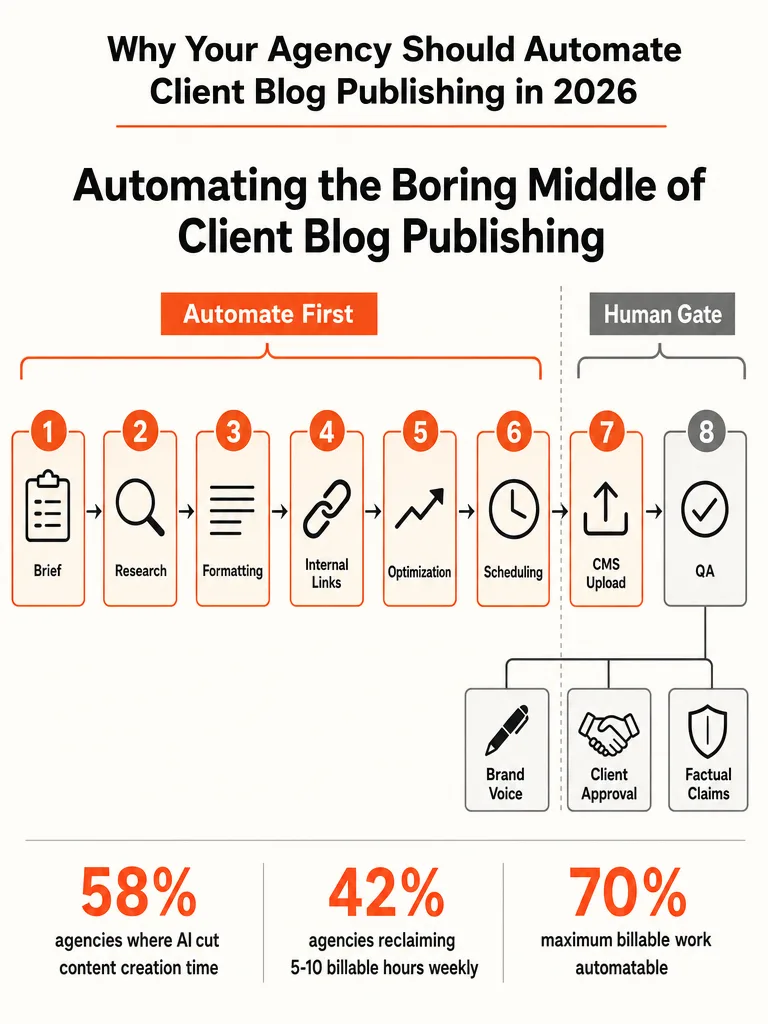
Agencies should automate the middle of the workflow first: briefing, formatting, internal linking, optimization, scheduling, and CMS upload, not just the draft. A blog post breaks into six stages, ideation, research, drafting, optimization, publishing, and distribution, and Ryan Robinson points out that most blog automation tools only touch one or two of those stages, usually drafting. That's why agencies save fifteen minutes on a post and wonder where the promised hours went.
For a multi-client agency, the middle section is where automation pays off fastest:
- Briefing - turn a topic or keyword into a structured brief automatically, so no one starts from a blank page.
- Formatting - apply consistent headers, structure, and CTAs without a human touching every post.
- Internal linking - route relevant links into every post as it's built, not as a manual cleanup pass afterward.
- Optimization - run SEO scoring and keyword checks before a draft ever reaches a human editor.
- Scheduling - queue approved posts to publish on a set cadence instead of one by one.
- CMS upload - push finished posts straight into the client's platform instead of copy-paste.
Drafting is the one stage every AI tool already handles well. The five steps around it are what actually give an agency its time back.
What Should Stay Human When You Automate Client Blogs?
Three things stay human no matter how far you automate: brand voice, client approval, and factual claims. That boundary isn't a soft guideline. It's the line between a system that scales and a client who leaves the day a post doesn't sound like them or gets a fact wrong.
Brand voice can't run on a single shared prompt across every client account. Each client has a different tone, audience, and set of things they'd never say. Automation that ignores that difference produces content that reads generic the moment volume goes up, and that's exactly the drift agencies need to prevent.
Client approval keeps the relationship built on trust intact. Even with a pipeline that runs research through publishing on its own, someone on the client side needs a final look before a post goes live under their name. That step protects the account, not just the post.
Factual claims need a human check because an AI system can generate a confident, wrong statistic just as easily as a correct one. A pipeline has no way to verify a number against reality. A person does. Brand voice, client approval, and factual claims are the three checkpoints that should stay on a human, at any volume.
How Do You Automate Client Content Without Losing Quality?
Generic AI output usually comes from a generic input, not a weak model. Feed every client's blog post the same generic prompt and the same default tone, and every client ends up sounding identical, and readers notice before Google does.
eesel, a tool for AI-assisted blog production, backs the same point from the production side: agencies that scale content volume without quality collapsing set up a distinct brand voice and source set for each client, then run a human editorial pass before anything ships. eesel says one content team scaled to 360+ posts a month, about twelve a day, on a small team using exactly that structure, a keyword-to-publish pipeline with batch review, not a free-for-all AI writer.
SIA SEO, an SEO agency that has written on agency blog automation, points to the same conclusion from a different angle. The agencies that solve scale automate topic selection, briefing, and quality scoring too, while keeping a lean human editorial layer in place to catch what automation can't.
The real fix skips per-post prompt tinkering and instead builds a client profile once: voice examples, approved sources, banned phrases, past posts. That profile feeds the automation before drafting starts, so the system has something specific to work from instead of guessing.
How to Roll Out Blog Automation Without Breaking What Already Works
Run the automated process and the manual process side by side before you cut over. Tommaso Maria Ricci's guide to AI for agencies recommends exactly this pattern: keep both running in parallel before retiring the workflow that already works. It's the step most rollouts skip because it feels slower than just flipping the switch.
The parallel-run period doesn't need to last long, but it needs to cover a real range of clients and topics, not just the easiest account. Watch for the same failure points across every post: does the automated pipeline pull the right internal links, hit the right tone, and format cleanly on the client's actual CMS, whether that's WordPress, Webflow, Wix, Ghost, or Shopify? Comparable output for a few weeks gives you real evidence to cut over. A gap between the two versions catches a broken system before it ships to twenty clients at once instead of one.
Skipping the parallel run to save a few weeks puts the account relationships an agency spent months building at risk.
Where Do Client Approvals Fit Into an Automated Blog Workflow?
Client approval belongs at one fixed checkpoint, right before publish, not scattered across every stage of the pipeline. Require sign-off on the brief, the draft, and the formatted version separately, and you've rebuilt the manual bottleneck you were trying to remove, only slower, because now there are three approval requests instead of one.
Route the work so the human step happens once, at the end. Let the automated pipeline handle research, drafting, formatting, internal links, and optimization on its own, then surface one finished, ready-to-publish post to the client for a single yes or no. That keeps the approval gate meaningful: the client is looking at something close to final, not a rough draft that still needs three more passes. It also keeps the team from waiting on five separate replies per post.
Build in a default. If a client doesn't respond within a set window, decide in advance whether that means auto-publish or auto-hold, and tell the client which one it is. A deadline on that approval step keeps the queue moving instead of letting posts stack up unpublished.
Automated Publishing vs Manual Publishing: What Actually Changes for Multi-Client Agencies
Automation changes the steps around the draft, not the drafting itself, the parts that don't get faster just because a team is using ChatGPT to write the post. Research, formatting, internal linking, and CMS publishing carry the real time cost once volume climbs across multiple client accounts.
| Step | Manual process | Automated pipeline |
|---|---|---|
| Research | Person searches topics and competitors per post | Pipeline pulls topic and keyword data automatically per client |
| Formatting | Person applies headers, images, and CTAs by hand | Pipeline applies consistent formatting to every post |
| Internal linking | Person hunts for relevant past posts to link | Pipeline inserts internal links as the post is built |
| Optimization | Person checks SEO after the draft is done | Pipeline scores and adjusts optimization before a human sees it |
| CMS publishing | Person copies and pastes into each client's platform | Pipeline pushes the finished post straight into the client's CMS |
The CMS publishing row is where multi-client agencies feel the most friction day to day. Ryan Robinson's RightBlogger workflow publishes directly across WordPress, Webflow, Wix, Ghost, and Shopify through direct integrations, which removes the copy-paste step entirely for agencies running clients on different platforms. Manual publishing forces a team to relearn a slightly different upload process for every CMS a client happens to use. An automated pipeline solves that once, not per client, per post.
How Do You Know If Blog Automation Is Actually Saving Time?
Track three numbers before calling an automation rollout a win: billable hours reclaimed, publishing cadence, and error rate. Duda's 2025 survey of agencies found that 42% reclaimed between 5 to 10 billable hours per week after using AI to cut content creation time. Use that range as a starting point for comparison, then confirm it against your own team's numbers.
Publishing cadence is the easiest to check: are posts actually going out on schedule across every client account, or are a few accounts quietly falling behind while attention stays on the loudest client? Error rate matters just as much. Track how many published posts needed a correction after going live, because a pipeline that publishes fast but wrong just moves the cleanup work downstream instead of removing it.
Public detail on a standardized method for measuring agency-specific time savings on blog publishing is limited as of this writing. Track your own before-and-after hours per post for a month rather than assuming a number from someone else's agency applies to yours.
What to Automate Next Once Client Blogs Run Themselves
Blog publishing is one lane. Once it runs on its own, the next place to point automation is the admin work sitting behind every client account: onboarding, billing, and reporting. Duda's research on agency growth found that 97% of agencies experience late payments, and 84% spend three to ten-plus hours every month chasing them down.
Client onboarding carries its own hidden tax too. Agencies typically lose around five hours per client just on initial setup and asset coordination before any billable work starts, and most of that delay traces back to clients, not the agency. An automated intake flow that collects business details, assets, and approvals up front removes that stall before the first strategy call happens. For a breakdown of which admin lanes to fix first, see what to automate before you hire another admin.
Running a lean team without the headcount to chase invoices, coordinate onboarding, and manage a blog pipeline by hand puts the same logic that fixed publishing to work everywhere else: automate the repeatable steps, keep a human on the judgment calls. That's the same approach behind what an AI operations audit actually inspects.
Ready to stop stitching together six different tools for something that should run on its own. Let's build something real.
Frequently asked questions
How much time do agencies typically lose onboarding a new client before any blog work starts?
Agencies lose about five hours per client on setup and asset coordination before billable work even begins. Most of that delay comes from the client, not the agency: 87% of content collection headaches trace back to slow responses, unusable submissions, or unclear direction. An automated intake flow that collects business details and approvals upfront removes that stall before the first strategy call.
How many billable hours can AI content automation actually reclaim for an agency each week?
42% of agencies reclaimed between five and ten billable hours per week after using AI to cut content creation time, according to a 2025 agency survey. That range is a starting point, not a guarantee: track your own before-and-after hours per post for a month before assuming someone else's numbers apply to your team.
How many stages does a blog post actually have, and which one do most automation tools cover?
A blog post breaks into six stages: ideation, research, drafting, optimization, publishing, and distribution. Most automation tools only touch one or two of them, usually drafting, which is why teams save fifteen minutes on a post and wonder where the promised hours went. The real time savings sit in the less glamorous middle: research, briefs, internal linking, and scheduling.
How many blog posts per month can a small team publish once the workflow is automated?
One content team scaled to more than 360 posts a month, about twelve a day, on a small team. That volume came from a structured pipeline: a distinct brand voice and source set for each client, a keyword-to-publish workflow, and a human editorial pass before anything ships, not a free-for-all AI writer generating unchecked content.
Which CMS platforms can automated blog publishing push posts to directly?
Direct integrations exist for WordPress, Webflow, Wix, Ghost, and Shopify, removing the copy-paste step agencies normally repeat for every client platform. Manual publishing forces a team to relearn a slightly different upload process for each CMS a client happens to use. An automated pipeline solves that once instead of once per client, per post.
How common are late client payments for agencies, and how much time do they cost?
97% of agencies experience late payments, and 84% spend three to ten-plus hours every month chasing them down. That admin tax sits right next to the five hours per client agencies lose on onboarding, making billing and intake two of the highest-value places to automate after blog publishing itself.