


Which records should a custom CRM pilot migrate first?
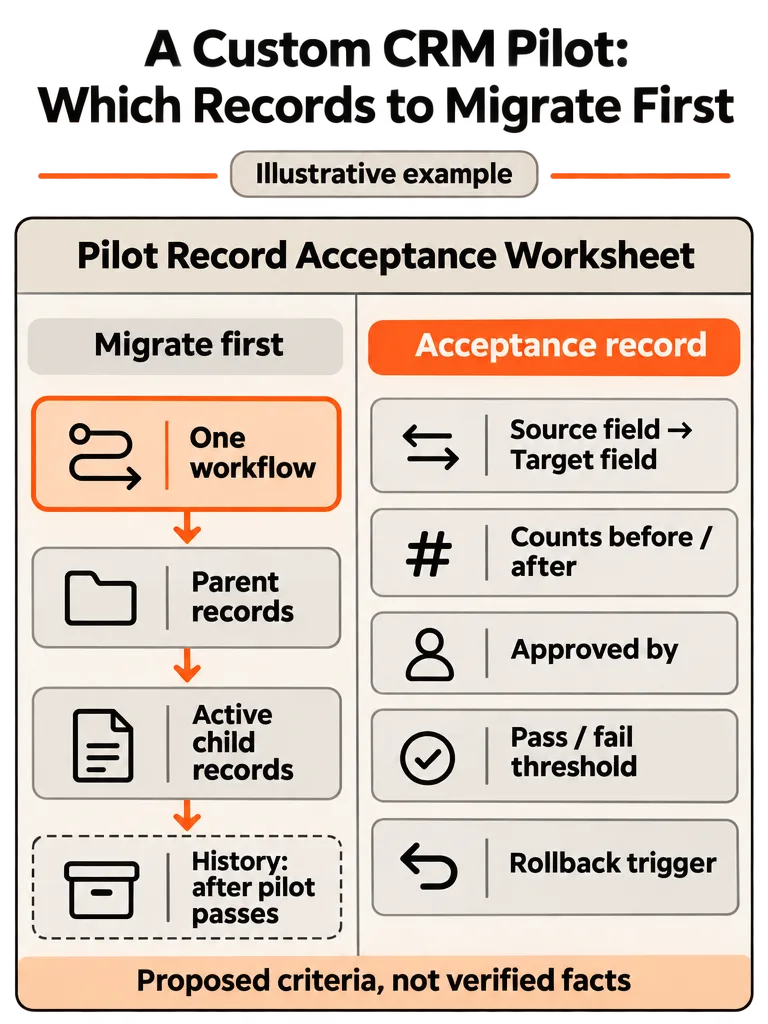
A custom CRM pilot should migrate only the active records that one workflow touches, plus the parent records those depend on. Leave history, archives, and everything else until the pilot passes acceptance. This order is a builder's judgment, not a verified standard, and the examples below are illustrative.
Pick one workflow and pull the live records inside it. Add only the contacts, companies, or properties those records point to. If a record doesn't change the workflow's outcome, it waits. The proposed goal is a cohort small enough to check by hand.
How do you pick the one workflow the pilot should test?
Pick the workflow where your team already leans on spreadsheets or manual re-entry. An observed search-grounded Exa answer from a scan dated November 6, 2026 gives a simple test for build-or-buy decisions: run one real job through your current tools and note where spreadsheets or re-entry appear. That is an AI-generated answer, not primary engineering evidence, so treat it as a prompt for your own check.
Here is an illustrative scenario, not a client result. A contractor wins a bid. Someone retypes the customer, address, and scope from the estimate into a job record. Then someone retypes them again into a scheduling sheet. Each retype is a place where the copies can drift apart.
That estimate-to-job handoff makes a good pilot. It has a clear start (estimate approved), a clear end (job exists with crew instructions), and a visible failure (the data doesn't match).
"All of sales" makes a weak pilot because it has no single pass or fail moment.
Which related records have to come along for the pilot to work?
A record comes along if the workflow can't run without it. Import parents before children so every child has something to attach to. The sources supplied for this article don't cover migration order, so the table below is a proposed sequence built on the construction handoff example.
| Record type | Why the pilot needs it | Depends on | Migrate |
|---|---|---|---|
| Customer / company | Every selected estimate and job points to one | Nothing (parent) | Now, only those referenced by a selected record |
| Contact | Who approves and who gets called | Customer | Now, only those referenced |
| Site / property | Estimates and jobs are tied to an address | Customer | Now, every site referenced by any selected estimate or job |
| Open estimate | The record that triggers the handoff | Customer, contact, site | Now |
| Approved estimate behind an active job | Source of the job's scope | Customer, contact, site | Now, even if it falls outside the open-estimate filter |
| Active job | The target of the handoff | Approved estimate, site | Now |
| Scope change | Tests the approval path | Active job | Now, if attached to an included job |
| Closed-lost estimates | History, not workflow | Customer | Later |
| Paid invoices, old notes, files | History | Jobs, customers | Later, unless the selected handoff needs them |
Four proposed checks keep the import clean:
- Stable IDs. Carry the old system's ID into a source-ID field on every record. It becomes the reconciliation key.
- Duplicates. Set the match rule (for example, same customer name and address) before import. Flag matches for a human instead of auto-merging.
- Relationships. After import, confirm every child resolves to a parent. Treat an orphan as a failure, not a warning.
- Data model fit. If your records don't fit contact-and-deal shapes, design the model before importing anything.
What does a pilot acceptance record look like?
A pilot acceptance record is a one-page document stating what moved, what was checked, who signed off, and what happens on failure. Write it before the import, not after. Everything below is a proposed worksheet with placeholder numbers. It is not a client result and not a verified engineering standard.
| Field | Example entry |
|---|---|
| Pilot workflow | Approved estimate becomes an active job |
| Cohort | Open estimates, active jobs, and every record they reference |
| Source field → target field | Estimate.Cust_Name → Customer.name; Estimate.ID → Job.source_estimate_id |
| Source ID kept | Yes, on every record |
| Orphans after import | 0 allowed |
| Duplicates | Each flagged pair reviewed and its disposition documented |
| Spot check | Workflow owner opens a set number of records side by side with source |
| Approved by | One named workflow owner |
| Pass threshold | Counts reconcile by record type, zero orphans, every duplicate resolved, one full handoff runs on the test copy |
| Rollback trigger | Any unexplained count gap or broken relationship: discard the imported cohort |
Reconcile counts for every included record type, not just the headline ones:
| Record type | Source (placeholder) | Documented duplicates | Expected in target |
|---|---|---|---|
| Customers | 40 | 2 | 38 |
| Contacts | 55 | 3 | 52 |
| Sites | 48 | 0 | 48 |
| Open estimates | 25 | 0 | 25 |
| Approved estimates behind active jobs | 4 | 0 | 4 |
| Active jobs | 12 | 0 | 12 |
| Open scope changes | 3 | 0 | 3 |
Should you build, buy, or defer the custom CRM?
Build only when the workflow is stable, the mismatch with your current software is measurable, and the cost of that inefficiency exceeds the build expense. Then look for a further reason: a data model that doesn't fit contact-and-deal structures, per-seat licensing that exceeds long-term maintenance cost, integration or compliance needs vendors can't meet, or a workflow that is a competitive edge. That comes from the observed Exa answer dated November 6, 2026.
Having one of these factors isn't enough. High seat costs matter only if they exceed what a custom system costs to maintain. Integration and compliance constraints matter only when standard products can't meet them.
The same answer suggests a hybrid: keep a standard CRM for core tasks and build only the missing module. It may reduce cost and risk, but the evidence is an AI-generated answer, not a verified cost study, so evaluate it against your own numbers.
Defer, as a proposed judgment, when the process is still being invented. Buy when a configured standard CRM passes your acceptance record. Build gets stronger if people still retype data after configuration.
For background, see custom CRM vs HubSpot and how to scope a custom CRM for a 10-person team.
What if the pilot fails acceptance?
If a pilot fails acceptance, the proposed process is to stop, keep the old system as the record of truth, reconcile every mismatch, correct whatever caused it, clear the failed import, and retest the same cohort. This process is a suggested procedure, not a sourced engineering standard.
- Stop the import. Don't add cohorts.
- Keep the old system authoritative. The imported cohort is a test copy; live jobs stay where they are, so the pipeline sits in one system.
- Reconcile the mismatches. List every count gap, orphan, and bad field, and diagnose each cause.
- Correct by cause. A wrong mapping rule gets fixed in the mapping. Bad source data, such as an unresolved duplicate or missing parent, gets fixed in the source. Fix rules rather than individual target records so the fix repeats on the next run.
- Clear the failed cohort. Save the mismatch list, then delete the imported records from the target so old and new rows don't mix.
- Rerun the same cohort. Use the same acceptance record and get a fresh sign-off.
Who owns the pilot after launch?
The workflow owner approves the pilot's acceptance record, and a technical owner maintains the system, backups, and security. The observed Exa answer from November 6, 2026 names both roles, plus clear contracts on data ownership and export rights. Those contract terms are a third requirement, not a third person.
- Workflow owner (internal). Knows the process, signs the acceptance record, and decides when the pilot expands.
- Technical owner. Handles long-term maintenance, backups, and security. It must be a named person, whether in-house or a builder.
- Written contract terms. Spell out who owns the data and how you export it, before the build starts.
Proposed addition, not from the source: record in writing who is responsible for fixing import problems found after launch.
What should you bring to a custom CRM pilot scoping discussion?
Bring one workflow defined by a start event and an end event, a sanitized sample of real records, your current tools and integrations, the person who approves the pilot, a proposed acceptance threshold, and the constraints behind your build, buy, or defer call. With these, scoping can center on one real workflow instead of a wish list.
- The workflow. For example: estimate approved (start), job created with crew instructions (end).
- Sample records. A sanitized set with names and sensitive details removed, including the messy ones: duplicates, missing fields, odd formats.
- Current tools and integrations. Every spreadsheet, app, and connection the workflow touches, including the ones you can't drop.
- The approver. One named person who signs the acceptance record.
- Acceptance threshold. Your draft of the pass criteria: count reconciliation, orphans allowed, duplicate handling, rollback trigger.
- Constraints. Seat costs, compliance or data-residency needs, and ownership and export requirements.
Frequently asked questions
What is a custom CRM pilot?
A custom CRM pilot is a small trial that moves one workflow's active records into a purpose-built customer system and checks the result before anything else migrates. A written acceptance record, signed by one named workflow owner, defines what counts as a pass. The term is unrelated to aviation's Crew Resource Management.
Should I migrate old deals, invoices, and notes in a CRM pilot?
No. Closed-lost estimates, paid invoices, old notes, and files are history rather than workflow, so they wait until the pilot passes acceptance. The exception is any record the selected workflow needs to run, such as the approved estimate behind an active job, which comes along even if it falls outside the open-estimate filter.
How do you handle duplicate records before importing into a custom CRM?
Set the match rule before import, for example same customer name and address, and flag matches for a person to review instead of auto-merging. Carry the old system's ID into a source-ID field on every record so counts reconcile afterward. Document the disposition of each flagged pair before the pilot is accepted.
Can the old system stay live while a custom CRM pilot runs?
Yes. Run acceptance on an imported test copy while the old system stays the record of truth, so live jobs stay in one place. Carry one estimate through to crew instructions in the copy. Production cutover is a separate decision, made only after the pilot passes its acceptance record.
When does building a custom CRM beat buying one?
Build only when the workflow is stable, the mismatch with your current software is measurable, and the cost of that inefficiency exceeds the build expense. A search-grounded AI answer from November 2026 adds further triggers: a data model that doesn't fit contact-and-deal structures, per-seat licensing above long-term maintenance cost, or integration and compliance needs standard vendors can't meet.
What ownership terms should I get in writing before a custom CRM build?
Put data ownership and export rights in the contract before the build starts. Name a technical owner for long-term maintenance, backups, and security, whether that person is in-house or the builder. A workflow owner inside your business should also sign the pilot's acceptance record and decide when the pilot expands.