Custom Booking Tool vs Calendly: What's the Real Difference?
Calendly books a person's time. A custom booking tool runs a business's operations. That's the whole split, and most comparison articles miss it because they stack feature lists instead of naming the actual unit of work.
Calendly's job is simple: read a calendar, show open slots, put a meeting on the books. It's built for the case where one person's free time is the entire scheduling problem, a sales call, an interview, a coaching session. PINCLER frames this as the core distinction in its Calendly-versus-custom comparison: Calendly's unit of work is a person's time, while a custom booking system's unit of work is a service the business sells, a haircut needing a specific stylist and a chair for 45 minutes, a physio session needing a practitioner, a room, and a deposit before it's confirmed.
The moment your booking depends on more than one calendar's availability, you've left Calendly's lane. That single test decides most cases before you get anywhere near a feature comparison.
When Should You Use Calendly Instead of Building a Custom Booking Tool?
Stay on Calendly when the service, the duration, and the price never change, and one person handles the whole booking. Minch Solutions puts it directly: Calendly is the right call when it's always the same service, the same time slot, and the same person on the other end.
That covers a lot of real businesses. Consultants, recruiters, sales teams, and solo coaches are scheduling meetings, not running service operations. That's Calendly's actual territory. Calendly's own small-business page backs this up: you can collect payment at booking, ask intake questions ahead of the call, send automated reminders, and embed your booking link on your site, all without touching code.
If Calendly's paid tiers feel like more than you need, there's a full tier of meeting-link tools built for the same job. Doodle and TidyCal show up repeatedly in scheduling comparisons as lighter, cheaper alternatives for the same person-centric booking problem, with Doodle built around group polling for finding a time that works for everyone. None of these tools solve staff rosters or resource conflicts. They solve "when are you free," which is exactly what a meeting tool should solve.
If your business has one calendar and one price, don't build anything. Buy the cheapest tool that does the job.
Can Calendly Handle Multi-Resource Scheduling or Dynamic Pricing?
No. Calendly checks one calendar's open slots against a request. It has no native way to reserve a staff member and a room and a piece of equipment for the same booking, or to quote a price that changes by service, duration, or add-on before the client confirms.
Minch Solutions lists exactly where this breaks: multi-step booking flows, dynamic pricing, automated invoicing, multiple resource types, and client portals are the triggers that push a business past what Calendly's link-and-slot model can express. Calendly is designed around a single owner's free time, not a rulebook of who and what has to be available together. Once a booking needs two things confirmed at once, a staff member and a chair, a technician and a van, Calendly has nowhere to put that logic.
When Does a Service Business Outgrow Calendly?
A service business outgrows Calendly at four specific breaking points, not at some vague "we've gotten bigger" moment. IntraCode names them directly in its build-versus-buy framework: multi-staff rules the tool can't express, deposit and cancellation policies that don't fit the template, custom workflows wrapped around the booking, and the long-term need to own your own customer data.
Each one is a distinct failure mode, not a feature gap you can patch with an add-on.
- Multi-staff rules: Calendly can't route a booking to whichever of six technicians is actually free and qualified for that job.
- Deposit and cancellation mismatches: your policy varies by service or client history; the tool offers one global rule.
- Custom workflows: quoting before confirming, approval steps, or multi-party sign-off don't fit a single-calendar link.
- Data ownership: your customer history, booking patterns, and follow-up sequences live inside someone else's platform, not your own database.
IntraCode is equally clear that this isn't a reason to rush toward custom. Off-the-shelf tools remain the right call for solo operators or small teams running straightforward services, because they're cheaper, already tested at scale, and faster to turn on than anything you'd commission. The outgrowing happens when the operational rules stop fitting, not when you simply want more polish.
What Does a Custom Booking System Do That Calendly Can't?
A custom booking system encodes the operational rules Calendly has no field for: which staff can do which service, what deposit applies to which booking type, and what happens to the client record after the appointment ends. Minch Solutions ties this directly to specific triggers: multi-step flows, dynamic pricing, automated invoicing, multiple resource types, and self-service client portals.
Acuity Scheduling is the useful middle reference here, because it's built appointment-first rather than meeting-first. Acuity's own comparison lists client intake forms and profiles, smart availability and resource management, deposits, invoices, receipts, card-on-file, tips, packages, subscriptions, gift cards, and coupons, features aimed at businesses where the appointment is tied directly to revenue, not just a calendar hold.
That list is the real map: every one of those features corresponds to a specific business trigger. Deposits and card-on-file exist because no-shows cost money. Packages and subscriptions exist because clients buy blocks of sessions, not single visits. Client portals exist because customers expect to manage their own bookings without calling anyone. A custom build earns its cost only when several of these triggers stack at once and a packaged tool still leaves gaps.
Once you know which of these triggers apply to your business, the scoping conversation is quick. Start that conversation with ZipLyne.
Is Custom Booking Software Cheaper Than Calendly?
Custom booking software can beat Calendly's total cost over three years, but only at real scale, and the numbers making that case come from agencies selling the build, not neutral market research. Both angles matter, so look at them together.
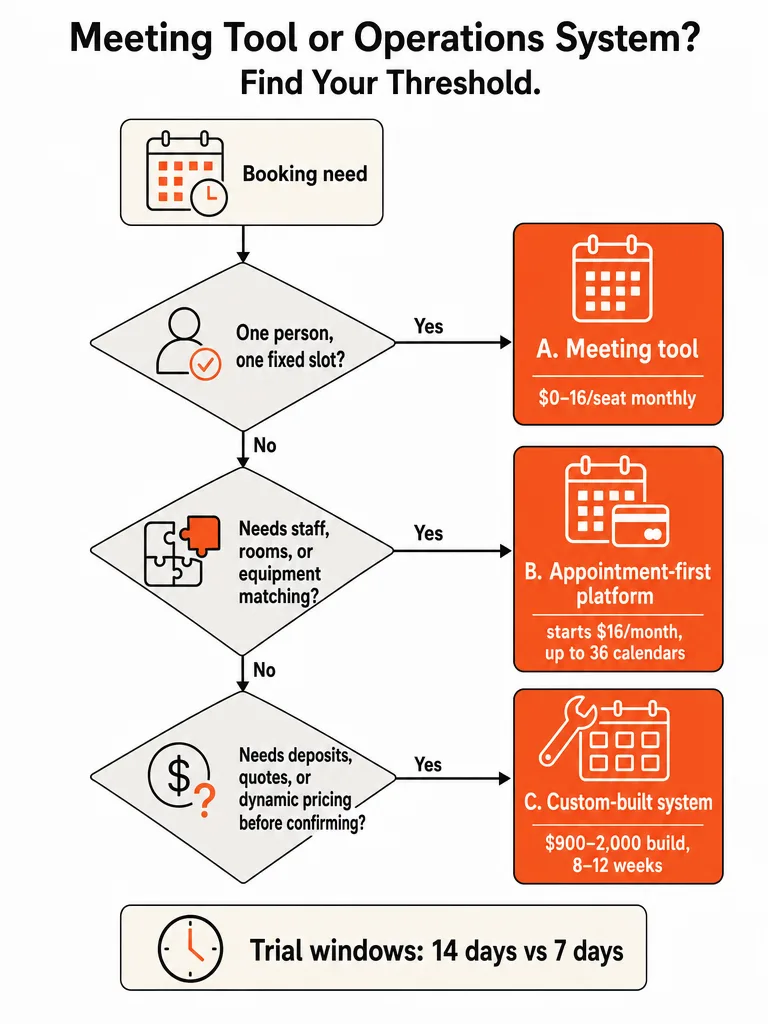
PINCLER's own comparison lists Calendly at $0–$16 per seat monthly on annual billing, against a custom build it prices at $900–$2,000 once. Run that across a 10-person team over three years and PINCLER's math puts Calendly's Teams seats at roughly $5,760, versus about $1,940 for its custom build plus hosting. Minch Solutions works from different assumptions and lands somewhere else: it lists Calendly at $12–$20 per user per month and estimates a custom build breaks even within 2–3 years for teams of 10 or more with complex needs. IntraCode's estimate for Calendly runs $15–25 AUD per user per month, and it recommends staying with bought software entirely if the manual workaround costs less than roughly $5,000 a year.
| Comparison point | Calendly (per source) | Custom build (per source) |
|---|---|---|
| Monthly/per-seat cost | $0–$16/seat (PINCLER), $12–$20/user (Minch), $15–25 AUD/user (IntraCode) | Not per-seat; one-time or project-based |
| One-time build cost | N/A | $900–$2,000 (PINCLER) |
| 10-person, 3-year total | ~$5,760 (PINCLER, Teams seats) | ~$1,940 incl. hosting (PINCLER) |
| Breakeven point | N/A | 2–3 years at 10+ users with complex needs (Minch) |
| Stay-with-buying threshold | Workaround cost under ~$5,000/year (IntraCode) | Above that threshold, building competes |
The honest read: at low seat counts and simple booking rules, Calendly is cheaper and it isn't close. The math flips only once staff count, workaround hours, and per-seat fees compound over multiple years, and only if the custom build actually eliminates the manual work it's meant to replace.
How Long Does It Take to Build a Custom Booking System?
Eight to twelve weeks is Minch Solutions' standard range for a custom booking build, with the low end covering simple booking flows and the high end covering multi-resource scheduling, dynamic pricing, payment integration, and a client portal built together. That range reflects a standard agency build cycle with discovery, development, and testing baked in.
PINCLER quotes a much faster window, 10–16 days, for what it describes as an AI-drafted build with senior engineer review rather than a from-scratch custom development cycle. The gap between 10 days and 12 weeks isn't a contradiction; it's a difference in build method. A fully bespoke system built the traditional way, feature by feature, sits closer to Minch's 8–12 week range. A build that starts from a proven pattern and gets senior engineering review on top can land much closer to PINCLER's figure. Ask any vendor which approach they're actually quoting before you compare timelines.
What Happens to Your Booking Data After Calendly Books the Slot?
Once Calendly confirms a slot, the booking record, the client's history, and any follow-up logic stay inside Calendly's platform, not in a database your business controls. That's fine for a meeting tool. It becomes a real cost the moment your business needs that data to drive anything downstream.
PINCLER's framing of custom booking software calls out client records, brand, data, and code as the things a business owns outright with a custom build, versus renting access to them through a vendor's workflow. Calendly's small-business page confirms the tool automates follow-up messages and reminders inside its own system, which is convenient right up until you want to combine that history with your CRM, your invoicing, or a loyalty program that spans years of visits.
The practical loss shows up in three places: you can't easily query booking history for patterns like which services get canceled most, you can't wire booking events directly into your own systems without hitting integration limits, and if you ever switch tools, that history doesn't travel cleanly with you. None of that matters for a business scheduling occasional sales calls. It matters a lot for a business where repeat bookings and customer history are the product.
How to Decide Between Calendly, Acuity, and a Custom Build
Match the tool to your business stage, not your ambition. Solo operators with one fixed service stay on Calendly. Multi-staff businesses with deposits, packages, and client records fit an appointment-first platform like Acuity Scheduling. Businesses with staff-plus-resource combinations, dynamic pricing, or booking logic tied directly to revenue are the ones where a custom build actually pays for itself.
IntraCode's threshold is the cleanest tiebreaker available: if your current workaround, extra admin time, missed bookings, manual invoicing, costs less than roughly $5,000 a year, keep buying. Above that, building starts to compete on cost as well as control.
| Business situation | Best fit | Why |
|---|---|---|
| Solo operator, one fixed service, one price | Calendly (or Doodle, TidyCal) | Person-centric scheduling is the whole job |
| Multiple staff, services tied to income, need deposits/packages | Acuity Scheduling | Appointment-first platform built for intake, payment, follow-up |
| Staff + rooms/equipment combos, dynamic pricing, quoting before booking | Custom build | No packaged tool expresses that rule set natively |
| Workaround cost under ~$5,000/year | Stay with bought software | Building doesn't clear IntraCode's cost threshold |
| Workaround cost above that, growing staff count | Custom build or Acuity | Per-seat fees and manual admin start compounding |
Minch Solutions' case study on an Australian skip bin business is a useful proof point on the upside of getting this right: after moving to a custom system, booking phone calls dropped 85% and average booking time fell to 3 minutes from 15. That's what happens when the tool finally matches the operation instead of forcing the operation to fit the tool.
Building a Custom Booking Tool the Fast Way
Most agency timelines for a custom booking build run 3–6 months, split across a discovery phase, a design phase, and a development phase stacked end to end. That timeline exists because most agencies are staffed for meetings, not shipping. Isaac Horowitz built ZipLyne around the opposite premise: real engineering, senior-level execution, and production-ready systems delivered fast, not sold as a slow-drip retainer.
If your booking rules involve staff assignment, resource conflicts, deposits, or a client portal, and you've already run the numbers on workaround cost versus build cost, the build itself is the last blocker. Scoping the operational rules your business actually runs on and shipping a system that handles them in production, not a demo that falls apart under real bookings, is the whole job.
Custom booking software only pays off if it actually ships. Get started with ZipLyne and skip the months of back-and-forth.
Frequently asked questions
What's the real difference between Calendly and a custom booking tool?
Calendly books a person's time; a custom system runs a service business's operations. Calendly reads one calendar and offers open slots for a meeting, sales call, or interview. A custom build handles bookings that need multiple things confirmed at once — a stylist and a chair for 45 minutes, or a practitioner, a room, and a deposit before an appointment locks in.
When should a business stick with Calendly instead of building something custom?
Stay on Calendly when the service, duration, and price never change and one person handles the whole booking. That covers consultants, recruiters, sales teams, and solo coaches scheduling meetings rather than running service operations. Calendly already supports payment collection at booking, pre-call intake questions, automated reminders, and website embedding — no custom development needed for that use case.
Can Calendly handle multiple staff, rooms, or dynamic pricing for bookings?
No — Calendly checks one calendar's open slots against a request and stops there. It has no native way to reserve a staff member and a room and a piece of equipment for the same booking, or quote a price that shifts by service, duration, or add-on. Multi-step booking flows, dynamic pricing, automated invoicing, and multiple resource types are exactly where its link-and-slot model breaks.
What are the real signs a service business has outgrown Calendly?
Four specific breaking points: staff rules Calendly can't route around, deposit or cancellation policies that don't fit its single global template, custom workflows like quoting before confirming, and the need to own customer data instead of leaving it inside someone else's platform. Each is a distinct failure mode, not something an add-on patches. Solo operators running simple services rarely hit any of these.
Is building a custom booking system actually cheaper than paying for Calendly?
Only at scale, and the numbers come from agencies selling the build, not neutral research. One agency comparison prices Calendly's Teams plan for a 10-person team at roughly $5,760 over three years versus about $1,940 for a custom build plus hosting — but treat that as a low-end case study, not a market baseline. A cleaner rule: if your current workaround costs less than roughly $5,000 a year, keep buying instead of building.
How long does a custom booking system take to build?
Eight to twelve weeks is the standard range for a fully bespoke build covering multi-resource scheduling, dynamic pricing, payment integration, and a client portal, following a typical discovery-to-testing agency cycle. Faster builds exist too — some agencies quote 10 to 16 days when starting from a proven pattern with senior engineering review rather than building every feature from scratch. Ask which method a vendor is actually quoting before comparing timelines.