Mobile app vs web app for SMBs: should you build web or mobile first?
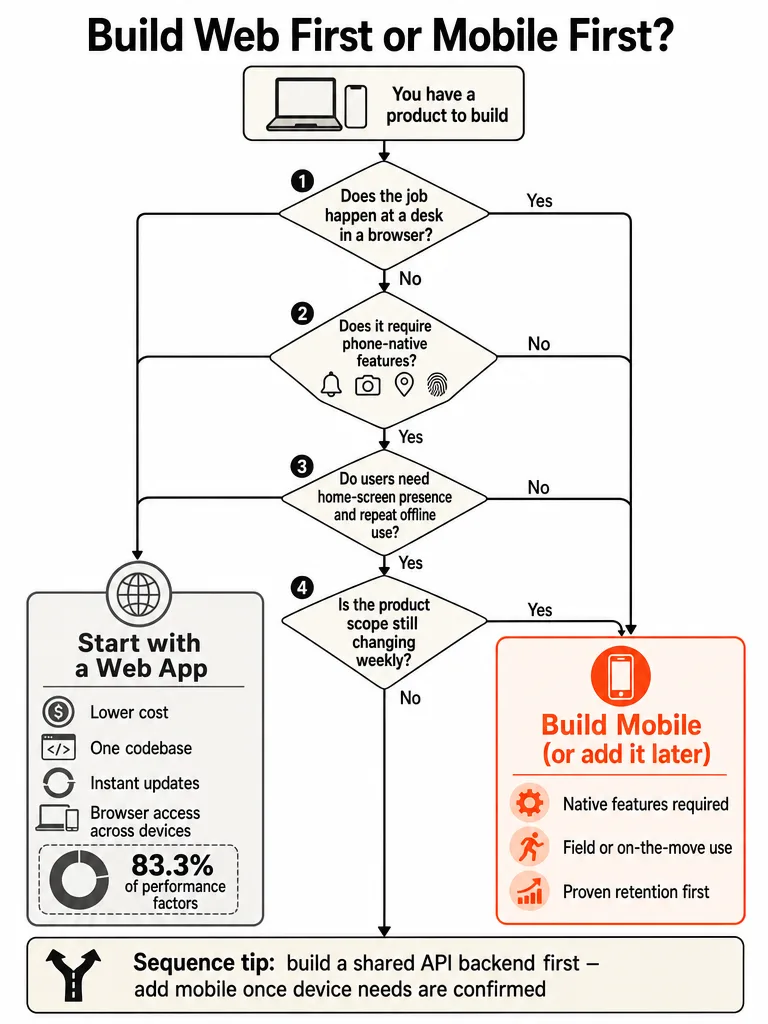
Most SMBs should build web first and only add mobile when the job depends on phone-native features, repeat mobile usage, or field work. A web app opens from a URL with no install, ships changes instantly, and covers dashboards, portals, and back-office tools at a lower cost. SummationWorks puts a focused first-version web app at roughly $10,000 to $40,000 and six to twelve weeks.
That's the answer for most cases. The exceptions are real but narrow. If the work happens on a phone in short bursts, or if the task genuinely needs a camera, background location, or reliable offline use, mobile earns its cost.
Caspio puts it plainly: for most business applications it makes more sense to build web apps because they're more cost-effective and work across all devices. The Provato Group reached the same conclusion in its comparison, scoring web apps ahead on 83.3% of the performance factors it evaluated.
The question isn't "mobile or web." It's whether the phone is actually part of getting the job done.
What's the difference between a web app and a mobile app?
A web app runs in a browser and opens from a URL, with nothing to install. A mobile app is built for a specific device platform and must be downloaded onto a phone or tablet. That single distinction drives most of the cost, speed, and reach tradeoffs that follow.
AWS draws the line the same way: web apps are delivered over an internet browser and users don't install them, while native apps are built for a specific platform and must be installed. The Provato Group adds that a web app works on any device with a browser and internet, while a mobile app only runs on the device it's installed on.
You already use both daily. Google Docs, Google Sheets, Trello, and LinkedIn on your laptop are web apps you reach through a browser tab. The LinkedIn app on your phone is native, installed from the store and wired into the device.
Are users doing the job at a desk or on the move?
Start here, because work context decides more than any feature list. Desk work in a browser, admin panels, dashboards, back-office tools, B2B ordering, points to web. Short-burst phone work, checking a booking, scanning a product, handling a delivery, points to mobile.
SummationWorks frames it around where the task actually happens. At a desk during office hours, a web app wins on larger screens, keyboard input, no install, and instant updates. On the move, a mobile app wins on home-screen presence, push notifications, camera, and location.
Map your real users, not your ideal ones:
| Work context | Typical tasks | Better fit |
|---|---|---|
| Desk, office hours | Admin panels, dashboards, back-office tools, B2B ordering | Web app |
| On the move, short bursts | Booking checks, scanning, delivery, location-based actions | Mobile app |
Most SMB internal tools and customer portals live in the desk column. If your product is a workflow your team runs from a laptop, the phone is a nice-to-have, not the job.
What device features require a native mobile app instead of a web app?
A native mobile app is justified when the task depends on deep device access a browser can't reliably reach. The clear triggers: reliable push notifications, offline operation, camera and barcode scanning, background location, biometrics, NFC, and wallet-level integration like Apple Pay.
AWS notes that web apps only give access to interactions supported by browsers, while native apps reach device features like location tracking, microphone, cameras, contact lists, touch gestures, and biometric security. SummationWorks makes the test operational: if the product depends on those OS-level features to complete the task, mobile is worth the cost.
The reverse test matters more. If your device-feature list is empty, a web app, possibly installable as a PWA, does everything needed for a fraction of the price. Write the list down. Field techs scanning barcodes offline all day is a real trigger. "We might want push notifications someday" is not.
A single truly-native requirement can justify mobile; a wish list of maybes cannot.
When should a business choose a web app over a mobile app?
Choose web when cost, reach, and iteration speed matter more than device access. One codebase serves every browser, updates ship instantly with no store review, maintenance stays centralized, and users are discovered through search and links instead of an app store. For most SMB tools, that's the whole game.
The Provato Group scored web apps ahead on 83.3% of its performance factors, winning on cost, reliability, scalability, team collaboration, and maintenance, while mobile held the edge only on offline access, at 16.7%. Caspio adds a maintenance point that adds up fast: a web app updates once and every user gets the latest version, while mobile apps need separate builds per platform and depend on users actually installing updates.
Web is also the right call while the product is still moving. SummationWorks points out that web apps ship changes instantly, so if you expect to rework scope during validation, the browser's iteration speed beats app-store distribution. That's true for most internal tools, customer portals, and B2B products.
When should a business choose a mobile app first?
Go mobile first only when the phone is where the product lives and users return to it constantly. That means home-screen presence, repeat daily usage, app-store distribution through the Apple App Store or Google Play, phone-first behavior, and device features that directly complete the task.
SummationWorks frames install friction as the deciding cost: websites are found through search and shared as links, while apps are discovered in stores and through your own marketing, and every install is a commitment users only make for something they'll use repeatedly. That's the bar. A tool someone opens once a quarter doesn't clear it.
Mobile-first makes sense for consumer products where usage is frequent and on the go, ordering, delivery, booking, scanning, and where offline reliability is part of the job. If your users open the thing several times a day on a phone and the task needs the camera or location to finish, the extra cost and store overhead pay off.
For everything else, the install ask is a tax you pay before delivering any value.
If you've landed on the platform your users actually need, the next move is building it. Let's build something real.
Can a PWA replace a native mobile app for a small business?
A progressive web app can cover a lot of the mobile experience without full native cost. A PWA is installable to the home screen, works offline for reads, and sends push notifications on Android and, with limits, on iOS. That makes it a genuine middle path for content, catalogues, booking flows, and internal tools.
SummationWorks positions the PWA exactly there: enough mobile feel to skip the store, without taking on a separate native codebase. The iOS gap narrowed too. Verlua notes that iOS added PWA push notification support in March 2023, closing one of the old dealbreakers.
Where a PWA stops being enough is the same list as before: barcode scanning at scale, background location, biometrics, NFC, wallet integration, and heavy offline writes. If the task needs deep OS access, treat the PWA as a stepping stone, not the destination.
Should I build the web application or mobile application first?
Build the backend as a shared API from day one, ship the web app first, learn from real usage, then add mobile once retention and device-feature needs are proven. This sequence keeps you from paying for native before the data says it's worth it.
SummationWorks calls web-first the default path for most start-ups and B2B products for a specific reason: mobile built later on the same API adds 40 to 60 percent to the cost rather than doubling it. Build the API once and the second channel gets cheaper, not free, but far from starting over.
The sequence in order:
- Build the backend as an API, not glued to one frontend.
- Ship the web app and put it in front of real users.
- Watch retention and note where users hit the browser's limits.
- Add mobile on the same API when device features or repeat usage clearly justify it.
Budget for the long run, not just the build. SummationWorks recommends setting aside 15 to 20 percent of build cost per year for maintenance on either channel, with mobile running a little higher. Skipping that line is how good launches rot.
How much should an SMB budget for web vs mobile app development?
Rough 2026 ranges from SummationWorks: a focused first-version web app runs $10,000 to $40,000 over six to twelve weeks, and a focused cross-platform mobile MVP for iOS and Android runs $15,000 to $45,000. Add roughly 15 to 20 percent of build cost per year for maintenance.
| Path | Rough build cost | Annual maintenance |
|---|---|---|
| Focused web app (6–12 weeks) | $10,000–$40,000 | 15–20% of build |
| Cross-platform mobile MVP | $15,000–$45,000 | 15–20% of build, slightly higher |
| Mobile added after web on same API | +40–60% of web cost | 15–20% of build |
Don't pick a platform off a price range. These bands overlap heavily, and scope, integrations, and data cleanliness swing the real number more than the web-versus-mobile label does. The decision comes from work context and device features. Cost tells you what the right call will run, not which call to make. A cheap build of the wrong platform is the most expensive option on the table.
How do you connect this decision to MVP scope and custom software choices?
Platform choice is one decision. Scope, cost, and build approach are the next ones, and they're where most SMB budgets actually get won or lost. Once you've settled web-first versus mobile-first, the next questions are how small to keep the first version and whether to build custom at all.
If mobile is genuinely the call, prove demand before you spend. How founders validate a mobile app MVP breaks down the exact signals that separate interest from commitment. To keep either build lean, rapid MVP development shows how to ship in weeks without bloating scope, and the real cost of building an MVP in 2026 lays out the full budget picture.
For internal tools, the platform question often comes after a bigger one: build or buy. Custom software vs off-the-shelf tools covers when SMBs should build, and custom internal tools vs spreadsheets shows the exact point a spreadsheet stops holding up.
Pick the platform your users actually need, keep the first version small, and ship it. When you're ready to move from decision to build, let's build something real.
Frequently asked questions
What does a focused first-version web app cost for a small business in 2026?
A focused first-version web app runs $10,000 to $40,000 over six to twelve weeks. That range covers a single codebase that works across every browser, ships updates instantly, and skips app-store review cycles entirely. Budget an additional 15 to 20 percent of build cost per year for maintenance — skipping that line is how solid launches quietly fall apart.
How much more does it cost to add a mobile app after building the web app first?
Adding mobile on the same shared API later costs roughly 40 to 60 percent more than the original web build — not double. Build the backend as an API from day one, ship the web app, validate retention, then layer mobile on top. That sequence keeps you from paying native-app rates before real usage data proves the investment is worth it.
What device features actually require a native mobile app instead of a web app?
The real triggers are reliable push notifications, offline operation with write capability, barcode and camera scanning at scale, background location tracking, biometrics, NFC, and wallet-level integrations like Apple Pay. Browsers can't reliably reach those OS-level features. If your feature list is empty on this test, a web app — or a PWA — handles the job for a fraction of the cost.
Can a PWA replace a native mobile app for a small business?
A PWA covers a lot — home-screen install, offline reads, and push notifications on Android. iOS closed a major gap in March 2023 when it added PWA push notification support. Where a PWA breaks down is deep OS access: barcode scanning at scale, background location, biometrics, NFC, and heavy offline writes still require native. Treat a PWA as the right final answer for many SMBs, not just a stepping stone.
When should a small business choose a web app over a mobile app?
Web wins when cost, reach, and iteration speed matter more than device access — which describes most SMB tools. Web apps scored ahead on 83.3% of key performance factors including cost, reliability, scalability, team collaboration, and maintenance, with mobile holding an edge only on offline access. One codebase, instant updates, and search-based discovery beat app-store distribution for most internal tools and customer portals.
What is the annual maintenance budget for a web app or mobile app?
Set aside 15 to 20 percent of your build cost per year for maintenance on either platform, with mobile running slightly higher. On a $30,000 web app, that's $4,500 to $6,000 annually. Mobile adds per-platform build and approval overhead on top. Most SMB budgets treat maintenance as optional until something breaks — that's the mistake that turns a good launch into a liability.
Sources
- How do you decide if your idea should be a mobile app or ...www.theprovatogroup.com
- Should You Build A Web App or a Mobile Appwww.caspio.com
- Web vs. Mobile App Developmentsummationworks.com